
Orelon
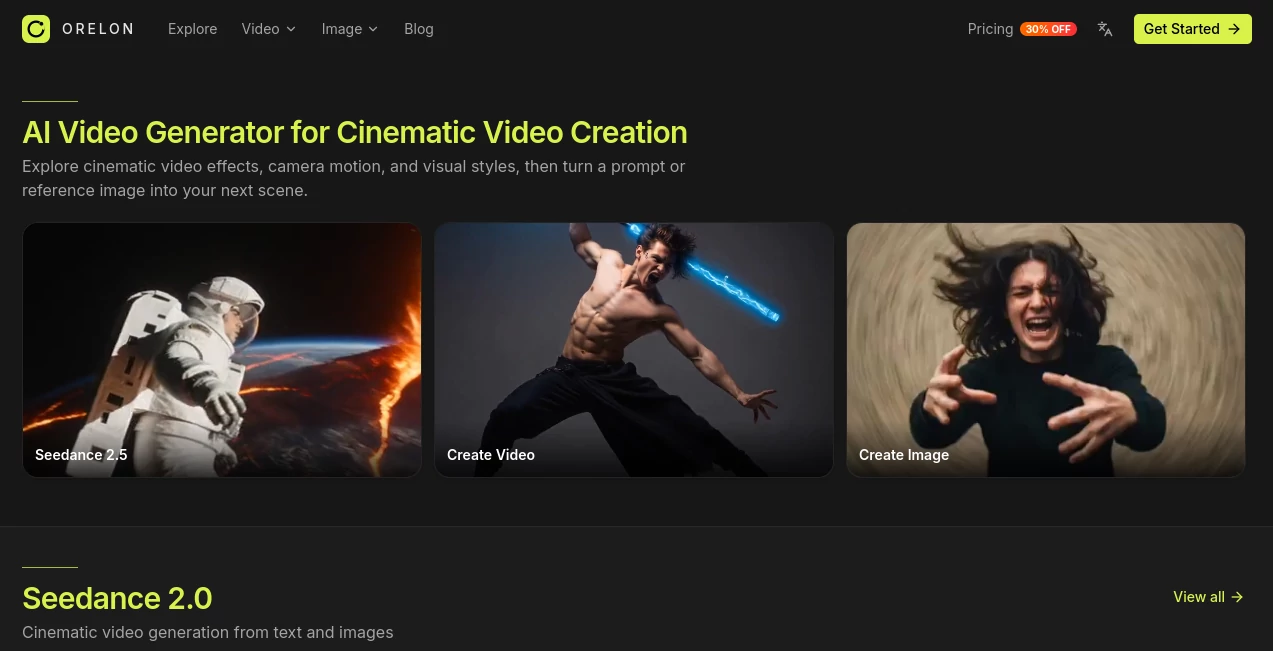
What is Orelon?
Creating a convincing video used to mean juggling editing software, stock footage, visual effects, and a long list of creative decisions. Orelon takes a much more direct approach. It gives creators a video-first workspace where an idea can begin with a written prompt, a reference image, or an existing visual direction and quickly become a moving scene.
The platform is particularly interesting for people who care about the look and movement of a shot rather than simply producing another generic AI clip. Its workflow puts cinematic camera movement, visual effects, creative templates, and model selection close to the actual generation process. The result is a more practical environment for experimenting with commercials, social videos, product scenes, short cinematic moments, and visual concepts.
Another useful part of the experience is discovery. Instead of starting with a completely blank canvas, creators can browse finished examples, camera ideas, effects, commercial concepts, and UGC-style templates before deciding what to make. That can be surprisingly helpful when the challenge is not knowing how to describe an idea, but figuring out what the idea should look like in the first place.
Key Features
- Text-to-video generation for turning written concepts into moving scenes.
- Image-to-video generation for animating reference images and existing visual concepts.
- Camera control for shaping movement, framing, and pacing.
- A broad selection of video generation models, including Seedance, Kling, Wan, MiniMax, PixVerse, Grok, and other models available through the platform.
- AI image generation within the same creative workspace.
- Ready-to-create templates covering cinematic shots, product visuals, UGC concepts, commercials, and social content.
- Visual effects and reusable creative treatments for different moods and styles.
- Commercial-oriented examples designed around product advertising and brand content.
- A feed of existing creations that can provide inspiration before starting a new generation.
User Interface
The interface is built around visual discovery rather than a traditional editing timeline. The home experience presents examples, models, effects, camera ideas, commercial concepts, and creative directions in a way that encourages browsing before generating.
This approach makes sense for visual work. A creator working on a skincare advertisement, for example, can look through product photography, macro shots, cinematic camera movements, and UGC examples before deciding on a direction. It reduces the amount of guesswork involved in writing the first prompt.
The generation workflow itself is also straightforward: choose a starting point, describe the scene and its movement, select an appropriate model or creative direction, generate the result, and refine it. For someone who prefers experimenting through several visual variations, that structure feels natural.
Accuracy & Performance
Video generation quality naturally depends on the model selected, the prompt, the reference material, and the complexity of the requested movement. Rather than relying on one generation model for every type of shot, the platform provides access to multiple video models, giving creators more room to find an output that matches the project.
This model-based approach is one of the stronger parts of the platform. A simple social clip may benefit from a fast model, while a cinematic sequence or demanding product shot can justify using a more capable option. The platform's credit system also makes model usage visible, helping users understand that different generations have different resource requirements.
Camera direction is another important factor. Being able to think about framing, movement, pace, and visual treatment before generating can make the process more deliberate than simply entering a sentence and hoping for an interesting result.
Capabilities
The platform supports several distinct ways to build a video. Text-to-video is useful when the concept exists mainly as an idea, while image-to-video is better suited to creators who already have a product image, character, illustration, or visual reference. The site also highlights motion control and camera-led creation, giving users more influence over how a scene moves.
Its image generation side adds another useful layer. Creators can produce visual assets and then use them as part of a video workflow instead of moving between unrelated applications. The available image models include options such as GPT Image 2, Nano Banana, Seedream, Qwen Image, Flux, and Grok Imagine.
There is also a strong advertising angle. The platform features commercial examples, product-focused shots, UGC formats, social concepts, fashion visuals, food campaigns, and other brand-oriented creative directions. For marketers, this makes it more than a tool for making random AI clips; it can function as a rapid visual prototyping environment.
Security & Privacy
The platform provides dedicated Privacy Policy, Terms of Service, and Cookie Policy pages, giving users formal documentation to review before using the service. :contentReference[oaicite:1]{index=1}
For professional projects, it is still sensible to review the current terms and privacy documentation before uploading confidential client material, unreleased products, or sensitive reference assets. The appropriate level of caution will depend on the type of content being created and the requirements of the project.
Use Cases
Product advertising: A product team can turn a simple product concept into cinematic shots, macro scenes, social advertisements, or campaign visuals. The platform specifically showcases product ads and brand-ready creative examples.
Social media content: Creators can experiment with hooks, transitions, short visual concepts, and UGC-style videos before investing time in a larger production.
Short cinematic scenes: Filmmakers and storytellers can explore character moments, atmospheric shots, camera movements, and short sequences as visual building blocks for larger projects.
Marketing campaigns: Marketing teams can quickly test different creative directions for a campaign, including product photography, commercial video concepts, vertical social content, and promotional visuals.
Content prototyping: When a creative team has an idea but is unsure whether it will work visually, generating several versions can be a practical way to test the concept before committing to a full production.
UGC-style advertising: The dedicated UGC and advertising template collections make the platform useful for exploring influencer-style product demonstrations, testimonials, social proof concepts, and short-form promotional formats.
Pros and Cons
- Pros: Multiple leading video models in one workspace.
- Pros: Text-to-video and image-to-video workflows.
- Pros: Strong focus on camera movement and cinematic creation.
- Pros: Large collection of visual effects and ready-to-use creative directions.
- Pros: Video and image generation available within the same workspace.
- Pros: Useful commercial and UGC-oriented templates.
- Pros: Free access is available with signup credits, making it possible to test the workflow before committing to a paid plan.
- Cons: Generation costs vary considerably between models, so heavy experimentation can consume credits quickly.
- Cons: Users looking for conventional timeline-based video editing may find the platform more focused on generation than traditional post-production.
Pricing Plans
The pricing structure is based on credits, with a free option providing 10 signup credits and paid plans designed for different levels of creative usage. The current annual pricing includes a 30% discount compared with the stated monthly rates.
The Starter plan is listed at $16 per month when billed annually, with $190 charged for the year and 810 credits per month. It provides access to 26 of the 39 available models and includes commercial use, watermark-free downloads, image and video creation, templates, and standard-queue generation.
The Creator plan is listed at $49 per month when billed annually, with $590 charged yearly. It provides 3,600 credits per month, access to all 39 models, faster generation, higher simultaneous generation capacity, commercial use, watermark-free downloads, and early access to selected new models.
The Pro plan is listed at $108 per month when billed annually, with $1,290 charged yearly. It includes 9,000 credits per month, all 39 models, priority generation, advanced creative models, more simultaneous generations, priority support, commercial use, and watermark-free downloads. :contentReference[oaicite:2]{index=2}
Additional credit packs are also available. The site currently lists a Creator Pack with 11,100 credits for $199 and a Studio Pack with 30,000 credits for $499. The Studio Pack credits are described as never expiring. :contentReference[oaicite:3]{index=3}
How to Use Orelon
Start by choosing the kind of visual you want to create. You can begin with a text prompt, upload a reference image, or browse an existing visual effect or creative example for inspiration.
Next, define the subject, style, atmosphere, and movement. If camera direction matters, think about the shot as you would when planning a real production: consider framing, movement, perspective, and pacing rather than describing only the subject.
Choose a suitable generation model and create the first version. If the result is close but not quite right, adjust the creative direction and generate another version. The workspace is designed around this iterative process, allowing creators to keep refining an idea instead of starting from scratch every time.
For a practical example, imagine a new skincare product that needs a short social advertisement. A creator could generate a clean product image, animate it into a short cinematic shot, experiment with a macro camera movement, and then explore a UGC-style alternative for social media. That workflow can turn one basic product idea into several different creative directions in a relatively short session.
Comparison with Similar Tools
Many AI video generators focus primarily on turning prompts into clips. This platform takes a broader approach by combining multiple video models with image generation, camera-oriented creative directions, visual effects, commercial examples, and UGC templates.
That distinction matters for creators who want to compare different generation approaches without constantly switching between services. Someone working on a cinematic product scene might prefer one model for a particular shot, while another model may work better for a different movement or visual style. Having those options together makes experimentation more convenient.
It is also more discovery-driven than a simple prompt-and-generate interface. The large collection of examples can serve as a creative reference library, which is particularly useful when a creator knows the desired mood or visual language but has not yet settled on the exact prompt.
Conclusion
Orelon is a compelling choice for creators who want AI video generation to feel closer to visual direction than simple prompt experimentation. Its combination of text-to-video, image-to-video, camera control, visual effects, multiple generation models, and ready-made creative examples gives users plenty of ways to approach a project.
The strongest part of the experience is arguably the connection between discovery and creation. Instead of staring at an empty prompt field, creators can see cinematic ideas, commercial concepts, camera movements, and visual treatments first, then use those references to shape their own work.
For marketers, designers, social creators, and filmmakers looking to develop polished visual concepts quickly, it offers a practical place to experiment. The credit-based pricing also gives users a clear way to scale usage from occasional projects to higher-volume production.
Frequently Asked Questions (FAQ)
What is an AI video generator?
An AI video generator converts written descriptions, images, or other creative inputs into video. It can handle elements such as subjects, environments, movement, style, and camera direction depending on the model being used.
Can I create a video from a text prompt?
Yes. Text-to-video is one of the core creation methods. You can describe the subject, visual style, atmosphere, and movement you want to see and then generate a scene from the prompt.
Can I turn an image into a video?
Yes. The image-to-video workflow allows a reference image to become the starting point for an animated scene while maintaining the visual direction of the original asset.
Can I control camera movement?
Yes. Camera control is a major part of the creative workflow, with examples and templates focused on movement, framing, pacing, and cinematic shot direction.
Which AI video models are available?
The available catalog includes models from several providers, including Seedance, Kling, Wan, MiniMax, PixVerse, Grok, and others. Access depends on the selected pricing plan and model.
Does it also generate images?
Yes. Image generation is available alongside video creation, with models including GPT Image 2, Nano Banana, Seedream, Qwen Image, Flux, and Grok Imagine.
Is there a free option?
Yes. The pricing page currently lists a free option with 10 signup credits, allowing new users to test the service before choosing a paid plan.
Can the generated content be used commercially?
The paid Starter, Creator, and Pro plans currently list commercial use as an included feature. Users should still review the current terms for project-specific requirements.
Are downloads watermarked?
The paid plans currently state that users can download their work without watermarks.
Can I cancel a paid plan?
The pricing page states that plans can be canceled anytime. Users should review the current billing terms for the exact cancellation procedure.
AI Image to Video , AI Video Generator , AI Advertising Assistant , AI UGC Video Generator .
These classifications represent its core capabilities and areas of application. For related tools, explore the linked categories above.

Orelon Alternatives Product

MuseCraft.AI
Kling 4.0 AI

Gemini AI vi…
Meigen AI

Omnigen Stud…

OmniGemini

Seedance 2
Subclip

GrokImagineAI