
Pagelive
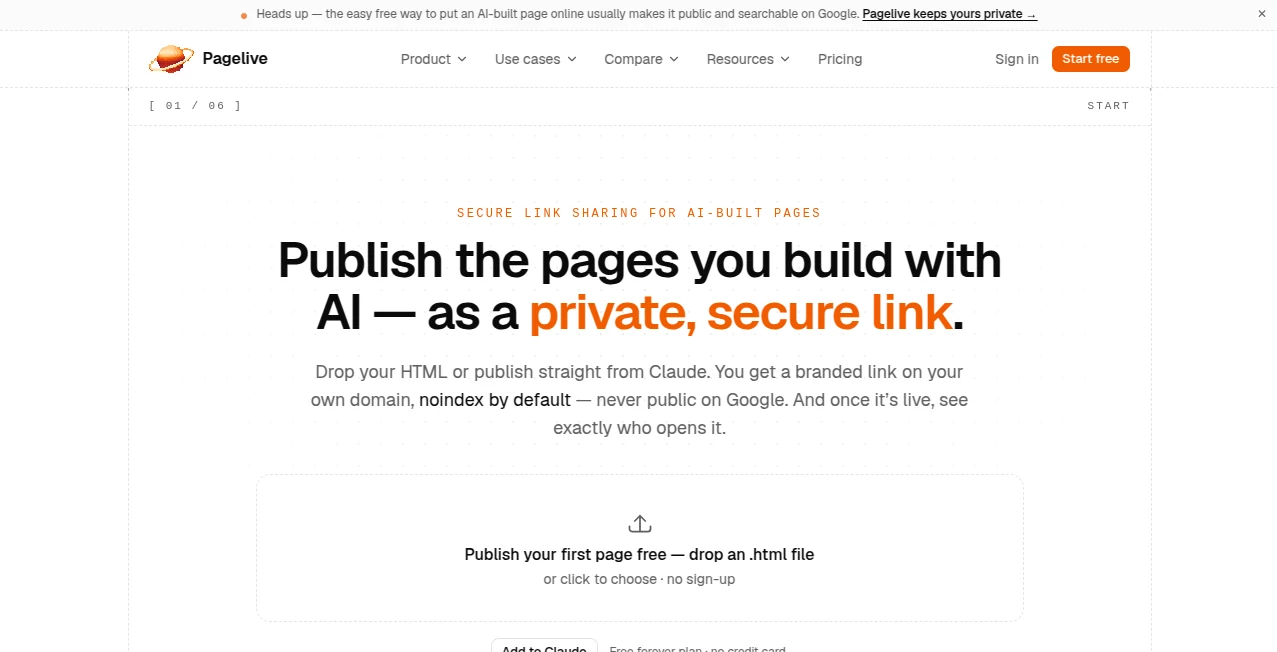
What is Pagelive?
You've just spent the last hour in a conversation with an AI assistant, perfecting a proposal. It looks incredible, but now you have a problem—how do you actually share this with a client? Exporting as a PDF kills the interactivity, and pasting it into an email is just messy. This is where this platform steps in to save the day. It acts as a bridge, taking any HTML page you create and turning it into a clean, private link you can actually send. I remember using it for a project deck recently. I published it in seconds, sent the link to a colleague, and got an email notification the moment he opened it. It felt like a superpower, transforming a static file into a professional, trackable document .
Key Features
This service is built around a simple, powerful idea: publishing and tracking should be as easy as creating. It connects directly to your AI workflow, so you never have to leave your creative flow.
User Interface
The interface is remarkably straightforward, especially if you're using it through an AI client. You don't need to navigate a clunky dashboard. By connecting via the MCP (Model Context Protocol) server, you can publish, update, and analyze pages using simple natural language prompts right from your conversation . For instance, you can just say, "Publish this page with Pagelive and give me the link". For those who prefer a more manual approach, the web interface is equally clean and intuitive, allowing you to paste HTML directly .
Accuracy & Performance
Performance is where this tool genuinely excels. Publication happens in seconds, bypassing the need for a complicated deployment flow or setting up a repository . The analytics are also precise. It provides bot-filtered data, giving you a clear view of real engagement with metrics like unique viewers, dwell time, and top countries by day. I found this incredibly useful to gauge genuine interest rather than just vanity metrics .
Capabilities
The core capabilities extend beyond just publishing. It acts as a robust publishing and analytics tool. You can update a page at any time, and the link stays the same, which is perfect for iterative drafts . Furthermore, you can add a reply or submission form to your page, and the responses are captured and can be analyzed directly back in your AI conversation . It also supports custom domains and branding for professional use .
Security & Privacy
For those sharing sensitive information, security is a primary concern. This tool addresses it effectively. All published pages are noindex by default, meaning they don't appear in search results . You can also add an optional password to restrict access for specific viewers. The pages are served through an isolated content plane on Cloudflare, adding another layer of security .
Use Cases
This tool is incredibly versatile. Freelancers and agencies can send interactive proposals and slide decks, knowing exactly when a potential client has viewed them. Marketers can publish reports and dashboards, tracking engagement in real-time. Even internal teams can use it to share demos, travel plans, or summaries without cluttering email inboxes with large files . It essentially removes the friction between creating a page and sharing it with the world—or just with a specific person.
Pros and Cons
Pros:
- Incredibly fast publishing—no deployment process, just a link.
- Tracks meaningful analytics (opens, dwell time, unique viewers) with bot filtering .
- Seamless integration with AI via MCP, allowing publishing through natural language .
- Maintains privacy by default with password protection and no-indexing .
- The link remains unchanged even when you update the page content .
Cons:
- Requires some setup to connect through MCP, though it's primarily OAuth-based .
- The free plan limits you to a certain number of pages (e.g., 10), which might be restrictive for heavy users.
Pricing Plans
Getting started is free, allowing you to publish up to 10 pages to test the waters . For users who need more, the Pro tier offers additional features like custom domains, custom slugs, and presumably a higher page limit. There is also a Team plan mentioned, which suggests workspace collaboration options for organizations .
How to Use Pagelive
Using the platform is straightforward and can be done in two ways. For the most integrated experience, you connect it to an MCP-capable client like Claude Desktop. You simply add a custom connector using the URL https://app.pagelive.io/api/mcp and sign in via OAuth . Once connected, you can use prompts like "Update my Q3 proposal page with this new version — keep the same link". Alternatively, you can use the web interface directly, copying and pasting your HTML to publish, and then sharing the generated link with your audience .
Comparison with Similar Tools
While other tools like GitHub Pages or Netlify allow you to deploy HTML, they require you to manage repositories and build processes. This tool is specifically designed for AI workflows. It strips away the technical overhead and adds a layer of analytics and privacy that is often missing from simpler deployment options. It feels more like a sharing and tracking tool than a full-fledged hosting platform, which is precisely the point .
Conclusion
This platform is a perfect companion for anyone using AI to generate content. It solves the final-mile problem of getting your creation into the hands of the people who need to see it, while also providing valuable insights into their engagement. It’s not just about making a link; it’s about making your work more professional, secure, and impactful. If you find yourself constantly asking, "How do I share this?", this is the answer you've been looking for.
Frequently Asked Questions (FAQ)
What kind of pages can I publish?
You can publish any HTML page, including proposals, slide decks, reports, demos, dashboards, or even mini-tools .
Is my published content visible to search engines?
No, by default, pages are noindex, meaning they are private and won't appear in search results . You can also add password protection.
Can I update a page after I've published it?
Yes, you can update the page at any time, and the original link will continue to work without changing.
How does the form feature work?
You can add a reply or submission form to your page. Any responses are captured and can be analyzed directly back within your AI conversation if using the MCP connection .
Do I need to be a developer to use this?
No, the platform is designed to be accessible. You can connect it to an AI client using simple prompts or use the web interface to publish HTML directly .
AI Landing Page Builder , AI Productivity Tools , AI Analytics Assistant , AI Developer Tools .
These classifications represent its core capabilities and areas of application. For related tools, explore the linked categories above.

Pagelive Alternatives Product

Liftburst

Nestify

Period Calcu…

Pixelied

FurWall

WhatsMyName …

Sales Prospe…

PurityRadar

CtrlOps