
Particles Simulator
What is Particles Simulator?
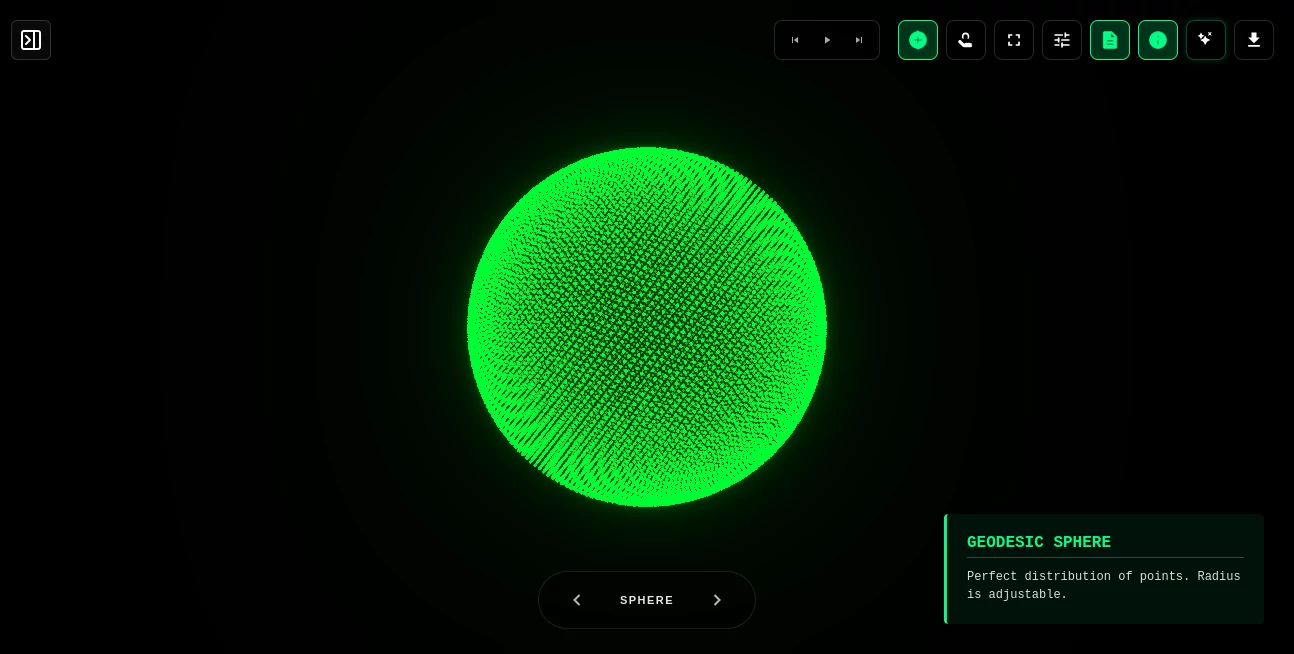
There’s something hypnotic about watching thousands of tiny glowing dots swirl, collide, and dance together in perfect harmony. I still remember the first time I opened this tool and typed a simple prompt — within seconds, an entire universe of particles came alive on my screen, twisting into shapes and flowing with beautiful physics. No heavy software to install, no steep learning curve. Just pure creative joy. Whether you’re a digital artist looking for inspiration or just someone who loves watching beautiful chaos unfold, it delivers that rare feeling of playing with something truly alive.
Introduction
This platform turns your browser into a powerful creative sandbox for 3D particle simulations. Built with high-performance WebGL, it lets you generate, manipulate, and export complex particle systems with ease. You can start with simple text prompts, tweak physics in real time, or dive deep into custom formations. It’s become a favorite for generative artists, creative coders, educators, and anyone who wants to create stunning visual effects without fighting complicated tools. The best part? It runs smoothly even with tens of thousands of particles, all directly in your browser.
Key Features
User Interface
The interface feels intuitive and playful. A clean control panel lets you adjust particle count, speed, glow intensity, and visual styles with simple sliders. Gesture support makes navigation natural — one finger to look around, open palm to zoom, peace sign to change speed. You can quickly switch between different formations like spheres, cubes, or custom shapes. Everything is responsive and designed to keep you in flow rather than fighting menus.
Accuracy & Performance
It handles massive particle counts (20,000+ units) with impressive smoothness, thanks to optimized WebGL rendering. Physics feel natural and responsive, while smart text integration lets particles form readable words and shapes without breaking performance. The simulation stays stable even during heavy experimentation, which is rare for browser-based tools of this complexity.
Capabilities
You can generate simulations from text prompts, import 3D models or blueprints, create custom formations, and export logic for use in production apps. It supports real-time physics, smart text engines that form readable words, media imports, and interactive controls. Perfect for generative art, educational visualizations, creative coding experiments, or adding particle magic to your own projects. The export feature is especially useful for developers who want to bring these effects into their applications.
Security & Privacy
Your creations stay yours. Simulations run locally in the browser where possible, and there’s no forced account or unnecessary data collection. You can save and publish to community cloud if you choose, but everything remains under your control. This respectful approach gives creators freedom to experiment without worry.
Use Cases
A digital artist experiments with particle typography for a new album cover. An educator builds interactive physics demonstrations that students can explore on their own devices. A game developer prototypes particle effects before implementing them in Unity. A motion designer creates hypnotic background visuals for videos or live streams. Even casual users lose themselves for hours just playing with different formations and watching beautiful patterns emerge.
Pros and Cons
Pros:
- Impressive performance with large particle counts directly in the browser.
- Intuitive controls including gesture navigation that feel natural.
- Great balance between ease of use and deep customization.
- Export options make it useful beyond just experimentation.
- Free to explore with meaningful creative possibilities.
Cons:
- Very complex custom simulations may require some learning and tweaking.
- Performance can vary depending on your device and browser.
Pricing Plans
The core experience is freely available so anyone can start creating immediately. Premium features and higher limits are available through optional plans for heavy users or professional needs. It’s priced in a way that feels fair — rewarding curiosity first while offering more power for those who want it.
How to Use Particles Simulator
Open the site and start with a simple prompt or choose a preset formation. Adjust sliders for particle count, speed, and glow until it feels right. Use gestures or mouse controls to explore the simulation from different angles. Try importing a 3D model or blueprint for more advanced effects. When you find something you love, export the configuration or logic for later use. The whole process is designed to be playful and addictive — you’ll likely lose track of time exploring possibilities.
Comparison with Similar Tools
Many particle tools are either too basic or require heavy desktop software with steep learning curves. This one stands out by running smoothly in the browser while offering professional-grade control and export options. It combines accessibility with real creative depth better than most alternatives, making it ideal for both quick experiments and serious generative art projects.
Conclusion
Creating beautiful, living particle systems used to require serious technical skills and computing power. This platform brings that magic to anyone with a browser and an idea. It’s playful yet powerful, simple yet deep, and consistently delivers moments of wonder. For artists, developers, educators, or anyone who loves visual experimentation, it’s one of those joyful tools that reminds you why creative technology can be so special.
Frequently Asked Questions (FAQ)
How many particles can it handle?
It performs well with 20,000+ particles, depending on your device.
Do I need to install anything?
No — everything runs directly in your browser.
Can I export my creations?
Yes, you can export formations and logic for use in other projects.
Is it suitable for beginners?
Absolutely — simple prompts and presets make it easy to start, while advanced controls reward deeper exploration.
AI Fun Tools , AI Design Generator , AI Graphic Design , Other .
These classifications represent its core capabilities and areas of application. For related tools, explore the linked categories above.
Particles Simulator details
Website unavailable — View Alternatives
Pricing
- Free
Apps
- Web App
Categories

Particles Simulator Alternatives Product

Pixelied

AIGAZOU

Luma AI

Lensgo

videodance

Launchelion
Play Queens …

Hantavirus C…

ImageKontext…