
Patternful
What is Patternful?
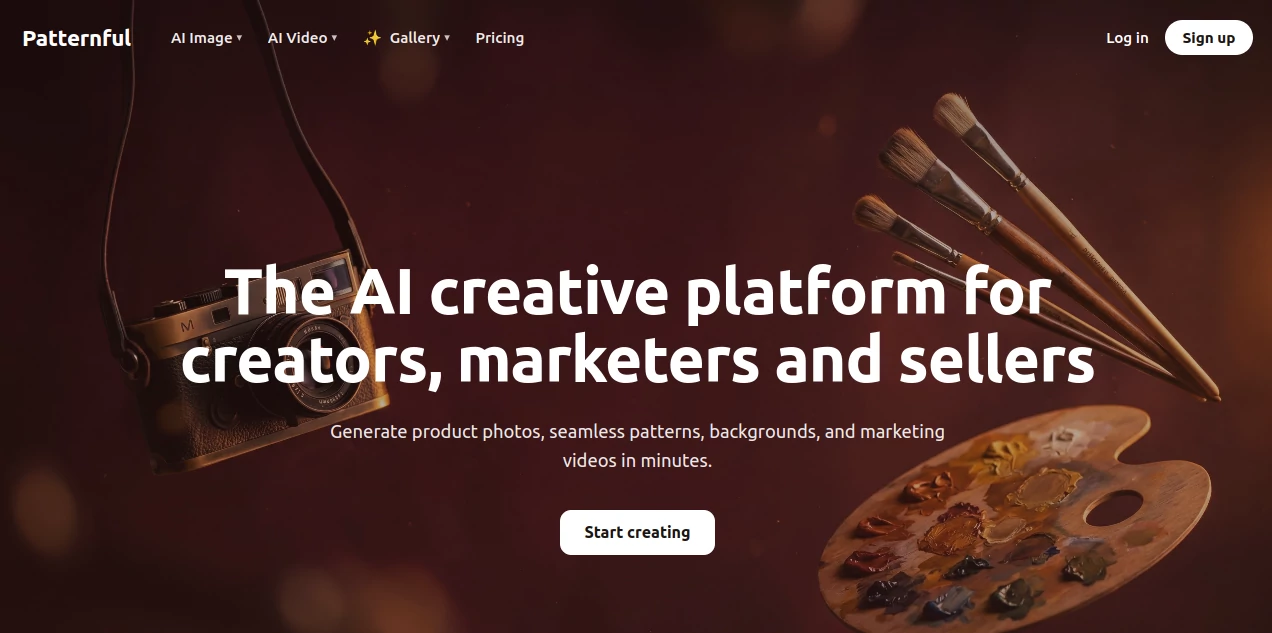
Patternful is built for people who need polished visual content without turning every project into a long design process. The platform brings image generation, editing, product photography, seamless patterns, mockups, vector artwork, and video creation into one workspace. For ecommerce sellers in particular, that combination is practical: a single product can move from a basic photo to a clean product shot, a branded visual, a promotional video, or a print-ready design without jumping between several applications.
The platform also gives users access to a range of current AI models, making it easier to experiment with different visual styles and workflows from one place. Whether the goal is to prepare product listings, create social media assets, design merchandise, or build campaign material, the emphasis is on getting from an idea to a usable asset quickly.
Key Features
- AI image generation from text prompts.
- AI video generation from text or still images.
- Image upscaling and enhancement for higher-quality outputs.
- Background removal and background replacement tools.
- AI outpainting for extending images into new aspect ratios or canvas sizes.
- Seamless pattern generation for print and textile projects.
- Product mockups for realistic ecommerce presentations.
- Ghost mannequin and virtual try-on workflows for product imagery.
- Vector art generation for branding and design work.
- Tee design and other print-focused creative tools.
- More than 40 AI filters and creative effects.
- High-resolution exports and commercial use rights on paid plans.
User Interface
The workspace is organized around different creative tasks rather than forcing users to build a complicated workflow from scratch. Image, product, and video tools are grouped together, so a creator can choose a starting point and continue editing the result in the same environment.
This approach is particularly useful for ecommerce work. Instead of downloading a generated image, opening another editor to remove its background, finding a separate mockup service, and then using another application for promotional content, many of those steps can be handled within one workflow. The interface feels more useful when treated as a creative workspace rather than simply another text-to-image generator.
Accuracy & Performance
Output quality depends on the selected model, prompt, source material, and type of task, but the platform's multi-model approach gives users room to compare results rather than relying on a single generation engine. Its image workflow also includes enhancement, expansion, editing, and background tools, which can help turn an acceptable first generation into a more production-ready asset.
The image expansion workflow is a good example. Users can expand an image to common ratios such as 1:1, 16:9, 9:16, 4:5, and several other formats, or specify a custom canvas size. This is useful when the same product photograph needs to fit different advertising placements without awkward cropping.
Capabilities
The platform covers a surprisingly broad portion of a modern visual content workflow. Users can generate images from prompts, create videos from text or images, upscale existing visuals, remove objects or backgrounds, create product mockups, and produce seamless patterns for merchandise and textiles.
Its model selection is another notable advantage. The service lists models including Nano Banana 2, Seedream 5, Flux 2, Recraft 4, Krea 2, Grok, Veo 3, and Kling 3, among others. Having these options together can save time for creators who would otherwise maintain several separate subscriptions just to access different generation models.
Use Cases
Ecommerce product photography: Sellers can create cleaner product shots, replace backgrounds, upscale images, build mockups, and prepare visuals suitable for online stores.
Print-on-demand: Seamless patterns, tee designs, and vector artwork make the platform useful for merchandise, stationery, textiles, and other printable products.
Advertising: Marketing teams can create campaign imagery, promotional videos, product visuals, and variations for different placements without arranging a traditional photoshoot for every concept.
Social media content: Creators can turn product ideas into images, short videos, illustrations, and branded visual assets suited to different social formats.
Brand design: Vector artwork and repeatable visual styles can help businesses create supporting graphics for websites, packaging, campaigns, and social profiles.
Creative experimentation: Designers can compare different AI models and styles when exploring a concept before committing to a final direction.
Pros and Cons
Pros
- Combines image, video, product, and design workflows in one platform.
- Offers access to multiple well-known AI generation models.
- Strong focus on ecommerce and commercial visual production.
- Includes practical editing tools rather than generation alone.
- Supports seamless patterns, mockups, vector art, and merchandise designs.
- Paid plans include commercial use rights and high-resolution exports.
- Offers a free starting option and several paid tiers.
Cons
- Credits can become an important consideration for users generating large volumes of content.
- The number of available tools and models may take some time for new users to explore.
- Results can vary between models and prompts, so important commercial assets may still require manual review.
- Users looking for only one narrowly focused design function may find the broader workspace more extensive than necessary.
Pricing Plans
The platform offers a free way to get started as well as monthly, annual, and pay-as-you-go options. Annual billing currently reduces the displayed monthly price compared with monthly billing.
- Starter: $14 per month, or $10.50 per month when billed annually, with 200 credits each month.
- Standard: $34 per month, or $25.50 per month when billed annually, with 500 credits each month. This plan adds private prompts and priority email support.
- Pro: $89 per month, or $69 per month when billed annually, with 1,300 credits each month and fully private content without gallery publication.
Paid plans include access to AI image generators, image editors and upscalers, video generators, background tools, high-resolution exports, and commercial use rights. The Pro option is especially interesting for professional users who need greater privacy and higher monthly production capacity.
How to Use Patternful
Start by choosing the type of asset you want to create. For example, an ecommerce seller might begin with an AI image or product workflow, while a print designer could go directly to the seamless pattern or tee design tools.
Enter a clear description of the desired visual or upload an existing image when the selected workflow supports it. Experiment with the available model or creative settings, generate the first result, and then refine it using the platform's editing, background, expansion, or enhancement tools.
For product work, it is worth thinking beyond the first generation. A useful workflow might be to create the product image, clean the background, expand it for a required advertising ratio, upscale the final version, and then create a mockup or promotional video. This turns the platform into a complete production pipeline rather than a one-click generator.
Comparison with Similar Tools
Many AI creative services concentrate on one area, such as text-to-image generation, AI video, background removal, or product photography. The main distinction here is the breadth of the workflow. Instead of positioning itself solely as an image generator, the platform combines generation with editing, ecommerce photography, print design, and video production.
That makes it particularly appealing to small ecommerce teams and independent creators who need several types of assets but do not want to maintain a separate tool for every stage. Users who already have a preferred specialist application may still prefer that dedicated workflow, but for someone building a complete visual production stack, having multiple models and creative tools together is a meaningful advantage.
Conclusion
For ecommerce sellers, creators, marketers, and independent designers, the real strength of this platform is not simply generating an attractive image. It is the ability to continue working with that image and turn it into something useful for a real business: a product listing, advertisement, mockup, print design, social post, or video.
The combination of multiple AI models, image editing, product photography, seamless patterns, vector artwork, and video tools makes it a versatile option for teams that produce visual content regularly. If your workflow involves creating several kinds of commercial graphics and you would rather keep those jobs in one workspace, it is well worth exploring.
Frequently Asked Questions (FAQ)
What is this platform mainly used for?
It is an AI creative platform designed especially for creators, marketers, ecommerce sellers, and businesses that need images, product photos, patterns, mockups, vector designs, and marketing videos.
Can it create product photos without a traditional studio?
Yes. Its product-focused workflows include AI-powered product photography, mockups, clean backgrounds, ghost mannequin effects, and virtual try-on capabilities.
Can I generate videos?
Yes. The platform includes video generation from text or images, along with video enhancement capabilities.
Does it support seamless patterns?
Yes. The seamless pattern generator is designed for print and textile applications, making it useful for merchandise, fabrics, stationery, and other repeat-pattern products.
Does it offer commercial use rights?
Commercial use rights are included with the paid plans, making them suitable for businesses producing assets for commercial projects.
Can I use different AI models?
Yes. The platform provides access to multiple image and video models, including models from several leading AI companies, giving users more flexibility when creating different types of content.
Is there a free option?
Yes. The service allows users to start for free before moving to a paid subscription when they need additional credits and advanced capabilities.
Is it suitable for beginners?
Yes. You do not need professional design experience to begin. The workflow-based approach lets users select a task, provide a prompt or source image, and refine the generated result with the available tools.
Which plan is best for professional users?
The Pro plan is designed for professionals who need higher production volume and privacy. It includes 1,300 monthly credits and keeps created content out of the public gallery.
AI Photo & Image Generator , AI Pattern Generator , AI Video Generator , AI Graphic Design .
These classifications represent its core capabilities and areas of application. For related tools, explore the linked categories above.

Patternful Alternatives Product

AI Animate I…

tryon.ink

GPT Image 2 …
Visfeng AI F…

Veo4

vio4 ai video
Lensgo

FluxMov
RightAI