
Photo Animate
What is Photo Animate?
Photo Animate is an AI-powered photo animation platform designed to turn still images into short, lifelike videos. Instead of leaving an old portrait, family snapshot, or creative image frozen in a single frame, the service adds natural movement and expressive details that make the picture feel alive.
The experience is particularly appealing for people working with personal memories. A faded wedding photograph, childhood portrait, or black-and-white family picture can become a short moving clip with gentle facial expressions, blinking, smiling, or subtle head movement. At the same time, the platform is useful for creators who want quick visual content without opening a traditional video editor.
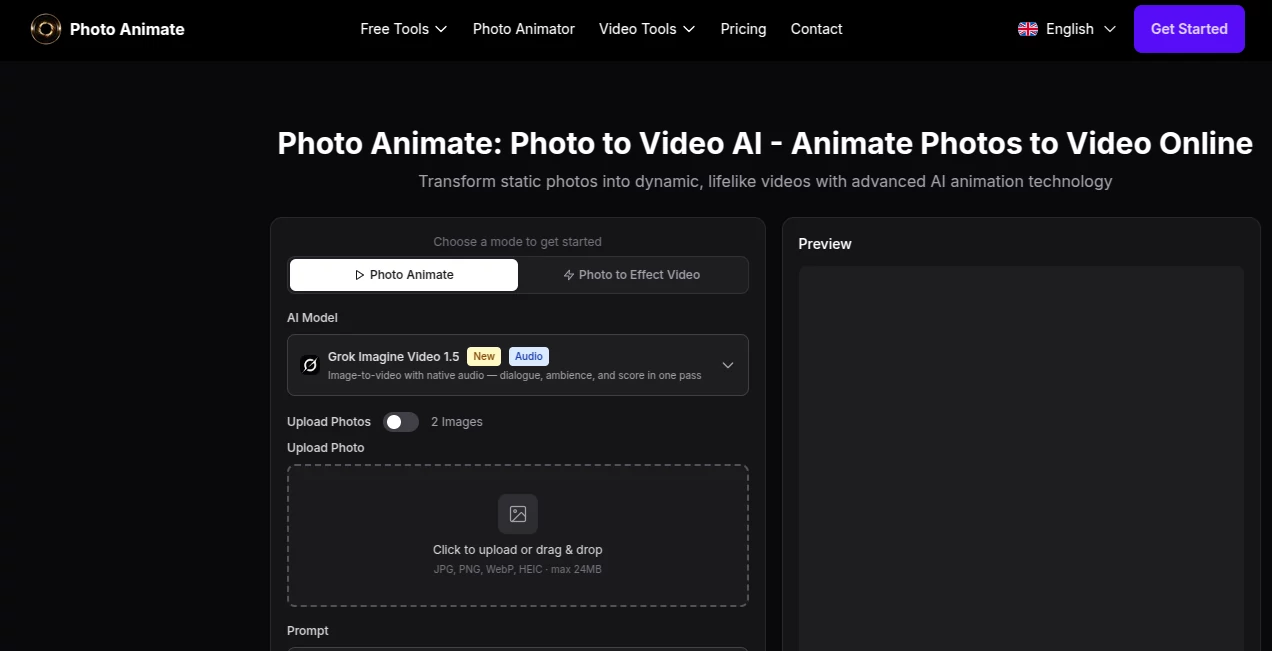
The workflow is refreshingly straightforward: upload an image, describe the movement you want, adjust the available settings, preview the result, and download the finished video. There is no need to understand keyframes, timelines, or complex animation software.
Key Features
- AI-powered image-to-video animation for turning still photos into moving clips.
- Support for JPG, PNG, WebP, and HEIC images up to 24MB.
- Motion prompts with up to 500 characters for describing the desired animation.
- Ready-made templates such as Dance, LoveHeart, Old Photo, Earth Zoom, Walking, Ghibli, Cartoon, Handshake, and Hugging.
- Video durations of 5, 10, or 15 seconds.
- 480p and 720p resolution options in the main photo animation workflow.
- Multiple aspect ratios, including 1:1, 16:9, 9:16, 4:3, 3:4, 3:2, and 2:3.
- Native audio support with the selected generation model, allowing dialogue, ambience, and score to be generated alongside the video.
- Support for two-photo animation scenarios, making it possible to create effects involving two people.
User Interface
The interface keeps the creative process visible from the beginning. Users can upload an image by clicking or dragging it into the upload area, enter a motion prompt, and select a template when they want a quicker starting point.
The controls are arranged around the actual generation process rather than a complicated editing timeline. Duration, resolution, and aspect ratio can be adjusted before rendering, while a preview area provides a clear place to inspect the result.
This approach should feel comfortable even for someone who has never worked with animation software. For example, a user restoring an old family archive can upload a portrait and start with the Old Photo template instead of trying to figure out how to describe every movement from scratch.
Accuracy & Performance
The platform focuses heavily on natural-looking motion, particularly for portraits and historical photographs. Its stated use cases include subtle blinking, smiles, head movements, and other restrained facial actions that preserve the character of the original image.
Results will naturally depend on the source photograph. A clear, well-lit face with recognizable facial features gives an animation model more useful visual information than a heavily damaged or extremely blurry image. For older photographs, restoring or enhancing the image first can therefore improve the starting point.
Generation is designed for short-form output rather than long productions. Five-, ten-, and fifteen-second clips make the service well suited to social posts, family slideshows, tribute videos, and quick creative experiments.
Capabilities
Beyond ordinary portrait animation, the platform covers a surprisingly broad range of image-to-video ideas. Users can animate old photographs, create dancing portraits, generate hugging or kissing scenes from multiple images, and experiment with playful effects such as fights or other movement-based transformations.
The available templates make experimentation easier, while prompts provide more control when a specific movement is required. Users can also work with different framing options, which is useful when preparing a clip for a vertical social feed, square post, or widescreen presentation.
The service also supports newer video-generation workflows using models such as Grok Imagine Video 1.5, with native audio available in the main interface. This gives the tool room to move beyond silent photo animation toward richer short-form video creation.
Security & Privacy
Privacy matters more than usual when a service works with personal portraits and family photographs. The platform states that it is designed with privacy in mind and directs users to its Privacy Policy for details about media storage, processing, and related handling.
Users should still review the applicable privacy terms before uploading sensitive personal material. When creating videos involving other people, obtaining their permission is also a sensible practice, particularly when the resulting animation could be shared publicly.
Use Cases
- Family memories: Turn childhood portraits, wedding photographs, and family snapshots into short moving memories.
- Historical archives: Add subtle motion to black-and-white and vintage photographs used in genealogy or family-history projects.
- Memorial videos: Create respectful portrait animations for tribute projects using gentle movement rather than exaggerated effects.
- Social media: Convert ordinary photographs into short clips that are more engaging in visual feeds.
- Creative experiments: Try dance, cartoon, hugging, handshake, or other templates to create playful photo-based videos.
- Personal gifts: Give an anniversary or family gift a more memorable touch by animating an old photograph.
- Content creation: Generate short visual assets that can be incorporated into reels, presentations, stories, or other creative projects.
Pros and Cons
Pros
- Simple photo-to-video workflow with little technical learning required.
- Particularly well suited to portraits and old family photographs.
- Useful templates reduce the effort required to design a motion prompt.
- Supports several common image formats.
- Multiple duration, resolution, and aspect-ratio options.
- Can handle creative scenarios involving one or two source images.
- Native audio support is available with the supported generation model.
- Free credits give new users an opportunity to test the service before paying.
Cons
- Short video durations make it better suited to clips than full-length productions.
- Final animation quality depends significantly on the quality and composition of the source image.
- Users looking for detailed timeline editing will still need a dedicated video editor.
- Higher-quality or more frequent generation may require additional credits or a paid plan.
Pricing Plans
The service uses a credit-based generation model. The main photo animation workflow currently shows a cost of 2 credits for an animation, while new users can receive free credits to try the generation experience.
For users who need more generations, paid options are available through additional credits and subscription-style plans. Because generation costs can vary by model, resolution, and other settings, checking the current pricing page before purchasing is the safest way to see the latest offers.
This model is useful for occasional users because they can experiment without committing to a full video-production subscription. More active creators can purchase additional credits when their usage increases.
How to Use the Tool
- Upload an image: Add a JPG, PNG, WebP, or HEIC photo through the upload area.
- Choose the movement: Select a template or describe the desired action in the prompt field. For portraits, subtle instructions such as blinking, smiling, or gentle head movement can produce more natural-looking results.
- Set the video parameters: Choose a duration, resolution, and aspect ratio according to where you plan to use the video.
- Generate the animation: Start the generation process and allow the AI to transform the still image into a moving clip.
- Review and download: Check the preview and download the finished video when the result matches your expectations.
Comparison with Similar Tools
Compared with general-purpose AI video generators, this platform has a more focused identity around animating existing photographs. That distinction matters when the goal is not to invent an entirely new scene but to preserve a particular face, memory, or photograph while adding movement.
Traditional photo editors provide much greater manual control, but they also require more time and technical knowledge. A conventional editor may be preferable for detailed compositing or frame-by-frame work, whereas an AI animation workflow is much faster when the desired result is a short moving portrait.
Generic image-to-video systems can also produce impressive results, especially for cinematic scenes. However, a dedicated photo-animation workflow can be more convenient for users whose starting point is a single family photograph or portrait and who want a practical result with minimal setup.
Conclusion
For anyone sitting on a collection of photographs that deserve more than a place in a folder, this platform offers an appealing way to make them move. Its strongest quality is not simply adding motion; it is the emphasis on keeping that motion connected to the original photograph.
The combination of portrait-focused animation, old-photo support, templates, prompts, adjustable video settings, and newer audio-enabled generation makes it useful for both sentimental projects and everyday content creation. A grandparent's wedding photograph, an old black-and-white portrait, or a simple profile picture can all become something much more engaging with only a few steps.
It is not intended to replace a full professional video-editing suite, and users should keep their expectations realistic when working with poor source images. For quick photo-to-video projects, however, it provides a convenient creative shortcut that can turn an otherwise static image into a memorable short clip.
Frequently Asked Questions (FAQ)
What does the tool do?
It uses AI to transform still photographs into short animated videos. The system can add facial expressions, subtle movements, and other motion based on a selected template or written prompt.
Can I animate old family photos?
Yes. Old family photographs are one of the platform's highlighted use cases. Vintage, faded, black-and-white, and historical portraits can be animated, with clearer facial details generally providing a better foundation for the result.
Can I animate a black-and-white photograph?
Yes. Black-and-white and sepia-toned photographs can be used. If an image is heavily damaged or unclear, restoring or enhancing it before animation may help produce a cleaner result.
Can I use two photos?
Yes. The platform supports two-image workflows for effects involving two people, including creative interactions such as hugging, kissing, or fighting.
What video lengths are available?
The main photo animation interface currently provides 5-second, 10-second, and 15-second options.
What image formats are supported?
JPG, PNG, WebP, and HEIC images are supported, with a maximum upload size of 24MB in the main interface.
Does it generate audio?
Native audio is available with the supported generation model. The platform describes the audio capability as generating dialogue, ambience, and score together with the video.
Is it free?
New users receive free credits to try the service. Additional generations are available through paid credit options and subscription plans.
Do I need video editing experience?
No. The workflow is designed around uploading an image, selecting or describing movement, choosing output settings, generating the clip, and downloading the result.
What type of photos work best?
Clear, well-lit portraits with visible facial features are generally the best starting point. For older photographs, improving facial clarity before animation can also help the AI interpret the image.
Can animated photos be used in social media or family videos?
Yes. Generated clips can be downloaded and used in family slideshows, tribute projects, anniversary videos, social content, and other creative edits, subject to the applicable usage terms.
Are uploaded photos private?
The platform states that it is designed with privacy in mind. Users should review the current Privacy Policy for specific information about storage, processing, and handling of uploaded media.
How long does generation take?
Generation time can vary according to the model, duration, resolution, and current processing load. Short clips are designed for a relatively quick creation workflow rather than traditional manual video production.
Is this a replacement for professional video editing software?
Not really. It is better viewed as a fast AI animation tool for turning photographs into short clips. Professional editors remain more suitable when you need detailed timelines, precise cuts, advanced effects, or extensive post-production.
AI Animated Video , AI Image to Video , AI Video Generator , Video .
These classifications represent its core capabilities and areas of application. For related tools, explore the linked categories above.
Photo Animate details
Website unavailable — View Alternatives
Pricing
- Freemium
Apps
- Web App
Categories

Photo Animate Alternatives Product

Faceless Ree…

AI Best
animearc

RenderFlow AI

Image2

RunwayAI

Framepack AI

Sisif

S2LIfe AI