
Photo Studio
What is Photo Studio?
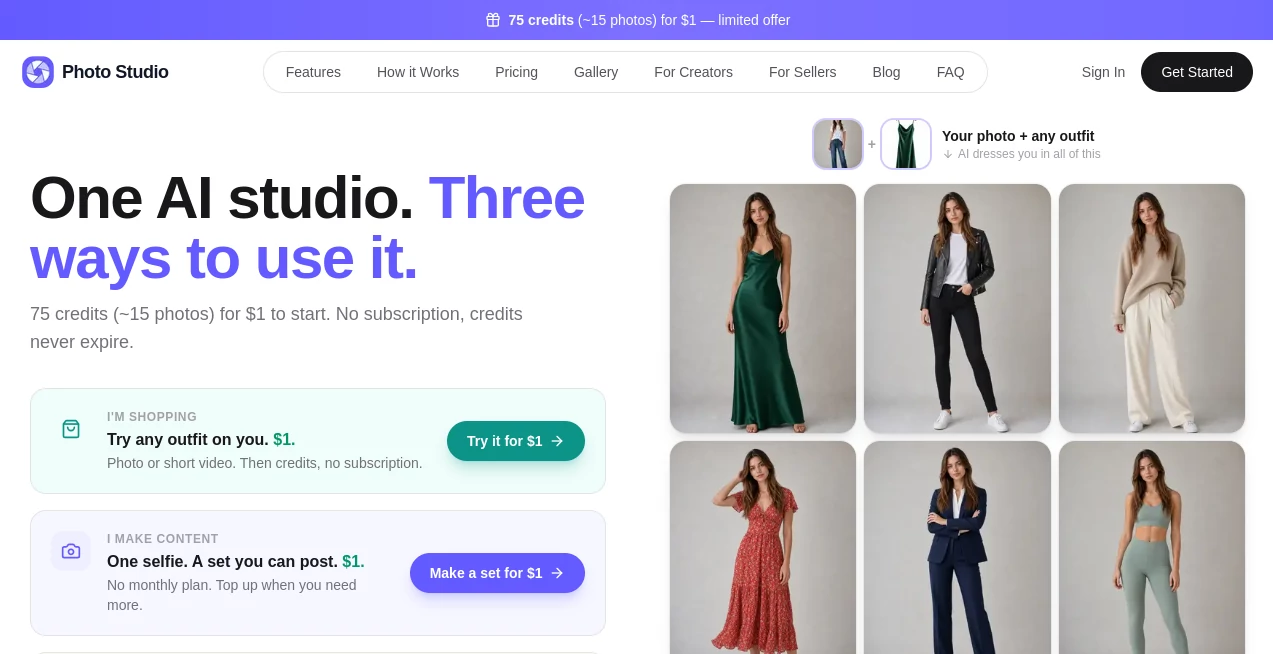
PhotoStudioGen is an AI-powered creative studio designed for people who want professional-looking photos and short videos without arranging a traditional photo shoot. Instead of needing a photographer, a studio, several outfits, and hours of preparation, users can start with a single clear selfie and turn it into a wide range of visual content.
The platform brings several practical tools into one place, including AI photo generation, virtual try-on, photo editing, image upscaling, and image-to-video generation. It is particularly useful for creators, online sellers, influencers, and anyone who regularly needs fresh visual content for social media or marketing.
One of its most appealing ideas is simplicity. Upload a photo, choose a style or describe what you want, and let the system handle the visual production. The website reports more than 250,000 photos and videos generated, with average generation times of around 30 seconds and more than 70 styles and presets available.
Key Features
- AI Photo Generation: Create new images from text descriptions or transform uploaded photos according to your instructions.
- Virtual Try-On: Upload a picture of yourself and an outfit image to preview how the clothing could look on you.
- Image-to-Video: Turn a still image into a short animated video with natural-looking movement.
- AI Photo Editing: Edit images using plain-language instructions, including background changes, lighting adjustments, object removal, and image combinations.
- AI Upscaling: Improve image resolution with an upscaling tool designed for portraits, faces, and product imagery.
- 70+ Styles and Presets: Ready-made visual styles make it easier to create different looks without writing complicated prompts.
- High-Resolution Output: The platform supports output of up to 4K, depending on the tool and plan used.
- Commercial Usage: The service states that generated images come with commercial rights, making the platform useful for marketing and business content.
User Interface
The interface is built around a straightforward upload-and-create workflow. A new user does not need to learn complicated editing software before producing something useful. The main process can be reduced to three steps: upload a suitable photo, select a style or describe the desired result, and download the finished content.
The collection of dedicated tools also makes the experience easier to navigate. Someone interested in virtual try-on can go directly to that workflow, while another user can choose image generation, editing, video creation, or upscaling. This separation keeps the creative process focused rather than turning the platform into an overwhelming collection of controls.
Accuracy & Performance
Speed is one of the platform's strongest practical advantages. The website reports that many images are generated in roughly 30 seconds, while some workflows may take longer depending on the operation. This is considerably more convenient than waiting for a conventional photo production process.
The virtual try-on feature is especially interesting because it is designed to preserve the user's face, pose, and body while applying the selected clothing. It can work with different types of outfit references, including product shots, flat-lays, and images of models.
For image-to-video generation, users can describe the desired movement in ordinary language. Generated clips can be between 5 and 12 seconds and are available in portrait, landscape, and square formats, which makes the feature practical for different social platforms.
Capabilities
The platform covers more than simple image generation. A creator could start with one selfie, create several styled photos, edit individual images, upscale the strongest results, and then animate selected photos into short clips. That makes it possible to build an entire content batch from a very small amount of source material.
The text-to-image workflow also allows users to start from an idea rather than an existing photograph. Users can describe a scene, visual concept, or creative direction and generate an image from that description. For people who prefer editing, the photo editor accepts plain-English instructions for changes such as removing objects, changing backgrounds, improving lighting, or combining images.
Security & Privacy
Privacy is an important consideration when uploading personal photographs. The service states that uploaded images are not shared, sold, or used for AI training. It also states that users can delete their data, while connections and transactions are protected with 256-bit SSL encryption.
Payment processing is handled through Stripe, and the privacy policy states that the platform does not store users' credit card information directly. As with any service that processes personal images, users should still review the current privacy policy and terms before uploading particularly sensitive material.
Use Cases
- Social Media Creators: Produce batches of photos and short videos from a single reference image instead of arranging repeated shoots.
- Fashion Shoppers: Use virtual try-on to visualize an outfit on a personal photo before making a purchase.
- Online Sellers: Create more polished product and lifestyle imagery without hiring a photographer for every listing.
- Influencers: Generate new looks and short-form video content for feeds, stories, and other social channels.
- Marketing Teams: Produce visual material for campaigns, advertisements, product pages, and promotional content.
- Photographers and Designers: Use AI editing and upscaling as supporting tools when developing or refining visual concepts.
Pros and Cons
- Pros: Simple workflow, multiple image and video tools in one platform, virtual try-on, 70+ styles and presets, fast generation, high-resolution output, commercial rights, and credit-based usage.
- Pros: Credits do not expire, and users can choose between one-time purchases and monthly plans.
- Pros: The image-to-video feature supports several aspect ratios and short clips suitable for social media.
- Cons: Results can vary depending on the quality and suitability of the uploaded reference image.
- Cons: Advanced or frequent generation can consume credits quickly, particularly when producing video.
- Cons: Users who need extensive professional photo editing controls may still prefer dedicated desktop editing software for highly detailed manual work.
Pricing Plans
The service uses a credit-based pricing system, allowing users to pay for individual usage or choose a monthly subscription. A starter offer provides 75 credits for $1, while credits purchased through the service do not expire.
The Basic plan costs $9 per month and includes 150 credits each month plus two free credits per daily login. The Pro plan costs $19 per month and provides 350 monthly credits plus three free credits per daily login, along with priority processing and support.
The highest monthly plan costs $49 and includes 1,000 credits per month, five additional daily login credits, faster processing, dedicated support, and a commercial license. The platform also lists a $15 pay-as-you-go option with 253 credits, intended for users who prefer a one-time purchase rather than a subscription.
Credit consumption depends on the tool. Standard photo generations generally use 5 credits, while image-to-video generation is charged at 7 credits per second. A seven-day money-back guarantee is available for the first purchase when less than 10% of the purchased credits have been used.
How to Use It
- Upload a clear selfie or another suitable reference image.
- Choose the creative tool you want to use, such as image generation, virtual try-on, editing, or image-to-video.
- Select one of the available presets or describe the desired result using a custom prompt.
- Generate the image or video and review the result.
- Make another generation or adjustment if the result needs refinement.
- Download the finished content and use it for your intended personal, social, marketing, or commercial purpose according to the applicable terms.
Comparison with Similar Tools
Many AI image platforms focus primarily on generating pictures from text, while traditional photo editors concentrate on manual adjustments. This platform takes a broader approach by combining generation, editing, virtual try-on, upscaling, and image-to-video capabilities in one workflow.
The virtual try-on feature is one of its clearest points of differentiation. Instead of simply creating a new fashion image, it is designed to take a person's existing photograph and apply an outfit reference while maintaining the person's appearance and pose. For creators and sellers who repeatedly need both still images and short videos, having these functions under one credit system can also reduce the need to move files between several different services.
Conclusion
For creators and businesses that need a steady stream of visual content, this AI studio offers a particularly practical combination of tools. Its strongest advantage is not simply generating another AI image; it is the ability to move from one reference photo to multiple useful forms of content, including styled images, outfit previews, edited photographs, upscaled assets, and short videos.
The combination of fast generation, numerous presets, commercial usage options, and flexible credit-based pricing makes it appealing to users who do not want the expense or complexity of repeated professional photo shoots. It is also easy enough for beginners to experiment with, while the broader toolset gives experienced creators more room to develop a repeatable content workflow.
If your goal is to create attractive visual content quickly rather than spend hours behind a traditional editing desk, this is a strong option worth exploring.
Frequently Asked Questions (FAQ)
What can I create with the platform?
You can generate and edit photos, create virtual try-on images, animate still images into short videos, upscale photographs, and develop different visual styles from a reference image or text prompt.
Can I try clothes on using AI?
Yes. The virtual try-on feature lets you upload a photo of yourself and a photo of an outfit. The system then generates an image showing the clothing on your body.
Can I turn a photo into a video?
Yes. The image-to-video feature can transform a still image into a 5-to-12-second clip. Users can describe the movement they want using plain language.
Does it support high-resolution images?
Yes. The platform advertises output of up to 4K resolution, although the available quality can depend on the particular tool and subscription plan.
Are generated images suitable for commercial projects?
The service states that generated images come with commercial rights. Users should still review the current terms for their specific use case, especially when working with third-party trademarks, recognizable people, or copyrighted material.
Do purchased credits expire?
No. The platform states that purchased credits do not expire. Subscription credits and usage rules should be checked against the current pricing terms before purchasing.
Is my uploaded photography private?
The service states that uploaded images are not shared, sold, or used to train AI models. It also provides 256-bit SSL encryption and allows users to delete their data.
Is there a free trial?
There is a low-cost starting option rather than a traditional unlimited free trial. The website currently advertises 75 credits for $1, allowing new users to test the workflow before committing to a larger plan.
AI Image to Video , Photo & Image Editor , AI Selfie & Portrait , AI Clothing Generator .
These classifications represent its core capabilities and areas of application. For related tools, explore the linked categories above.
Photo Studio details
Website unavailable — View Alternatives
Pricing
- Freemium
Apps
- Web App
Categories

Photo Studio Alternatives Product

MaxArt AI

Banana Pro

Seedream 4.5
Kirkify Al
Color-Analys…

SeeDream 4.5
AI Photo Edi…

LTX 2.3

ds video