
Picture Enhancer
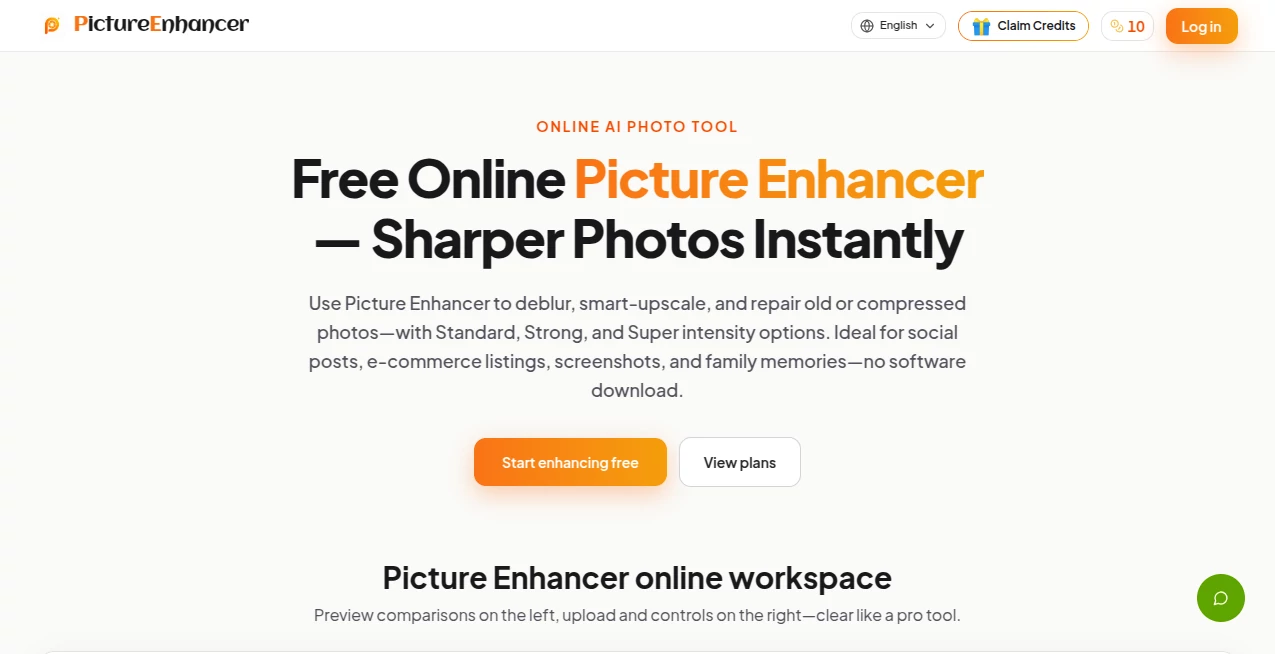
What is Picture Enhancer?
High-quality visuals make a lasting impression, whether they are used for personal memories, online stores, presentations, or social media. Blurry photos, faded colors, and low-resolution images can reduce the impact of even the best moments. This AI-powered image enhancement platform provides a fast and practical way to improve image quality without requiring professional editing skills.
The platform combines multiple enhancement technologies into a simple workflow. Images can be sharpened, enlarged, and color-corrected automatically with just a few clicks. Instead of spending time adjusting complicated editing tools, users simply upload a file and allow the AI engine to analyze every detail before producing a cleaner and more vibrant result. The service also supports resolution upscaling of up to four times while preserving natural textures and minimizing quality loss.
Its browser-based interface makes the experience accessible from virtually any device, allowing photographers, designers, marketers, students, and business owners to improve images in seconds. From restoring old family photos to preparing product images for e-commerce, the platform delivers consistent and impressive results through automation.
Key Features
User Interface
The interface is intentionally simple. Users upload an image, choose the desired enhancement option, wait a few moments while the AI processes the file, and download the improved version. There is no complicated setup or learning curve, making it suitable for beginners as well as experienced creators.
Accuracy & Performance
The AI analyzes image structure, edges, lighting, textures, and colors before applying targeted improvements. Rather than relying on basic sharpening filters, it intelligently restores clarity, enhances details, improves brightness, and increases resolution while maintaining a natural appearance. Image processing is completed quickly, making it practical for both occasional and frequent use.
Capabilities
- AI-powered image enhancement.
- Automatic color enhancement and light balancing.
- Resolution enlargement up to 4×.
- Blur reduction and clarity improvement.
- Restoration of low-quality and old photographs.
- Support for multiple image formats.
- Fast browser-based processing.
- No advanced editing knowledge required.
Security & Privacy
Image processing is performed online, allowing users to avoid installing desktop software. Uploaded files are processed automatically during enhancement, making the workflow convenient for individuals and businesses that need quick image improvements. As with any cloud-based service, users should review the platform's privacy policy before uploading highly sensitive content.
Use Cases
- Enhancing product photos for online stores.
- Improving social media images before publishing.
- Restoring old family photographs.
- Increasing image resolution for printing.
- Preparing professional marketing materials.
- Improving real estate photography.
- Creating sharper portfolio images.
- Enhancing travel and landscape photography.
- Upgrading presentation graphics.
- Improving scanned images and archived documents.
Pros and Cons
Pros
- Easy-to-use interface.
- Fast AI processing.
- Automatic color enhancement.
- Supports image upscaling up to 4×.
- Produces natural-looking improvements.
- No professional editing experience required.
- Works directly in the browser.
Cons
- Internet connection is required.
- Results depend on the quality of the original image.
- Extremely damaged photos may still require manual editing.
Pricing Plans
The platform offers online AI image enhancement tools. Available plans and feature limits may change over time, so users should check the official pricing page for the latest subscription options, usage allowances, and premium features.
How to Use Picture Enhancer
- Upload an image from your device.
- Select the desired enhancement option.
- Allow the AI to analyze and process the image.
- Preview the enhanced result.
- Download the improved version if satisfied.
Comparison with Similar Tools
Many AI image editors focus on a wide collection of editing features, which can make simple enhancement tasks unnecessarily complicated. This platform concentrates on delivering fast and automatic improvements with minimal effort. Its combination of color enhancement, clarity restoration, and 4× resolution enlargement makes it especially useful for users who want professional-looking results without learning complex editing software. The streamlined workflow also helps save valuable time when processing multiple images.
Conclusion
Creating high-quality visuals no longer requires advanced editing skills or expensive software. By combining intelligent image enhancement, automatic color correction, blur reduction, and AI-powered upscaling into one simple workflow, this solution makes professional-quality improvements accessible to everyone. Whether enhancing personal memories, preparing e-commerce listings, or producing marketing materials, it provides an efficient and reliable way to achieve cleaner, sharper, and more vibrant images with only a few clicks.
Frequently Asked Questions (FAQ)
Can the AI improve blurry photos?
Yes. The platform automatically enhances image clarity and reduces blur where possible.
Can images be enlarged without significant quality loss?
Yes. AI-powered upscaling allows images to be enlarged up to four times while preserving visual quality.
Does it help restore old photographs?
Yes. The enhancement engine can improve faded or low-quality images by increasing clarity and color quality.
Do I need photo editing experience?
No. The workflow is fully automated and designed for users of all experience levels.
Can it improve product photos for online stores?
Yes. The platform is well suited for sharpening product images, improving colors, and increasing resolution for professional-looking listings.
AI Photo & Image Generator , Photo & Image Editor , AI Photo Enhancer , AI Image to Image .
These classifications represent its core capabilities and areas of application. For related tools, explore the linked categories above.
Picture Enhancer details
Website unavailable — View Alternatives
Pricing
- Free
Apps
- Web App
Categories

Picture Enhancer Alternatives Product

AIGPTImage

Upscale image
Caricature G…

JPG to Small

Remove Text

CircleCrop

Nano Banana …

z image

PNG to 3D