
Pineify
What is Pineify?
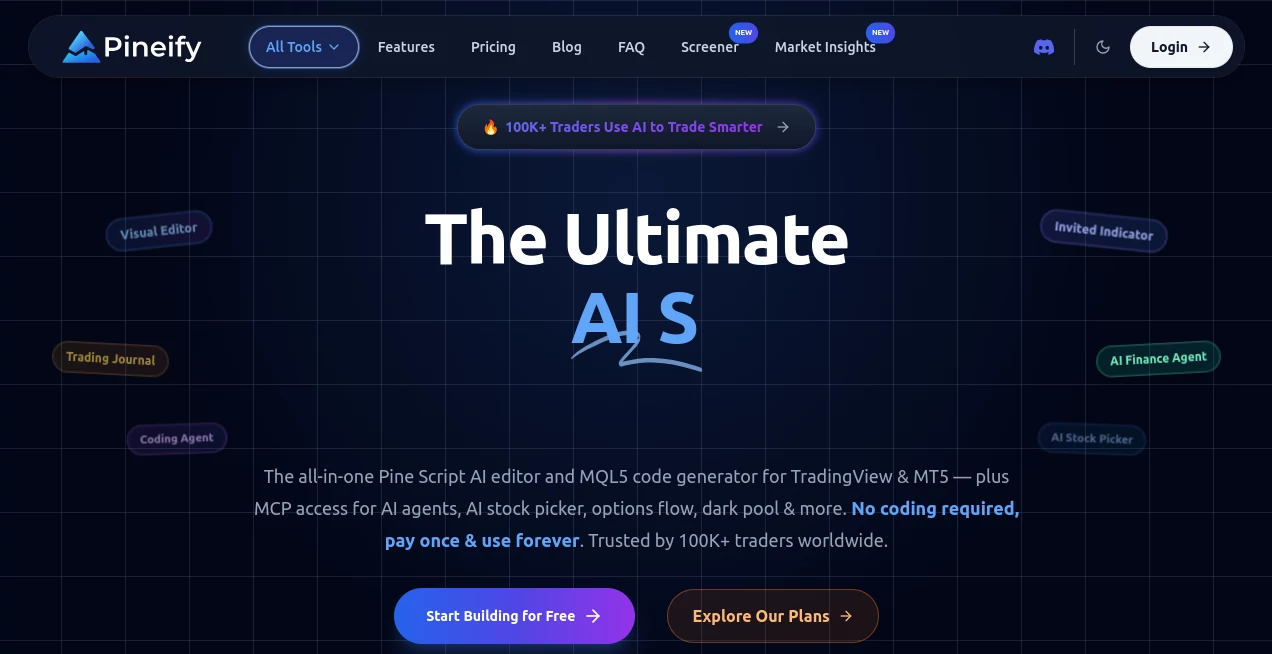
Building custom trading indicators and automated strategies often requires programming knowledge that many traders simply do not have. This platform removes that barrier by combining artificial intelligence with a visual editor, allowing users to create professional Pine Script and MQL5 code without writing everything manually. Whether someone is exploring algorithmic trading for the first time or refining an advanced strategy, the workflow feels intuitive and remarkably efficient.
Instead of spending hours learning syntax or hiring developers, traders can describe what they want, visually assemble trading logic, and generate production-ready code within minutes. The generated scripts can then be imported into TradingView or compatible trading environments for testing and live analysis. This practical approach helps traders focus on market logic rather than programming challenges.
With support for AI-assisted coding, visual strategy building, backtesting, multiple indicators, and advanced trading conditions, the platform has become a valuable companion for investors who want to prototype ideas faster while maintaining full control over their trading strategies.
Key Features
User Interface
The clean visual builder is designed for traders instead of software developers. Conditions, indicators, variables, and trading rules can be connected through an easy-to-understand interface, making complex strategies accessible even for beginners. Templates help users get started quickly while experienced traders can customize nearly every component.
Accuracy & Performance
The AI coding engine generates structured Pine Script and MQL5 code that significantly reduces development time. Traders can rapidly iterate, test different conditions, and refine strategies through historical backtesting before using them in real market environments.
Capabilities
- AI-powered Pine Script generation.
- No-code visual strategy builder.
- MT5 and MQL5 code generation.
- TradingView indicator creation.
- Strategy backtesting support.
- Multi-timeframe analysis.
- Multi-symbol strategies.
- Custom technical indicators.
- Advanced condition editor.
- Trading alerts and notifications.
- Visual chart plotting.
- Import existing Pine Script projects.
- AI-assisted strategy optimization.
- Reusable templates for faster development.
Security & Privacy
User accounts are protected through standard authentication and encrypted website connections. Since trading strategies can represent valuable intellectual property, the platform provides a secure cloud environment while allowing users to export generated code for independent storage and management.
Use Cases
- Create custom TradingView indicators without programming experience.
- Generate automated trading strategies using AI.
- Convert trading ideas into executable Pine Script.
- Develop MT5 algorithms more efficiently.
- Backtest strategies before live deployment.
- Build educational examples for learning technical analysis.
- Prototype new market signals quickly.
- Combine multiple indicators into one trading system.
Pros and Cons
Pros
- Very beginner-friendly interface.
- No coding knowledge required for most workflows.
- Powerful AI code generation.
- Supports both TradingView and MT5 ecosystems.
- Excellent visual strategy builder.
- Fast iteration through backtesting.
- Suitable for beginners and professional traders alike.
Cons
- Focused primarily on trading and financial markets.
- Advanced trading knowledge is still important for creating profitable strategies.
- Some premium AI capabilities require paid plans.
Pricing Plans
A free version allows users to explore the platform and experience its visual workflow. Paid lifetime plans unlock additional AI credits, advanced features, premium models, and more sophisticated trading tools for users with larger development needs.
How to Use Pineify
Start by creating an account and choosing whether to build an indicator or a trading strategy. Use the visual editor or describe your idea to the AI assistant, customize inputs and conditions, generate the corresponding Pine Script or MQL5 code, and review the output. Copy the generated script into TradingView or your supported trading platform, run historical backtests, fine-tune parameters, and deploy your strategy when satisfied with the results.
Comparison with Similar Tools
Unlike traditional code editors that require extensive knowledge of Pine Script, this solution emphasizes accessibility through visual development and artificial intelligence. Compared with standard scripting environments, it dramatically shortens development time while lowering the technical barrier for non-programmers. The combination of no-code editing, AI generation, strategy testing, and support for multiple trading environments makes it a comprehensive toolkit rather than a simple code generator.
Conclusion
For traders who want to transform ideas into functional indicators and automated strategies without becoming software developers, this platform delivers an impressive balance of simplicity and professional capability. The visual workflow, AI-powered coding, and extensive backtesting features help reduce development time while encouraging experimentation. Whether someone is building their first indicator or optimizing an advanced trading system, it provides an efficient environment for turning market concepts into practical trading tools.
Frequently Asked Questions (FAQ)
Do I need programming experience?
No. The visual editor and AI assistant are designed for users with little or no coding experience.
Can I create TradingView indicators?
Yes. The platform specializes in generating Pine Script indicators and trading strategies compatible with TradingView.
Does it support MT5?
Yes. It can generate MQL5 code for MetaTrader 5 workflows.
Can I backtest my strategies?
Yes. Generated strategies are intended to be tested using TradingView's historical backtesting capabilities before live trading.
Is there a free plan?
Yes. Users can begin with a free version before upgrading to paid plans for additional AI capabilities and advanced features.
AI No-Code & Low-Code , AI Code Generator , AI Developer Tools , AI Trading Bot Assistant .
These classifications represent its core capabilities and areas of application. For related tools, explore the linked categories above.

Pineify Alternatives Product

PromptCoder

git-lrc

Bolt AI

Perchance AI
RepoClip

Toonifyit

Project Mela

DeepSeek V4

globalize.now