


















PlateSnap
What is PlateSnap?
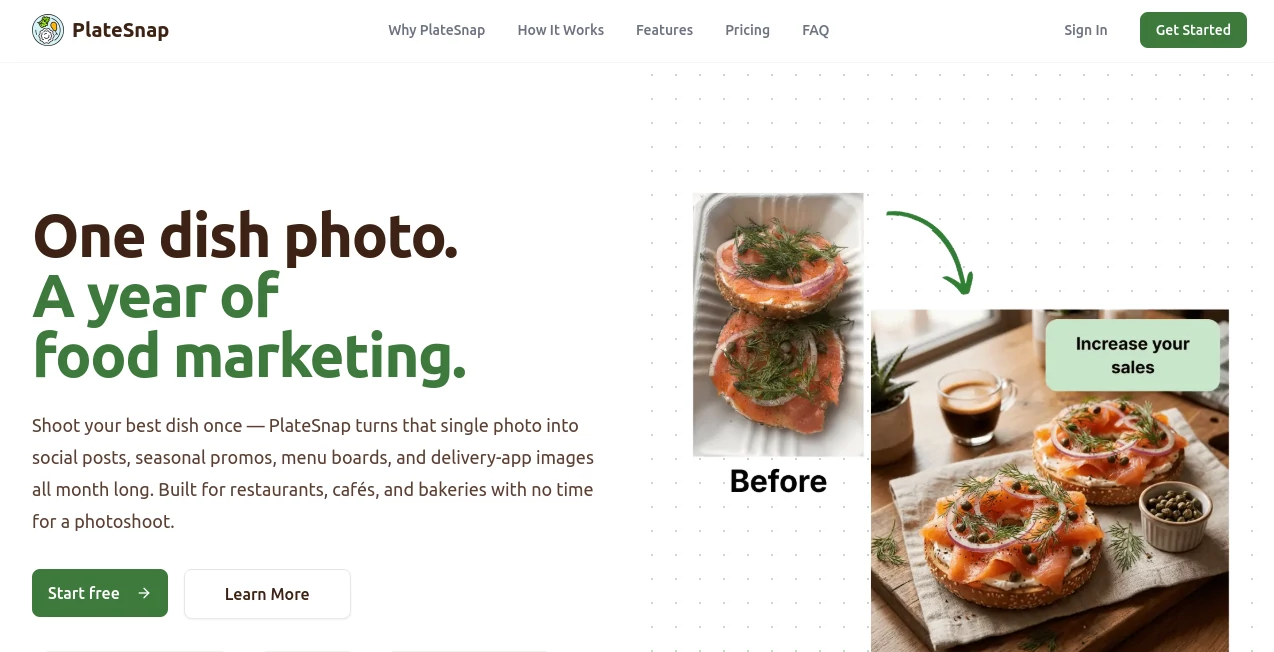
PlateSnap is an AI-powered food photography generator designed to help restaurants, food businesses, delivery brands, and creators transform ordinary dish photos into professional-looking food images. The platform allows users to create realistic, high-quality visuals without expensive photography equipment, studio sessions, or complicated editing workflows.
For businesses that depend on attractive food presentation, great images can directly influence customer decisions. This solution makes it easier to create appealing menu photos, social media content, and marketing materials while saving time and production costs. Users can upload a simple meal photo and enhance it with professional styles that match their brand identity.
Key Features
- AI Food Photography Generation: Transform regular food images into realistic professional visuals suitable for menus, websites, and social media.
- High-Resolution Output: Generate detailed images with high-quality results designed for commercial use.
- Multiple Photography Styles: Choose different visual styles such as editorial, menu-focused, and dramatic food photography looks.
- Fast Image Creation: Produce polished food visuals within seconds instead of waiting for traditional photoshoots.
- Brand Consistency: Maintain a consistent visual style across restaurant menus, advertisements, and online platforms.
- Commercial Usage Support: Create marketing-ready images for professional business needs.
User Interface
The platform provides a simple and beginner-friendly workflow. Users do not need professional design skills or photography experience. The process is straightforward: upload a food image, select a preferred style, and generate a new professional version.
The clean interface makes it practical for restaurant owners, marketers, and creators who want better visuals without spending hours learning editing software.
Accuracy & Performance
The AI technology focuses on preserving the original appearance of food while improving lighting, presentation, and overall visual quality. Generated images are designed to look natural by maintaining realistic textures, colors, and details.
The fast generation process allows businesses to create multiple variations and experiment with different presentation styles before choosing the best option for their audience.
Capabilities
This tool is built for anyone who needs professional food imagery without traditional photography costs. It can help improve restaurant menus, delivery platform listings, promotional campaigns, and social media posts.
From small cafes to growing food brands, users can create attractive visuals that make dishes look more appealing and increase engagement with potential customers.
Security & Privacy
The platform focuses on providing a reliable experience for businesses and creators. Users can generate private images and manage their content while creating professional assets for their marketing activities.
Use Cases
- Restaurants: Create better menu images without hiring professional photographers.
- Food Delivery Businesses: Improve product photos displayed on delivery platforms.
- Food Bloggers: Enhance recipe images and create more engaging content.
- Marketing Agencies: Produce food visuals for advertising campaigns.
- Social Media Managers: Generate attractive posts for food-related brands.
- Small Businesses: Build professional branding materials with limited budgets.
Pros and Cons
Pros
- Creates professional food images quickly.
- Reduces the cost of traditional food photography.
- Easy workflow for beginners.
- Offers multiple creative styles.
- Useful for restaurants and online food businesses.
Cons
- AI-generated images may require occasional adjustments for specific dishes.
- Advanced photographers may prefer full manual editing control.
Pricing Plans
The platform offers different subscription options designed for different levels of usage. Users can start with a free option to test the service and upgrade to paid plans for more generations and additional features.
- Starter Plan: Designed for individuals and small businesses needing regular food image generation.
- Business Plan: Suitable for restaurants and brands requiring higher usage limits.
- Scale Plan: Built for larger teams and businesses with frequent content production needs.
How to Use PlateSnap
- Upload a photo of your food or dish.
- Select a preferred photography style.
- Generate a professional version of the image.
- Download and use the final image for menus, websites, advertisements, or social media.
Comparison with Similar Tools
Compared with traditional food photography services, this AI solution provides a faster and more affordable way to create high-quality visuals. Instead of scheduling photoshoots and managing expensive equipment, businesses can generate images whenever they need new content.
Compared with general AI image generators, it focuses specifically on food presentation, helping create results that are more suitable for restaurants, menus, and culinary marketing.
Conclusion
PlateSnap provides a practical solution for businesses that want professional food photography without the complexity and expense of traditional production methods. Its combination of realistic results, simple workflow, and flexible styles makes it a valuable tool for restaurants, marketers, and food creators.
By turning everyday food photos into polished marketing assets, this platform helps brands create stronger visual experiences and attract more attention from customers.
Frequently Asked Questions (FAQ)
What is this AI food photography tool?
It is an AI-based platform that transforms ordinary food photos into professional-looking images for restaurants, creators, and businesses.
Do I need photography skills to use it?
No. The platform is designed for beginners and allows users to create improved food visuals with a simple upload process.
Can businesses use generated images commercially?
Yes, available plans include commercial usage options for businesses that need marketing materials.
How long does image generation take?
Images are generated quickly, allowing users to create professional visuals in a short amount of time.
What types of businesses can benefit from it?
Restaurants, cafes, delivery services, food bloggers, agencies, and online food brands can use it to improve their visual content.
AI Photo & Image Generator , Marketing , Photo & Image Editor , AI Photography .
These classifications represent its core capabilities and areas of application. For related tools, explore the linked categories above.

PlateSnap Alternatives Product

nana banana …

poseup
RenderQuill
Fahhh Meme

UndressMe AI

MuseCraft.AI

MAGIK FACE
Roblox Man F…

Uni-1
