
PostMCP AI
What is PostMCP AI?
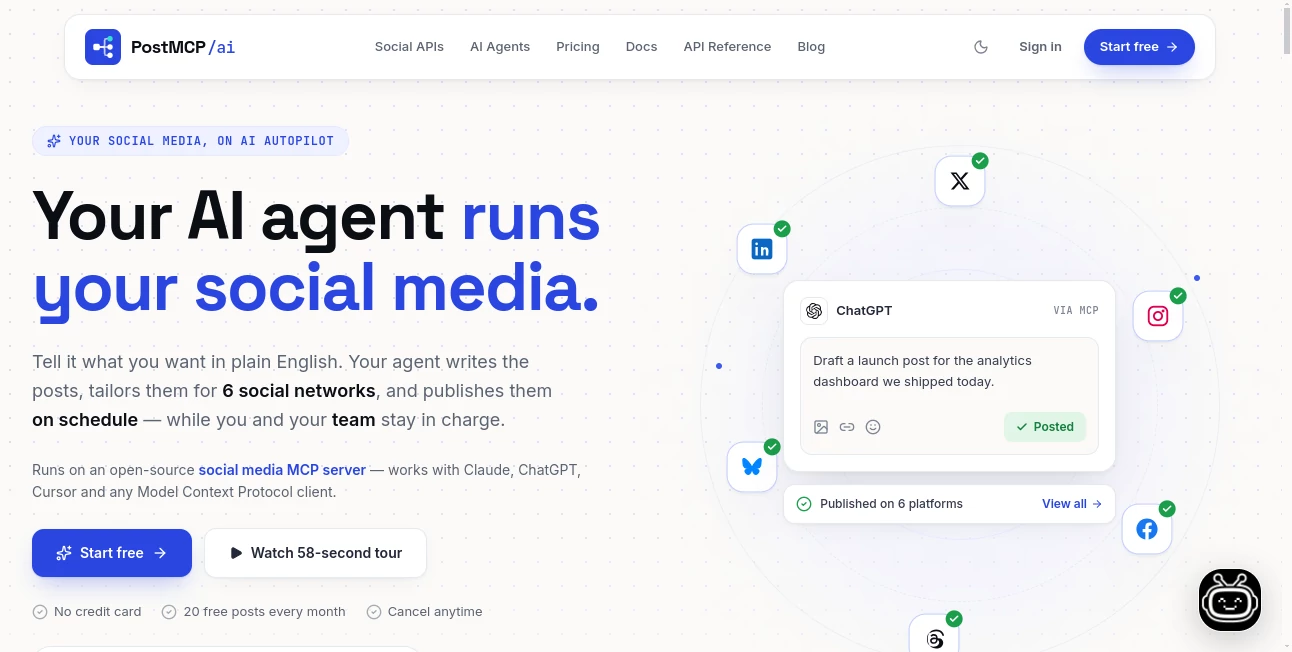
Managing several social media accounts can quickly become a repetitive job. Writing a post, adapting it for different platforms, choosing a suitable publishing time, checking the queue, and making sure everything follows the brand voice takes more time than many creators and marketing teams expect. PostMCP AI brings these tasks into one AI-powered workflow, allowing users to describe what they want in plain English and let an AI agent handle the writing, formatting, scheduling, and publishing.
The platform is designed around modern social media workflows rather than simple post generation. It can work with X, LinkedIn, Instagram, Facebook, Threads, and Bluesky, adapting content for each network instead of simply copying the same message everywhere. Users can still review drafts, move scheduled posts, and keep control over what gets published.
For a small business announcing a new product, for example, a single instruction can become several platform-specific posts scheduled across the week. That makes the service particularly useful for creators, founders, marketing teams, and businesses that want a more consistent social presence without spending hours inside multiple dashboards.
Key Features
- AI-assisted writing based on simple natural-language instructions.
- Cross-platform formatting for six major social networks.
- Automatic scheduling and publishing.
- Visual content calendar for reviewing and rearranging scheduled posts.
- Brand voice and tone memory for more consistent content.
- Shared workspaces for teams and collaborators.
- Approval workflows that let teams review content before publication.
- Connections with ChatGPT, Claude, Cursor, and MCP-compatible clients.
- REST API access for developers building custom publishing workflows.
- OAuth-based social account connections without storing social passwords.
User Interface
The interface is built around a visual publishing calendar, making the content queue easy to understand at a glance. Scheduled posts can be moved around the calendar instead of forcing users to dig through menus to change a publishing time.
This approach is especially practical for teams. A content manager can review what the AI has planned, move an announcement to another day, or remove a post before it goes live. The interface keeps automation from becoming a black box, which is an important distinction for businesses managing public-facing accounts.
Accuracy & Performance
One of the more useful aspects of the platform is its network-specific content adaptation. A LinkedIn post does not necessarily need the same structure as an X post, and the system adjusts elements such as character limits, line breaks, hashtags, and tone for the selected network.
The scheduling system is also designed to keep the publishing queue organized. The platform states that users can create their first published post in under five minutes, while its API can handle publishing, editing, rescheduling, cancellation, and other operations through a unified interface.
Capabilities
The platform goes beyond basic social media scheduling by giving AI agents direct publishing capabilities. Users can connect AI tools such as ChatGPT, Claude, or Cursor, while developers can use the REST API or MCP server to integrate social publishing into their own applications and automations.
The API provides a unified publishing layer for LinkedIn, X, Facebook, Instagram, Threads, and Bluesky. It can also record the status of individual platform deliveries, which is useful when one network succeeds while another encounters a problem.
For developers, the MCP integration is particularly interesting. Instead of building separate integrations for every social network, an AI agent can work with a common set of publishing tools. This opens the door to automated content pipelines, custom agents, and more advanced marketing workflows.
Security & Privacy
Social media access is handled through the official authorization systems of the supported networks. According to the service, social passwords are not stored or exposed to the platform, while access tokens are encrypted at rest. Users can also disconnect an account when necessary.
The service provides review controls before publication, giving teams the option to check AI-generated content rather than allowing every automated instruction to immediately appear on their social channels. For businesses, this human approval layer can be useful when brand reputation and publishing accuracy matter.
Use Cases
Social media management: Creators and businesses can manage several social profiles from one publishing environment rather than switching between individual platforms.
Content marketing: Marketing teams can turn a product announcement, campaign idea, or company update into platform-specific posts and schedule them ahead of time.
AI-powered workflows: Users who already work with AI assistants can connect those systems to their social accounts and allow agents to create, refine, schedule, and publish content.
Agency management: Agencies managing multiple clients can benefit from workspaces, collaborators, approval processes, and centralized scheduling.
Developer automation: Developers can use the REST API and MCP server to add social publishing to internal tools, applications, webhooks, or custom AI agents.
Pros and Cons
Pros:
- Supports multiple major social networks from one workflow.
- AI adapts posts for different platforms instead of relying on identical cross-posts.
- Visual calendar makes scheduling easy to review.
- Brand voice memory can improve consistency across generated posts.
- Supports teams, collaborators, and content approvals.
- Offers both user-friendly automation and developer-focused API/MCP integrations.
- Provides a free plan without requiring a credit card.
Cons:
- The most advanced collaboration and automation capabilities require paid plans.
- Users who only manage one social account may not need the full range of features.
- Developers may need to understand MCP or API concepts to take full advantage of the technical integrations.
Pricing Plans
The service uses a credit-based model where a published post consumes one credit. A free plan is available permanently, making it possible to test the core workflow without committing to a subscription.
- Free Forever: $0 per month, with 20 AI credits per month, up to 5 social profiles, one workspace, and core AI writing and scheduling features.
- Starter: $20 per month, with 2,000 AI credits, up to 10 social profiles, three workspaces, five collaborators, brand voice memory, smart hashtag recommendations, and peak-engagement scheduling.
- Professional: $50 per month, with 6,000 AI credits, up to 25 social profiles, five workspaces, ten collaborators, approvals, advanced calendar features, and local MCP server support.
- Business: $100 per month, with 14,000 AI credits, up to 50 social profiles, ten workspaces, twenty collaborators, multi-user approvals, a dedicated account vault, and custom workflow API endpoints.
Annual billing is also available with savings compared with monthly pricing. The free option is particularly useful for individuals who want to evaluate the workflow before deciding whether they need higher publishing limits or team features.
How to Use PostMCP AI
Getting started is straightforward. First, connect the social accounts you want to manage through their official authorization flow. Once the accounts are connected, you can give the AI agent a simple instruction describing what you want to publish.
For example, a user could ask for an announcement about a new product launching on Friday. The system can turn that idea into content tailored to the connected networks, then place the posts into the publishing schedule.
Before publication, users can review the generated content and adjust the schedule through the visual calendar. Developers have another option: they can connect an AI client through MCP or use the REST API to integrate publishing into their own software and automated workflows.
Comparison with Similar Tools
Traditional social media management platforms generally focus on giving users dashboards for composing and scheduling content. This approach is useful, but it still leaves much of the writing and decision-making to the person managing the calendar.
This platform takes a more agent-oriented approach. Instead of treating AI as a separate writing assistant, it gives AI agents access to the publishing workflow itself. The distinction becomes more noticeable when working with MCP, where an AI client can interact with publishing tools rather than simply generating text that the user must manually copy into another application.
It is therefore a particularly interesting option for users who want automation and for developers experimenting with AI-driven marketing systems. Someone looking only for a basic social media calendar may find traditional scheduling software simpler, while users interested in autonomous workflows can take advantage of the deeper integrations.
Conclusion
AI-powered social media management is moving beyond simple caption generation, and this platform is a good example of that shift. Its combination of AI writing, network-specific formatting, scheduling, brand memory, team collaboration, MCP connectivity, and API access creates a workflow that can handle much more than drafting individual posts.
The biggest advantage is the balance between automation and control. Users can let an AI agent handle repetitive publishing work while still reviewing drafts, adjusting the calendar, and deciding what ultimately reaches their audience.
For creators and small businesses, the free plan offers an accessible way to experiment with automated publishing. For agencies and developers, the larger plans and API capabilities provide room for more sophisticated workflows. Overall, it is a compelling choice for anyone looking to make social media publishing more automated without completely handing over editorial control.
Frequently Asked Questions (FAQ)
Do I need technical skills to use the platform?
No. The standard workflow is designed around plain-English instructions, so users can create and schedule content without writing code. Technical knowledge becomes more relevant only when using the API or MCP integrations.
Which social networks are supported?
The platform supports X, LinkedIn, Instagram, Facebook, Threads, and Bluesky through its unified publishing system.
Can AI agents publish content automatically?
Yes. AI agents can draft, schedule, and publish social content through the platform's agent integrations and MCP capabilities. Users can also keep approval controls in place when they want human review before publishing.
Can I connect ChatGPT or Claude?
Yes. The service supports connections with ChatGPT, Claude, Cursor, and MCP-capable clients, allowing these AI environments to interact with social publishing workflows.
Is there a free plan?
Yes. The Free Forever plan costs $0 per month and includes 20 AI credits each month along with support for up to five social profiles.
Does the platform store my social media passwords?
According to its security information, social accounts are connected through official OAuth authorization rather than collecting social passwords. Access tokens are encrypted at rest, and connected channels can be revoked.
Can developers use an API?
Yes. Developers can use the REST API and MCP server to integrate publishing capabilities into applications, automations, webhooks, and custom AI agents.
Can teams review posts before they are published?
Yes. Paid plans include collaboration and approval capabilities, allowing team members to work together on drafts and review scheduled content before publication.
AI Workflow Management , AI Marketing Plan Generator , AI Social Media Assistant , AI Advertising Assistant .
These classifications represent its core capabilities and areas of application. For related tools, explore the linked categories above.

PostMCP AI Alternatives Product

Picmim

Referent

Enji

GEO Checker

Beamtrace

Kapwing

Adscriptly

BlogBuster

PostingCat