Prism
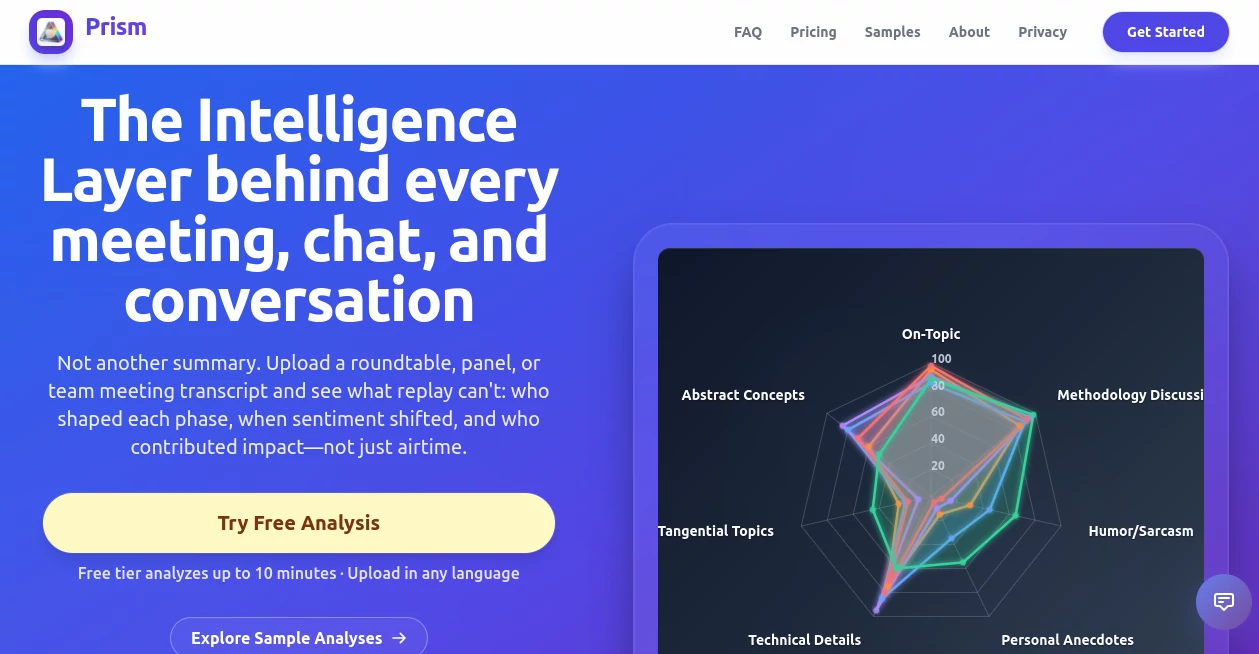
What is Prism?
Every important conversation contains valuable insights that often disappear once the meeting ends. While traditional transcription tools focus on converting speech into text, this platform goes much further by uncovering the dynamics behind discussions, revealing who influenced decisions, how topics evolved, and where collaboration truly happened.
Designed for modern teams, managers, researchers, consultants, and organizations, it transforms transcripts into rich conversation intelligence. Instead of reading lengthy meeting notes or replaying recordings, users receive detailed analysis of participation, sentiment, engagement, topic progression, and overall communication quality. The result is a deeper understanding of how teams work together and how future conversations can become even more productive.
Whether reviewing leadership meetings, customer interviews, brainstorming sessions, panel discussions, or internal workshops, the platform delivers actionable information that helps improve communication, decision-making, and collaboration across every department.
Key Features
User Interface
The interface is clean, intuitive, and designed for fast navigation. Uploading a transcript requires only a few clicks, after which the analysis is presented through organized reports, interactive visualizations, and easy-to-understand metrics. Instead of overwhelming users with raw data, every insight is displayed in a way that supports quick interpretation and practical decision-making.
Accuracy & Performance
Rather than simply counting speaking time, the system evaluates conversations from multiple perspectives. It identifies topic transitions, highlights turning points, measures participation balance, detects emotional shifts, and recognizes meaningful contributions. This deeper level of analysis provides a far more complete understanding of team interactions than traditional meeting summaries.
Capabilities
- Conversation phase detection and topic flow analysis.
- Identification of key contributors and influential participants.
- Sentiment tracking throughout discussions.
- Conversation health and effectiveness scoring.
- Engagement and participation balance metrics.
- Detection of off-topic discussions and conversation deviations.
- Recognition of overlooked contributors with valuable input.
- Actionable recommendations for improving future meetings.
- Visual reports with charts and collaboration insights.
- Support for multilingual transcript analysis with English reporting.
- Downloadable reports for documentation and sharing.
- Transparent calculation breakdowns for reported metrics.
Security & Privacy
Business conversations often contain confidential information, making secure processing essential. Reports can be shared using protected links with expiration controls and viewing limits, allowing organizations to collaborate safely while maintaining control over sensitive meeting data.
Use Cases
- Analyzing executive leadership meetings.
- Improving remote team collaboration.
- Evaluating customer discovery interviews.
- Reviewing sales and client conversations.
- Assessing workshop participation.
- Measuring communication effectiveness across departments.
- Studying panel discussions and roundtable events.
- Supporting coaching and leadership development.
- Tracking decision-making during project meetings.
- Researching conversational behavior and group dynamics.
Pros and Cons
- Pros
- Provides far more than standard meeting summaries.
- Excellent visualization of collaboration patterns.
- Highlights hidden contributors who may otherwise be overlooked.
- Useful conversation quality and effectiveness metrics.
- Supports multilingual transcript analysis.
- Easy report sharing for distributed teams.
- Actionable recommendations help improve future meetings.
- Cons
- Requires meeting transcripts before analysis.
- Best suited for professional and collaborative environments.
- Advanced analytics may be unnecessary for very short conversations.
Pricing Plans
A free plan is available, allowing users to experience conversation analysis without requiring a credit card. Additional paid plans provide expanded capabilities and higher usage limits for individuals and organizations with larger collaboration needs.
How to Use Prism
- Upload a meeting or conversation transcript.
- Allow the analysis engine to process the discussion.
- Review conversation phases, participation metrics, and sentiment insights.
- Explore charts, contributor analysis, and effectiveness scores.
- Download or securely share the completed report with teammates.
- Apply the recommendations to improve future meetings.
Comparison with Similar Tools
Many meeting assistants focus primarily on transcription, note generation, or action items. This platform distinguishes itself by examining the structure and quality of conversations themselves. Instead of asking only "What was discussed?", it answers questions such as "Who influenced the discussion?", "Where did engagement change?", "Which participants created the greatest impact?", and "How effective was the collaboration?" This makes it especially valuable for organizations seeking measurable improvements in communication rather than simple documentation.
Conclusion
Organizations that rely on meetings generate an enormous amount of valuable knowledge, but much of it remains hidden inside conversations. By transforming transcripts into detailed collaboration intelligence, this solution helps teams better understand communication patterns, identify influential contributors, and continuously improve meeting quality. Its combination of conversation analytics, visual reporting, multilingual support, and actionable recommendations makes it an excellent choice for businesses that want every discussion to lead to smarter decisions and stronger teamwork.
Frequently Asked Questions (FAQ)
Can it analyze conversations in different languages?
Yes. It supports multilingual transcript analysis while generating reports in English for easier collaboration.
Does it only generate meeting summaries?
No. It goes beyond summaries by providing detailed analytics about participation, sentiment, collaboration, topic flow, and conversation quality.
Can reports be shared securely?
Yes. Reports can be shared through protected links with expiration dates and viewing limitations.
Who benefits the most from this platform?
Business leaders, project managers, consultants, researchers, sales teams, HR professionals, and organizations that regularly conduct collaborative meetings.
Is there a free version?
Yes. Users can begin with a free plan before upgrading to higher-tier options if additional capacity or advanced features are needed.
AI Team Collaboration , AI Productivity Tools , AI Analytics Assistant , AI Meeting Assistant .
These classifications represent its core capabilities and areas of application. For related tools, explore the linked categories above.

Prism Alternatives Product

Productivity…

Nano Banana
Automaited

broop

QuickFlip.AI
MikeSullyToo…

Lynote

Notion
Astic AI