

















Privacy Scrubber
Verified Blue CheckMark
Verified Blue CheckMark products are featured above free or unverified listings.
This badge indicates authenticity and builds trust, giving your product higher visibility across the platform.
Upgrade to get verified
Verified Blue CheckMark products are featured above free or unverified listings. This badge indicates authenticity and builds trust, giving your product higher visibility across the platform.
Upgrade to get verified
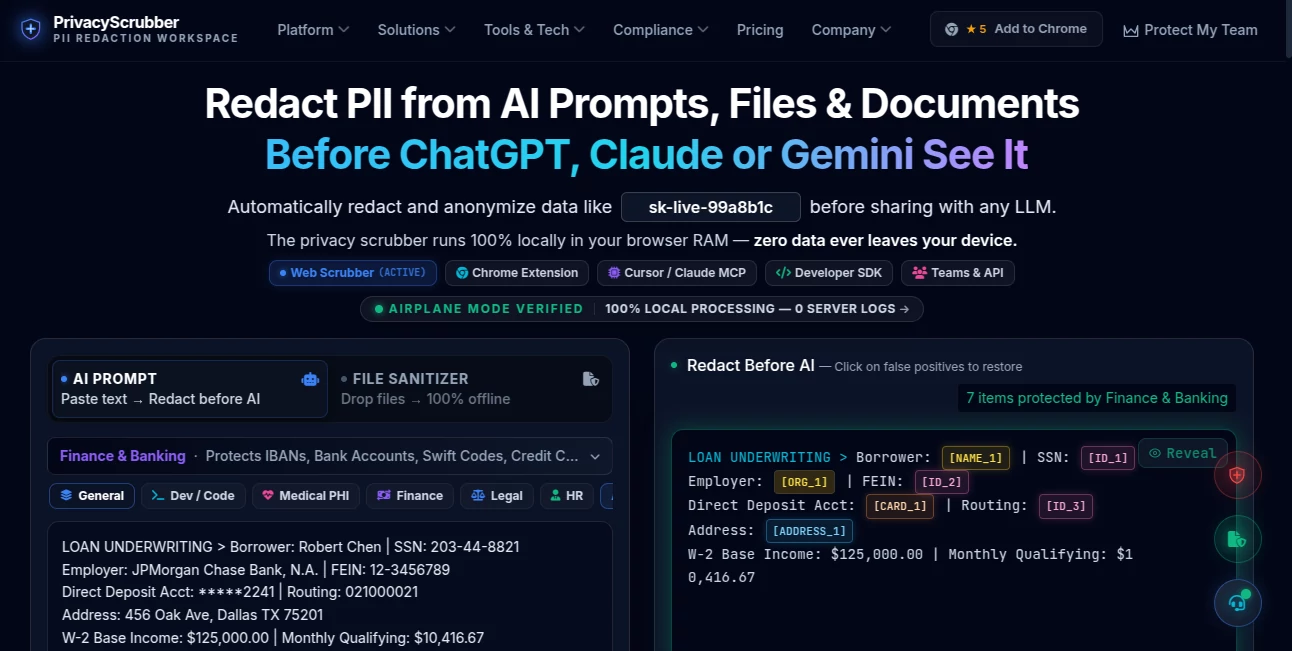
What is Privacy Scrubber?
PrivacyScrubber is a privacy-focused tool designed for people who work with AI while handling information that should never be exposed unnecessarily. Instead of sending sensitive names, email addresses, phone numbers, financial records, medical information, credentials, or internal company data to another service for sanitization, it processes the information locally in the browser.
The main idea is simple: protect sensitive information before it reaches an AI model. A user can paste a prompt, upload a supported document, or prepare information for an AI workflow, identify sensitive entities, replace them with tokens, and then restore the original information later when needed. Because the processing is performed in local browser memory, the workflow is particularly interesting for professionals who are cautious about putting confidential information into cloud-based privacy tools.
This approach is useful in everyday situations as well as more demanding professional environments. A marketing employee might want to remove customer details from a campaign brief, while a developer may need to discuss a server log with an AI assistant without exposing API keys or credentials.
Key Features
- Local PII detection and redaction directly in browser memory.
- Protection for names, email addresses, phone numbers, addresses, financial information, medical identifiers, credentials, and other sensitive entities.
- Multiple industry-oriented detection profiles for areas such as healthcare, legal, finance, HR, DevOps, sales, compliance, and marketing.
- Support for text and several document formats, including TXT, DOCX, CSV, XLSX, and PDF.
- Offline OCR capabilities for supported images and scanned documents on paid plans.
- Custom rules and regular expressions for company-specific identifiers and proprietary information.
- One-click restoration of tokenized information through the local session map.
- Chrome extension support for protecting prompts directly inside popular AI platforms.
- Local MCP server support for developer workflows involving tools such as Cursor, Windsurf, and Claude Desktop.
- Developer SDK capabilities for programmatic sanitization, RAG pipelines, ETL workflows, and internal automation.
User Interface
The interface is built around a straightforward workflow rather than a complicated security dashboard. Users can paste sensitive text into the workspace or attach a supported document, choose an appropriate detection profile, and protect the information before sending it to an AI service.
The workflow also makes the transformation visible. Sensitive values can be replaced with readable placeholders such as [NAME_1], [EMAIL_1], or [FINANCIAL_1]. This makes it easier to understand what has been protected and gives users confidence that the resulting prompt is still usable.
The browser extension takes the concept further by allowing protection directly inside supported AI websites. For someone who regularly moves between a browser and an AI assistant, avoiding repeated copy-and-paste steps can make a noticeable difference.
Accuracy & Performance
A major technical choice is the use of deterministic pattern matching for many detection tasks instead of relying on a remote language model to decide what should be removed. This can make results more predictable because the same rule produces the same type of tokenization instead of depending on an external AI response.
The platform states that its local engine can process common PII patterns with very low latency and provides preconfigured detection libraries for categories such as names, emails, phone numbers, financial identifiers, medical identifiers, API secrets, and IP addresses. PRO users can also add custom regular expressions when standard patterns are not enough.
For scanned documents, the paid version uses local WebAssembly-based OCR, allowing text extraction to happen on the device rather than requiring a conventional cloud OCR service.
Capabilities
The tool goes beyond simple text replacement. Its workflow is designed around a complete protect, use, and restore cycle. Sensitive information can first be converted into tokens, the protected prompt can then be used with an AI assistant, and the resulting response can be brought back into the local workspace to restore the original values.
There are also specialized options for developers. The MCP server can sanitize information before AI coding agents interact with source material, while the SDK is intended for automated environments such as RAG ingestion, vector databases, ETL pipelines, and internal microservices.
For organizations, the Teams offering adds shared security workflows, encrypted session handoffs, custom rule management, and administrative controls intended for larger internal deployments.
Security & Privacy
Privacy is the central part of the product rather than an optional feature. The service states that sensitive information is processed in volatile browser RAM and that it does not require the user's private data to be uploaded to a central server for sanitization.
The local-first architecture also supports an interesting practical test: users can disconnect from the internet after loading the application and continue testing the local sanitization workflow. This gives privacy-conscious teams a way to verify the basic processing model themselves through browser developer tools and network monitoring.
For organizations dealing with regulated or confidential information, this architecture can reduce one important risk: introducing another external data processor simply to clean information before using an AI model. However, organizations should still perform their own legal, compliance, and security assessments rather than treating a technical architecture alone as a guarantee of regulatory compliance.
Use Cases
- Developers: Remove API keys, database credentials, tokens, environment variables, and other secrets from debugging prompts before sharing logs with AI coding assistants.
- Healthcare teams: Mask patient identifiers and other sensitive medical information before using AI for analysis, summarization, or drafting.
- Legal professionals: Protect client names, case identifiers, contracts, and confidential details while using AI for document-related work.
- HR teams: Remove candidate names, contact information, salaries, and other personal details from resumes and internal documents.
- Finance professionals: Sanitize banking information, account numbers, financial records, and transaction-related data before AI processing.
- Marketing teams: Protect customer information, lead identifiers, campaign codes, and internal metrics while preparing AI-generated content.
- Support teams: Remove customer identifiers and confidential ticket information before asking AI to summarize or analyze support conversations.
- AI developers: Add local sanitization to MCP, RAG, ETL, and internal automation workflows where confidential information may pass through an AI pipeline.
Pros and Cons
Pros
- Local processing keeps the sanitization workflow on the user's device.
- No conventional cloud upload is required for the core redaction process.
- Useful detection profiles cover a broad range of professional scenarios.
- Custom regular expressions allow teams to protect proprietary identifiers.
- Supports browser, document, developer, and enterprise workflows.
- Offline OCR is valuable for scanned documents that contain sensitive information.
- The token-and-restore workflow makes protected prompts practical rather than simply destructive.
Cons
- Some advanced capabilities are restricted to paid plans.
- Users working with unusual or highly specialized data may need to create custom detection rules.
- Local processing means performance can depend on the user's device and browser environment.
- Teams with complex governance requirements may need additional enterprise controls and their own compliance review.
- Users must keep the relevant local session available when they want to restore protected values later.
Pricing Plans
The platform offers a free option for basic personal use, making it possible to test the core redaction workflow without committing to a subscription.
- Free: $0, with basic text protection, limited file processing, local processing, and core PII detection.
- PRO: $15 per month or $110 for lifetime access. This tier adds industry detection profiles, batch processing, custom regex rules, offline OCR, PDF sanitization, and developer-oriented MCP capabilities.
- TEAMS: $99 per month with unlimited internal team seats. It adds organizational features such as encrypted blueprints, team handoffs, shared rules, and stronger administrative controls.
- Developer SDK: $299 per month or $2,990 annually for internal automation, headless execution, RAG, ETL, microservices, and other programmatic use cases.
- OEM & Enterprise: Custom pricing for organizations that need commercial SaaS embedding, air-gapped deployment, source-code escrow, custom agreements, or other enterprise requirements.
How to Use It
- Open the web application and paste the text you want to protect or select a supported file.
- Choose a suitable detection profile, such as General PII, Legal, Finance, Healthcare, HR, DevOps, or another specialized profile.
- Review the detected sensitive information and use the protection action to replace private values with tokens.
- Copy the sanitized prompt into ChatGPT, Claude, Gemini, or another supported AI service.
- When the AI response is ready, return it to the local workspace and use the reveal function to restore the original values.
- For developer workflows, install the MCP server or integrate the SDK when automated protection is required.
A practical example would be a developer troubleshooting a production error. Instead of pasting a raw log containing credentials into an AI coding assistant, the developer can sanitize the credentials first. The AI still receives the useful structure of the error, while the original secret remains locally mapped to a token.
Comparison with Similar Tools
Many privacy tools rely on a cloud service to receive information, process it, and return a sanitized version. That model can be convenient, but it introduces another location where confidential information must travel.
This solution takes a different approach by putting local processing at the center of the workflow. The distinction becomes particularly important for organizations that cannot comfortably send raw documents or prompts to an additional third-party privacy service.
Another difference is the breadth of deployment options. A browser-based workflow is suitable for everyday users, while the Chrome extension reduces friction inside AI websites. Developers can move into MCP-based workflows, and organizations can use team-oriented features or programmatic SDK integration. This makes the platform more flexible than a basic standalone PII text redactor.
Conclusion
For anyone using generative AI with information that was never meant to leave a private environment, local sanitization is a practical layer of protection. The strongest part of this solution is its focus on processing sensitive information before it reaches an AI model, rather than attempting to control the information after it has already been shared.
The combination of browser-based processing, industry-specific detection profiles, custom rules, document support, offline OCR, browser integration, MCP, and developer tooling gives it a broad range of applications. Individuals can start with the free tier, while professionals and organizations have options for more advanced workflows.
It is not a replacement for a complete corporate data-loss-prevention program, but it can be a useful guardrail for teams that want to make safer AI usage part of their everyday workflow. For privacy-conscious AI users, that extra step before pressing the send button can be surprisingly valuable.
Frequently Asked Questions (FAQ)
Does it send my sensitive information to a server?
The core sanitization process is designed to run locally in the browser's memory, and the platform states that user data is not sent to its servers for processing. Its airplane-mode workflow is also designed to demonstrate that local sanitization can continue without an active network connection.
Can I protect information before sending it to ChatGPT?
Yes. The workflow is specifically designed to sanitize prompts before they are submitted to AI services. The browser extension can also provide in-page protection for supported AI platforms.
What types of sensitive information can it detect?
Detection includes common PII such as names, email addresses, phone numbers, addresses, financial identifiers, medical identifiers, API secrets, IP addresses, and other specialized entities. Industry profiles extend detection for professional scenarios.
Can I process documents?
Yes. Supported formats include TXT, DOCX, CSV, XLSX, and PDF, with additional document and OCR capabilities available on paid plans.
Does it support scanned PDFs and images?
PRO-level functionality includes offline OCR powered by WebAssembly, allowing supported scanned documents and images to be processed locally rather than relying on a cloud OCR service.
Can I create my own privacy rules?
Yes. Custom regular expressions can be used to detect internal project codes, account identifiers, proprietary terminology, and other patterns that may not be covered by the predefined profiles.
Can developers use it with AI coding tools?
Yes. The local MCP server is designed for developer environments and can sanitize sensitive information before AI coding agents access source code, logs, credentials, or other development data.
Is there a free plan?
Yes. The free tier is designed for basic personal use and provides core text protection without requiring a paid subscription.
What is the main advantage of local processing?
The main advantage is reducing the number of places where sensitive information needs to travel. Instead of uploading raw data to a separate sanitization service, the redaction can happen on the user's own device before the information is passed to an AI model.