

















TokenCalculator.dev
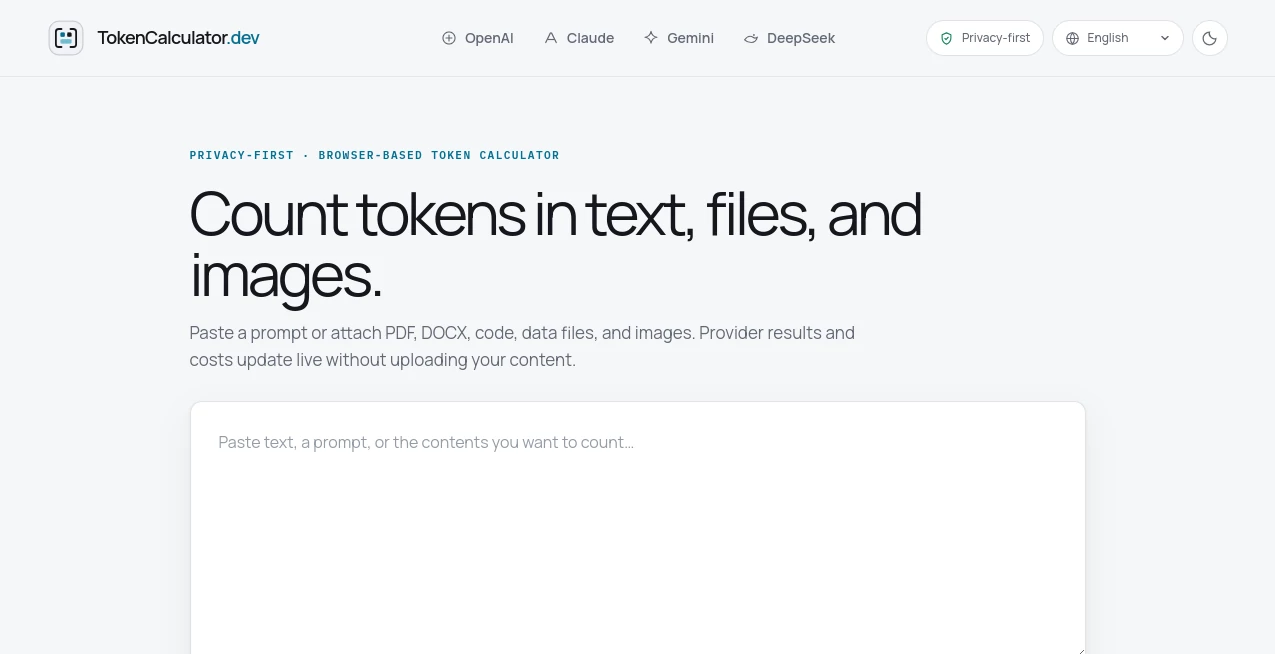
What is TokenCalculator.dev?
Understanding token usage is becoming increasingly important for anyone working with large language models. A prompt that looks short to a person can represent a surprisingly large workload for an AI model, especially when it includes documents, source code, structured data, or images.
TokenCalculator.dev is a privacy-first, browser-based token calculator designed to make that process easier. It lets users measure real input payloads across major AI providers, compare token usage, check context-window fit, and estimate input costs before sending a request to an API. The approach is particularly useful for developers, AI teams, researchers, and anyone trying to keep model usage predictable.
What makes the service especially practical is that calculations happen in the browser. Text, uploaded documents, code, and supported images remain on the user's device rather than being sent to a token-counting server.
Key Features
- Live token counting for prompts and other text-based input.
- Support for PDF, DOCX, Markdown, CSV, JSON, JavaScript, TypeScript, Python, Go, Rust, Java, C/C++, HTML, CSS, XML, YAML, TOML, SQL, and shell files.
- Image token estimation for PNG, JPEG, WebP, and GIF files.
- Comparison across OpenAI, Anthropic Claude, Google Gemini, and DeepSeek models.
- Context-window fit checks before an API request is made.
- Input cost estimation based on current model pricing.
- A workload and scaling planner for estimating per-call, daily, and monthly costs.
- Markdown breakdown export and calculation sharing.
- Local browser processing for text, documents, code, and image measurements.
User Interface
The interface is built around a straightforward workflow. Users can paste a prompt directly into the input area or attach files and images, then view provider results below. The provider cards make it possible to inspect available models without turning the process into a complicated technical exercise.
For developers working with several types of input, the file support is particularly convenient. Instead of copying a long document into a text box, a user can attach a supported PDF, Word document, code file, or data file and let the browser extract readable content automatically.
The workload planner adds another useful layer. Users can enter expected output tokens and request volume to get a clearer picture of how a particular workload may scale over time.
Accuracy & Performance
One of the strongest aspects of the calculator is that it does not present every number as if it were equally exact. The methodology distinguishes between exact local tokenization and provider-calibrated projections.
OpenAI text calculations use local o200k_base BPE tokenization, while Claude, Gemini, and DeepSeek text calculations use deterministic provider-calibrated UTF-8 token projections. Supported image calculations use documented provider rules such as patch, tile, detail, or media-token formulas.
Each result identifies its calculation method and accuracy level. This distinction is valuable because token counts can vary between providers, and actual API usage can also include message wrappers, tools, system instructions, or other model-specific processing.
The site also states that its pricing registry was reviewed on August 23, 2026, with pricing refreshed from Models.dev and an offline bundled registry available as a fallback.
Capabilities
The calculator goes beyond simply counting words. It measures text prompts, source code, structured data, readable documents, and supported images against multiple major AI model families.
For documents, the browser extracts readable text from supported PDF and DOCX files and combines it with the prompt content. This makes it possible to evaluate a complete request instead of estimating each component separately.
For multimodal workloads, image dimensions are analyzed locally and the appropriate published provider formula is applied when available. If a model does not have a documented vision-token rule, the calculator reports that the image calculation is unavailable instead of creating an unsupported estimate.
The workload planner is also useful for production planning. For example, a developer preparing a system that processes 1,000 requests per day can enter the expected output size and compare estimated costs across models before choosing an API provider.
Security & Privacy
Privacy is one of the clearest priorities of the service. Text, prompts, documents, code, and uploaded images are processed in the browser rather than being sent to an external token-counting server.
Text-based PDF and DOCX extraction is performed locally, as is image-dimension analysis. The site states that uploaded content does not leave the user's device, while only public model metadata may be refreshed from its pricing data source.
This approach is particularly appealing for developers who need to inspect private source code, internal documentation, business data, or confidential prompts before using an AI model.
Use Cases
There are several situations where this type of calculator can save time and prevent unnecessary API spending.
- API development: Developers can measure a real request before sending it to a production model.
- Document processing: Teams can estimate the token footprint of PDFs, Word documents, and other text-based files.
- Code analysis: Developers can combine source code, configuration files, and documentation to see whether a model has enough context capacity.
- AI cost planning: Teams can compare input costs across different providers using the same workload.
- Multimodal applications: Developers can estimate the visual-token footprint of supported images before making a vision request.
- Batch processing: Businesses can estimate daily and monthly costs for recurring AI workloads.
- Prompt optimization: Users can identify unexpectedly large prompts and reduce unnecessary context before making API calls.
Pros and Cons
Pros
- Runs calculations directly in the browser.
- Supports text, documents, code, structured data, and images.
- Compares several major AI providers in one place.
- Shows the methodology behind token results.
- Separates exact measurements from estimates.
- Includes context-window and cost planning.
- Useful for both individual developers and larger AI workloads.
Cons
- Some provider calculations are projections rather than exact tokenizer results.
- Scanned PDFs requiring OCR are not supported.
- Image calculations depend on whether a provider has published a documented formula for the selected model.
- Actual API billing can differ because providers may apply caching, tools, message wrappers, tiers, or other processing rules.
Pricing Plans
The public website presents the calculator as a browser-based tool and does not display a conventional subscription or paid-plan structure on its main page. The core token-counting and workload-planning experience is presented directly through the web interface.
Because AI model pricing changes frequently, the service focuses on refreshing model pricing data rather than locking users into a fixed cost table. This makes the calculator more useful for comparing current API economics before committing to a particular model.
How to Use the Tool
- Open the calculator in a modern web browser.
- Paste a prompt into the input area or attach a supported document, code file, data file, or image.
- Select the provider or model you want to evaluate.
- Review the reported token count and calculation method.
- Check whether the workload fits within the selected model's context window.
- Review the estimated input cost using the displayed model pricing.
- For recurring workloads, enter expected output tokens and request volume in the scaling planner.
- Compare the results before choosing a model or sending the API request.
A practical example would be a developer preparing a repository review. Instead of guessing whether a collection of TypeScript, JSON, and Markdown files will fit into a model's context window, the files can be measured together and compared across providers. That gives the developer a much stronger basis for choosing a model.
Comparison with Similar Tools
Many token counters focus primarily on pasted text. This calculator takes a broader approach by combining token measurement with document ingestion, image estimation, context-window checks, provider comparison, and cost planning.
Another important difference is transparency. Rather than treating every provider calculation as an exact tokenizer result, the service explains whether the number comes from exact local BPE tokenization, a deterministic provider-calibrated projection, or a published image-token formula.
For someone who only needs a quick word or token count, a basic counter may be sufficient. For developers building applications around multiple AI APIs, however, the ability to compare a complete real-world workload can be considerably more useful.
Conclusion
Token usage sits at the heart of modern AI application development, yet it is surprisingly easy to underestimate the size and cost of a real API request. Prompts, documents, code, structured data, images, and conversation context can all contribute to the final workload.
This calculator provides a practical way to measure those inputs before they reach an API. Its support for multiple providers, local document processing, image-token estimation, context checks, and cost planning makes it more than a simple token counter.
For developers and AI teams that care about predictable model usage, privacy, and informed provider selection, it offers a convenient place to examine a real workload before making the next API call.
Frequently Asked Questions (FAQ)
Can I calculate tokens from files and images?
Yes. Supported inputs include PDF, DOCX, code and data files, as well as PNG, JPEG, WebP, and GIF images. Text extraction and image-dimension analysis are performed locally in the browser.
Does the calculator upload my content?
No. The service states that prompts, documents, code, and uploaded images remain in the browser and are not sent to an external token-counting server.
Are all token counts exact?
No. OpenAI text calculations use matching local BPE encoding, while calculations for some other providers are clearly labeled as deterministic projections. Image calculations use published provider rules when those rules are available.
Can I calculate the token cost of an API request?
Yes. The calculator reports estimated input costs using the selected model's input price per million tokens. Actual billing can differ because providers may apply caching, tools, tiers, message wrappers, or other processing.
Can I calculate tokens from a PDF or Word document?
Yes. Text-based PDF and DOCX files can be attached and their readable text is extracted locally before the provider calculations are performed. Scanned PDFs that require OCR are not supported.
Can I estimate image tokens for vision models?
Yes, when a supported model has a documented image-token calculation method. The calculator reads the image dimensions locally and applies the relevant provider rule. If no documented rule is available, it does not invent an estimate.
Why might the API report a different token count?
An API can include additional elements such as system instructions, message wrappers, tools, or model-specific processing. The calculator's methodology and accuracy labels explain what is included in its measurement.
Which AI providers are supported?
The calculator currently provides comparisons for OpenAI, Anthropic Claude, Google Gemini, and DeepSeek models, with provider-specific calculation methods and model pricing information.
Is the calculator useful for estimating monthly AI costs?
Yes. The workload and scaling planner allows users to enter expected output tokens and request volume, making it possible to examine estimated per-call, daily, and monthly input costs.