
ReelCine
What is ReelCine?
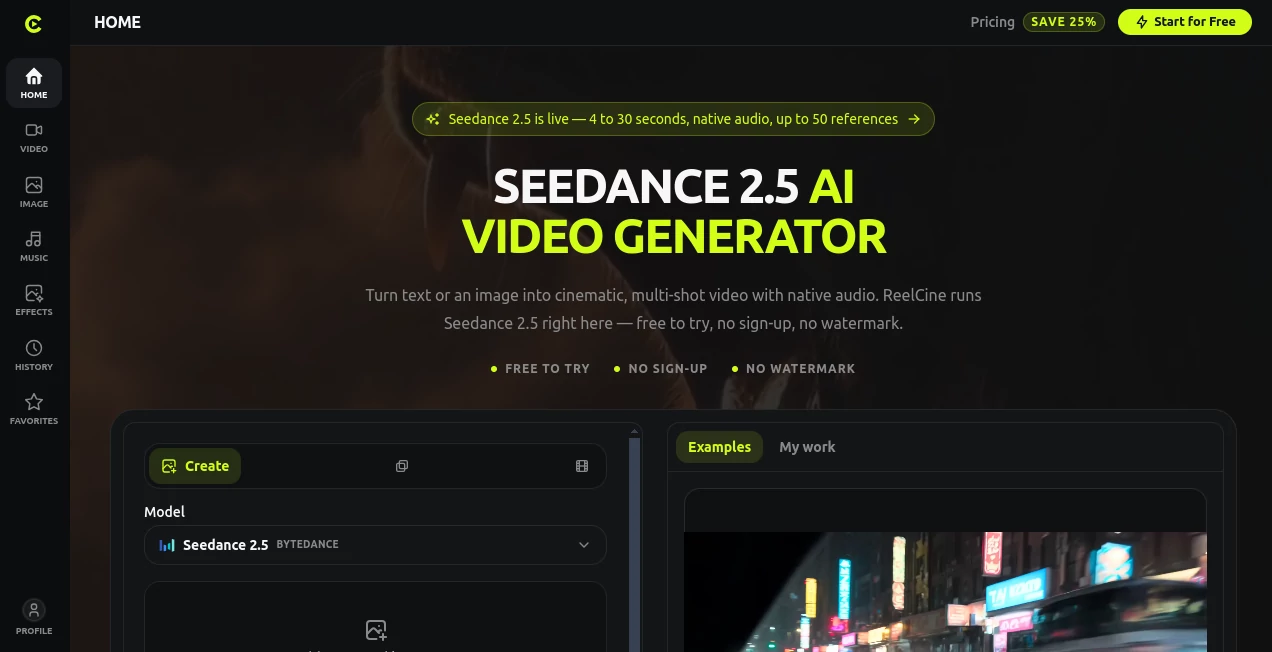
ReelCine is a browser-based AI video generation platform built around Seedance 2.5, giving creators a practical way to turn written ideas, still images, reference material, and existing videos into cinematic clips. The experience is designed to keep the creative process in one workspace rather than making users jump between separate generation tools.
The platform is particularly interesting for creators who want to experiment before committing to a paid plan. The generator can be explored without an account, while new accounts receive free credits for creating initial videos. Generated clips are also produced without a watermark, which makes the testing experience feel much more useful than a typical limited demo.
What stands out is the amount of control available for short-form production. Users can generate clips from 4 to 30 seconds, choose different aspect ratios, add multimodal references, and create native audio alongside the video. For someone working on a product scene, social media clip, storyboard, or cinematic concept, that combination can save a considerable amount of time.
Key Features
- Seedance 2.5 as the default video generation model
- Text-to-video and image-to-video generation
- Reference-to-video and video-to-video workflows
- Native audio generation in more than 10 languages
- Support for up to 50 combined image, video, and audio references
- First-frame and last-frame control for image-to-video generation
- Video durations from 4 to 30 seconds
- Multiple aspect ratios including 21:9, 16:9, 4:3, 1:1, 3:4, and 9:16
- Multiple integrated video models in one workspace
- Prompt gallery containing thousands of generated examples
- History and reusable generation settings
- No-watermark output when using the platform
User Interface
The interface is built around the generator itself rather than hiding the main creation controls behind several pages. Text/image-to-video, reference workflows, restyling, image tools, effects, history, and favorites are available from the main workspace.
A particularly useful touch is the example gallery. Instead of staring at an empty prompt box wondering what to write, users can browse existing generations and load the associated prompt directly into the generator. This makes the platform approachable for beginners while still giving experienced creators a starting point for refining their own prompts.
Accuracy & Performance
Performance depends on the selected model, duration, resolution, and number of references, but the platform states that most ordinary generations finish within a couple of minutes. Longer clips, higher resolutions, and heavier reference sets naturally require more processing time.
Seedance 2.5 is designed to follow structured instructions closely. Describing the subject, sequence of actions, camera movement, lighting, timing, and sound can produce more controlled results than simply filling a prompt with visual adjectives. That makes careful prompting genuinely worthwhile.
The platform also supports precise editing and extension workflows, allowing creators to continue working with a promising result rather than always starting from scratch.
Capabilities
The strongest part of the platform is the range of ways a creator can begin a video. Text-to-video turns a written shot description into footage, while image-to-video adds motion to an existing still. With two images, the first and last frames can define the beginning and ending points of the movement.
Reference inputs provide another layer of control. Users can supply up to 30 images, 10 videos, and 10 audio clips, with a total limit of 50 assets. These references can help establish character identity, visual style, movement, products, or other creative elements across a sequence.
Native audio is another useful feature. The system can generate dialogue, ambience, music, and sound effects together with the video, with support for more than ten languages. This can reduce the amount of post-production needed for short clips.
The workspace also brings several other video models together, including Veo 3.1, Sora 2, Kling v3, Seedance 2.0, PixVerse v6, Vidu Q3, Hailuo 2.3, and others. That gives creators the option to switch models when a particular shot calls for a different generation style or capability.
Security & Privacy
Creative projects often involve original images, videos, audio, and prompts, so users should review the platform's privacy policy and terms before uploading sensitive material. The service also places responsibility on users to make sure their prompts and reference assets do not improperly use real people's likenesses, trademarks, or copyrighted material.
For commercial projects, the platform states that generated outputs can be used for lawful personal or commercial purposes, subject to applicable law and the terms of the selected model or provider. Businesses should therefore check the relevant terms when a project has specific licensing requirements.
Use Cases
Social Media Content: Short 9:16 clips can be created for platforms where quick, visually engaging content matters. Creators can start with an idea, product image, or character and turn it into a moving scene.
Product Marketing: Image-to-video generation can animate an existing product image while keeping the approved composition as the starting point. This is useful for advertisements, promotional clips, and social campaigns.
Storyboards and Previsualization: Filmmakers and creative teams can turn written shots or reference images into moving concepts before investing in a full production.
Character and Concept Work: Multiple references can help maintain a visual identity across generated scenes, making the workflow useful for character concepts, fictional worlds, and narrative experiments.
Short Films: Multi-shot generation, native audio, reference controls, and several video models make the platform suitable for experimenting with short cinematic sequences.
Creative Experimentation: The free credits and example-based prompt workflow make it easy to test different ideas without immediately paying for every generation.
Pros and Cons
- Pros: Free credits for new users and easy initial access.
- Pros: No watermark on generated videos.
- Pros: Text-to-video, image-to-video, reference, and video-to-video workflows in one workspace.
- Pros: Native audio generation in more than 10 languages.
- Pros: Up to 50 multimodal reference assets.
- Pros: Multiple leading video models available from the same interface.
- Pros: Example generations can load their prompts directly into the generator.
- Cons: Video generation uses credits, so frequent production requires a paid plan.
- Cons: Generation cost varies according to model, duration, resolution, mode, and optional audio.
- Cons: The maximum resolution and capabilities depend on the selected model.
Pricing Plans
The platform uses a credit-based pricing system. Users can see the exact credit cost before starting a generation, and failed generations are automatically refunded. One-time credit packs do not expire, while subscription credits remain valid through their billing period.
The Plus plan costs $19.90 per month on monthly billing, or $14.90 per month when billed annually, and includes 1,000 credits each month. The annual option is billed at $179 for the year.
The Pro plan costs $49.90 per month, or $37.40 per month with annual billing, and provides 2,500 monthly credits. The annual price is $449.
The Max plan costs $99.90 per month, or $74.90 per month with annual billing, and provides 5,000 monthly credits. The annual price is $899.
Paid plans include access to the available video models and workflows, with higher tiers increasing parallel generation and batch-processing capacity. Plans also support commercial use of generated content subject to the applicable terms.
How to Use ReelCine
Start by opening the video generator and choosing the type of creation you want to make. For a completely new scene, text-to-video is the simplest starting point. Describe the subject, action, environment, camera movement, lighting, timing, and desired sound.
If you already have a suitable image, choose image-to-video and upload it as the starting frame. When precise beginning and ending compositions matter, add a second image to define the final frame.
For projects requiring stronger visual consistency, add reference images, videos, or audio. Give each reference a clear purpose in the prompt so the model knows which asset represents the character, style, movement, or other important element.
Next, select the desired duration, aspect ratio, resolution, and model. Review the displayed credit cost before generating. Once the clip is ready, it remains available through the history area for reuse and downloading.
A useful approach for beginners is to browse the existing generation gallery first. When you find a result close to what you want, load its prompt, change the subject or scene details, and generate your own variation. It is a much easier way to learn effective prompting than starting completely from zero.
Comparison with Similar Tools
Many AI video platforms specialize around a single generation model or a particular workflow. This platform takes a broader approach by putting several video models and different input methods into one creative environment.
Compared with a basic text-to-video generator, it offers more ways to control a shot through images, videos, audio references, and first-and-last-frame guidance. Compared with a traditional video editor, it removes much of the manual timeline work from the initial creation stage and lets the AI handle the transformation from concept to footage.
It is also appealing for creators who want to compare models without maintaining separate workflows. Seedance 2.5 is the featured model, but other integrated options can be selected when a different model is better suited to a particular shot.
The prompt gallery gives the service another practical advantage. Rather than treating successful generations as isolated examples, it connects them to the prompts that created them. For someone learning AI video generation, that can turn browsing into a hands-on learning process.
Conclusion
For creators who want a straightforward route from an idea to finished AI-generated footage, this platform offers an unusually complete starting point. Text, images, reference assets, video inputs, native audio, multiple models, and flexible output settings are brought together without requiring a complicated production setup.
The free starting experience is especially useful for testing the workflow before paying, while the credit-based plans provide a clear path for people producing videos regularly. Its combination of Seedance 2.5, reference controls, native audio, and a large prompt gallery makes it worth exploring for marketers, filmmakers, social media creators, designers, and anyone experimenting with AI-generated video.
Frequently Asked Questions (FAQ)
What is this AI video generator?
It is a browser-based AI video creation platform centered on Seedance 2.5. It can generate videos from text, images, references, and existing video material.
Can I try it for free?
Yes. The generator can be explored without an account, and new accounts receive free credits for initial video generation. Failed generations are automatically refunded.
How long can generated videos be?
Seedance 2.5 supports whole-number durations from 4 to 30 seconds. Available duration and resolution can vary when using other integrated models.
Can I generate video from an image?
Yes. Image-to-video generation can animate an uploaded still image. A second image can also be supplied to establish the desired final frame.
How many references can I use?
The platform supports up to 50 total reference assets, consisting of up to 30 images, 10 videos, and 10 audio clips.
Does it generate audio?
Yes. Seedance 2.5 can generate native audio alongside video, including dialogue, ambience, music, and sound effects, with support for more than ten languages.
Can I use generated videos commercially?
The platform states that generated outputs may be used for lawful commercial purposes, subject to applicable law and the terms of the selected model or provider.
What are the paid plans?
The available subscription tiers are Plus, Pro, and Max. They provide 1,000, 2,500, and 5,000 monthly credits respectively, with higher tiers offering greater parallel and batch-generation capacity.
How can I improve my generated videos?
Use prompts that describe the subject, ordered actions, environment, camera movement, lighting, timing, and sound rather than relying only on descriptive adjectives. Reference images and existing successful prompts can also provide a stronger starting point.
AI Video to Video , AI Image to Video , AI Video Generator , AI Text to Video .
These classifications represent its core capabilities and areas of application. For related tools, explore the linked categories above.

ReelCine Alternatives Product

Kling 5.0

wan2-6.org

seedance 3.0

Wan AI Video…
Seedance 2.0

Seedance 3.0…

lyric video …

Blipix

ViraFlow