RenderBeat
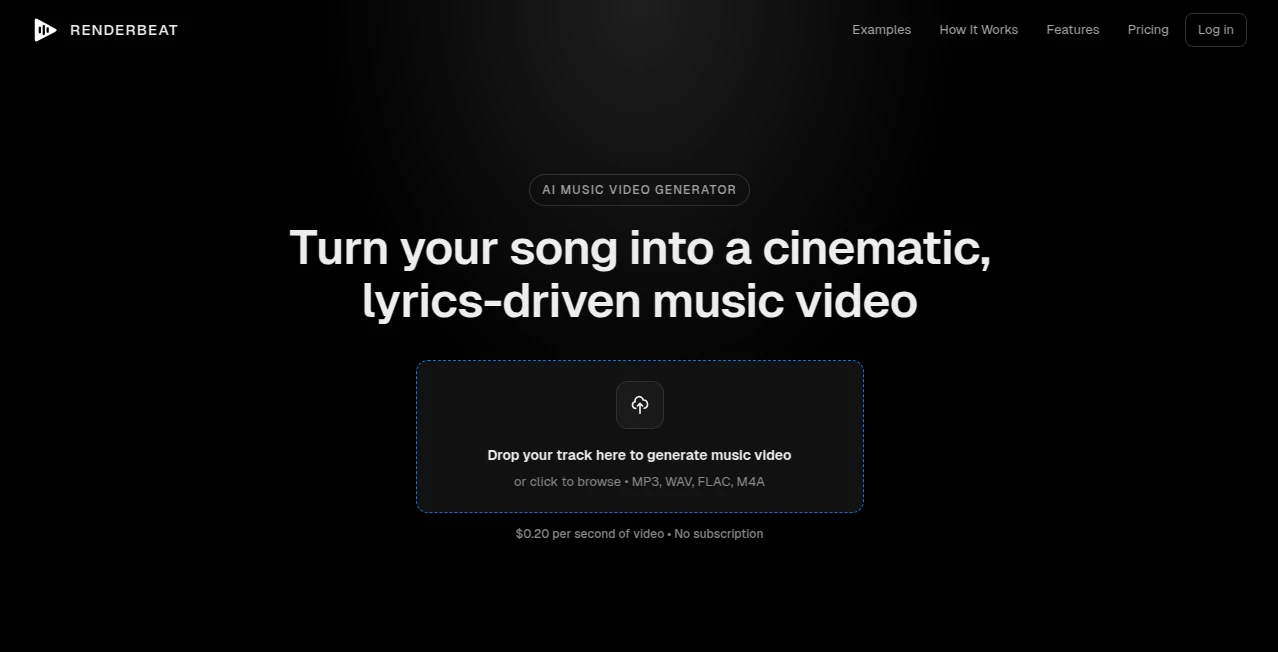
What is RenderBeat?
Creating a professional music video has traditionally required a significant investment of time, money, and creative resources. For independent musicians, producers, and content creators, that process can often feel out of reach. This platform changes that experience by transforming audio tracks into cinematic, lyrics-driven music videos through an intelligent and streamlined workflow.
Instead of relying on complex editing software or production teams, users can upload a song and receive a complete visual storyboard that reflects the mood, lyrics, and energy of the music. The result is a polished video that feels tailored to the track rather than assembled from generic stock footage. For artists looking to enhance releases, engage audiences, and expand their visual presence, this solution offers an impressive combination of speed, creativity, and control.
Key Features
User Interface
The platform offers a straightforward and beginner-friendly experience. Users can upload a song, review automatically generated storyboards, customize scenes, and render a finished video without navigating complicated editing timelines. The workflow is organized into clear stages, making it accessible even for creators with no prior video production experience.
Accuracy & Performance
One of the most impressive aspects is the system's ability to analyze lyrics, rhythm, and overall mood. Visual scenes are generated to match the emotional tone of the music, while captions are synchronized with remarkable precision. This level of alignment helps videos feel intentional and professionally directed.
Capabilities
- Automatic song analysis and mood detection
- AI-generated visual storyboards
- Lyrics-driven scene creation
- Editable captions with accurate synchronization
- Consistent character appearance across scenes
- Support for landscape and vertical video formats
- Commercial usage rights for generated videos
- Storyboard customization before final rendering
Security & Privacy
Uploaded audio files remain part of a controlled production workflow designed for content creation. Users maintain ownership of their finished videos, and commercial rights are included, making the platform suitable for professional releases, social media campaigns, and monetized content.
Use Cases
- Independent artists creating official music videos without hiring production teams
- Singers and songwriters releasing visual content alongside new tracks
- Music producers promoting instrumental projects and albums
- Social media creators publishing lyric videos and promotional clips
- Record labels producing cost-effective visual assets for multiple artists
- DJs and electronic musicians generating visuals for online releases
Pros and Cons
Pros
- Designed specifically for music video creation
- Fast generation process compared to traditional production
- Accurate lyric synchronization
- Storyboard editing before payment
- Character consistency throughout videos
- No subscription requirement
- Commercial rights included
Cons
- Focused primarily on music-related projects
- Advanced filmmakers may want deeper manual editing options
- Video costs increase with longer songs
- Currently limited to available output resolutions and formats
Pricing Plans
The platform follows a pay-as-you-go pricing model instead of recurring subscriptions. Users pay based on video duration and generated scene images, making it attractive for creators who only need occasional projects.
- Video generation is charged per second of completed video.
- Scene image generation is billed separately.
- No monthly subscription fees.
- Commercial rights included with completed projects.
- Money-back guarantee available for eligible projects.
This transparent approach allows artists to estimate costs before committing to production.
How to Use RenderBeat
- Upload an audio file in a supported format.
- Allow the AI system to analyze lyrics, mood, and structure.
- Review the generated storyboard.
- Edit scenes, prompts, and visual direction as needed.
- Customize character appearance and visual style.
- Preview synchronized captions and timing.
- Render the final music video.
- Download and publish the finished content across platforms.
Comparison with Similar Tools
Many AI video generators focus on general-purpose content creation, marketing videos, or short social clips. This platform stands out because it is purpose-built for musicians. Rather than starting with a text prompt alone, it analyzes actual music and creates visuals that follow the song's narrative and emotional progression.
Compared with standard video generators, the emphasis on lyric synchronization, storyboard-driven storytelling, and character consistency provides a more cohesive result for music-focused projects. Artists seeking a dedicated solution for song promotion are likely to find the experience more specialized and relevant than broader video creation platforms.
Conclusion
For musicians who want professional-looking music videos without the traditional costs and production challenges, this platform delivers a refreshing alternative. Its ability to understand songs, generate visual narratives, and synchronize lyrics creates a workflow that feels both practical and creative.
Whether you're preparing a debut single, launching an album, or building a stronger presence on social media, the platform provides an efficient way to transform music into engaging visual content. The combination of cinematic storytelling, flexible customization, and transparent pricing makes it a valuable addition to the modern creator toolkit.
Frequently Asked Questions (FAQ)
Can beginners create professional-looking music videos?
Yes. The workflow is designed for creators with little or no video editing experience.
Are the generated videos unique?
Yes. Visuals are created based on the uploaded song's lyrics, mood, and structure, resulting in personalized content.
Can I edit scenes before rendering?
Yes. Users can review and customize storyboard scenes before generating the final video.
Do I receive commercial rights?
Yes. Generated videos can be used commercially without additional licensing requirements.
Which video formats are supported?
The platform supports both horizontal and vertical formats suitable for YouTube, TikTok, Reels, and other social platforms.
How long does video generation take?
Most projects are completed within minutes, depending on the length of the uploaded song and rendering requirements.
AI Music Video Generator , AI Text to Video , AI Video Generator , AI Short Clips Generator .
These classifications represent its core capabilities and areas of application. For related tools, explore the linked categories above.

RenderBeat Alternatives Product

Seedance 2.0…

Gemini Omni

happyhorsevi…

HypeClip

Free Sora Ge…
Wan 2.7

Aura AI
Zilivo AI

Sora-2.co