Resume Studio
What is Resume Studio?
Resume Studio is an AI-powered career assistant designed to help job seekers create stronger resumes, improve their applications, and prepare for interviews with confidence. Instead of starting from a blank page or struggling with formatting, users can build, review, and improve their resumes through an easier workflow that combines writing support, resume analysis, and career preparation tools.
Finding the right words to describe professional experience can be challenging. Many candidates have valuable skills but fail to present them effectively. This platform helps transform existing experience into clearer achievements, better structured resume sections, and job-focused content that can make applications more competitive.
Key Features
- AI-powered resume writing assistance to improve summaries and experience sections.
- Resume scoring and ATS compatibility checks with actionable improvement suggestions.
- Job-specific resume tailoring based on target job descriptions.
- Professional resume templates designed for modern hiring systems.
- Matching cover letter creation for a complete application package.
- Mock interview practice based on the user's resume and target role.
- Career profile management to save achievements and reuse information.
- Clean PDF export with recruiter-friendly formatting.
User Interface
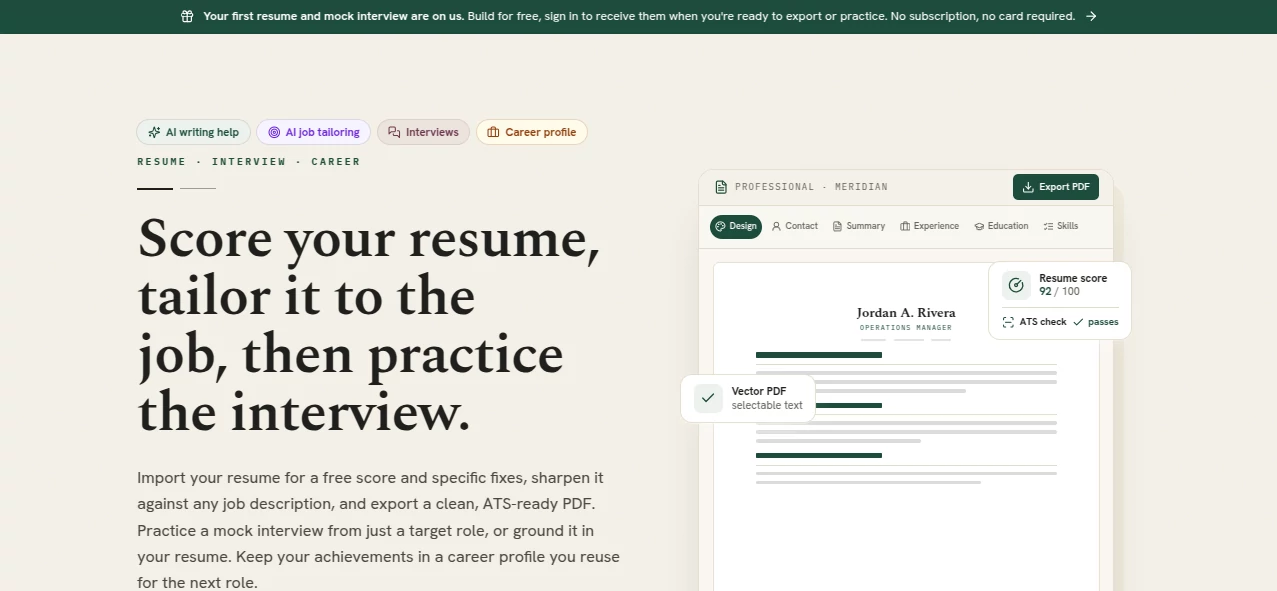
The interface focuses on simplicity and efficiency. Users can import an existing resume or begin creating a new one, then review changes through a live preview experience. The editor keeps the design process straightforward, allowing candidates to switch layouts, improve content, and see how the final document will look before exporting.
The experience feels closer to working with a career assistant rather than filling out complicated forms. Every section can be reviewed and adjusted, giving users control over the final result.
Accuracy & Performance
The platform focuses on practical resume improvements by analyzing structure, readability, keywords, and alignment with job requirements. The resume checking system provides feedback that helps users identify missing information and areas where their application can become stronger.
By combining AI suggestions with user review, candidates can create documents that represent their real experience while improving clarity for both recruiters and automated screening systems.
Capabilities
This tool supports the complete resume creation journey, from improving individual bullet points to preparing for interviews. Users can adapt their resume for different positions by matching their skills and achievements with specific job requirements.
The AI writing assistant can help rewrite weak descriptions, create professional summaries, and improve the presentation of career accomplishments. The interview practice feature also allows candidates to prepare answers based on their background and desired role.
Security & Privacy
Career documents often contain personal and professional information, so privacy is an important part of the experience. Users maintain control over their resume content and can manage their career information while using the platform's features.
Use Cases
- Students creating their first professional resume.
- Professionals updating their resume for a career change.
- Job seekers applying for multiple roles with customized versions.
- Freelancers presenting their experience to new clients.
- Candidates preparing for interviews after submitting applications.
- People who want professional resume formatting without hiring a career writer.
Pros and Cons
Pros
- Combines resume building, optimization, and interview preparation in one place.
- Provides helpful AI writing support for improving professional descriptions.
- Creates ATS-friendly documents with clean formatting.
- Allows users to preview their resume before exporting.
- Includes career-focused tools beyond simple resume templates.
Cons
- Users who need highly customized designs may want additional manual editing options.
- AI suggestions still require personal review to ensure they accurately represent individual experience.
Pricing Plans
The platform follows a flexible payment approach instead of traditional subscriptions. Users can build and preview their resume before deciding to export the final PDF. This model is useful for people who only need a resume occasionally and do not want recurring monthly charges.
Each exported resume includes valuable career features, and users can keep their finished documents for future use. The pricing structure is designed around actual resume creation needs rather than ongoing membership.
How to Use Resume Studio
Start by importing an existing resume or creating a new one from scratch. Review your information, improve sections with AI writing assistance, and adjust the design using available templates.
For better results, add a target job description and customize your resume according to the role requirements. After reviewing the final version, export your professional PDF and use the interview preparation tools to practice before speaking with recruiters.
Comparison with Similar Tools
Many resume builders focus mainly on templates and formatting. This platform takes a broader approach by combining resume creation with analysis, job-focused improvements, cover letter support, and interview preparation.
For users who want more than a visually attractive document, the combination of writing assistance and career preparation features creates a more complete solution for the modern job search process.
Conclusion
Creating a resume that represents your experience clearly can make a major difference during a job search. This AI career assistant helps simplify the process by combining professional formatting, writing improvements, resume analysis, and interview preparation in one workflow.
Whether you are applying for your first position, changing careers, or targeting a competitive role, the platform provides practical tools to help you present your skills with more confidence and professionalism.
Frequently Asked Questions (FAQ)
Can I create a resume without professional writing experience?
Yes. The AI writing features help users improve descriptions, summaries, and achievements even if they are not experienced resume writers.
Does it help optimize resumes for ATS systems?
Yes. The platform includes resume scoring and ATS-focused feedback to help improve compatibility with automated hiring systems.
Can I customize my resume for different jobs?
Yes. Users can tailor their resume content according to different job descriptions and career goals.
Can I practice interviews?
Yes. The interview practice feature helps users prepare answers based on their resume and target position.
Can I export my resume as a PDF?
Yes. Users can export a clean PDF version designed for professional applications.
AI Cover Letter Generator , AI Interview Assistant , AI Recruiting , AI Resume Builder .
These classifications represent its core capabilities and areas of application. For related tools, explore the linked categories above.

Resume Studio Alternatives Product
ResumeFreePro

Mployee.me

Hirescope.te…

EarnBetter

Resuque

ApplyBtn

CoPrep AI

Interview Te…

Candidate Sc…