
scriptgecko
What is scriptgecko?
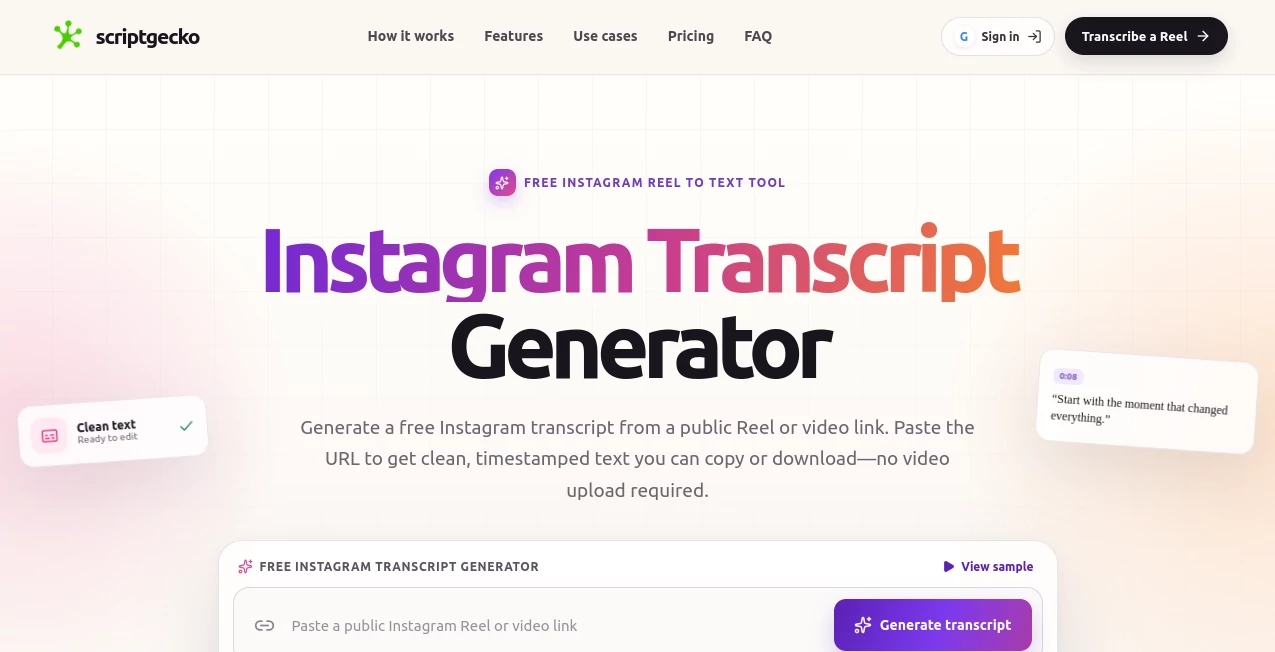
Turning a short Instagram video into useful written content should not require replaying the same Reel over and over. ScriptGecko is built around a simple idea: paste a public Instagram Reel or video link and get clean, timestamped text that can be copied or downloaded. There is no need to upload a video file, making the process particularly convenient for creators, marketers, researchers, and anyone who regularly works with short-form content.
The service is designed for public Instagram content and focuses on turning spoken words into something easier to search, quote, review, and repurpose. For example, a creator can take the transcript of a Reel and use it as the starting point for a caption, newsletter idea, content outline, or new script.
Key Features
- Transcribe public Instagram Reels and supported Instagram videos from their URLs.
- Generate timestamped transcript segments that remain connected to the original moments in the video.
- Copy the complete transcript directly for use in other applications.
- Download transcript text as a TXT file.
- Process videos without requiring a local video upload.
- Work with spoken content even when the original Instagram video does not have native captions.
- Search through written transcript text instead of repeatedly replaying the original video.
- Support multiple languages returned by the connected transcription provider.
User Interface
The interface keeps the main task remarkably straightforward. Instead of presenting users with a complicated editor or a long list of settings, the workflow centers on one input field where a public Instagram Reel or video URL can be pasted. From there, the transcript can be generated and reviewed.
The output is organized into timestamped segments, which makes it easier to connect a sentence with the exact point where it was spoken. This is especially useful when someone is researching a longer Reel and wants to locate a particular quote without watching the entire video again.
Accuracy & Performance
Transcript quality depends on the source recording and the transcription provider handling the audio. Clear speech generally produces better results, while background music, strong accents, overlapping speakers, poor audio quality, names, and numbers can require additional review.
This is an important advantage of having timestamps alongside the text. If a sentence looks questionable, the original moment can be checked quickly instead of searching through the entire video. For professional publishing, quotations, statistics, and names should always be verified against the original recording.
Capabilities
The core capability is converting speech from public Instagram video content into structured text. The resulting transcript can be copied or exported as a text file, giving users a practical starting point for several types of content work.
Because the transcript is searchable and organized, it can also be useful for finding hooks, identifying recurring topics, collecting quotes, studying content structure, and turning spoken ideas into written material. A marketer, for instance, could examine several public videos in a niche and compare how different creators introduce an offer or address a common customer objection.
Security & Privacy
The service is designed around public Instagram links and does not require users to provide an Instagram password or bypass private-account restrictions. Private posts, inaccessible content, expired links, region-restricted material, and videos without accessible audio may not be available for transcription.
This public-content approach also makes the intended use of the service clear. Users should make sure they have the appropriate rights and permission when reusing transcript content, particularly when publishing quotes or substantially repurposing someone else's work.
Use Cases
Content creators: A Reel transcript can become the raw material for captions, newsletters, outlines, blog ideas, or another short-form script. Instead of starting from a blank document, creators already have the spoken version of their idea in front of them.
Researchers: Educational and informational Reels can contain useful details that are difficult to capture while watching. A searchable transcript makes it easier to find specific statements and build notes around them.
Marketers: Public videos can be studied for hooks, offers, objections, messaging patterns, and content structure. This can be particularly helpful when researching how a niche communicates with its audience.
Social media teams: Teams working with large amounts of short-form content can turn spoken material into text that is easier to review, organize, and pass between team members.
Content repurposing: A single spoken video can serve as the starting point for several written formats. The transcript provides the source material without forcing the user to manually type everything that was said.
Pros and Cons
Pros
- Very simple URL-based workflow.
- No local video upload is required for the Instagram transcription workflow.
- Timestamped text makes transcripts easier to review.
- Transcript text can be copied or downloaded.
- Useful for content research and repurposing.
- Free daily usage is available without immediately committing to a paid plan.
- Does not require an Instagram password for public-content transcription.
Cons
- The workflow is focused on public Instagram content.
- Transcript quality can vary with audio conditions and speech clarity.
- Important names, numbers, and quotations should be manually checked.
- Free usage has daily limits.
- Unused monthly credits do not roll over to the next billing cycle.
Pricing Plans
The service uses a combination of free daily access and monthly credit-based subscriptions. Guests can generate up to 2 transcripts per day, while signed-in users receive up to 3 transcripts per day without paying for a subscription.
The Starter plan costs $9.99 per month and includes 200 transcript credits. The Popular plan costs $19.99 per month and provides 1,000 transcript credits, making it the more suitable option for creators or teams processing a larger amount of content.
Credits are refreshed automatically with each billing cycle. One credit represents each started five-minute block, so a transcript lasting between 5:01 and 10:00 uses two credits. Failed transcription jobs do not consume credits.
How to Use ScriptGecko
Using the service takes only a few steps. First, open the public Instagram Reel or video you want to transcribe and copy its link. Next, paste the URL into the transcript generator and start the transcription process. Once processing is complete, review the timestamped text and copy it or download the transcript as a TXT file.
For the best results, choose videos with clear speech and relatively clean audio. If the transcript will be used for publication, take a moment to compare important statements with the original video before publishing.
Comparison with Similar Tools
Many transcription services are designed around uploaded audio or video files, while this workflow is specifically centered on public Instagram URLs. That distinction can make the process faster for someone who already has the Reel link and simply wants its spoken content in written form.
Traditional transcription software may offer broader file support and more advanced editing features, but it can also introduce an additional download-and-upload step. Here, the focus is narrower: take a public Instagram video, turn its speech into readable text, preserve timestamps, and make the result easy to reuse.
For occasional users, the free daily allowance is also a useful way to test the workflow before considering a subscription. Users processing content regularly may find the monthly credit system more practical.
Conclusion
For anyone who spends a significant amount of time watching Instagram Reels for research, content creation, or marketing, turning speech into searchable text can remove a surprisingly tedious part of the workflow. The combination of URL-based transcription, timestamps, copying, and TXT export keeps the process focused on what users actually need: getting useful words out of a video.
Its strongest appeal is its simplicity. There is no complicated production workflow to learn, and the free allowance gives users an easy way to see whether the transcription process fits their routine. Creators can turn spoken ideas into new content, researchers can find useful moments faster, and marketers can study public short-form content without repeatedly replaying the same videos.
Frequently Asked Questions (FAQ)
Can I transcribe an Instagram Reel without downloading the video?
Yes. The Instagram workflow is based on a public Reel or video URL, so users do not need to upload the video file locally.
Is the Instagram transcript generator free?
Yes. Guests can generate up to 2 transcripts per day, while signed-in users can generate up to 3 transcripts per day. Paid monthly plans provide additional transcript credits.
Can it transcribe Instagram videos without captions?
Yes. Native Instagram captions are not required when spoken audio is accessible. The service transcribes the speech from the supported video.
Can private Instagram videos be transcribed?
No. The service is intended for public Instagram links and does not attempt to bypass Instagram privacy restrictions.
Can I download the transcript?
Yes. After processing, the transcript can be copied or downloaded as a TXT file.
How accurate are the generated transcripts?
Accuracy depends on audio clarity, background noise, music, accents, speaker overlap, and the transcription provider. Important names, numbers, and quotations should be reviewed before publication.
What are transcript credits?
Paid plans use credits based on transcript duration. One credit covers each started five-minute block. For example, a video lasting 5 minutes and 1 second uses two credits.
Do unused monthly credits roll over?
No. Monthly credits reset automatically at the beginning of the next billing cycle, and unused credits do not carry forward.
Who can benefit from an Instagram transcript?
Creators, marketers, researchers, social media teams, and anyone who needs to search, quote, review, or repurpose spoken content can benefit from having a clean written transcript.
AI Transcriber , AI Social Media Assistant , AI Transcription , AI Captions or Subtitle .
These classifications represent its core capabilities and areas of application. For related tools, explore the linked categories above.
scriptgecko details
Website unavailable — View Alternatives
Pricing
- Freemium
Apps
- Web App
Categories

scriptgecko Alternatives Product

VideoText

SkipBait

Jasper

VideoSnap

Klyra AI

ScriptHook

Maestra
MP3 to Text …

Overlap