
Seedance AI Video Generator
What is Seedance AI Video Generator?
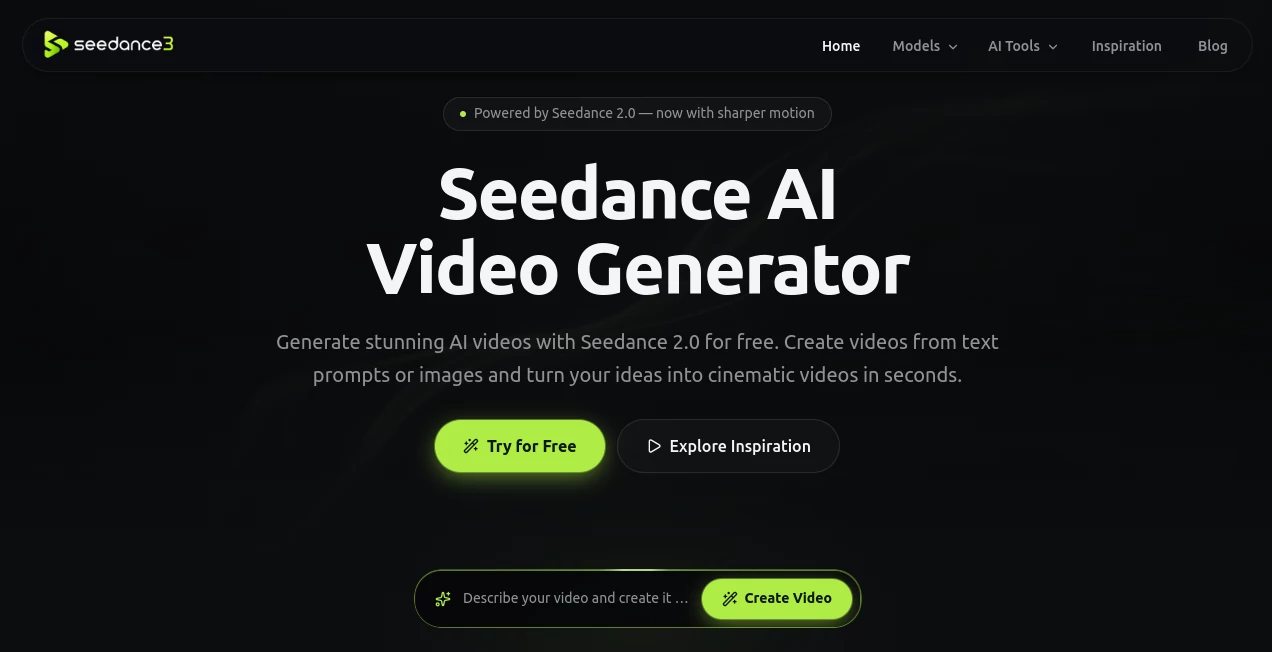
Seedance AI Video Generator is a creative platform built around AI-powered video generation, allowing users to turn text prompts, images, videos, and audio references into short cinematic clips. Powered by Seedance 2.0, it is designed to make video creation more accessible without requiring cameras, actors, or complicated editing software.
The workflow is particularly appealing for creators who want to experiment quickly. A simple description can become a moving scene, while a product photo, character illustration, or portrait can be transformed into an animated video. The platform also provides free daily generations, making it possible to test ideas before deciding whether a larger production workflow is worthwhile.
Key Features
- Text-to-video generation from natural-language prompts
- Image-to-video generation for animating still images and artwork
- Multimodal input supporting images, video, and audio references
- 1080P video generation alongside 480P and 720P options
- Multiple aspect ratios including 16:9, 9:16, 1:1, 4:3, 3:4, and 21:9
- Cinematic camera movement and realistic motion generation
- AI-generated speech and synchronized facial movement
- Prompt-based control over scenes, actions, camera movements, and visual styles
- Free daily generations without requiring an account to get started
- Inspiration examples with prompts that can be reused for new creative projects
User Interface
The interface keeps the main generation workflow straightforward. Users can select the model, add their creative inputs, write a prompt, choose an output size, and start generating from one central workspace. The available controls are easy to understand, which is useful for someone trying AI video generation for the first time.
Another practical touch is the inspiration area. Instead of beginning with a completely blank screen, users can browse examples such as product advertisements, cinematic scenes, character animation, and short-form social content. Seeing what is possible can make prompt experimentation much easier.
Accuracy & Performance
Performance depends heavily on the prompt, reference material, and complexity of the requested scene, as is common with generative video. The platform is built to interpret descriptions involving movement, camera direction, characters, lighting, and visual style rather than simply producing a static image with basic animation.
Its support for up to 1080P output and multiple aspect ratios also makes it more flexible than a tool designed around one fixed video format. For example, a creator working on YouTube content can use a landscape format, while a social media manager can prepare vertical material for short-form platforms.
Capabilities
The strongest part of the platform is its range of creative inputs. Text prompts can be used to describe an entire scene from scratch, while images can provide a visual starting point for characters, products, illustrations, or environments. Existing video and audio references can also be included for more involved generations.
For marketing teams, this opens up interesting possibilities. A single product image can become the starting point for a promotional clip, while an illustrated character can be given movement and expression. Filmmakers and designers can also use generated clips as storyboards or visual experiments before committing resources to a traditional production.
Security & Privacy
Users should review the platform's current privacy policy and terms before uploading confidential, copyrighted, or sensitive material. As with any online generative media service, it is sensible to avoid uploading private information or assets that you are not authorized to process.
The service states that it collects account information, usage details, device information, cookies, and payment-related information where applicable. Users should therefore consider the nature of their uploaded material and the applicable terms before using the platform for sensitive commercial projects.
Use Cases
- Social media content: Create short vertical clips for TikTok, Instagram Reels, YouTube Shorts, and similar channels.
- Product marketing: Turn product photographs into promotional scenes, advertisements, and visual showcases.
- Storyboarding: Quickly visualize scenes, camera movements, characters, and environments before filming.
- Creative storytelling: Experiment with cinematic scenes and short narrative sequences from written ideas.
- Character animation: Bring portraits, illustrations, avatars, and fictional characters to life.
- E-commerce: Produce visual demonstrations and promotional material without organizing a full video shoot.
- Advertising concepts: Test different visual ideas and campaign concepts before investing in professional production.
- Faceless content: Create engaging visual clips without appearing on camera.
Pros and Cons
Pros
- Supports several types of creative input instead of relying only on text prompts.
- Offers multiple aspect ratios for different publishing platforms.
- 1080P generation is available for higher-resolution projects.
- The workflow is simple enough for beginners.
- Daily free access makes experimentation easier.
- The inspiration gallery provides useful starting points for prompt ideas.
Cons
- Video generation results can vary depending on the prompt and source material.
- The current generation workflow uses a fixed five-second duration.
- More demanding projects may require repeated generations to reach the desired result.
- Users creating large volumes of content may eventually need a paid workflow.
Pricing Plans
The platform currently promotes free daily video generations, allowing users to experiment without committing to a subscription. This is particularly useful for beginners who want to understand the quality and workflow before paying for AI video production.
For users with larger production requirements, pricing and available usage limits should be checked directly on the platform because AI generation plans and quotas can change over time. Starting with the free access is a practical way to evaluate whether the output fits your particular workflow.
How to Use Seedance AI Video Generator
Start by selecting the available generation model and deciding what you want the final clip to look like. You can write a text prompt for a scene from scratch or provide an image, video, or audio reference.
Next, describe the subject, action, environment, camera movement, lighting, and visual style as clearly as possible. Choose an appropriate aspect ratio and output quality, then click Generate.
Once the video is ready, preview the result. If the movement or composition is not quite right, adjust the prompt and generate another version. This iterative approach is often more effective than trying to write an extremely complicated prompt on the first attempt.
Comparison with Similar Tools
AI video generators such as Runway, Kling AI, Google Veo, and OpenAI's Sora target many of the same creative workflows, but their interfaces, models, pricing structures, generation limits, and output characteristics differ.
This platform stands out primarily for its straightforward browser-based workflow, multimodal input options, multiple aspect ratios, and free daily access. It can be a particularly convenient choice for users who want to experiment with short AI-generated videos without immediately committing to a complex professional production environment.
Conclusion
For creators who want to turn an idea into a short video without setting up a traditional production, this platform offers a remarkably approachable starting point. The combination of text prompts, image references, video and audio inputs, cinematic motion, several output formats, and free daily generations gives users plenty of room to experiment.
It is not a replacement for every professional video workflow, and generated footage may still require iteration. However, for social media clips, product concepts, creative experiments, storyboards, and quick promotional videos, it provides a convenient way to move from an idea to something visual in a matter of minutes.
Frequently Asked Questions (FAQ)
What is this AI video generator used for?
It can create short AI-generated videos from text prompts and reference media. Common uses include social media clips, product advertisements, storytelling, character animation, and creative concept development.
Can I create a video from an image?
Yes. Users can upload an image and use it as a reference for generating an animated video. This can be useful for portraits, product photographs, illustrations, characters, and other static visuals.
What video resolutions are available?
The generation interface currently offers 480P, 720P, and 1080P quality options.
Can I choose the video aspect ratio?
Yes. Available options include landscape, portrait, square, and wider cinematic formats, including 16:9, 9:16, 1:1, 4:3, 3:4, and 21:9.
Is it free to use?
The platform offers free daily generations, allowing users to test the AI video workflow without immediately purchasing a plan. Usage limits and paid options may change, so checking the current offering before starting a larger project is recommended.
Can it create videos for social media?
Yes. The available portrait format makes it suitable for short-form content intended for platforms such as TikTok, Instagram Reels, and YouTube Shorts.
AI Image to Video , AI Video Generator , AI Text to Video .
These classifications represent its core capabilities and areas of application. For related tools, explore the linked categories above.
Seedance AI Video Generator details
Website unavailable — View Alternatives
Pricing
- Free
Apps
- Web App
Categories

Seedance AI Video Generator Alternatives Product

Happy Oyster

See dance 2.…

Seedance 2.0

FastMoro AI

AI Motion Co…

Nano Banana …
Seedance 2.0

Fast Wan

Seedance 2.0…