
SeiSei AI
What is SeiSei AI?
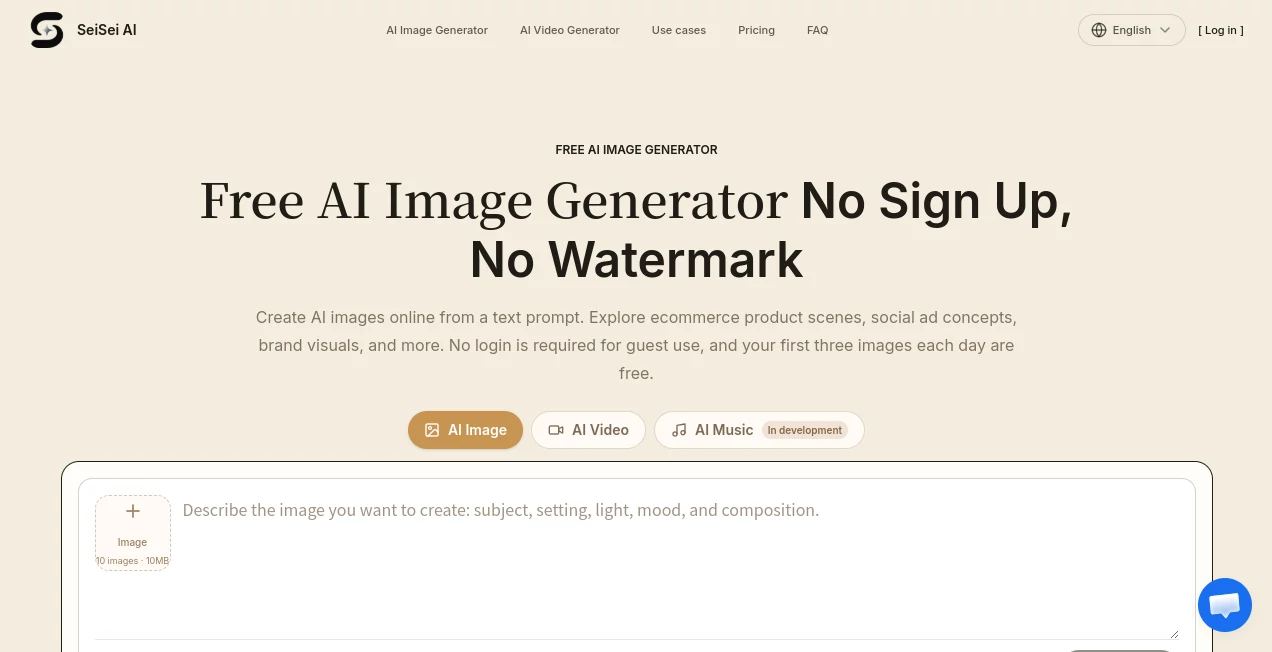
Creating a useful visual no longer has to begin with a complicated design workflow. This AI image generator gives users a straightforward way to turn a written idea into an image, with no account required for the initial experience. Guests can create up to three images per day for free, making it particularly convenient for anyone who wants to test an idea before committing to a paid plan.
The platform is built around a simple concept: describe the subject, setting, lighting, colors, composition, and overall mood, then review the result and refine the prompt. This approach works well for quick creative exploration, especially when you need several visual directions before deciding which one deserves further work.
Its practical focus is also noticeable in the examples provided on the site. Product concepts, social advertising ideas, brand visuals, editorial graphics, and creator thumbnails are all presented as realistic starting points rather than promises of finished production photography. That distinction makes the tool useful for creative planning as well as image generation.
Key Features
- Free guest image generation without requiring an account.
- Up to three free images per day for guest users.
- No platform watermark on generated images.
- Text-to-image generation for creating visuals from written prompts.
- Image-to-image generation using reference images.
- Support for up to ten JPEG, PNG, or WEBP reference images when using the image upload feature.
- Multiple model choices available after signing in.
- High-resolution image output on paid plans.
- Generation history and prompt reuse for signed-in users.
- Image generation suited to ecommerce, advertising, social media, editorial, and concept development.
User Interface
The interface is designed around the generation process rather than a crowded collection of controls. Users begin by describing what they want to see, check the selected model, and then review the generated image. This makes the first interaction approachable even for people who have little experience with generative image technology.
Reference images can also be added when a written description alone is not enough. This is useful when the desired composition, visual direction, or source material needs to be communicated more clearly. The overall workflow encourages small adjustments instead of forcing users to write a perfect prompt from the beginning.
Accuracy & Performance
Image quality naturally depends on the selected model, prompt, reference material, and the complexity of the requested scene. The service handles this by showing the required credit amount before generation, while additional model options become available after login.
A particularly useful part of the workflow is the emphasis on iterative prompting. Instead of completely replacing a prompt after every result, users can identify one problem at a time. Moving a subject, changing the lighting, adjusting the color palette, or adding negative space can produce a more controlled second result.
This is especially helpful for commercial concepts where composition matters as much as the subject itself. For example, a social advertisement may need an empty area for headline text, while an ecommerce concept may require the product to remain visually dominant.
Capabilities
The generator supports both text-to-image and image-to-image workflows. Written prompts can describe people, objects, environments, lighting, materials, composition, and artistic direction. Reference images can be used to give the generation process additional visual guidance.
The platform is also positioned for practical commercial ideation. Users can explore product campaign concepts, paid social creatives, brand announcements, blog headers, editorial visuals, and video thumbnail directions without first arranging a full photography or design session.
Another useful capability is the ability to think about the final placement while creating the image. The platform encourages users to specify framing and empty space when an image will later contain headlines, calls to action, or other design elements.
Security & Privacy
The service provides a dedicated privacy policy covering information associated with accounts, support requests, billing, prompts, and reference images. Account-related information may include a name or display name, email address, and login details, while payment processing is handled through payment processors rather than storing full card numbers on the platform's servers.
Users should still review the applicable terms before uploading sensitive material or using generated images commercially. Image-generation services can involve prompts and reference material as part of the generation workflow, so understanding how submitted content is handled is an important step for professional use.
Use Cases
- Ecommerce: Create product scene concepts, experiment with lighting, backgrounds, materials, and composition before arranging a professional shoot.
- Social Media: Develop visual directions for product launches, announcements, seasonal campaigns, and community posts.
- Advertising: Test paid-social concepts with specific subject positioning and space reserved for headlines or calls to action.
- Content Creation: Develop blog covers, editorial images, creator thumbnails, and visual concepts for online publishing.
- Brand Development: Explore color palettes, composition, visual moods, and campaign directions before final production.
- Creative Exploration: Turn an early idea into several visual possibilities without needing drawing skills or photography equipment.
Pros and Cons
- Pros: No-sign-up access, three free guest generations per day, no platform watermark, text-to-image and image-to-image workflows, reference image support, multiple model options after login, and practical commercial use cases.
- Cons: Guest generation is limited to three images per day, higher-volume creation requires credits, model availability can vary, and generated images still require human review before professional or commercial publication.
Pricing Plans
The service uses a credit-based pricing system alongside free guest access. Users receive five credits once after signing up, while the amount required for each generation depends on the selected model.
The Basic plan costs ¥3,000 per month and includes 300 credits. It provides high-resolution output, the platform's image modes, text-to-image and image-to-image generation, and email support.
The Pro plan costs ¥6,000 per month and includes 1,600 credits. It adds a substantially larger monthly allowance while retaining high-resolution output, image modes, text-to-image and image-to-image generation, with priority support.
The Max plan costs ¥30,000 per month and includes 9,200 credits. It is designed for studios and heavier workloads and includes commercial use under the applicable terms, along with priority support.
Annual billing is also available at a reduced effective monthly rate, with the pricing page advertising a 50% saving for annual subscriptions. One-time credit packs are available as another option for users who prefer not to rely entirely on a monthly subscription.
How to Use the AI Image Generator
- Open the image-generation interface and enter a description of the scene you want to create.
- Describe the subject, location, lighting, color palette, composition, style, and any important visual details.
- If necessary, upload reference images to provide additional visual guidance.
- Check the selected model and review the credit requirement before generating.
- Generate the image and examine the result carefully.
- If something is not right, change one element of the prompt at a time rather than rewriting everything.
- Adjust framing, lighting, colors, subject placement, or negative space according to where the final image will be used.
- Save the result or generate another direction until the visual concept is closer to the intended result.
Comparison with Similar Tools
Compared with more complex creative platforms, this service puts less emphasis on a large editing workspace and more emphasis on getting an image generated quickly. That makes it appealing when the goal is to explore an idea rather than build an entire design inside the same application.
Another difference is the low barrier to entry. Being able to create initial images without signing up gives users an opportunity to judge the workflow before creating an account or purchasing credits. For occasional users, this can be more convenient than immediately entering a subscription-based workflow.
For professional projects, however, the right choice will depend on the specific model options, generation limits, editing requirements, commercial terms, and level of control needed. A dedicated image editor may still be preferable when extensive post-production is required.
Conclusion
This AI image generator is a strong option for people who want to move quickly from an idea to a visual concept. The combination of free guest access, no platform watermark, reference-image support, multiple models, and a credit-based paid system gives it a flexible starting point for both casual experimentation and recurring creative work.
Its biggest strength is arguably the simplicity of the process. Instead of demanding a polished prompt or an elaborate setup, it encourages users to generate a first version, inspect what works, and make focused adjustments. That makes the experience feel closer to a creative conversation than a one-shot image request.
For marketers, ecommerce sellers, creators, designers, and anyone who regularly needs visual concepts, it is worth trying the free experience first. Three guest generations per day provide enough room to understand the workflow and decide whether the available models and credit plans fit a larger project.
Frequently Asked Questions (FAQ)
Is the AI image generator free?
Yes. Guests can generate up to three images per day without creating an account. The free access applies to the basic guest text-to-image experience and does not provide unlimited access to every available model.
Can I use it without creating an account?
Yes. Guest users can enter a prompt and start generating without logging in. Guest access is limited to three images per day.
Is there a watermark on generated images?
The service states that it does not add its own platform logo or watermark to generated images. Users should still check the rights associated with people, brands, characters, and other third-party material before publishing an image.
Can I upload reference images?
Yes. The image upload feature supports up to ten JPEG, PNG, or WEBP reference images, allowing users to provide additional visual context for a generation.
Can generated images be used commercially?
Commercial use is supported within the applicable terms, particularly on the higher-tier Max plan. Users remain responsible for checking intellectual-property and other rights related to people, trademarks, characters, buildings, and source materials appearing in their creations.
How many images can I create for free?
Guest users can create up to three images per day without an account. After signing in, users can continue with the available credit system and review the required credits before each generation.
What happens after I create an account?
Signed-in users can access features such as generation history, prompt reuse, a one-time five-credit welcome allocation, and additional model choices available within the account experience.
Which image formats can be uploaded as references?
Reference uploads support JPEG, PNG, and WEBP images.
AI Photo & Image Generator , AI Illustration Generator , AI Image to Image , AI Text to Image .
These classifications represent its core capabilities and areas of application. For related tools, explore the linked categories above.

SeiSei AI Alternatives Product
Caricature G…

Nanosora
Photoshoot A…

Ghibli Image…

Createimg.ai

Try FLux2

upscayl

Nano AI
Z image AI