
Sherlock AI Face Search
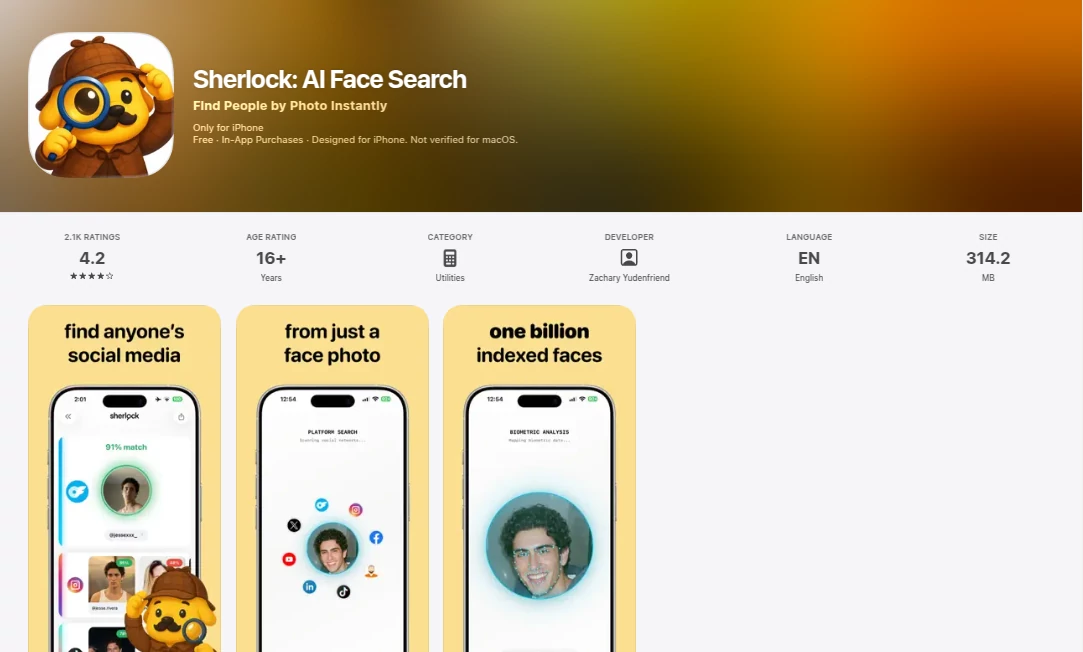
What is Sherlock AI Face Search?
In a world where images circulate faster than ever, identifying or tracing visual matches has become a real need for many users. This mobile application steps into that space with a focused idea: helping people discover visually similar faces using artificial intelligence directly from their iPhone. It feels simple on the surface, but behind the scenes it brings together modern facial recognition techniques and a smooth mobile experience that makes searching feel almost effortless.
Instead of complicated tools or technical workflows, the experience is designed for everyday users who just want fast, clear results. Whether you're curious about an image you found online or trying to locate visually similar profiles, the app offers a direct and surprisingly intuitive solution.
Key Features
User Interface
The interface is clean, minimal, and built for speed. Users can upload or capture an image within seconds and immediately start a search. There are no unnecessary steps, which makes the experience feel lightweight and modern.
Accuracy & Performance
The system focuses on delivering relevant matches rather than overwhelming users with endless results. Its AI-driven engine is optimized to detect facial patterns and similarities, helping surface meaningful matches quickly and efficiently.
Capabilities
- Face-based image recognition and matching
- Quick search through visual similarity detection
- Mobile-optimized processing for fast results
- Simple image upload and camera capture support
- Streamlined result presentation for easy browsing
Security & Privacy
Privacy is an important part of the experience. The application is designed to handle user-submitted images responsibly, ensuring that searches remain focused and controlled within the platform’s intended use.
Use Cases
- Identifying visually similar people from images
- Exploring potential matches from online photos
- Supporting digital investigations or curiosity-based searches
- Helping users verify or trace image sources
- Enhancing personal or professional image research workflows
Pros and Cons
Pros
- Fast and responsive mobile experience
- Simple interface with no learning curve
- Focused on face-based search results
- Convenient for on-the-go usage
Cons
- Limited to facial recognition use cases
- Performance depends on image quality
- May not replace advanced desktop-based tools
Pricing Plans
The app follows a mobile-first distribution model, typically offering a free version with core functionality and optional in-app purchases or premium upgrades for enhanced features. This allows users to try the experience before committing to additional capabilities.
How to Use This Tool
Getting started is straightforward. After installing the app, users can either upload an image from their gallery or capture one directly using the camera. Once the image is submitted, the system begins analyzing facial features and returns visually similar results within moments. From there, users can explore matches and refine their search based on results.
Comparison with Similar Tools
Compared to traditional reverse image search engines, this application is more specialized. While general tools often return broad or mixed results, this one focuses specifically on facial similarity, making it more targeted for identity-related searches. However, broader platforms may still offer more diverse image-based results across different categories.
Conclusion
This application delivers a focused and modern approach to face-based image search. It is not overloaded with unnecessary features, which is exactly what makes it appealing. For users who want quick, mobile-friendly facial recognition capabilities without complexity, it offers a smooth and practical experience that fits naturally into everyday use.
Frequently Asked Questions (FAQ)
Is the app free to use?
Yes, it generally offers a free version with optional upgrades depending on advanced needs.
Does it work with any image?
It works best with clear facial images where features are visible and not heavily distorted.
Is it available on all devices?
It is designed specifically for mobile use, especially iOS devices.
How fast are the results?
Results are typically generated within seconds depending on image quality and connection speed.
Does it store uploaded images?
The app is designed with privacy in mind, focusing on processing images securely within the platform’s intended workflow.
AI Face Swap Generator , AI Image Recognition , AI Selfie & Portrait , AI Image Scanning .
These classifications represent its core capabilities and areas of application. For related tools, explore the linked categories above.
Sherlock AI Face Search details
Website unavailable — View Alternatives
Pricing
- Free
Apps
- Web App
Categories

Sherlock AI Face Search Alternatives Product

FaceSage

Max Studio AI

Stinglo
AI Face Anal…

Ultralytics

PhotextAI

Toon Tone

Artguru

poseup