

















What is Shortsboost?
ShortsBoost is an AI-powered toolkit built for YouTube creators who want to turn a simple content idea into a more complete video package. Instead of jumping between separate tools for titles, hooks, scripts, thumbnails, and video analysis, creators can handle several of these tasks from one place.
The platform is particularly useful when a creator knows what they want to talk about but needs help developing the idea into something stronger. It can generate multiple titles and hooks, suggest thumbnail concepts, create scripts, and even provide additional ideas for future videos.
Key Features
User Interface
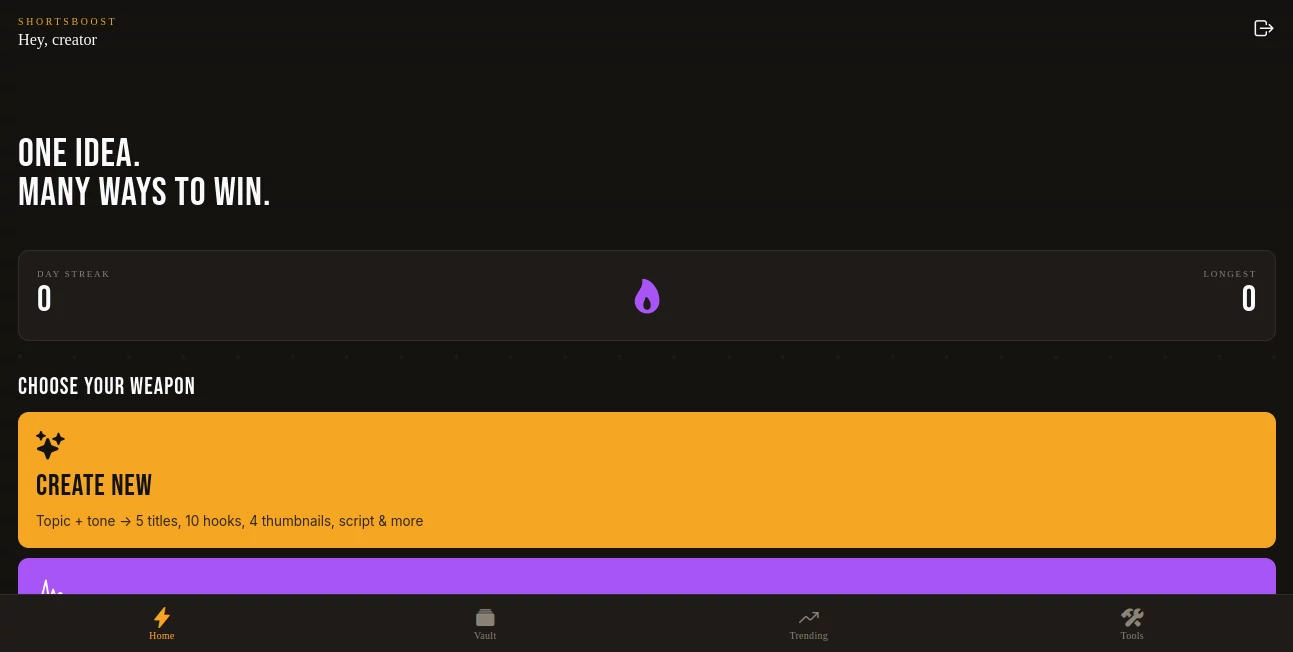
The interface keeps the main workflow straightforward. Creators can choose between creating something new, analyzing an existing underperforming video, using the AI copilot, or opening one of the quick tools. This makes it easy to start with the task that needs attention rather than working through a complicated editing process.
The home screen also includes tools such as a title review feature, a seven-day planning tool, a script writer, and a trending section. The result is a practical workspace for creators who prefer having their planning and ideation tools in one location.
Accuracy & Performance
One of the more useful aspects of the platform is its focus on practical YouTube decisions rather than simply generating generic text. When an existing YouTube video is provided for analysis, the system is designed to produce an autopsy-style report that identifies potential weaknesses and suggests improvements.
For new content, the workflow can turn a topic and selected tone into several creative elements at once. This can help creators compare different approaches before committing to a final title, hook, or concept.
Capabilities
- Generate multiple YouTube title ideas from a single topic.
- Create several hooks designed to give a video a stronger opening.
- Suggest thumbnail concepts for a new video idea.
- Generate scripts based on the creator's chosen direction.
- Build a broader video package from one initial idea.
- Provide descriptions and additional video ideas.
- Analyze an underperforming YouTube video from its URL.
- Offer a seven-day planning workflow for content creation.
- Provide quick-access tools for titles, scripts, trends, and content planning.
Security & Privacy
The public-facing page provides a dedicated privacy policy link, which is a useful starting point for understanding how information submitted to the service is handled. However, the available public interface does not provide enough technical detail to make specific claims about encryption, data retention, third-party processing, or account security practices.
Creators should therefore review the platform's privacy documentation before submitting information they consider confidential, particularly when analyzing unpublished content or sharing video-related information.
Use Cases
The platform can be useful for a range of YouTube workflows. A new creator can start with a basic topic and develop it into several possible titles, opening hooks, thumbnail concepts, and a script. This is helpful when the hardest part is getting from a rough idea to a workable video plan.
It can also be useful for established channels. For example, a creator may have a video that received fewer views than expected. Instead of simply moving on to the next upload, they can use the video-analysis workflow to examine potential problems and identify areas that could be improved.
Another practical use is content planning. A creator who has one successful topic can use the AI copilot to develop a complete package around it and generate additional ideas, creating a starting point for a broader publishing schedule.
Pros and Cons
- Pros: Brings several YouTube content-planning tasks into one workspace.
- Pros: Generates multiple creative options instead of relying on a single suggestion.
- Pros: Includes an analysis workflow for underperforming YouTube videos.
- Pros: Covers titles, hooks, scripts, thumbnails, descriptions, and additional ideas.
- Pros: Includes quick tools for common creator tasks.
- Cons: The public page provides limited information about detailed pricing and usage limits.
- Cons: Advanced privacy and data-processing details are not clearly explained on the main page.
- Cons: It is primarily focused on content strategy and ideation rather than full video editing.
Pricing Plans
The publicly accessible product interface does not clearly display detailed pricing plans or subscription tiers. Because pricing and usage limits can change, creators should check the service directly for the current commercial terms before making a purchase or relying on a particular allowance.
For users evaluating the platform, the most important factors to compare are the number of generations available, access to video analysis, AI copilot usage, and any restrictions attached to the available tools.
How to Use It
- Start with a video topic or content idea.
- Choose the creation workflow when developing a new video.
- Provide the topic and select an appropriate tone.
- Review the generated titles, hooks, thumbnail concepts, and script.
- Use the AI copilot when you want to develop the idea into a broader video package.
- For an existing video, provide its YouTube URL and review the generated analysis.
- Apply the useful recommendations to your title, opening, structure, thumbnail, or overall content strategy.
- Use the planning and quick tools to prepare future uploads.
Comparison with Similar Tools
Many AI video platforms concentrate on automatically cutting long videos into short clips or generating complete videos. This platform takes a different approach by concentrating more heavily on the strategic side of YouTube content creation.
For example, a creator looking for automated video clipping may need a dedicated video-to-shorts editor. By contrast, someone struggling with the idea itself, the opening hook, title options, thumbnail direction, or content planning may find this type of workflow more useful.
The ability to combine idea development with an analysis workflow is particularly valuable because it supports both sides of the publishing process: deciding what to create next and learning from content that has already been published.
Conclusion
For YouTube creators, a good video idea is only the starting point. The title, opening seconds, thumbnail, script, description, and overall positioning can all influence how an upload performs. Bringing these decisions together can make the creative process considerably easier.
This platform stands out as a focused workspace for that part of the process. Its combination of content generation, video diagnosis, AI-assisted planning, and quick creator tools makes it a practical option for creators who want to spend less time staring at a blank page and more time developing publishable ideas.
It is not positioned as a replacement for a full video editor. Instead, its strength is helping creators think through what to make, how to package it, and where an existing piece of content may have gone wrong.
Frequently Asked Questions (FAQ)
What is this tool designed for?
It is designed to help YouTube creators with content ideation, titles, hooks, scripts, thumbnails, descriptions, planning, and analysis of underperforming videos.
Can it analyze an existing YouTube video?
Yes. The platform provides a workflow where creators can paste an underperforming YouTube URL and receive an analysis report with suggested improvements.
Can it create YouTube titles and hooks?
Yes. A topic and tone can be used to generate multiple title and hook options, giving creators several directions to consider before publishing.
Can it help with thumbnails?
Yes. The creation workflow includes thumbnail concepts as part of the content package generated from an idea.
Does it write scripts?
Yes. Script generation is one of the available creator tools, and scripting is also included in the broader content-package workflow.
Can it generate more video ideas?
Yes. The AI copilot can turn one initial idea into a broader package and provide additional ideas that can be used for future content.
Is it a complete video editor?
The available interface is primarily focused on YouTube ideation, planning, analysis, and content generation rather than traditional timeline-based video editing.
Who can benefit from using it?
It can be useful for new YouTubers who need help developing their first ideas, as well as experienced creators who want a faster way to plan content or diagnose weaker-performing uploads.
Does it have paid plans?
Detailed pricing information is not clearly displayed on the publicly accessible main interface, so users should check the service for the latest pricing and usage information.