
Simple Image Upscaler
What is Simple Image Upscaler?
High-quality visuals make a lasting impression, whether they are used for online stores, creative portfolios, social media, marketing campaigns, or printed materials. Enlarging a low-resolution image without losing clarity has always been challenging, but modern AI technology has changed that completely. This platform makes image enhancement surprisingly simple by transforming small or blurry pictures into sharp, high-resolution versions in just a few clicks.
Designed for both beginners and professionals, the service works directly in a web browser without requiring software installation. Users can enlarge images up to 8× while improving details, reducing noise, restoring clarity, and producing results suitable for both digital and print projects. The straightforward workflow and generous free access make it an appealing choice for creators who need reliable image enhancement without unnecessary complexity.
Key Features
User Interface
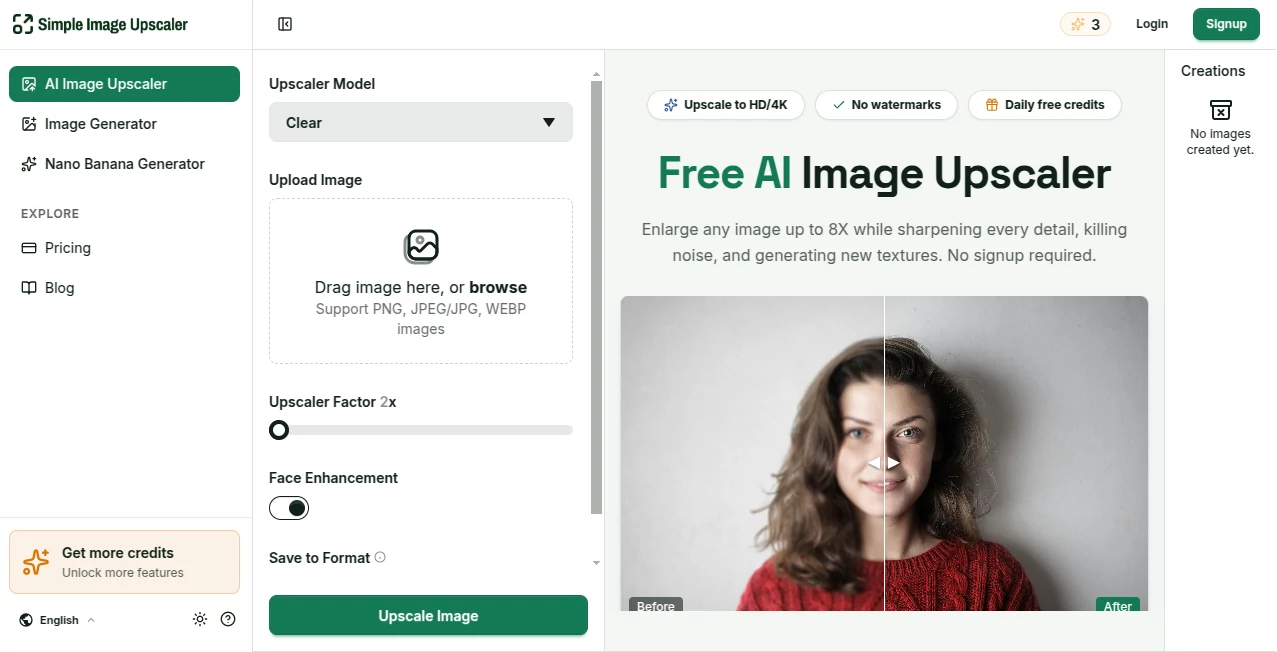
The interface is clean, modern, and extremely easy to navigate. Images can be uploaded by dragging and dropping supported files or selecting them manually. Once uploaded, users simply choose the desired enlargement level, select the processing mode, and download the finished image after processing. Before-and-after previews make it easy to compare improvements before saving the final version.
Accuracy & Performance
The AI delivers impressive image reconstruction while preserving natural textures. Users can choose between two enhancement approaches depending on their project. The creative mode intelligently generates additional texture and detail, making artwork and AI-generated images look richer. The precise mode focuses on maintaining the original appearance while increasing resolution without introducing unnecessary changes. Face enhancement and noise reduction further improve photo quality for portraits and older images.
Capabilities
- Upscale images by 2×, 4×, 6×, or 8×.
- Enhance blurry or low-resolution photographs.
- Reduce digital noise and compression artifacts.
- Restore old photographs with clearer details.
- Improve portraits through automatic facial enhancement.
- Process multiple images using batch upscaling.
- Create watermark-free downloads.
- Support commercial usage of generated results.
- Work directly from any modern web browser.
- Handle JPG, PNG, and WEBP image formats.
Security & Privacy
User privacy is handled with practical safeguards. Uploaded images are processed securely, and the service outlines data retention practices within its privacy documentation. Account passwords are encrypted, and uploaded images are automatically removed after a limited storage period. The platform also minimizes personal data collection while allowing users to manage their information when needed.
Use Cases
- Improving product photography for online marketplaces.
- Preparing large-format prints from smaller images.
- Enhancing AI-generated artwork before publication.
- Restoring old family photographs.
- Creating sharper YouTube thumbnails.
- Improving scanned documents for better readability.
- Enhancing architectural presentations.
- Preparing illustrations, manga, and digital artwork for printing.
- Increasing the quality of social media visuals.
- Upgrading gaming assets and digital textures.
Pros and Cons
Pros
- Free daily usage without requiring signup.
- Supports up to 8× image enlargement.
- Two different enhancement modes for different workflows.
- Batch processing saves time.
- No watermarks on exported images.
- Commercial use is permitted.
- Simple interface suitable for beginners.
- Runs entirely in a web browser.
Cons
- Free usage is limited by daily credits.
- Extremely poor-quality images cannot always be fully restored.
- Higher-volume projects require a paid subscription or credit packs.
Pricing Plans
The platform offers a free plan with three credits each day, making it easy to test all major features without registration. Paid subscriptions begin with affordable monthly plans that include significantly more processing credits, ad-free usage, priority support, and higher capacity for professional creators. Users who only need occasional enhancements can also purchase permanent credit packs instead of subscribing.
How to Use Simple Image Upscaler
- Upload an image from your computer.
- Select the desired upscale level between 2× and 8×.
- Choose either Creative Mode or Precise Mode.
- Enable face enhancement or denoising if necessary.
- Start processing.
- Preview the enhanced version.
- Download the final high-resolution image.
Comparison with Similar Tools
Many AI image enhancement platforms focus on either speed or quality, but this solution successfully balances both. The availability of two processing modes gives users more flexibility than many competing services. Creative professionals can generate richer textures for artwork, while photographers can preserve realistic details through precise enhancement. Batch processing, watermark-free exports, browser-based accessibility, and commercial usage rights further strengthen its value compared to many alternatives that restrict free users more heavily.
Conclusion
For anyone looking to improve image quality without installing software or learning complicated editing techniques, this platform offers an excellent balance of simplicity and professional results. Its AI-powered enhancement engine produces cleaner, sharper, and larger images while remaining accessible to beginners. Whether enhancing product photos, restoring family memories, preparing artwork for printing, or improving marketing assets, it provides an efficient workflow backed by practical features and flexible pricing. The combination of free daily access, high-quality output, and intuitive controls makes it a valuable addition to any creative toolkit.
Frequently Asked Questions (FAQ)
Can images be enlarged without losing quality?
Yes. AI enhancement significantly improves sharpness and detail while increasing image resolution up to 8×.
Is registration required?
No. Free daily credits are available without creating an account.
Are exported images watermarked?
No. Downloads are provided without watermarks.
Can enhanced images be used commercially?
Yes. Commercial usage is supported according to the platform's licensing information.
Does it work on mobile devices?
Yes. Since everything runs inside a web browser, it works across desktops, tablets, and smartphones.
AI Photo & Image Generator , Photo & Image Editor , AI Photo Enhancer , AI Image to Image .
These classifications represent its core capabilities and areas of application. For related tools, explore the linked categories above.
Simple Image Upscaler details
Website unavailable — View Alternatives
Pricing
- Free
Apps
- Web App
Categories

Simple Image Upscaler Alternatives Product

HD Photo Con…

AI Polaroid …
GPT Image 2 …
Kirkified AI

Tryonr

Art-Neurona

seedream 6

Nano Banana 2

Consistent C…