


















SkillForge
What is SkillForge?
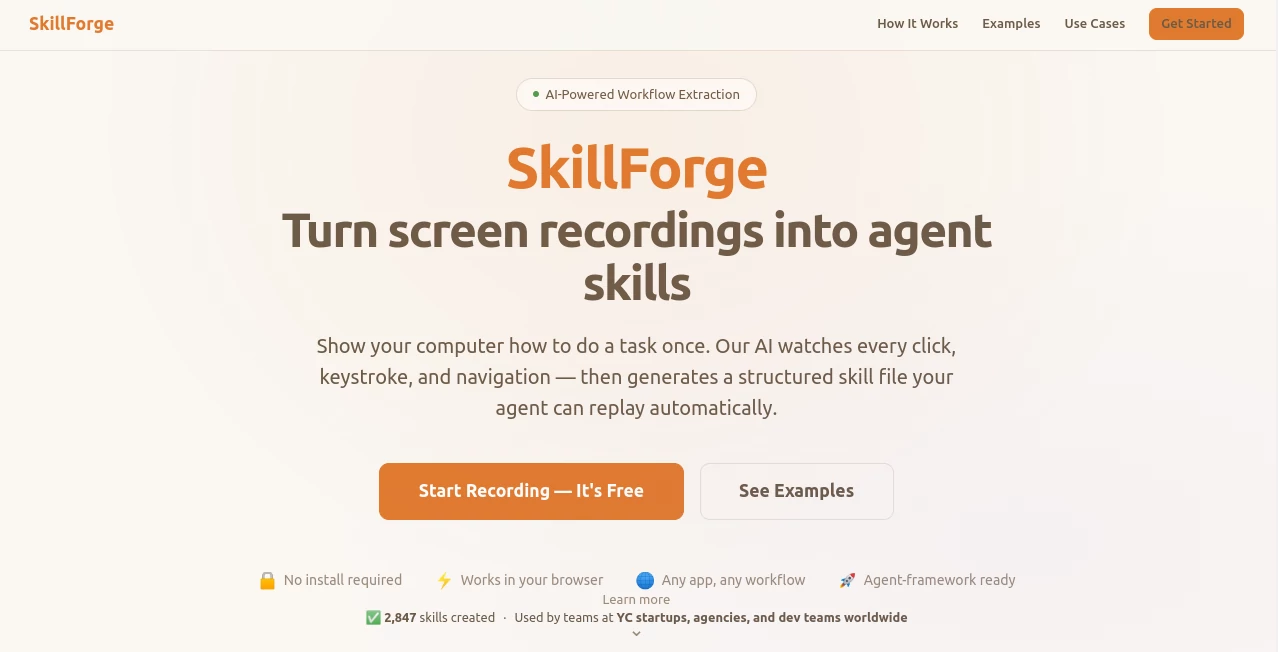
Most automation still feels clunky—you either write brittle scripts or spend hours explaining the same task to an AI. This tool changes that completely. Just record yourself doing the task once, exactly as you normally would, and it watches every click, keystroke, and tab switch. Then it turns that recording into a clean, structured skill file your AI agent can replay reliably. I’ve seen developers go from manually repeating the same workflow every morning to letting their agent handle it completely. The difference in daily friction is massive, and the best part is how natural the whole process feels.
Introduction
AI agents are powerful, but getting them to reliably perform real computer tasks has always been the tricky part. SkillForge bridges that gap by turning human demonstrations into reusable agent skills. Record any workflow—across multiple apps if needed—and the AI extracts each step into a clear, editable format. No coding required. It’s become especially popular among YC startups, agencies, and dev teams who want to automate repetitive work without building everything from scratch. The result is something that feels like teaching a very attentive intern who never forgets and works 24/7.
Key Features
User Interface
The experience is intentionally straightforward. You hit record, perform your task naturally (clicking, typing, switching tabs), and stop when done. The AI then shows a clean step-by-step breakdown you can review and edit. Everything happens in the browser—no installations, no complicated setups. The interface stays out of your way so you can focus on demonstrating the task the way you actually do it every day.
Accuracy & Performance
It captures actions with impressive precision—knowing which button you clicked, what you typed, and where you navigated. The extracted workflows are structured and reliable, with clear step descriptions that agents can follow. Processing is fast, and the output works across popular agent frameworks. Users report high success rates on first attempts, especially for common office and development workflows.
Capabilities
Record any desktop workflow, even across multiple applications. The AI extracts steps into a portable SKILL.md file that works with Claude, GPT, Gemini, and other agent frameworks. You can review, edit steps, reorder actions, add descriptions, or trim parts of the recording. It supports complex tasks like data entry, research across tabs, form submissions, and reporting. Once created, the skill can be reused forever by your agents.
Security & Privacy
Recordings are processed securely in your browser where possible, and you control the final skill files. No unnecessary data sharing or long-term storage of sensitive workflows. For teams handling client data or internal processes, this respectful approach provides important peace of mind.
Use Cases
A support agent records how they check customer tickets and respond to common issues—the skill then lets the AI handle routine replies. A founder records their weekly reporting process across spreadsheets and dashboards, turning hours of work into automated runs. Developers create skills for repetitive testing or deployment steps. Sales teams automate CRM updates and follow-up sequences. Any repetitive computer task that can be shown on screen becomes fair game for automation.
Pros and Cons
Pros:
- Extremely natural workflow — just do the task as you normally would.
- High accuracy in extracting real user actions across apps.
- Portable skills that work with multiple agent frameworks.
- No coding or complex configuration needed.
- Fast from recording to reusable skill.
Cons:
- Very unusual or highly branched workflows may need some manual editing.
- Best results come from clean, deliberate demonstrations.
- Advanced team features may require higher plans.
Pricing Plans
It starts free so you can test the quality on your own workflows. Paid plans unlock unlimited recordings, team collaboration, more complex skill handling, and priority support. The pricing feels reasonable for the time it saves—many teams say it pays for itself after automating just a handful of daily processes.
How to Use SkillForge
Go to the recorder, choose your screen/window/tab, and hit start. Perform the task exactly as you normally would—click, type, switch apps. Stop recording when finished. Review the AI-extracted steps, make any edits or clarifications, then export the skill file. Plug that file into your agent framework and let it run the task autonomously. You can refine the skill later as your process evolves. It’s simple enough for quick wins but powerful enough for serious automation.
Comparison with Similar Tools
Traditional automation scripts require coding and break easily when interfaces change. Other screen-to-action tools often produce brittle or overly complex outputs. SkillForge stands out by focusing on clean, human-readable, agent-ready skills that are easy to review and maintain. It bridges the gap between demonstration and automation more naturally than most alternatives, especially for cross-app workflows.
Conclusion
The future of work isn’t about replacing people—it’s about removing repetitive drudgery so people can focus on what matters. SkillForge makes that shift practical and accessible by turning everyday tasks into reusable agent capabilities. It’s not magic, but it feels close when you watch your own recording turn into something an AI can reliably execute. For teams and individuals tired of doing the same things over and over, it’s one of those tools that quietly transforms how you work.
Frequently Asked Questions (FAQ)
How long does a recording need to be?
Usually 30 seconds to a couple of minutes—long enough to show the full workflow.
Do I need coding knowledge?
No—the AI handles extraction. You just demonstrate the task normally.
Which agent frameworks does it work with?
It exports portable skill files compatible with Claude, GPT, Gemini, and others.
Can multiple people collaborate on skills?
Yes—paid plans support team workflows and shared skills.
Is it secure for sensitive tasks?
Yes—recordings are processed privately and you control the final skill files.
AI Workflow Management , AI Productivity Tools , AI Research Tool , AI Developer Tools .
These classifications represent its core capabilities and areas of application. For related tools, explore the linked categories above.

SkillForge Alternatives Product

AI Workflow …

Domain Rank …

Standard Com…

Block Poster…
Skillselion

Arobis AI Vi…

AI Agent Ski…
MeetAssist

eesel AI
