
Slash
What is Slash?
Managing business finances often means switching between banking platforms, payment systems, expense trackers, accounting tools, and reporting software. That fragmented experience can slow teams down and create unnecessary complexity. This platform brings those essential financial operations together in one modern environment designed for startups, growing companies, and digital-first businesses.
Instead of treating banking as a standalone service, it combines business accounts, corporate cards, treasury management, analytics, payments, virtual cards, accounting automation, and financial insights within a single ecosystem. The result is a smoother workflow for finance teams that need speed, visibility, and control over company spending.
What stands out most is how practical the experience feels. From issuing virtual cards in seconds to monitoring spending trends in real time, every feature appears focused on reducing administrative work and helping businesses make better financial decisions.
Key Features
User Interface
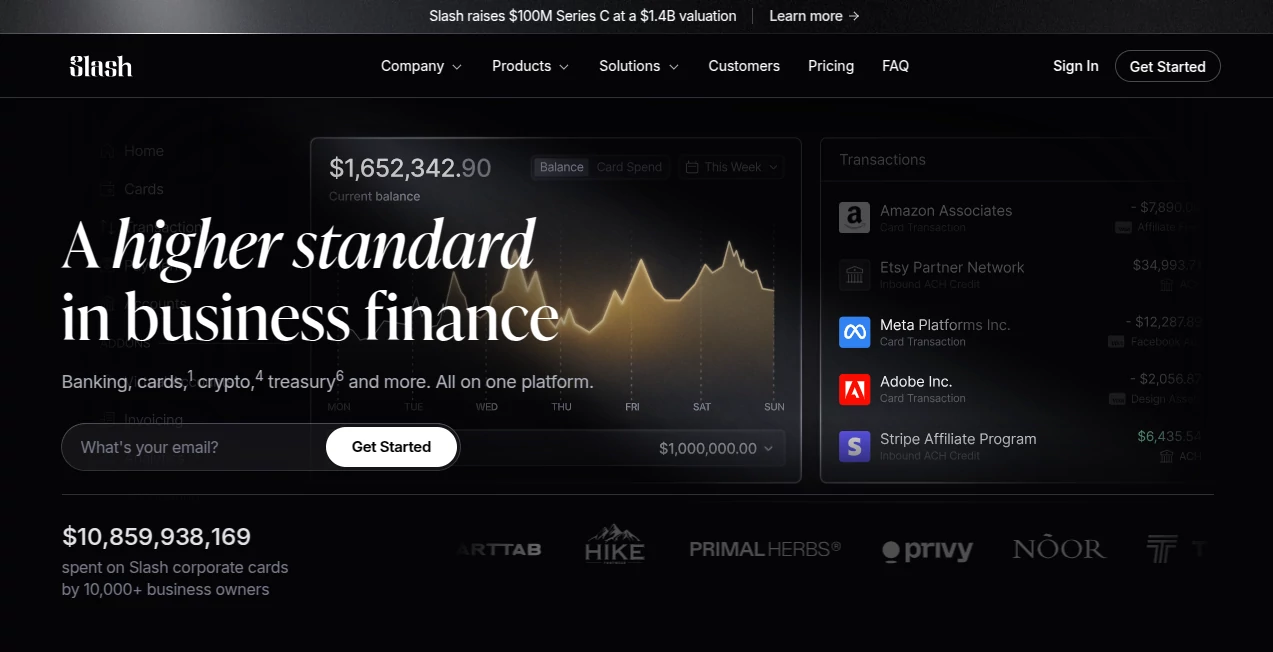
The platform offers a clean and modern dashboard that makes financial management surprisingly approachable. Navigation is intuitive, allowing users to access accounts, payments, cards, analytics, invoices, and treasury features without digging through complicated menus.
Financial data is presented in a way that feels actionable rather than overwhelming. Teams can quickly review balances, spending activity, payment history, and account performance from a centralized workspace.
Accuracy & Performance
Real-time financial visibility is one of the strongest aspects of the platform. Businesses can monitor transactions, track spending trends, manage payment activity, and generate financial insights without waiting for delayed reports.
Automated transaction categorization and accounting integrations help reduce manual errors while improving consistency across financial records. This is especially valuable for teams processing large volumes of expenses every month.
Capabilities
- Business banking and financial management
- Unlimited virtual card creation
- Corporate card controls and spending limits
- Domestic and international payments
- ACH and wire transfer support
- Treasury management and yield-focused cash solutions
- Real-time spending analytics
- Accounting automation
- QuickBooks and Xero integrations
- Multi-entity financial management
- Developer API access
- AI-powered financial assistance and insights
- Invoice management capabilities
- Expense categorization and reporting
Security & Privacy
Security receives significant attention through enterprise-grade protections and modern authentication mechanisms. Multi-factor authentication, permission controls, transaction monitoring, approval workflows, and compliance-focused infrastructure help organizations maintain confidence when managing sensitive financial operations.
Role-based access controls also ensure team members only see information relevant to their responsibilities, which is particularly useful for growing companies with multiple departments and stakeholders.
Use Cases
- Managing startup and business finances from a single dashboard
- Creating virtual cards for subscriptions and vendors
- Tracking company-wide spending in real time
- Automating accounting workflows
- Improving expense visibility across teams
- Managing multiple business entities
- Handling domestic and international payments
- Generating financial reports for leadership teams
- Reducing manual bookkeeping work
- Implementing stronger spending controls and approval processes
Pros and Cons
Pros
- Comprehensive all-in-one financial platform
- Easy-to-use and modern interface
- Strong virtual card management capabilities
- Real-time analytics and spending visibility
- Useful accounting integrations
- Developer-friendly API access
- AI-powered financial assistance features
- Suitable for startups and growing businesses
- Advanced spending controls and permissions
Cons
- Some advanced capabilities may require paid plans
- Certain financial services may depend on regional availability
- Organizations with highly specialized banking requirements may require additional integrations
Pricing Plans
A free plan is available for businesses seeking core banking and financial management functionality. Organizations requiring more advanced capabilities can upgrade to premium plans that include additional payment benefits, enhanced financial features, and expanded operational tools.
Pricing structures may evolve over time, so businesses should review the latest information directly from the provider before making a decision.
How to Use Slash
Getting started is straightforward:
- Create a business account.
- Complete the company verification process.
- Set up banking and payment preferences.
- Issue virtual or physical cards for team members.
- Connect accounting software if needed.
- Monitor transactions and spending activity.
- Generate reports and financial insights.
- Use automation tools to streamline workflows.
Most businesses can begin managing expenses and payments shortly after onboarding, making implementation relatively quick compared to traditional financial systems.
Comparison with Similar Tools
Compared with traditional business banking solutions, this platform focuses heavily on automation, visibility, and operational efficiency. While many competitors provide banking services, fewer combine treasury management, accounting automation, virtual cards, analytics, APIs, and AI-powered financial assistance within a unified experience.
It is particularly attractive for modern startups and internet-based businesses that want financial infrastructure capable of scaling alongside company growth. The combination of spending controls, automation, and real-time insights creates a more flexible experience than many conventional banking platforms.
Conclusion
For businesses seeking a smarter approach to financial management, this platform delivers an impressive combination of banking services, expense controls, payment tools, accounting automation, analytics, and intelligent financial assistance. Its focus on usability and operational efficiency helps finance teams spend less time on administrative tasks and more time driving business growth.
Whether managing daily expenses, overseeing company-wide spending, automating accounting processes, or improving financial visibility, it provides a powerful foundation for organizations looking to modernize their financial operations.
Frequently Asked Questions (FAQ)
Is this platform suitable for startups?
Yes. It is designed to support startups, growing businesses, and digital-first organizations that require flexible financial management tools.
Can teams create virtual cards?
Yes. Users can generate virtual cards for vendors, subscriptions, departments, and employees while maintaining spending controls.
Does it support accounting software integrations?
Yes. Popular accounting platforms such as QuickBooks and Xero can be connected to automate financial workflows.
Are analytics and reporting included?
Yes. Businesses can access spending insights, transaction data, and financial analytics directly from the dashboard.
Does it offer API access?
Yes. Developer APIs are available for businesses that want to automate processes and build custom integrations.
AI Workflow Management , AI Accounting Assistant , AI Analytics Assistant , AI Productivity Tools .
These classifications represent its core capabilities and areas of application. For related tools, explore the linked categories above.

Slash Alternatives Product

GPT Image 2 …

TutuoAI

Pips Hint

TypingFirst

SeoWebChecker

Skywork Supe…

UPDF AI

Kol find

Nimbalyst