

















Nimbalyst
Verified Blue CheckMark
Verified Blue CheckMark products are featured above free or unverified listings.
This badge indicates authenticity and builds trust, giving your product higher visibility across the platform.
Upgrade to get verified
Verified Blue CheckMark products are featured above free or unverified listings. This badge indicates authenticity and builds trust, giving your product higher visibility across the platform.
Upgrade to get verified
What is Nimbalyst?
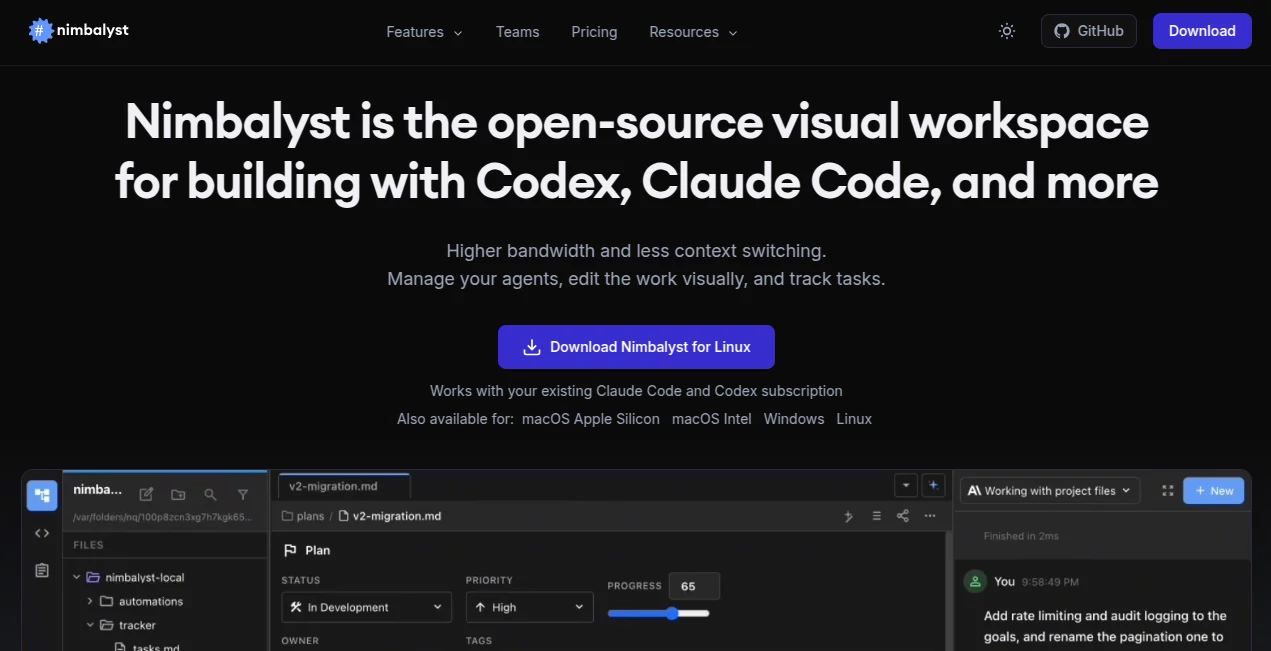
Modern AI-assisted software development goes far beyond chatting with a coding model. Developers need a workspace where conversations, files, diagrams, documentation, and source code can exist together without constantly switching between different applications. This platform was created to solve exactly that challenge by providing a visual environment that keeps every part of an AI-driven workflow connected.
Instead of treating AI as a separate chat window, it becomes part of the development process. Documentation, markdown files, mockups, diagrams, code changes, and multiple AI sessions can all be managed from one interface. The result is a smoother workflow that helps developers maintain context while building complex projects.
Its local-first architecture is another standout advantage. Projects remain on the user's device, while developers are free to connect their preferred AI providers such as Claude Code, Codex, or locally hosted models. This approach delivers flexibility without sacrificing control over sensitive development data. The workspace is also open source, making it attractive for individuals and engineering teams that value transparency and customization. Based on official information, the application focuses on visual editing, session management, multi-agent workflows, and local storage rather than locking users into a proprietary cloud ecosystem.
Key Features
User Interface
The interface is designed around visual productivity instead of endless terminal windows. Markdown documents, diagrams, mockups, code, CSV files, and project assets can be viewed and edited side by side. Multiple AI sessions can run simultaneously while remaining easy to organize and revisit later.
A WYSIWYG editing experience makes reviewing AI-generated content much more intuitive. Developers can inspect visual differences, annotate changes, and edit directly inside the workspace without jumping between multiple applications.
Accuracy & Performance
Rather than generating code itself, the workspace enhances the performance of leading AI coding assistants by preserving context across sessions. Developers can resume previous conversations, organize tasks, compare revisions, and iterate more effectively. Since files are stored locally, navigation and editing remain responsive even for larger projects.
Capabilities
- Visual editing for markdown, code, diagrams, mockups, and structured documents.
- Run multiple AI sessions simultaneously.
- Manage AI agents and development tasks from one workspace.
- Review code differences with visual comparison tools.
- Support for Claude Code, Codex, and compatible AI providers.
- Extension-friendly architecture for custom workflows.
- Built-in terminal and Git workflow support.
- Session history with searchable organization.
- Link project files with AI conversations.
- Support for locally hosted language models.
Security & Privacy
Privacy is one of the strongest aspects of the platform. Documents, project files, workspace settings, and API keys remain stored locally on the user's machine. AI prompts and conversations are not stored on company servers. Optional sharing features use encrypted transmission, giving developers greater control over what they choose to publish or synchronize. This local-first philosophy makes it especially appealing for teams working with confidential repositories and sensitive documentation.
Use Cases
- Managing long-running AI coding sessions.
- Building software with Claude Code or Codex.
- Creating technical documentation alongside source code.
- Reviewing AI-generated code changes visually.
- Organizing multiple development tasks across large projects.
- Collaborating with AI agents during software planning.
- Designing mockups and diagrams while keeping implementation connected.
- Working with local language models for privacy-focused development.
Pros and Cons
Pros
- Open-source development environment.
- Excellent visual editing experience.
- Supports multiple AI coding assistants.
- Local-first architecture improves privacy.
- Powerful session management.
- Integrated Git and terminal workflow.
- Flexible extension architecture.
- Ideal for complex software projects.
Cons
- Primarily designed for developers and product managers rather than general users.
- Advanced features may require familiarity with AI coding workflows.Maximum value comes from pairing it with external AI providers.
Pricing Plans
The workspace is available as a free and open-source solution. Users can connect supported AI providers using their own credentials. Costs associated with AI model usage depend on the selected provider rather than the workspace itself.
How to Use Nimbalyst
Download and install the desktop application, then connect your preferred AI coding provider or local language model. Import an existing project or create a new workspace. Open markdown files, code, diagrams, or mockups and begin working with AI sessions directly inside the visual interface. Organize conversations by project, compare generated changes, manage Git operations, and continue refining your work without losing context.
Comparison with Similar Tools
Unlike traditional code editors that simply integrate AI chat panels, this workspace is built around the concept of persistent AI collaboration. It combines session management, visual editing, project organization, Git workflows, and documentation into a unified environment. Compared with standalone coding assistants, it provides a much richer way to organize ongoing development work instead of treating each conversation as an isolated interaction.
Conclusion
Developers who rely on AI every day often discover that managing conversations becomes more difficult than writing the code itself. This workspace addresses that problem by turning AI interactions into an organized, visual development experience. Its combination of local-first privacy, support for multiple AI providers, open-source flexibility, and thoughtful session management creates an environment where coding with AI feels structured instead of fragmented. Whether building personal projects or collaborating across larger engineering teams, it offers a practical way to make AI-assisted software development significantly more productive.
Frequently Asked Questions (FAQ)
Is this platform free to use?
Yes. It is available as an open-source project with free access.
Does it support multiple AI coding assistants?
Yes. It is designed to work with Claude Code, Codex, and compatible AI providers, including locally hosted models.
Are project files stored in the cloud?
No. The application follows a local-first architecture where files, sessions, and settings remain on the user's device unless optional sharing features are enabled.
Can developers manage several AI sessions at once?
Yes. Multiple concurrent sessions can be organized, resumed, searched, and linked to project files.
Who is the ideal user?
Software developers, engineering teams, technical writers, and AI-powered builders who want a more organized workflow for coding with modern language models.