
SnapFood
What is SnapFood?
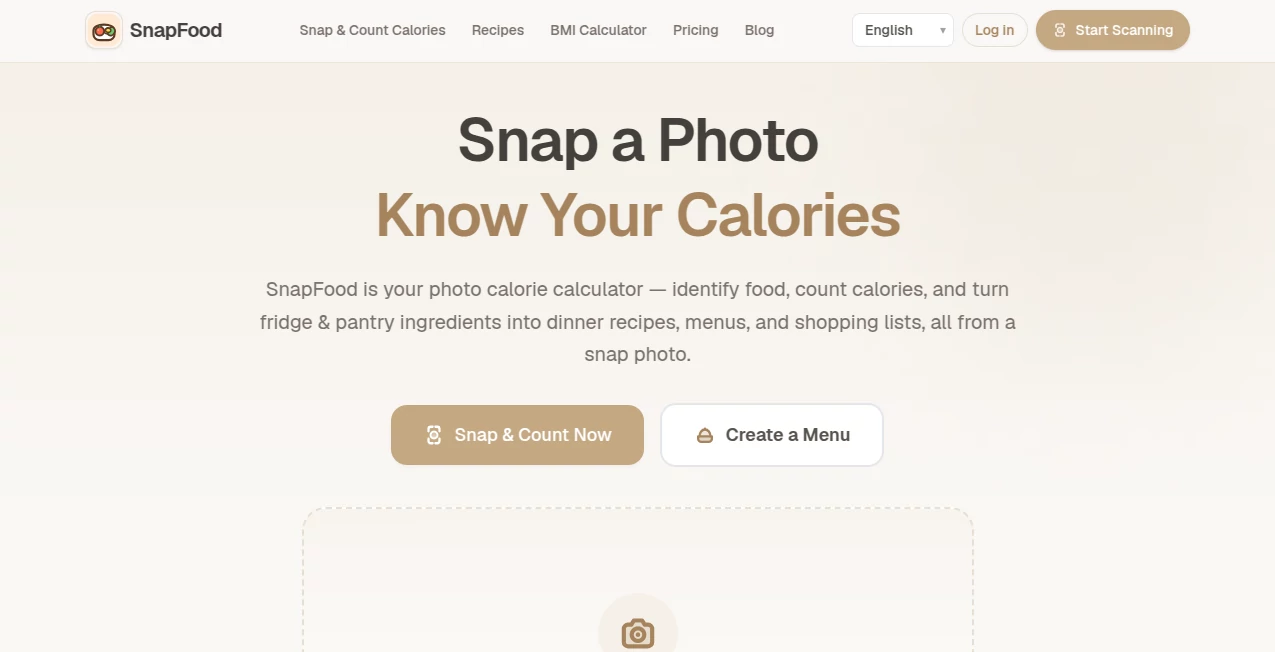
SnapFood is a photo-based calorie calculator that makes food tracking much less tedious. Instead of searching through food databases and manually entering every ingredient, users can take a picture of a meal and receive an estimated nutrition breakdown within seconds. The service is designed around a simple idea: understanding what is on your plate should not require a spreadsheet.
The experience is particularly useful for people who want to keep an eye on calories, protein, carbohydrates, fat, and fiber without turning every meal into a long tracking session. It can be used for home-cooked meals, restaurant food, snacks, takeout, and leftovers, making it practical for everyday eating rather than only carefully measured meals.
Key Features
- AI-powered food recognition from a photo
- Estimated calories, protein, carbohydrates, fat, and fiber
- Portion estimation for individual dishes
- Confidence scores for nutrition results
- Personalized dietary tips after a scan
- Support for JPG, PNG, and WebP images up to 10MB
- Mobile camera support for quick meal scanning
- Five supported languages: English, Chinese, Spanish, French, and German
- No account or signup required for the core experience
User Interface
The interface keeps the main action remarkably straightforward. A user can point a phone camera at a plate or upload an existing image, then let the system analyze it. There is no need to navigate through long food lists before getting started. The results are presented as a clear nutrition summary with macronutrient information and food categories, which makes the experience approachable even for someone who has never used a calorie tracker before.
This simplicity is one of its strongest qualities. Someone eating lunch at a restaurant, for example, can take a quick photo instead of trying to remember every ingredient later. The service also works directly from a desktop browser when an existing image is more convenient.
Accuracy & Performance
The AI analyzes visual characteristics such as the appearance, color, and shape of food before estimating the nutritional information. It also attempts to identify portions and individual dishes, allowing the result to go beyond a simple guess about the meal's total calories.
That said, photo-based nutrition analysis should always be treated as an estimate. Cooking methods, hidden ingredients, sauces, serving sizes, and recipes can significantly change nutritional values. The service itself makes this limitation clear, so users who require precise dietary information should verify important figures against food labels or professional nutritional guidance.
Capabilities
The core capability is turning a food photograph into useful nutritional information. A single scan can provide estimated calories along with protein, carbohydrates, fat, and fiber, giving users a more complete picture than calories alone.
There is also a broader kitchen-focused direction to the product. A planned fridge-to-recipe feature is intended to analyze ingredients from a refrigerator or pantry and turn them into dinner menus, shopping lists, and recipe books. This could make the platform useful not only after eating but also when deciding what to cook.
Security & Privacy
The core service can be used without creating an account, which reduces friction for people who simply want to try photo-based food analysis. Users can upload supported image formats directly from their device and receive the analysis without going through a traditional registration process.
As with any service that analyzes photographs, users should still be thoughtful about what they upload. Food images are generally less sensitive than many other types of personal information, but users should avoid including unrelated private material in photographs whenever possible.
Use Cases
The most obvious use case is everyday calorie tracking. Someone trying to manage their weight can photograph meals throughout the day and use the estimates to understand eating patterns without manually recording every food item.
It can also be useful for fitness-focused users who pay attention to protein and macronutrients. A quick meal scan can provide an initial overview before deciding whether a meal fits a particular nutrition target.
Another practical scenario is restaurant and takeout tracking. Exact ingredients and portions are often difficult to determine when eating away from home, so a photograph can provide a convenient starting point for estimating the meal.
For home cooks, the planned ingredient-to-recipe functionality could add another useful dimension by helping turn whatever is already available in the kitchen into meal ideas.
Pros and Cons
- Pros: Fast photo-based food analysis, simple workflow, no signup for core features, useful macro information, personalized tips, mobile camera support, and multilingual results.
- Cons: Nutrition values are estimates rather than laboratory measurements, portion estimation can be difficult from a photograph, and the photo-to-recipe functionality is still under development.
Pricing Plans
The core experience is currently free to use and does not require an account. Users can start scanning meals immediately without a subscription or paywall blocking the basic photo-calorie functionality.
Premium functionality may be introduced in the future, but the current service keeps its essential scanning experience accessible without payment. This makes it easy for someone to test the concept before deciding whether photo-based nutrition tracking fits their routine.
How to Use It
- Open the service on a phone or computer.
- Choose the camera option or upload an existing food image.
- Use a clear photograph showing as much of the meal as possible.
- Let the AI analyze the food and estimate portions.
- Review the calories, protein, carbohydrates, fat, and fiber shown in the results.
- Use the nutrition breakdown and personalized tips as a reference when planning your meals.
Comparison with Similar Tools
Traditional calorie trackers usually depend heavily on manual searches, food databases, barcode scanning, or detailed portion entry. That approach can be useful when exact information is available, but it can also become tedious when dealing with homemade meals or restaurant dishes.
The photo-first approach takes a different route. Instead of asking the user to describe every ingredient before receiving an answer, it starts with the meal itself. This makes it particularly appealing to people who value speed and convenience. The trade-off is that visual analysis cannot always know the exact recipe, cooking method, or hidden ingredients, so conventional databases may still be preferable when precision is more important than convenience.
Conclusion
SnapFood offers a refreshingly simple approach to nutrition tracking: take a picture, let AI examine the meal, and use the resulting estimates to better understand what you are eating. Its combination of food recognition, calorie estimation, macronutrient information, and personalized tips makes the process considerably less repetitive than traditional food logging.
It is not a replacement for professional dietary advice or precise nutritional measurement, but that is not really its purpose. Its strength lies in making everyday tracking easier. For people who regularly abandon calorie apps because entering every meal feels like work, a camera-based workflow can be a much more natural alternative.
Frequently Asked Questions (FAQ)
How does the AI identify calories from a photo?
The system analyzes visual characteristics of the food, including its appearance, color, and shape, then estimates the food and nutritional values using nutrition data.
Can it recognize multiple foods on one plate?
Yes. The system is designed to identify individual dishes and provide nutritional estimates for the food shown in the photograph.
Are the calorie results completely accurate?
No. The results are AI-generated estimates. Actual nutrition can vary depending on portion size, ingredients, preparation method, sauces, and other factors.
Do I need to create an account?
No. The core photo-scanning functionality is available without signup, allowing users to start analyzing meals immediately.
Which image formats are supported?
JPG, PNG, and WebP images are supported, with a maximum file size of 10MB.
Can it calculate protein and other macros?
Yes. Along with estimated calories, results include protein, carbohydrates, fat, and fiber.
Does it work on mobile devices?
Yes. The service supports mobile camera use, so users can photograph a meal directly rather than uploading an image later.
Can it create recipes from ingredients?
A fridge-to-recipe feature is being developed to turn photographed pantry and refrigerator ingredients into dinner menus, shopping lists, and recipe collections.
What languages are supported?
Nutrition results are currently available in English, Chinese, Spanish, French, and German.
Is it useful for weight-loss goals?
It can be useful as a convenient way to estimate meal calories and compare eating patterns over time. However, people with specific medical or dietary requirements should rely on qualified professional guidance for important nutrition decisions.
AI Recipe Assistant , AI Life Assistant , AI Fitness .
These classifications represent its core capabilities and areas of application. For related tools, explore the linked categories above.

SnapFood Alternatives Product

MemoTune
AI Meal Plan…

Smart Chicke…

core level

Sourcetable

TDEE Calcula…

AiZolo

UPDF AI

What The Food