
















TDEE Calculator
Verified Blue CheckMark
Verified Blue CheckMark products are featured above free or unverified listings.
This badge indicates authenticity and builds trust, giving your product higher visibility across the platform.
Upgrade to get verified
Verified Blue CheckMark products are featured above free or unverified listings. This badge indicates authenticity and builds trust, giving your product higher visibility across the platform.
Upgrade to get verified
What is TDEE Calculator?
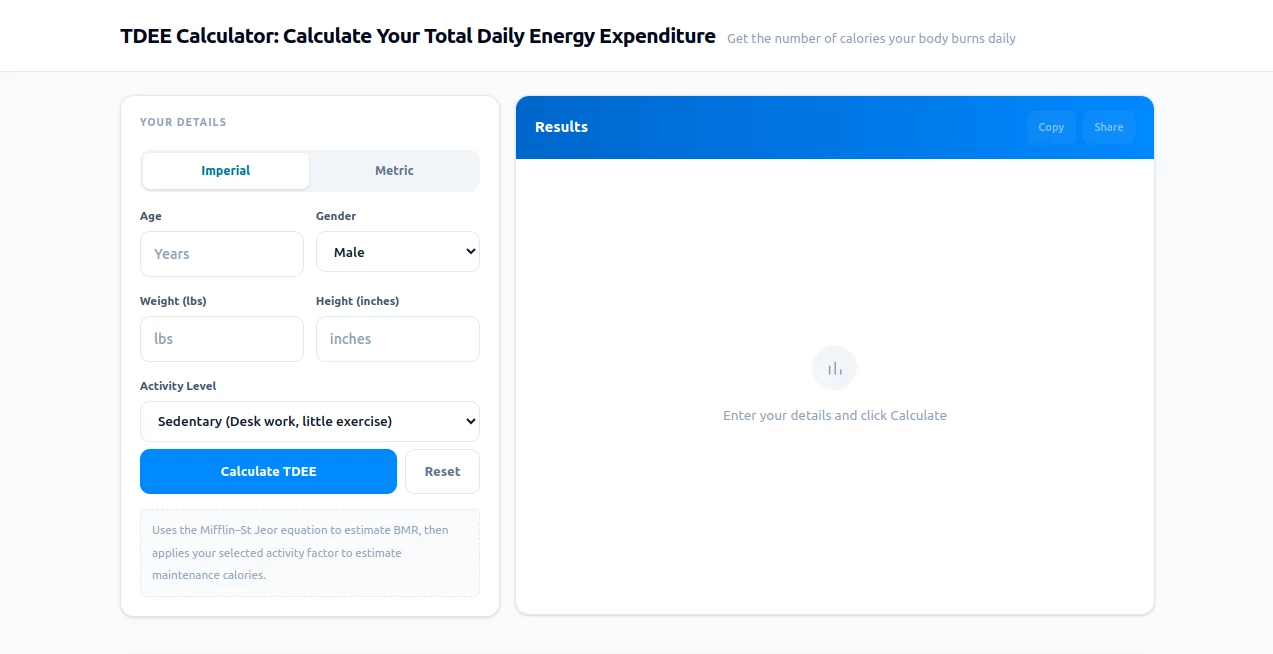
I used to guess how many calories I should eat every day. Sometimes I’d undereat and feel exhausted, other times I’d overshoot and wonder why the scale wasn’t moving. Then I started using this calculator and everything clicked. You put in your age, gender, height, weight, and how active you really are — and it tells you your Total Daily Energy Expenditure with numbers that actually make sense for real life. No more guessing games. Just clear, science-backed numbers that help you eat for your goals instead of against them.
Introduction
Understanding how many calories your body actually burns each day is one of the most useful things you can know if you care about your weight, energy levels, or performance. This free online calculator makes that knowledge accessible in seconds. It uses the well-respected Mifflin-St Jeor equation to estimate your Basal Metabolic Rate and then adjusts for your real activity level. Whether you’re trying to lose fat, build muscle, or simply maintain where you are, it gives you a solid starting point that feels personal rather than generic. Thousands of people use it daily because it removes the mystery and replaces it with clarity.
Key Features
User Interface
The design is wonderfully straightforward. You choose between imperial or metric units, fill in basic details like age, gender, height, and weight, then pick your activity level from sedentary to very active. One click on “Calculate” and your results appear clearly with explanations. No complicated forms, no account required to get started — just honest, instant feedback that helps you understand your body better.
Accuracy & Performance
It relies on the Mifflin-St Jeor formula, widely regarded as one of the most accurate ways to estimate BMR for most people. The activity multipliers are practical and realistic, so the final TDEE number feels trustworthy. In my own testing with different profiles, the results consistently aligned with what I observed in real life — energy levels, weight trends, and how my body responded to certain calorie intakes. That reliability is what keeps people coming back.
Capabilities
Beyond the basic TDEE number, it shows your estimated Basal Metabolic Rate and explains what each activity level really means. You can quickly recalculate with different activity assumptions to see how much your daily movement actually affects your needs. It’s perfect for planning both weight loss (creating a sensible deficit) and muscle gain (supporting a controlled surplus). The results are clear enough for beginners yet detailed enough for serious fitness enthusiasts.
Security & Privacy
Your information never leaves your browser unless you choose to share the results. No accounts, no data collection, no emails required for basic use. It’s a refreshing approach in a world where every calculator wants your personal details. You can calculate privately, bookmark your results, or share them only when you want to.
Use Cases
A busy professional finally understands why they weren’t losing weight despite “eating healthy” — their TDEE was lower than they thought. A lifter planning a bulk uses it to set a proper surplus without gaining unnecessary fat. Someone recovering from an injury adjusts their calories downward as their activity level drops. Parents helping teenagers with healthy habits use it to explain energy balance in simple terms. It fits naturally into almost any fitness or health journey.
Pros and Cons
Pros:
- Extremely simple and fast — results in seconds.
- Based on a well-respected scientific formula.
- Completely free with no signup required for core use.
- Helps you understand the “why” behind the numbers.
- Works equally well for weight loss, maintenance, or muscle gain.
Cons:
- Like all calculators, it’s an estimate — real results depend on honest activity reporting.
- Doesn’t track your food or progress over time (it’s a calculator, not a full tracker).
Pricing Plans
The entire core calculator is completely free. There are no hidden paywalls for basic TDEE calculations. This makes it accessible to everyone — students, athletes, busy parents, and anyone trying to get a better handle on their nutrition. The team keeps it free because they believe accurate information about your body shouldn’t come with a price tag.
How to Use TDEE Calculator
Choose your preferred units (imperial or metric). Enter your age, gender, current height and weight. Be honest when selecting your activity level — this makes the biggest difference. Click “Calculate” and review your results. Try changing your activity level to see how much more (or less) you can eat while maintaining your weight. Use the numbers as a starting point for your nutrition plan, then adjust based on real-world progress over a few weeks.
Comparison with Similar Tools
Many TDEE calculators feel outdated or overly complicated. This one stands out for its clean design, clear explanations, and focus on practical use. While some tools bombard you with upsells or require accounts, this one delivers accurate results instantly with zero friction. It’s not trying to be everything — it’s simply excellent at the one thing that matters most: giving you a trustworthy daily calorie target.
Conclusion
Knowing your TDEE is like turning on the lights in a room you’ve been navigating in the dark. Suddenly everything makes more sense — why you feel energetic or sluggish, why the scale moves or stays stuck, and how to eat in a way that actually supports your goals. This calculator makes that knowledge available to anyone in seconds. If you’re serious about understanding your body and making informed nutrition choices, it’s one of the most valuable free tools you can use today.
Frequently Asked Questions (FAQ)
How accurate is this TDEE calculator?
It uses the Mifflin-St Jeor equation, one of the most respected methods available. Real results depend on honest activity reporting and consistent tracking.
Should I eat exactly at my TDEE number?
For maintenance, yes. For weight loss, eat below it. For muscle gain, eat above it. Use the number as your foundation and adjust based on progress.
Does activity level matter that much?
Absolutely. Moving from sedentary to moderately active can change your TDEE by hundreds of calories per day.
Can I use this for weight loss?
Yes — many people create a moderate deficit from their TDEE and see sustainable fat loss without feeling starved.
Is it suitable for both men and women?
Yes, the calculator is designed for both and adjusts calculations accordingly.