


















softrun
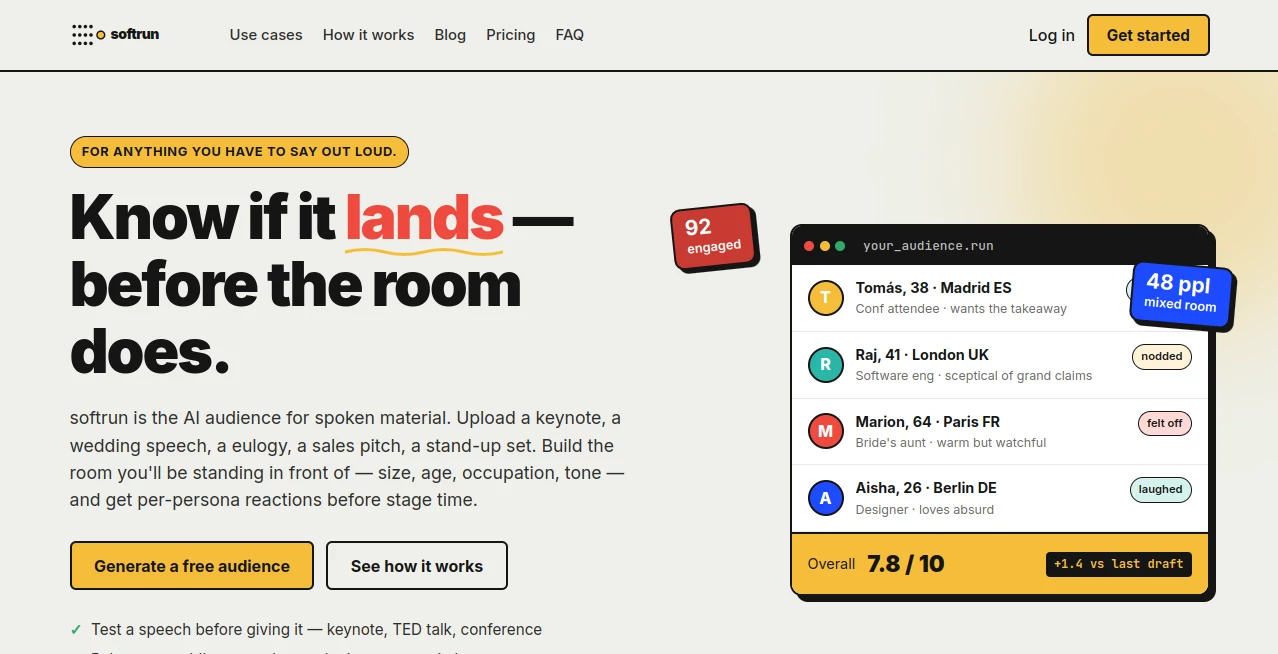
What is softrun?
Delivering a memorable speech, presentation, or performance takes more than confidence. It requires understanding how a real audience is likely to react before stepping onto the stage. This platform introduces a refreshing approach by simulating realistic audience responses, allowing speakers, comedians, founders, educators, and professionals to refine their message with meaningful feedback before the live event.
Instead of relying on guesswork or asking a few friends for opinions, users can create customized virtual audiences with different backgrounds, personalities, professions, age groups, and attitudes. Every rehearsal produces detailed reactions that reveal what resonates, what feels unclear, and which moments deserve another revision. The result is a far more polished performance with greater confidence and stronger audience engagement.
Key Features
User Interface
The interface is designed to keep preparation simple. Users only need to paste their script, configure the desired audience profile, and start the simulation. Navigation is intuitive, making it accessible even for first-time users who want immediate feedback without a steep learning curve.
Accuracy & Performance
The platform generates detailed persona-based reactions rather than generic scores. Different audience members respond according to their backgrounds, interests, and personalities, producing insights that feel remarkably close to real-world situations. Engagement ratings, reaction summaries, and improvement suggestions help users identify weak sections with precision.
Capabilities
- Simulates audiences ranging from a single listener to large groups.
- Supports speeches, keynote presentations, sales pitches, stand-up comedy, wedding toasts, eulogies, and educational talks.
- Allows demographic customization including age, profession, location, and personality.
- Provides engagement analysis across different parts of a presentation.
- Highlights jokes, stories, and messages that perform well or require improvement.
- Helps refine pacing, tone, and overall delivery.
- Offers actionable recommendations after every rehearsal.
Security & Privacy
Speech drafts often contain confidential business ideas or deeply personal stories. The platform is designed to let users rehearse privately before sharing their content publicly. This makes it suitable for sensitive presentations, investor pitches, personal ceremonies, and professional events where privacy matters.
Use Cases
- Preparing keynote presentations for conferences.
- Practicing TED-style talks.
- Testing startup investor pitches.
- Improving sales presentations.
- Rehearsing wedding speeches and family celebrations.
- Refining stand-up comedy routines.
- Reviewing podcast scripts before recording.
- Preparing educational lectures and workshops.
- Evaluating public speaking performances.
- Testing emotional speeches before important occasions.
Pros and Cons
- Pros
- Highly realistic audience simulation.
- Detailed persona-based reactions instead of simple ratings.
- Supports many speaking scenarios.
- Easy setup with minimal learning time.
- Helps identify weak sections before live delivery.
- Useful for both professionals and beginners.
- Cons
- Virtual feedback cannot completely replace live audience experience.
- Performance quality still depends on the quality of the submitted script.
- Some users may prefer combining AI feedback with human coaching.
Pricing Plans
A free option is available for creating and testing virtual audiences. Additional premium capabilities may be available as the platform continues to expand its feature set. Users should check the official pricing page for the latest subscription information.
How to Use softrun
Begin by pasting your speech, presentation, comedy routine, or pitch into the editor. Build a virtual audience by selecting characteristics such as age, profession, location, and overall attitude. Start the simulation to receive individual reactions, engagement scores, and practical suggestions. Revise your content based on the feedback, then repeat the process until your delivery feels polished and ready for the real audience.
Comparison with Similar Tools
Traditional presentation coaching tools typically focus on pronunciation, pacing, or vocal delivery. Generic AI assistants can improve grammar or wording, but they rarely simulate audience psychology. This platform stands out by recreating audience behavior itself, helping users understand emotional impact, engagement, and message clarity before facing real people. That perspective makes rehearsals significantly more practical for high-stakes presentations.
Conclusion
Preparing for an important presentation should involve more than reading a script aloud. Having the opportunity to experience realistic audience reactions before the actual event provides valuable confidence and practical insights that are difficult to obtain elsewhere. Whether the goal is inspiring a conference audience, entertaining a comedy club, convincing investors, or delivering a heartfelt family speech, this solution transforms rehearsal into an interactive learning experience that helps every version become stronger than the last.
Frequently Asked Questions (FAQ)
What types of speeches can be tested?
The platform supports keynote presentations, sales pitches, comedy routines, wedding speeches, educational talks, eulogies, podcasts, and many other spoken formats.
Can the audience be customized?
Yes. Users can configure audience size and various demographic characteristics to better match the people they expect to face.
Does it provide detailed feedback?
Yes. Each simulation includes engagement scores, persona-specific reactions, and practical suggestions for improvement.
Is it suitable for beginners?
Absolutely. The simple workflow allows both experienced speakers and first-time presenters to benefit from meaningful rehearsal feedback.
Can it help improve public speaking confidence?
Yes. Practicing with realistic audience simulations helps reduce uncertainty and gives speakers greater confidence before important events.
AI Meeting Assistant , AI Productivity Tools , AI Coaching , AI Presentation Generator .
These classifications represent its core capabilities and areas of application. For related tools, explore the linked categories above.

softrun Alternatives Product

Weekly Brief

CSCA Prepare…

TopPDF

PDF Inspector

Miro

Fina Money

PDFgear

ukamiru

Parking Prac…
