

















Ssave App
What is Ssave App?
Ssave.cc is a free online TikTok downloader built for people who want to save videos quickly without dealing with complicated software or unnecessary steps. The service focuses on a simple experience: copy a TikTok link, paste it into the downloader, and save the result directly to your device.
What makes the service particularly useful is its focus on clean downloads. Videos can be saved without the original TikTok watermark, while the same link can also be used to extract audio as an MP3 file. The website states that it can deliver Full HD video when that quality is available from the source, making it a practical option for users who want to keep content for offline viewing or personal use.
Key Features
- Download TikTok videos without a watermark.
- Support for high-quality and Full HD video downloads when available.
- Extract TikTok audio as MP3 at up to 320kbps.
- Free access without registration or subscription fees.
- Works directly from a web browser without installing an application.
- Designed for Android, iOS, Windows, and Mac devices.
- Fast processing designed to complete conversions within seconds.
- Supports downloading TikTok Stories as well as regular videos.
- No CAPTCHA or third-party advertising interruptions according to the service's own description.
User Interface
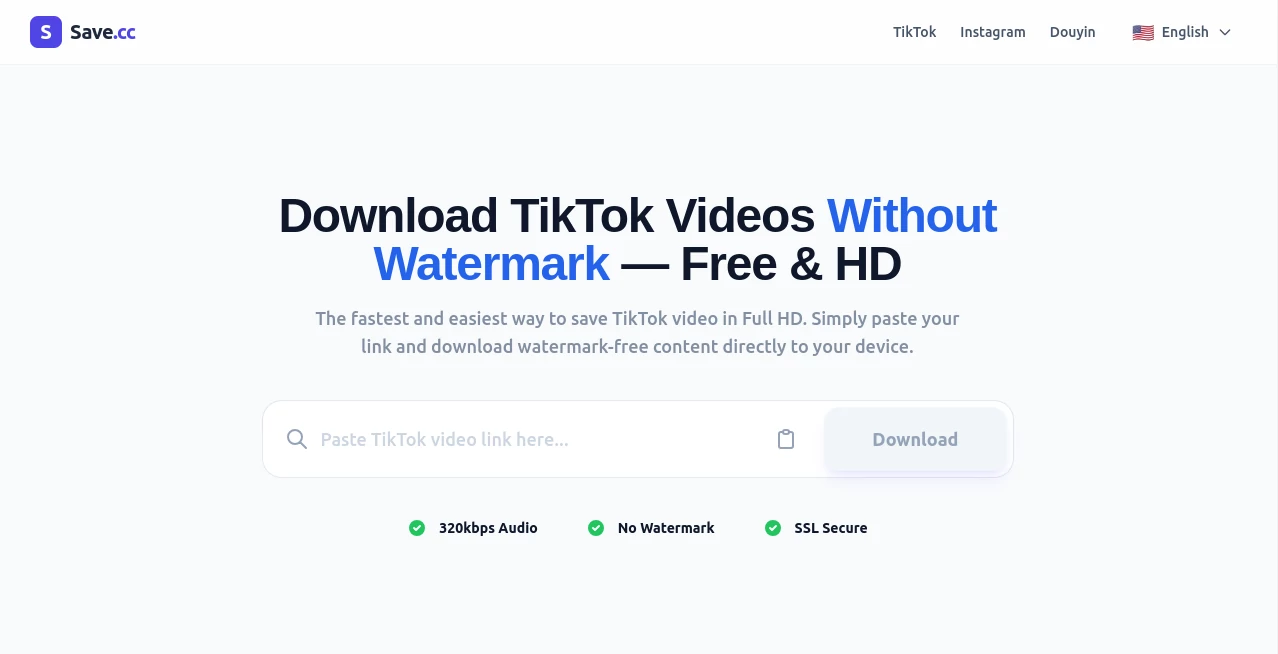
The interface keeps things deliberately straightforward. Instead of presenting users with a crowded dashboard, the main page centers around a link input field and a download action. This is exactly the kind of layout that works well for a utility tool because the user usually arrives with one clear goal: save a particular TikTok video.
The process is also comfortable on mobile devices. Since everything runs through a browser, there is no need to find, install, and maintain another application just to download an occasional video.
Accuracy & Performance
Performance is one of the strongest parts of the service's positioning. The site says its conversion engine processes requests in seconds rather than minutes. For a downloader, that matters more than a long list of complicated features. A short wait followed by a ready-to-save file makes the whole experience feel much more natural.
Quality is handled in a similarly practical way. The service attempts to extract the highest available resolution from the TikTok source, with Full HD available when the original content supports it. Audio extraction can reach 320kbps MP3, giving users a useful alternative when they only need the sound rather than the complete video.
Capabilities
The main capability is watermark-free TikTok video downloading, but the service goes beyond simply saving an MP4 file. Users can also extract audio, making it useful when a TikTok clip contains music, speech, an interview, or another audio element they want to keep separately.
The workflow is intentionally minimal. There is no requirement to understand video formats or use desktop conversion software. For example, someone browsing TikTok on a phone can copy a video's share link, open the downloader in Safari or Chrome, paste the link, and save the resulting file to their device.
Security & Privacy
Privacy is an important consideration when using online download services. The service states that downloaded videos are not stored on its servers and that it does not retain a history of the links users paste or files they download. It also explains that server logs may contain technical information such as an IP address for security purposes.
The website also highlights SSL-secured connections and presents the service as a no-registration utility. Users should still respect TikTok's terms, copyright requirements, and the rights of content creators when saving or reusing downloaded material.
Use Cases
There are several everyday situations where a lightweight TikTok downloader can be useful. A user might want to keep a useful tutorial for offline viewing, save a personally created video without the platform watermark, or preserve a public clip for reference.
Content creators can also use the download function when working with their own published material and need a clean local copy. Meanwhile, people interested only in the audio can use the MP3 extraction option instead of downloading the entire video.
For mobile users in particular, the browser-based workflow removes a common source of friction. There is no application installation, account creation, or complicated configuration standing between the copied TikTok link and the downloaded file.
Pros and Cons
Pros
- Free to use.
- No account or registration required.
- Watermark-free video downloads.
- High-quality video extraction.
- MP3 audio extraction up to 320kbps.
- Works across mobile and desktop devices.
- Simple three-step download process.
- No need to install dedicated software.
Cons
- It is primarily focused on TikTok rather than being a general multi-platform downloader.
- Private, deleted, or region-restricted TikTok content may not be accessible.
- Available video quality depends on the quality provided by the original TikTok source.
- Users should verify that downloading and reusing a particular piece of content is permitted.
Pricing Plans
The service is completely free to use. There is no subscription requirement, registration fee, or stated daily download limit. This makes it especially attractive for users who only need a downloader occasionally but still want access to HD video and MP3 extraction.
Because the service works directly in a browser, there are also no desktop application costs or installation requirements. The straightforward pricing model is one of its most appealing characteristics for casual users.
How to Use Ssave.cc
Using the downloader takes only a few steps.
- Open TikTok and find the public video you want to save.
- Tap the Share button and select the option to copy the video link.
- Open the downloader in your preferred mobile or desktop browser.
- Paste the copied TikTok URL into the input field.
- Click the Download button.
- Select the available video or audio format that suits your needs.
- Save the generated file to your device.
If a link does not work, the website recommends checking that the URL was copied correctly and that the content is publicly accessible. Private, removed, or region-restricted videos may not be available for processing.
Comparison with Similar Tools
There are many TikTok downloading services available, including tools that offer similar watermark-free video and MP3 functionality. The main advantage of this service is its deliberately narrow focus. Instead of trying to become a large multi-platform downloader, it concentrates on making the TikTok-to-file workflow quick and uncomplicated.
Compared with desktop download applications, the browser-based approach is more convenient for occasional use. Compared with more feature-heavy services, the minimal interface can also be an advantage for users who do not want accounts, complicated settings, or additional software.
The result is a tool that fits a very specific need well: turning a publicly accessible TikTok link into a downloadable video or audio file with as little friction as possible.
Conclusion
For anyone looking for a straightforward way to save TikTok content, this service offers a focused and convenient solution. Its combination of watermark-free downloads, high-quality video extraction, 320kbps MP3 support, mobile compatibility, and free access gives it a strong appeal for everyday use.
The best part is arguably the simplicity. There is no learning curve and no complicated workflow to remember. Copy the link, paste it, download the file. For a utility that is designed around one specific task, that simplicity is exactly what users want.
Frequently Asked Questions (FAQ)
Is the TikTok downloader free?
Yes. The service is presented as a completely free online downloader with no subscription or registration requirement.
Can I download TikTok videos without a watermark?
Yes. The service is specifically designed to provide watermark-free TikTok video downloads when the source can be processed successfully.
Can I download TikTok videos in HD?
Yes. The downloader attempts to provide the highest available resolution, with Full HD supported when that quality is available from the original TikTok video.
Can I convert a TikTok video to MP3?
Yes. TikTok audio can be extracted as an MP3 file, with the service advertising audio quality of up to 320kbps.
Does it work on mobile phones?
Yes. The service works through mobile browsers such as Safari and Chrome and supports both Android and iOS devices.
Do I need to install an app?
No. The downloader is browser-based, so users can access it without installing dedicated software.
Why might a TikTok link fail?
A link may fail if the video is private, deleted, region-restricted, or if the URL was not copied correctly. Using the complete share URL can also help when a shortened link does not work.
Does the service store downloaded videos?
The service states that it does not store downloaded videos or maintain a history of submitted links and downloaded files. It notes that technical server information such as IP addresses may be recorded for security purposes.