What is AI Video Free?
What Is AIVideoFree?
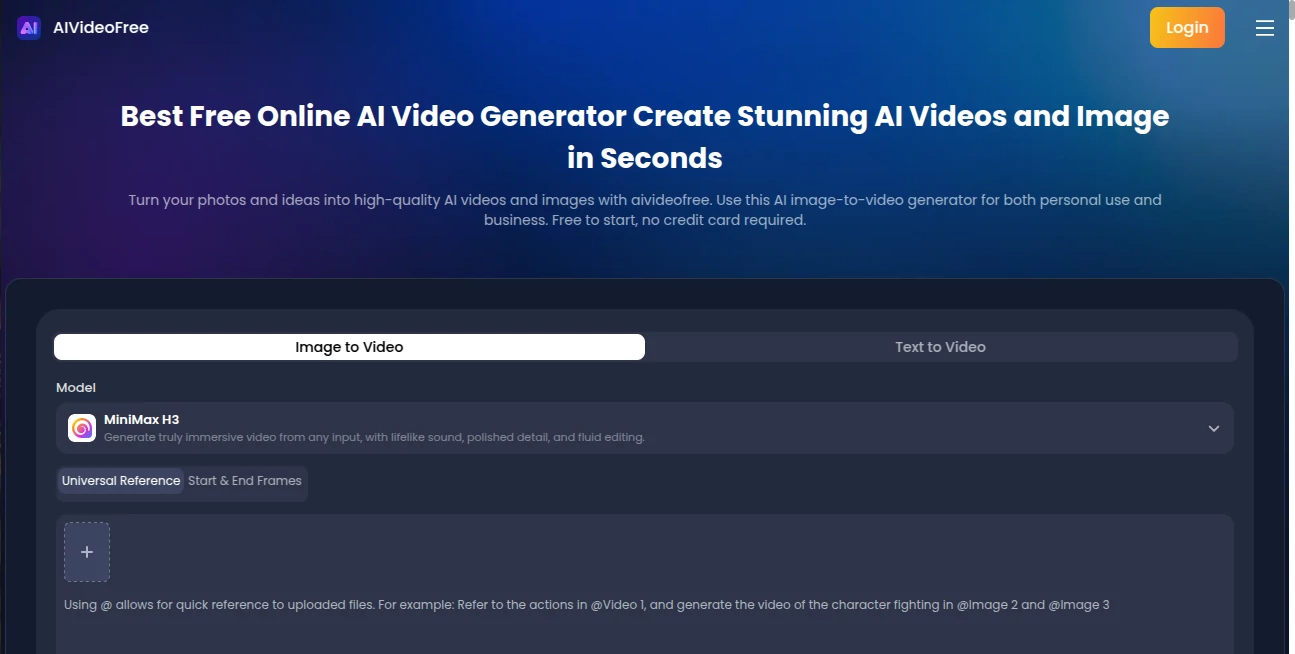
AIVideoFree is an online AI video generator and AI image generator that helps creators turn text prompts and images into engaging visual content. It brings multiple AI generation models into one browser-based platform, making it easier to explore creative styles, produce videos, and generate images without installing desktop software.
From social media content and product visuals to advertising concepts and creative experiments, AIVideoFree provides a practical way to transform ideas into visual content using AI.
Key Features
Text-to-Video Generation: Turn written prompts into AI-generated videos. Describe the subject, setting, action, camera movement, lighting, and visual style to guide the result.
Image-to-Video Generation: Use an existing image as the starting point for a video, bringing product photos, illustrations, and other visual assets to life with generated motion.
Multiple AI Video Models: Explore supported models such as Seedance 2.5, Kling 3.0, Veo, Wan 3.0, MiniMax H3, and Hailuo 2.3, subject to current platform availability.
AI Image Generation: Create images with supported models, including GPT Image 2.5, Seedream 5.0 Pro, and Nano Banana 2.1, subject to current availability.
One Platform for Creative Work: Access video and image generation in one online workspace instead of switching between separate tools for every experiment.
Watermark-Free Video Downloads: Download generated videos without watermarks, including eligible free generations.
Free Sign-Up Credits: New users receive free credits without needing a credit card. The available amount may vary by country or region.
Credits That Do Not Expire: Unused credits do not expire, allowing users to return to their creative projects when they are ready.
Commercial Projects: Use generated content for commercial projects subject to applicable platform policies, model-specific terms, and relevant rights or licensing requirements.
Who Is AIVideoFree For?
Social Media Creators: Develop short-form video ideas, visual posts, and creative assets for platforms such as TikTok, Instagram, and YouTube.
Digital Marketers: Explore advertising concepts, test visual directions, and create promotional content for campaigns.
Ecommerce Sellers: Animate product images and experiment with visual content for product promotion and online stores.
Designers and Freelancers: Turn creative briefs into visual drafts and explore different styles before refining a final deliverable.
Small Businesses and Agencies: Produce early-stage marketing concepts and visual assets without arranging a traditional production shoot for every idea.
AI Enthusiasts: Experiment with supported video and image models in one browser-based platform.
What Problems Does AIVideoFree Solve?
Creating video and image content can require multiple tools, production skills, and repeated manual work. AIVideoFree simplifies the early creative process by letting users start with a text prompt or an image and generate visual content online.
Its multi-model approach makes it easier to explore different generation options in one place. Free sign-up credits lower the barrier to trying the platform, while watermark-free video downloads and non-expiring unused credits offer additional flexibility for eligible users.
Use Cases
Social Media Videos: Generate visual concepts and short video content for social channels, including vertical-format creative ideas.
Product Marketing: Start with product images and explore animated promotional clips for ecommerce listings, product launches, or marketing campaigns.
Advertising Concepts: Create initial visual drafts to compare different hooks, scenes, and creative directions before investing in a larger production.
Creative Prototyping: Explore visual styles, scene ideas, and motion concepts before refining them in a dedicated editing workflow.
AI Image Creation: Generate images for design concepts, marketing materials, social posts, and other creative projects.
Image Animation: Turn suitable still images into video concepts with generated motion, finding new ways to use existing visual assets.
Pros and Considerations
Pros
- Combines AI video and image generation in one online platform.
- Supports text-to-video and image-to-video workflows.
- Provides access to multiple supported AI models.
- Offers free sign-up credits without requiring a credit card.
- Supports watermark-free video downloads for eligible generations.
- Unused credits do not expire.
- Works through a browser without dedicated desktop software.
Things to Consider
- Video generation consumes credits, and costs can vary by model and settings.
- Results may require several prompt iterations to match a creative brief.
- Model availability and generation capabilities can change.
- Users should review applicable terms before using generated content commercially.
Pricing Plans
Free Access: New users receive free sign-up credits without a credit card. The available amount may vary by country or region, and unused credits do not expire.
Credit Packs: Paid credit packs start at $6.90 for 600 credits, according to the listed pricing information.
Subscription: An annual-billing subscription is listed at $7.40 per month, billed at $88.80 per year, with 14,400 credits per year.
Pricing, credit allowances, and available plans may change. Check the current pricing information before purchasing, and compare the credit cost of your preferred models with your expected usage.
How to Use AIVideoFree
Step 1 — Choose a Workflow: Select an available video or image generation tool according to your project.
Step 2 — Enter a Prompt or Add an Image: For text-to-video, describe the subject, action, environment, and visual style. For image-to-video, start with a suitable image.
Step 3 — Select a Model: Choose from the models currently available for your selected workflow.
Step 4 — Generate Your Content: Start the generation process using your available credits.
Step 5 — Review and Refine: Check the result and adjust the prompt or settings if the output does not match your expectations.
Step 6 — Download and Continue Editing: Download your result when it is ready. If needed, use a video or image editor for additional trimming, sound, captions, or finishing work.
How to Evaluate AI Video and Image Generators
AI creation platforms differ in model availability, output quality, generation speed, supported formats, credit consumption, and licensing terms. The best choice depends on your project and workflow.
When evaluating a tool, consider whether it supports text-to-video and image-to-video, whether its available models fit your needs, how much each generation costs, whether downloads contain watermarks, and whether its commercial-use terms suit your intended project.
AIVideoFree is worth exploring if you want to try multiple supported models, create both videos and images, and start with free sign-up credits in a browser-based workspace.
Conclusion
AIVideoFree is an online AI video and image generation platform for creators, marketers, ecommerce sellers, designers, and businesses that need visual content. With text-to-video, image-to-video, multiple supported models, free sign-up credits, watermark-free video downloads, and credits that do not expire, it offers a flexible starting point for AI-assisted creative work.
As with any AI generation tool, results and costs depend on the selected model and settings. Reviewing current model availability, pricing, and usage terms can help you decide whether AIVideoFree fits your workflow.
Frequently Asked Questions
What is AIVideoFree?
AIVideoFree is an online AI video generator and AI image generator that lets users create visual content from text prompts and images using supported AI models.
Can I generate videos from text?
Yes. The platform supports text-to-video generation, allowing users to describe a scene and generate a video from the prompt.
Can I turn an image into a video?
Yes. Image-to-video generation lets users start with an existing image and generate motion for a video.
Does AIVideoFree offer free credits?
Yes. New users receive free sign-up credits without a credit card. The amount may vary by country or region.
Do unused credits expire?
Unused credits do not expire according to the platform's stated policy. Review the current terms for any plan-specific conditions.
Do generated videos have watermarks?
The platform offers watermark-free video downloads, including eligible free generations.
Can I use generated content commercially?
Commercial use is supported subject to applicable platform policies, model-specific terms, and relevant rights or licensing requirements. Review the terms before using content in a commercial project.
How much does AIVideoFree cost?
Users can start with free sign-up credits. Listed paid options include credit packs starting at $6.90 for 600 credits and an annual-billing subscription listed at $7.40 per month. Check current pricing for the latest details.
Do I need to install software?
AIVideoFree is browser-based, so users can access its online generation tools without installing dedicated desktop software.