Stilla
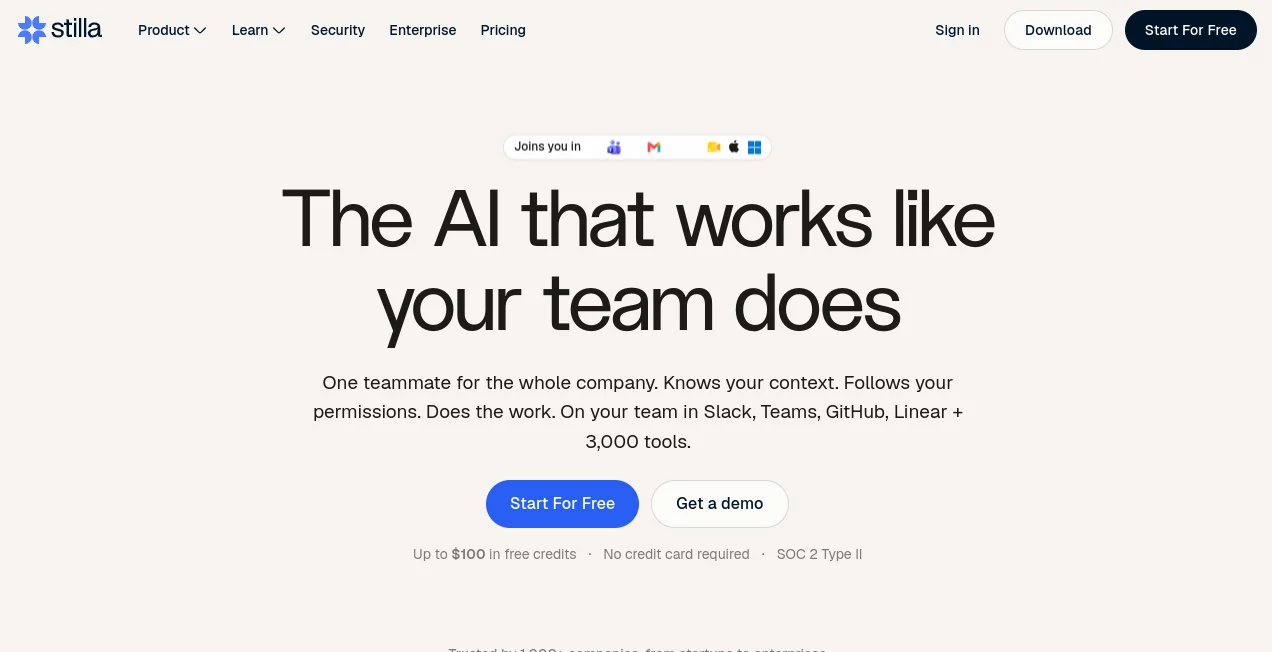
What is Stilla?
Modern product teams move fast, but information rarely stays organized for long. Conversations happen in chat, project updates live in multiple platforms, meetings generate dozens of action items, and valuable context is often lost before work even begins. This platform was created to solve exactly that problem by acting as a shared AI teammate that remembers, organizes, and executes work across the tools teams already use.
Rather than functioning as a traditional chatbot, it continuously captures context from meetings, documents, repositories, and communication channels. The result is an intelligent workspace where discussions become structured tasks, documentation stays synchronized, and repetitive coordination disappears. Teams spend less time searching for information and more time shipping products.
One of the most impressive aspects is how naturally it blends into existing workflows. Whether developers are managing repositories, product managers are planning roadmaps, or designers are documenting decisions, everyone benefits from the same shared knowledge without creating additional administrative work.
Key Features
User Interface
The interface is designed around collaboration instead of isolated conversations. Shared workspaces, searchable discussions, meeting notes, AI chat, folders, and collaborative documents make it easy for entire teams to stay aligned. Navigation feels clean, while integrations with popular workplace applications reduce the need to constantly switch between different tools.
Accuracy & Performance
Instead of relying only on user prompts, the system understands organizational context by indexing connected platforms such as Slack, GitHub, Linear, Notion, Google Drive, and Gmail. This broader understanding allows responses to remain relevant while reducing duplicated work and outdated information. AI-generated actions are grounded in real project data rather than isolated conversations.
Capabilities
- Transcribes meetings automatically.
- Generates structured meeting notes.
- Converts discussions into actionable tasks.
- Creates project tickets and development tasks.
- Drafts pull requests and documentation.
- Searches organizational knowledge across connected services.
- Supports reusable AI agents for workflow automation.
- Schedules automated processes using natural language.
- Helps teams write code and documentation.
- Keeps project information synchronized across multiple platforms.
Security & Privacy
Security receives significant attention throughout the platform. Enterprise-grade encryption protects information during transmission and storage, while administrators control exactly which services and data sources can be accessed. The platform is SOC 2 Type II certified and GDPR compliant, providing additional confidence for organizations handling sensitive business information. Customer data is not used for AI model training, giving businesses greater control over proprietary knowledge.
Use Cases
- Managing product development across distributed teams.
- Recording meetings and generating action items automatically.
- Keeping engineering documentation synchronized.
- Automating repetitive project management workflows.
- Improving collaboration between developers, designers, and product managers.
- Searching company knowledge without manually browsing multiple applications.
- Writing code, fixing bugs, and maintaining documentation with AI assistance.
- Reducing manual status updates and coordination meetings.
Pros and Cons
Pros
- Excellent integration with popular workplace platforms.
- Transforms conversations directly into actionable work.
- Supports collaborative AI instead of single-user interactions.
- Strong security and enterprise compliance.
- Meeting transcription works across multiple languages.
- Reusable AI agents simplify recurring workflows.
- Helps both technical and non-technical teams.
Cons
- Many advanced features provide the greatest value after connecting multiple business applications.
- Enterprise capabilities may be unnecessary for individual users.
- Mobile experience is currently more limited than the desktop-focused workflow.
Pricing Plans
A free tier is available for viewing shared workspaces and documents. New users can start with a 14-day Pro trial without providing a credit card. The Pro plan unlocks unlimited integrations, unlimited AI actions, complete history, and priority support. Enterprise plans are available for organizations requiring SAML SSO, SCIM provisioning, custom agreements, and dedicated support.
How to Use Stilla
Begin by creating an account and connecting your preferred workplace applications such as Slack, GitHub, Notion, Linear, Google Drive, or Gmail. Once connected, the platform starts indexing organizational knowledge and building shared context.
Record meetings or import existing conversations to generate searchable transcripts and collaborative notes. AI can then transform discussions into project tasks, documentation updates, code suggestions, and workflow automations. Teams can also create reusable AI agents that perform recurring processes automatically using simple natural-language instructions.
Comparison with Similar Tools
Traditional AI assistants primarily answer questions based on prompts, while project management software focuses on organizing tasks. This platform combines both approaches by understanding organizational context and taking real actions instead of only generating text.
Compared with standalone meeting assistants, it extends beyond transcription by automatically creating tickets, updating documentation, drafting code changes, and coordinating work across connected applications. For growing product organizations, this creates a much more complete productivity ecosystem than relying on separate AI tools for meetings, documentation, coding, and task management.
Conclusion
For teams looking to reduce administrative work while improving collaboration, this platform offers a thoughtful approach to AI-powered productivity. Instead of acting as another chatbot, it becomes part of the team's daily workflow by understanding conversations, preserving organizational knowledge, and turning decisions into completed work.
The combination of workflow automation, meeting intelligence, coding assistance, collaborative documentation, and enterprise-level security makes it particularly valuable for modern product organizations that rely on multiple software platforms. As businesses continue adopting AI into everyday operations, solutions that connect information and execute meaningful actions will likely become essential components of productive teams.
Frequently Asked Questions (FAQ)
What makes this platform different from a standard AI chatbot?
It understands your organization's shared context, connects to workplace applications, and performs real actions such as creating tasks, updating documentation, and drafting code changes.
Can it record and summarize meetings?
Yes. It automatically transcribes meetings, creates collaborative notes, identifies action items, and converts decisions into structured work.
Does it support software development teams?
Yes. Developers can generate code, draft pull requests, maintain documentation, automate workflows, and connect repositories for better project visibility.
Is business data protected?
Yes. The platform provides enterprise-grade security, encryption, SOC 2 Type II certification, GDPR compliance, and does not train AI models using customer data.
Is there a free version?
Yes. Users can access a free tier after the trial period, while paid plans unlock advanced AI capabilities, unlimited integrations, and additional collaboration features.
AI Project Management , AI Productivity Tools , AI Team Collaboration , AI Meeting Assistant .
These classifications represent its core capabilities and areas of application. For related tools, explore the linked categories above.

Stilla Alternatives Product

Speech Text

Rierino

Eleven AI

Jamy.ai | Au…

GPT Image 2 …

Magpie

gpt-plus.ai

Vibebot.gg

Tooladda