
SVG Maker AI
What is SVG Maker AI?
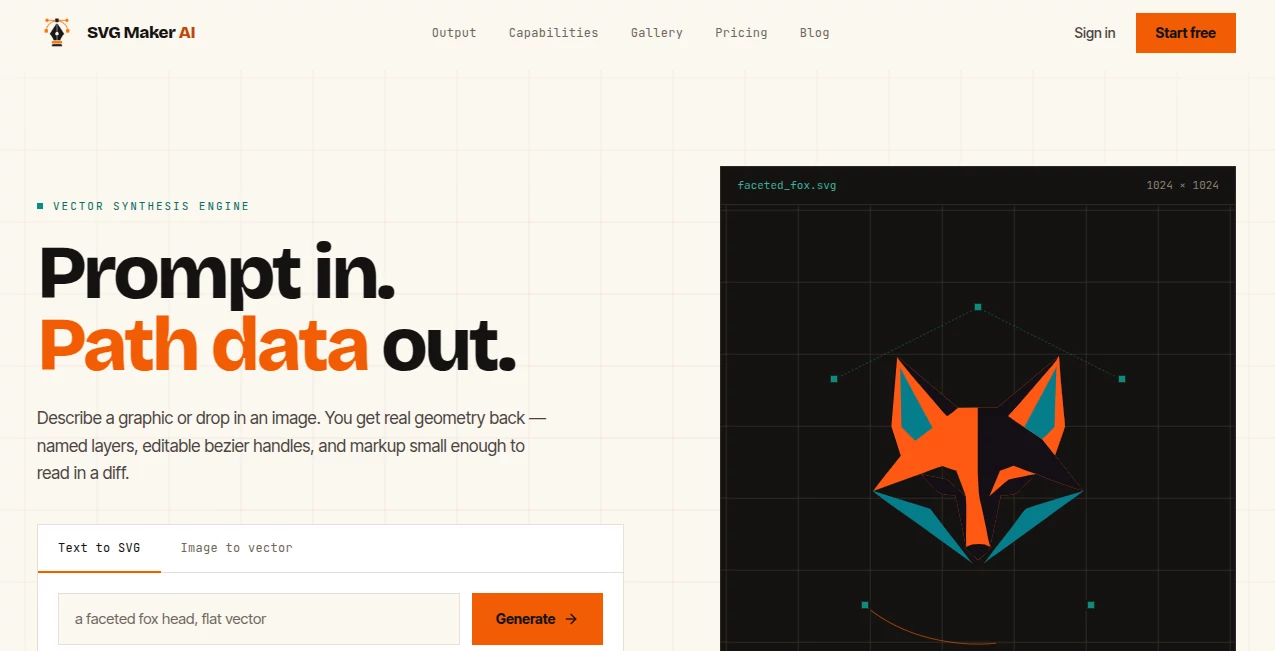
SVG Maker AI takes a straightforward approach to vector design: describe what you need in plain language or upload an existing raster image, and turn that idea into editable SVG geometry. Instead of treating a finished graphic as a flat picture, the platform focuses on the underlying paths, shapes, layers, and structure that make an SVG useful in real design and development workflows.
This makes it particularly appealing to designers, developers, marketers, and creators who need icons, illustrations, logos, patterns, or other vector assets without spending hours drawing every curve manually. The generated files are designed to remain readable and editable, which is a meaningful advantage when an asset needs to be adjusted later rather than simply downloaded and forgotten.
Key Features
- Generate SVG graphics from natural-language prompts.
- Convert PNG, JPG, and WebP images into layered vector paths.
- Create graphics using closed geometry and smooth Bezier handles.
- Organize artwork with readable, named layer IDs.
- Refine anchor points, colors, and layers directly on the canvas.
- Optimize exported SVG markup by removing unnecessary namespaces, reducing decimal precision, and collapsing redundant groups.
- Export standard SVG files or copy designs as React and Vue components.
- Support linear and radial gradients.
- Use CSS keyframe animation inside the editor for animated SVG artwork.
- Access REST API functionality for batch generation, color retheming, and format conversion on supported plans.
User Interface
The interface is built around a simple prompt-and-edit workflow. Users can begin by describing a graphic such as a geometric animal icon, a rocket badge, or a botanical pattern. The resulting artwork can then be inspected and refined rather than treated as a finished black box.
The canvas editor provides practical controls for dragging anchor points, changing colors, renaming layers, and removing unwanted elements. This is useful when the first generated version is close to the target but needs a few human adjustments. The layer structure is also designed to remain understandable when the file is opened in applications such as Figma.
Accuracy & Performance
The platform's focus on actual vector geometry is one of its strongest technical characteristics. Rather than simply tracing every visible pixel, it constructs shapes using paths and Bezier curves. This can produce substantially cleaner files for icons and illustrations, where unnecessary points can make later editing frustrating.
The published examples demonstrate relatively compact SVG outputs. For instance, one sample illustration contains 12 paths and 204 nodes with a file size of about 8.12 KB. Other gallery examples show how output size and path complexity vary depending on the artwork being generated.
Performance is also practical for quick creative work. The service describes its workflow as taking roughly a minute from describing or uploading an asset through generation, refinement, and export. Actual generation time can naturally vary with the complexity of the request.
Capabilities
The tool goes beyond basic text-to-vector generation. A designer can start with a prompt, inspect the generated geometry, and continue editing the result on the canvas. Alternatively, an existing PNG, JPG, or WebP file can be converted into scalable vector paths.
For developers, the output is especially interesting because the SVG source remains accessible. Designs can be copied as raw SVG markup or exported as React and Vue components, with fill and stroke properties prepared for component-based workflows.
There is also support for gradients, SVG animation, and API-based workflows. Business users can use the REST API for tasks such as batch generation, color retheming, and format conversion, making the platform more suitable for production workflows than a simple one-click image generator.
Security & Privacy
When working with design assets, ownership and usage rights matter almost as much as the generated artwork itself. The service states that graphics produced on its Creator Pro and Business plans are owned by the customer and can be used for client projects, logos, templates, and merchandise without royalties or attribution.
For teams handling commercial design work, this distinction is important because it makes the paid plans more suitable for professional production than a personal-use-only workflow. Users should still review the current license and privacy terms before uploading confidential or commercially sensitive assets.
Use Cases
One of the most practical applications is creating icons and interface graphics. A developer who needs a custom settings icon, database illustration, or product symbol can describe the concept and then adjust the resulting paths instead of drawing everything manually.
Branding is another strong use case. Designers can create initial logo concepts, badges, mascots, and simple brand illustrations, then refine the geometry in a vector editor. Because the output remains scalable, the same asset can be used for a website, presentation, printed material, or merchandise.
It can also be useful for marketing teams that regularly need visual assets. Social graphics, decorative patterns, product illustrations, landing-page elements, and campaign icons can be produced quickly and subsequently modified to match a particular visual direction.
Developers have another reason to consider it. A vector graphic can be exported directly into a web project or converted into a React or Vue component, reducing the gap between the design stage and implementation.
Pros and Cons
- Pros: Creates genuine editable SVG geometry rather than only raster images.
- Pros: Supports both text-to-SVG generation and raster-to-vector conversion.
- Pros: Named layers make complex files easier to understand and maintain.
- Pros: Direct editing of anchor points and colors gives users control over generated results.
- Pros: React and Vue component export is useful for modern web development.
- Pros: Paid plans include commercial usage rights.
- Cons: The quality of a generated graphic still depends heavily on the clarity of the prompt.
- Cons: Highly detailed artwork can naturally produce larger and more complex SVG files.
- Cons: Some advanced capabilities, including API access and commercial rights, require a paid plan.
Pricing Plans
The pricing structure is based on generations rather than per-seat licensing. The Starter plan is free and includes one generation credit, standard SVG export, access to the community prompt library, and personal-use rights.
Creator Pro costs $15 per month and includes 70 generations, AI-assisted anchor point editing, full commercial rights, priority generation, Figma and Illustrator import, and React and Vue component export.
The Business plan costs $45 per month and raises the allowance to 250 generations. It also adds shared team folders, collaborative editing sessions, batch generation from prompt lists, REST API access, and a dedicated support contact.
For users who do not want a subscription, one-time credit packages are also available. The listed options include 30 credits for $10, 100 credits for $25, and 250 credits for $50. The purchased credits do not expire.
How to Use SVG Maker AI
- Start by describing the graphic you want in plain English, or upload a PNG, JPG, or WebP image.
- Let the vector engine generate the underlying SVG geometry.
- Review the result on the canvas and inspect its paths and layers.
- Drag anchor points, adjust colors, rename layers, or remove elements that are not needed.
- Download the finished SVG or copy the markup into your project.
- For web development, export the graphic as a React or Vue component when that workflow is more convenient.
A good prompt should describe the subject, style, colors, and important visual characteristics. For example, asking for a clean geometric fox icon with angular facets gives the generator more useful direction than simply requesting a fox. From there, small manual adjustments can turn a good first result into something much closer to a finished design.
Comparison with Similar Tools
Traditional vector editors remain the better choice when a designer wants complete manual control over every element from the beginning. They provide extensive drawing and typography tools, but creating a graphic from an empty canvas can take considerable time.
Raster-to-vector tracers solve a different problem. They are useful when the goal is to reproduce an existing image, but automatic tracing can create large numbers of points and shapes because it follows pixel boundaries. This approach may leave a file that is technically scalable but unnecessarily difficult to edit.
The approach here sits between those two workflows. Users can begin with a natural-language concept while still receiving editable vector geometry. That combination is particularly useful when speed matters but the final asset still needs to be maintained, customized, or integrated into a development project.
Conclusion
For anyone who regularly needs vector graphics but does not want every project to begin with hours of manual path drawing, this platform offers a compelling workflow. Its emphasis on editable geometry, named layers, compact SVG markup, and direct refinement makes it more practical than a generator that simply produces a finished picture.
The strongest appeal is arguably its balance between automation and control. You can start with a simple description, receive a working vector design, and then take over when human judgment is needed. Designers can refine the artwork, while developers can take the resulting SVG directly into a web project.
For occasional personal experiments, the free option provides an easy way to test the concept. For commercial design work or development teams, the higher plans add the licensing, integrations, collaboration, and API capabilities that make the workflow considerably more useful.
Frequently Asked Questions (FAQ)
What can I create with this tool?
You can generate vector icons, illustrations, patterns, logos, badges, interface graphics, and other SVG artwork from text prompts. Existing raster images can also be converted into editable vector paths.
Can I convert a PNG or JPG into an SVG?
Yes. The Image to Vector workflow accepts PNG, JPG, and WebP images and turns them into layered, scalable paths that can be edited afterward.
Are the generated SVG files editable?
Yes. The output is made from vector paths and shapes rather than being a flat raster image. You can adjust anchor points, colors, layers, and other elements within the editor or continue editing the SVG in compatible design software.
Can I use the generated graphics commercially?
Commercial rights are included with the Creator Pro and Business plans. The free Starter plan is intended for personal use.
Does it work with Figma and Illustrator?
Yes. SVG files can be downloaded and imported into design applications such as Figma and Illustrator. The Creator Pro plan also specifically includes Figma and Illustrator import support.
Can developers use the SVG files in websites?
Yes. The SVG markup can be copied directly, and supported plans can export graphics as React or Vue components. Business users can also access a REST API for production-oriented workflows.
Does it support animated SVG graphics?
Yes. The platform supports linear and radial gradients and allows CSS keyframe animation to be added inside the editor before exporting a self-contained SVG.
Do the purchased credits expire?
No. The listed one-time credit packages are designed so that purchased credits do not expire.
Is there a free plan?
Yes. The Starter plan is available at no cost and includes one generation credit, standard SVG export, and personal-use rights.
AI Logo Generator , Design & Art , AI Design Generator , AI Graphic Design .
These classifications represent its core capabilities and areas of application. For related tools, explore the linked categories above.
SVG Maker AI details
Website unavailable — View Alternatives
Pricing
- Freemium
Apps
- Web App
Categories

SVG Maker AI Alternatives Product
YoFont

GenPPT AI

Flux 2 Cloud

insMind

Mage

Nano Banana …

Logo Teddy

AI Family Ph…

NanoBanana P…