
SwapMeIn
What is SwapMeIn?
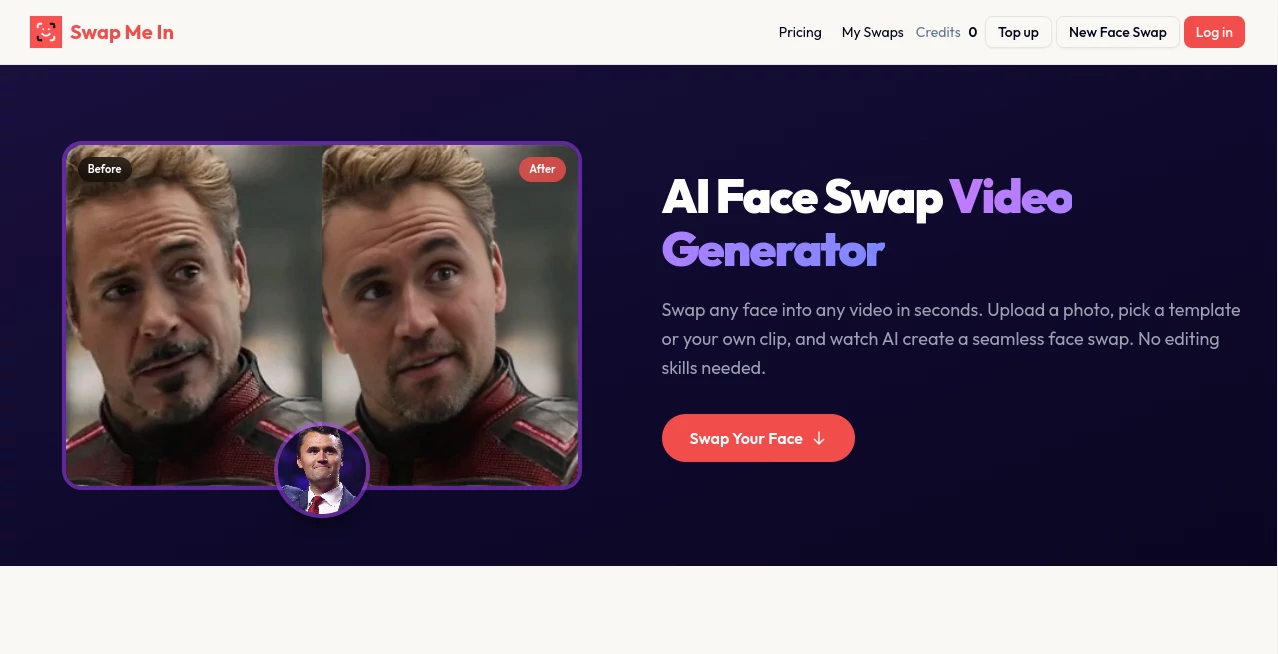
Digital content creation has moved far beyond simple photo editing. Today, creators want tools that can transform visuals in seconds without complex software or technical skills. This platform is designed exactly for that purpose—bringing advanced face and identity swapping technology into a simple, browser-based experience that feels almost effortless.
Whether you're experimenting with creative visuals, producing social media content, or building engaging marketing campaigns, this tool helps you generate realistic and entertaining results in just a few clicks. It removes the barrier between imagination and execution.
Key Features
User Interface
The interface is clean, modern, and built for speed. Users are not overwhelmed with unnecessary options. Everything is placed intuitively, making it easy for beginners to get started while still offering flexibility for advanced users.
Accuracy & Performance
One of the strongest aspects of this platform is the realism of its output. Facial alignment, lighting adaptation, and blending quality are handled intelligently, producing results that often look naturally integrated rather than artificially edited.
Capabilities
- High-quality face swapping in images and videos
- Automatic detection of facial landmarks
- Support for multiple media formats
- Fast processing with minimal waiting time
- Creative templates for quick content generation
Security & Privacy
User content is processed with attention to privacy and safety. Uploaded media is handled securely, and temporary processing ensures that personal files are not unnecessarily stored beyond their intended use.
Use Cases
This tool is widely used by content creators, marketers, meme designers, and social media managers. It is especially useful for viral content creation, entertainment edits, personalized campaigns, and storytelling visuals.
- Social media content creation
- Marketing campaigns and advertisements
- Entertainment and meme generation
- Creative storytelling projects
- Concept visualization for video production
Pros and Cons
Pros
- Very easy to use, even for beginners
- Fast processing speed
- High-quality and realistic results
- No advanced editing skills required
Cons
- Advanced customization options may be limited for professionals
- Requires strong input images for best results
Pricing Plans
The platform typically offers a flexible pricing structure that may include free trials or limited usage options, along with premium plans for users who need higher resolution outputs, faster processing, or extended usage limits.
How to Use the Tool
Getting started is straightforward. Users simply upload their media, select the desired swap or transformation option, and let the system process the result automatically. Within moments, the final output is ready for download or sharing.
No installation is required, and everything works directly through the browser, making it accessible across devices.
Comparison with Similar Tools
Compared to traditional photo editing software, this platform removes the need for manual editing and technical expertise. While other tools may offer more granular control, they often require a learning curve. This solution focuses on speed, simplicity, and realistic output, making it ideal for everyday creators.
Conclusion
In a world where visual content drives attention, having a fast and reliable creation tool is a major advantage. This platform delivers exactly that—helping users turn simple images into engaging, shareable content without complexity. It’s a practical choice for anyone looking to enhance their creative workflow.
Frequently Asked Questions (FAQ)
Is it beginner-friendly?
Yes, the platform is designed for users with no technical background.
Does it work for videos as well as images?
Yes, it supports both image and video-based transformations depending on the selected features.
Do I need to install any software?
No installation is required. Everything runs directly in the browser.
Are the results realistic?
The system is optimized to produce natural-looking outputs with smooth blending and accurate facial mapping.
AI Avatar Generator , AI Video Generator , AI Face Swap Generator , AI Image to Image .
These classifications represent its core capabilities and areas of application. For related tools, explore the linked categories above.

SwapMeIn Alternatives Product
Niji V7

Kling 5.0
Banana AI

Blipix

ModelsLab

Gemini Omni …
Gemini Omni …

Toon Composer

Seedance AI …