


















Talkniva
What is Talkniva?
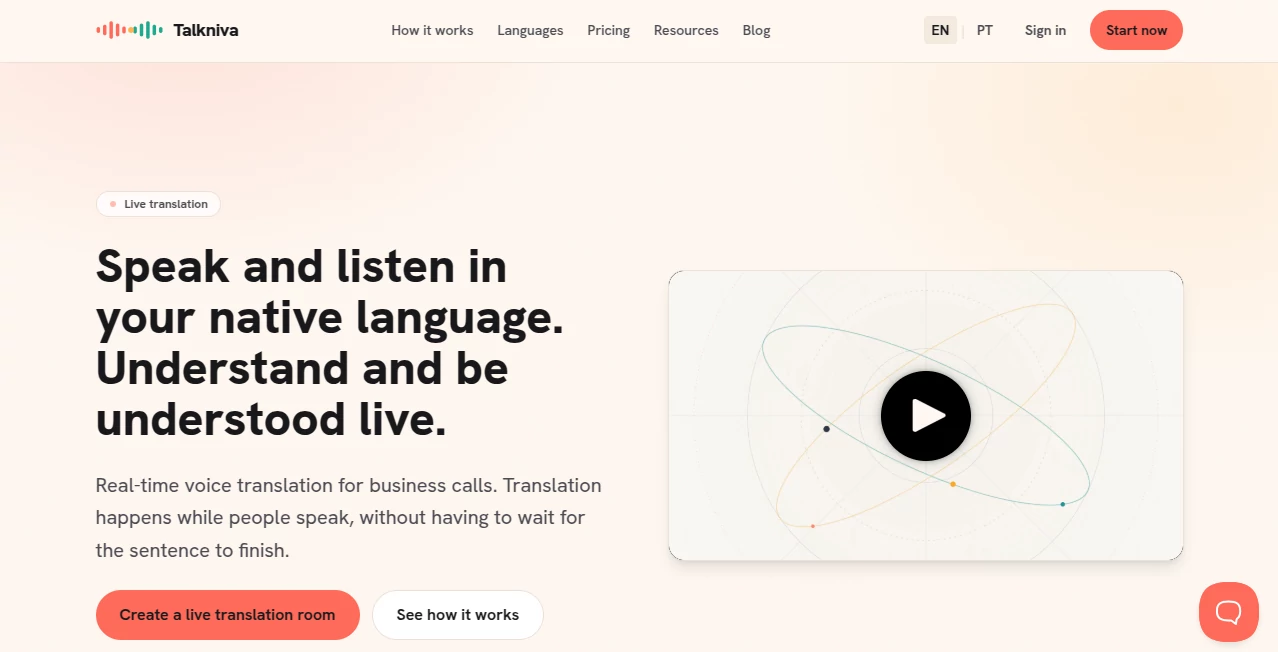
I’ve been on too many international calls where the conversation drags because everyone is waiting for the other person to finish speaking before the translator kicks in. It breaks the natural flow and makes everything feel stiff. Talkniva changes that completely. You speak normally in your own language, the other person does the same in theirs, and the translation happens live, in the rhythm of the conversation. No awkward pauses, no reading text while trying to listen — just natural back-and-forth with voices that actually sound human. It’s one of those tools that makes you wonder how you ever managed without it.
Introduction
Global business doesn’t wait for perfect language skills. Sales calls, customer support, partner meetings, interviews — they all move faster when people can communicate comfortably in their native tongue. This platform delivers exactly that: real-time voice translation that keeps the conversation alive. You create a room with one click, share the link, and everyone joins without downloading anything. The host can even wait alone without burning minutes. It’s built specifically for situations where timing and tone matter, and it shows. The natural flow it creates makes cross-language calls feel surprisingly effortless.
Key Features
User Interface
The whole experience is deliberately simple. Create a room in one click, copy the link, and share it. Participants join straight from their browser — no accounts or apps required. Once the call starts, you speak and hear the translated voice in real time, with captions appearing for important details like names and numbers. The interface stays clean and out of the way, focusing on the conversation rather than fancy controls. It feels so natural that even non-technical team members join without hesitation.
Accuracy & Performance
The translation happens while people speak, not after they finish, which keeps the momentum going. Voices sound natural with proper tone, and the system handles business context well — pricing discussions, deadlines, technical terms. In real calls, it maintains clarity even when people talk over each other slightly or speak quickly. The low-latency approach makes interactions feel much closer to being in the same room.
Capabilities
It supports 13 languages right now with plans to expand. You can run sales calls, customer support sessions, interviews, onboarding, or partner meetings with everyone speaking comfortably. Captions help confirm key details, and the host controls the room without burning credits while waiting. The pay-per-active-guest model means you only pay for the time people are actually talking, which keeps costs predictable and fair.
Security & Privacy
Business conversations often involve sensitive information. The platform is built with that in mind — secure rooms, no unnecessary data storage, and clear controls for the host. It’s designed for professional use where trust matters, giving teams confidence to discuss important matters across languages.
Use Cases
A sales rep in Germany comfortably pitches to a client in Brazil, both speaking their native language while understanding each other perfectly. A support team handles customer issues from multiple countries without forcing English. HR conducts international interviews where candidates can shine by speaking naturally. Product teams run alignment meetings with partners in different time zones and languages. The common benefit is faster, clearer communication that builds better relationships.
Pros and Cons
Pros:
- Real-time translation that keeps the natural rhythm of conversation.
- No downloads or complicated setup — just a link.
- Pay only for active speaking time, which keeps costs reasonable.
- Natural-sounding translated voices with proper tone.
- Captions help catch important details like numbers and names.
Cons:
- Currently supports 13 languages (strong coverage but not every language yet).
- Best performance still depends on stable internet connections on both sides.
Pricing Plans
It uses a smart credit system based on active guests rather than forcing subscriptions. You buy packs of guest-hours as needed — 1, 5, or 10 hour options — giving you flexibility without lock-in. The host can prepare rooms without using credits while waiting, which makes planning easier. Overall, it feels fair and predictable for both occasional and regular international communication.
How to Use Talkniva
Go to the site, create a new room with one click, and copy the invite link. Share it with participants — they join directly in their browser. Once everyone is in, start talking normally in your language. The system translates in real time so everyone hears and speaks comfortably. Use captions when needed for clarity on details. When the call ends, the room closes. It’s that straightforward — no complicated setup or training required.
Comparison with Similar Tools
Traditional translation apps often force you to wait for full sentences or rely on text, which kills conversation flow. Many require downloads or accounts. This one stands out by keeping everything browser-based, translating live as people speak, and charging only for actual usage. It feels purpose-built for business conversations rather than general chat, which shows in the natural rhythm and professional focus.
Conclusion
Breaking language barriers shouldn’t slow down business — it should accelerate it. This platform makes that possible by letting everyone communicate comfortably in their native language while keeping the conversation flowing naturally. For teams working across borders, it removes one of the biggest friction points and helps build stronger, clearer relationships. If you regularly talk with people who speak different languages, this is one of those tools that quickly becomes essential.
Frequently Asked Questions (FAQ)
How many languages are supported?
13 languages are available now, with more being added regularly.
Do participants need to create accounts?
No — they simply click the link and join the call in their browser.
Can the host wait without using credits?
Yes — waiting time for the host doesn’t consume guest credits.
Is it suitable for long meetings?
Absolutely — it’s built for real business conversations of any length.
What if the connection isn’t perfect?
It performs well on standard connections, but like any VoIP service, stronger internet gives the best results.
AI Translate , AI Voice Assistants , AI Speech Synthesis , AI Voice & Audio Editing .
These classifications represent its core capabilities and areas of application. For related tools, explore the linked categories above.

Talkniva Alternatives Product

Chatzy AI

TranslateAI …
Sonicker

AI2AI project

Zinng

Tinylawn

Coach Call AI

Nova AI

AI Describe …
