
TapEdit
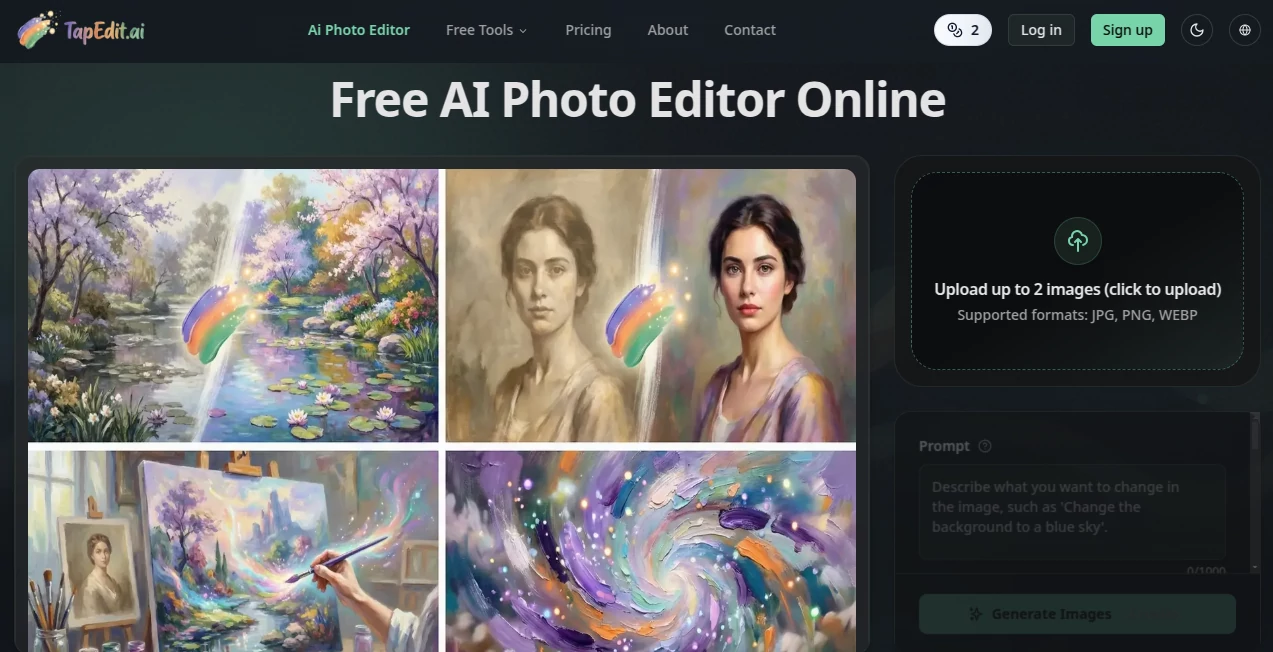
What is TapEdit?
I used to dread editing videos. Hours spent cutting clips, fighting with timelines, adding captions by hand, and still ending up with something that felt just okay. Then I tried this tool and everything changed. You upload your raw footage, tap on the parts you want to keep or remove, and the AI handles the rest — smooth transitions, smart cuts, perfectly timed captions, and even background music suggestions. The first time I turned a 20-minute messy recording into a polished 90-second clip in under ten minutes, I actually laughed out loud. It doesn’t just speed things up — it makes video editing feel fun again.
Introduction
Creating good video content has never been easier to start, but editing it well still stops most people. TapEdit removes that barrier. It’s built for creators, marketers, educators, and anyone who wants to turn raw footage into engaging videos without learning complex software. You don’t need to be a pro editor. Just record, upload, and tap your way through the process. The AI understands context, timing, and pacing in a way that feels almost intuitive. It’s become my go-to whenever I need to turn meeting recordings, vlogs, or client footage into something shareable and professional.
Key Features
User Interface
The interface is one of the cleanest I’ve seen in video tools. A simple timeline where you literally tap to cut, keep, or highlight moments. No overwhelming buttons or hidden menus. The AI suggests edits as you go, and you can accept, tweak, or ignore them with one tap. Everything feels responsive and natural — like the tool is actually helping rather than getting in your way. Even my non-technical friends managed to edit their first video without any guidance.
Accuracy & Performance
The AI is remarkably good at understanding what matters in a video. It detects good takes, removes filler words and awkward pauses, and suggests cuts that feel natural. Captions are accurate and well-timed, and the auto-zoom and framing adjustments make phone footage look surprisingly cinematic. Processing is fast enough that you stay in flow instead of waiting around. In my experience, the first pass is already 80-90% there — the rest is just fun polishing.
Capabilities
It handles everything from basic trimming to full multi-clip storytelling. Smart auto-captions, background music that matches the mood, smooth transitions, object removal, voice enhancement, and even one-tap style filters. You can edit by text (“remove the part where I say um”), by tapping, or by describing what you want. It works great for short social videos, longer YouTube content, client presentations, and educational material. The combination of speed and creative control is what makes it special.
Security & Privacy
Your videos are processed securely and not used to train models without permission. The platform takes privacy seriously, especially important when working with client footage or personal content. You stay in control of your files at every step.
Use Cases
A content creator records a 30-minute vlog and turns it into three polished shorts in one sitting. A small business owner films product demos on their phone and quickly creates professional-looking videos for their website and ads. A teacher records lessons and generates engaging clips for students to watch later. A coach records client sessions (with permission) and creates highlight reels. It fits anywhere video needs to go from raw to ready quickly and beautifully.
Pros and Cons
Pros:
- Truly intuitive tap-to-edit workflow that feels natural.
- Excellent auto-captions and smart trimming save massive time.
- Results look professional without requiring pro skills.
- Fast processing keeps you in creative flow.
- Great balance between AI automation and human control.
Cons:
- Very complex multi-scene storytelling still benefits from some manual guidance.
- Advanced effects and exports are more powerful on paid plans.
Pricing Plans
It offers a generous free tier so you can test it with real videos and see the difference immediately. Paid plans unlock unlimited exports, higher resolution, advanced features, and priority processing. Many creators find that the time saved on editing more than justifies the upgrade, especially once they start posting more consistently.
How to Use TapEdit
Upload your raw video (or record directly in the browser). The AI analyzes it and suggests an initial cut. Tap on sections you want to keep or remove. Add text instructions like “add captions” or “make this part slower.” Preview the changes instantly, adjust as needed, then export in your preferred format. The whole process stays visual and tactile — you edit by tapping and watching rather than wrestling with timelines.
Comparison with Similar Tools
Traditional editors like Premiere or DaVinci give total control but demand steep learning curves and time. Other AI tools often feel either too basic or overly automated with poor results. TapEdit sits in the sweet spot: smart enough to do the heavy lifting while staying intuitive and giving you final say. It’s faster than manual editing and more controllable than fully automatic tools.
Conclusion
Video is one of the most powerful ways to communicate today, but editing shouldn’t hold you back. This tool removes that friction without sacrificing quality or creativity. It respects your time, understands your intent, and helps you produce content you’re proud to share. Whether you create videos occasionally or every day, it makes the process feel lighter and more enjoyable. If you’ve been putting off video because of the editing burden, this might be the nudge you’ve been waiting for.
Frequently Asked Questions (FAQ)
How long does editing take?
Most videos are ready in 5–15 minutes depending on length and how much tweaking you want.
Do I need professional footage?
Not at all — it works great with smartphone videos and webcam recordings.
Are the captions accurate?
Very accurate for clear speech, with easy manual editing if needed.
Can I use it for YouTube or TikTok?
Yes — perfect for both short-form and longer content.
Is there a free version?
Yes, with generous limits so you can try it properly before upgrading.
AI Animated Video , AI Video Generator , AI Video Editor , AI Short Clips Generator .
These classifications represent its core capabilities and areas of application. For related tools, explore the linked categories above.

TapEdit Alternatives Product
GoViralTrend

Voe4 AI Video

ImagineToVid…

Seedance AI

Quso AI
Framepack AI

ModelsLab
gemini video

FluxMov