
Text3D.ai
What is Text3D.ai?
Creating high-quality 3D assets has traditionally required advanced modeling skills, expensive software, and countless hours of manual work. This platform changes that experience by allowing anyone to transform simple text prompts or reference images into detailed, downloadable 3D models within minutes. Whether you're designing game assets, visualizing product concepts, preparing objects for 3D printing, or building immersive AR experiences, it offers an intuitive workflow that dramatically reduces production time.
Beyond generation, the platform provides a complete workspace for refining models. Users can preview assets in a 360-degree viewer, inspect wireframes, enhance textures, repair geometry, convert between multiple file formats, and export ready-to-use models for professional pipelines. The combination of accessibility and production-focused features makes it appealing for beginners while still delivering the flexibility experienced creators expect.
Key Features
User Interface
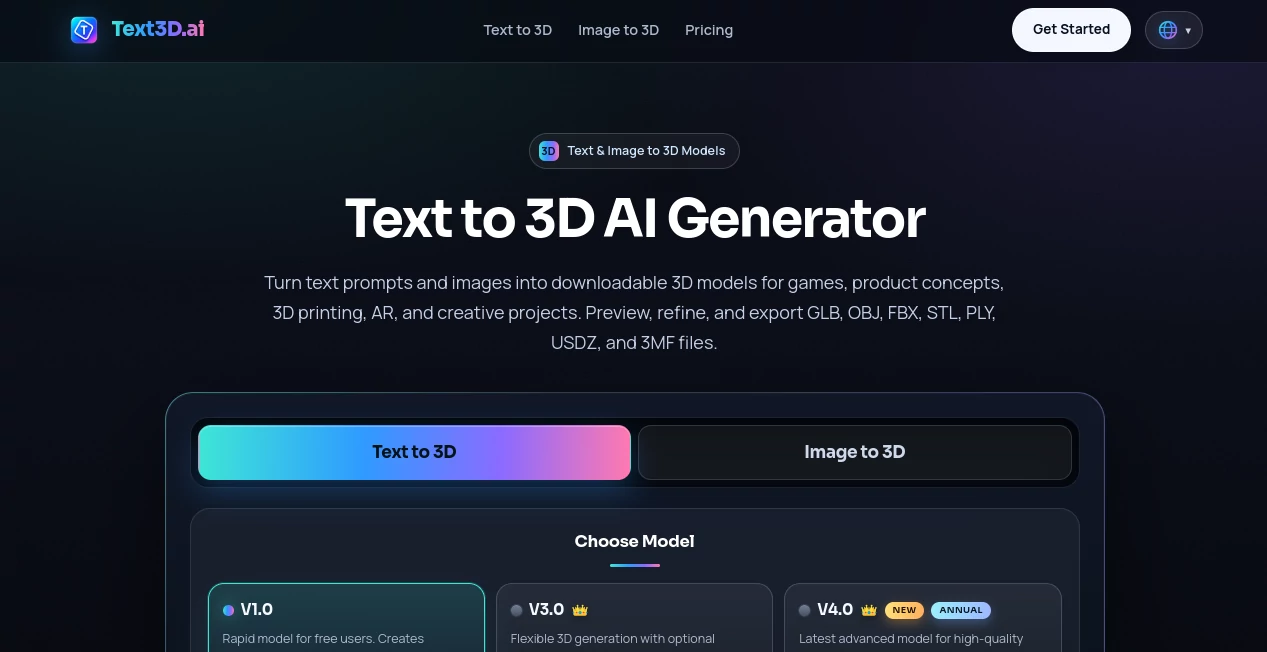
The interface is clean, modern, and designed around a simple three-step workflow: describe your idea, generate the model, and export the result. Navigation remains straightforward, making it easy for both newcomers and experienced designers to move between creation, preview, editing, and downloading without unnecessary complexity.
Accuracy & Performance
The generation engine produces textured 3D assets that closely follow text descriptions or uploaded reference images. Users can inspect every model through an interactive 360-degree viewer, evaluate lighting presets, analyze wireframe topology, and refine the output before downloading. Higher-quality generation models are available for creators who require more detailed geometry and production-ready assets.
Capabilities
- Generate 3D models directly from text prompts.
- Create 3D assets from a single reference image.
- Support multi-view image generation for improved consistency.
- Preview models in an interactive 360-degree viewer.
- Inspect mesh topology using wireframe mode.
- Generate AI-powered textures.
- Repair damaged or incomplete geometry.
- Convert between major 3D file formats.
- Create render images from generated models.
- Export models in GLB, OBJ, FBX, STL, PLY, USDZ, and 3MF formats.
Security & Privacy
The service operates as a browser-based platform with user accounts and cloud-based project management. Subscription plans include commercial usage rights for generated assets, making the platform suitable for professional workflows. Dedicated privacy policies and terms of service outline how user information, uploaded assets, and generated content are managed.
Use Cases
- Rapid game asset creation for Unity and Unreal Engine projects.
- Industrial and product concept visualization.
- 3D printing prototypes and printable object generation.
- AR and VR content development.
- Educational demonstrations and STEM projects.
- Marketing visuals and promotional 3D graphics.
- E-commerce product visualization.
- Creative artwork and digital collectibles.
Pros and Cons
Pros
- Very easy for beginners to start creating 3D models.
- Supports both text-to-3D and image-to-3D workflows.
- Offers multiple export formats compatible with professional software.
- Includes built-in repair, texture generation, rendering, and conversion tools.
- Interactive model preview improves quality control before export.
- Free plan available for new users.
Cons
- Premium models require a paid subscription.
- Complex objects may still require manual refinement.
- Generation speed depends on server workload.
Pricing Plans
A free plan allows users to generate models using the entry-level AI engine with daily credit refills. Paid subscription plans unlock higher-quality generation models, advanced options, increased credits, and commercial licensing for professional projects.
How to Use Text3D.ai
- Create a free account.
- Choose whether to start from text, a single image, or multiple reference images.
- Describe the object you want to generate.
- Select the preferred AI generation model.
- Generate the 3D asset.
- Review the model using the interactive viewer.
- Optionally repair, texture, convert, or optimize the asset.
- Export the final model in the desired file format.
Comparison with Similar Tools
Unlike many AI generators that only produce a downloadable mesh, this platform delivers an end-to-end production workflow. Integrated rendering, mesh repair, texture generation, file conversion, and support for numerous export formats eliminate the need to switch between several applications. Its browser-based experience also lowers the barrier for creators who want professional results without installing complex desktop software.
Conclusion
For anyone looking to accelerate 3D content creation, this solution offers an impressive combination of simplicity and professional functionality. From game developers and product designers to educators and hobbyists, users can transform ideas into production-ready 3D assets with minimal effort. The built-in editing tools, broad export support, and flexible generation methods make it far more than a simple AI generator—it serves as a complete workspace for modern 3D creation.
Frequently Asked Questions (FAQ)
Can beginners create 3D models without prior experience?
Yes. The platform is designed for users with little or no 3D modeling experience, allowing models to be created using simple text prompts.
Which file formats are supported?
Generated assets can be exported as GLB, OBJ, FBX, STL, PLY, USDZ, and 3MF files.
Can I generate models from images?
Yes. Users can upload one or multiple reference images to generate consistent 3D assets.
Is there a free version?
Yes. New users receive free AI credits that refresh over time, allowing them to generate models without an initial payment.
Can generated models be used commercially?
Commercial usage rights are included with eligible subscription plans, making the platform suitable for professional and business projects.
Design & Art , AI 3D Model Generator , AI Text to 3D , AI Image to 3D Model .
These classifications represent its core capabilities and areas of application. For related tools, explore the linked categories above.

Text3D.ai Alternatives Product

Modelfy 3D

SAM 3D

trellis 2

String Art G…

SAM 3D

Tripo 3D

Meshy AI

text to 3d w…

volume shader