

















ImageToSTL
What is ImageToSTL?
Creating a 3D model traditionally requires specialized software, technical expertise, and hours of manual work. Image to STL changes that experience by allowing users to transform a simple 2D image into a printable 3D model in just a few steps. Whether you are a hobbyist experimenting with a home 3D printer, a product designer building quick prototypes, or a game developer looking for rapid asset creation, this platform offers an efficient workflow that dramatically reduces modeling time.
The platform supports common image formats such as JPG, PNG, and WebP while producing high-quality STL files suitable for 3D printing. In addition to STL, users can also export models in GLB and OBJ formats, making the generated assets useful for game development, AR/VR experiences, visualization projects, and digital design workflows. Multiple quality modes allow creators to balance speed and detail depending on project requirements, making the service suitable for both beginners and professionals. Its browser-based workflow eliminates complicated installations, enabling anyone to start creating almost immediately. Based on the official platform, users can upload single or multi-view images, preview generated models, and export them in several popular 3D formats. :contentReference[oaicite:0]{index=0}
Key Features
User Interface
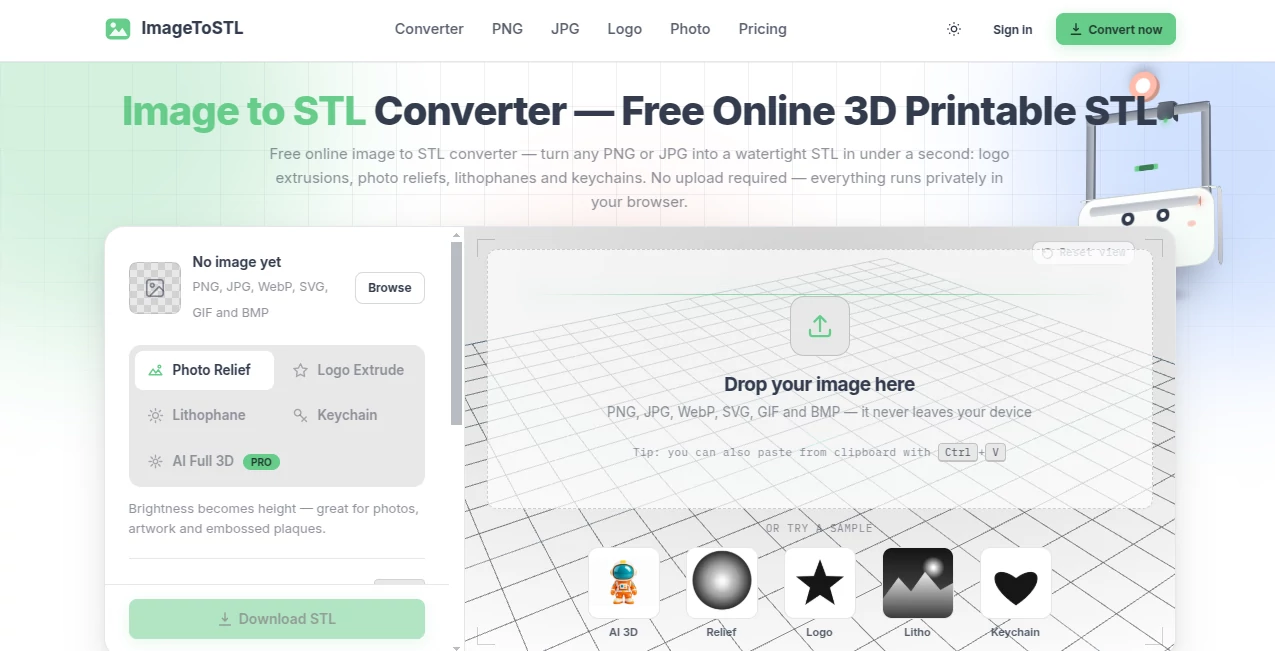
The interface is clean, modern, and designed around a simple step-by-step workflow. Uploading images, selecting output quality, adjusting advanced settings, previewing the generated model, and downloading the final result all happen within one page. Even users with no previous 3D modeling experience can understand the process within minutes.
Accuracy & Performance
Advanced AI analyzes image depth, contours, and visible geometry to create realistic meshes suitable for 3D printing. Multiple quality options allow faster draft models or highly detailed meshes with significantly increased polygon counts for professional projects. Multi-view image support also improves reconstruction accuracy for complex objects. :contentReference[oaicite:1]{index=1}
Capabilities
The platform is much more than a simple image converter. It can generate printable figurines, product prototypes, architectural concepts, game assets, digital sculptures, and AR/VR models. Support for STL, GLB, and OBJ exports makes it compatible with most popular 3D software and printing workflows.
Security & Privacy
Paid plans provide private model ownership and permanent downloads, making the service suitable for creators handling commercial or confidential projects. Users maintain greater control over their generated assets while benefiting from cloud-based AI processing. :contentReference[oaicite:2]{index=2}
Use Cases
Designers can rapidly prototype new product ideas without manually sculpting every detail. Makers and hobbyists can transform logos, drawings, or photographs into printable collectibles. Architects may convert concept sketches into presentation models for clients, while educators can build interactive teaching materials for science and engineering classes. Game developers and AR creators also benefit from quick generation of 3D assets that can be refined later inside professional modeling software.
Pros and Cons
Pros
Easy browser-based workflow.
Supports STL, GLB, and OBJ exports.
High-quality AI-generated meshes.
Multiple quality levels for different projects.
Multi-view image support improves accuracy.
Suitable for beginners and professionals.
Cons
Highest quality modes require paid credits.
Complex organic objects may still require manual refinement.
Generation quality depends on the clarity of uploaded images.
Pricing Plans
A free plan is available with limited monthly credits and basic downloads, making it suitable for testing the service. Premium subscriptions provide larger monthly credit allowances, permanent downloads, private assets, creative styles, higher priority processing, and improved generation quality. Additional credit packages are also available for users with occasional high-volume projects. :contentReference[oaicite:3]{index=3}
How to Use Image to STL
Upload a clear image or several images from different angles. Select the preferred quality level according to your project requirements. Allow the AI engine to generate the 3D mesh automatically. Preview the model inside the interactive viewer, inspect the geometry, regenerate if necessary, and finally export the completed model as STL, GLB, or OBJ for printing or further editing. :contentReference[oaicite:4]{index=4}
Comparison with Similar Tools
Unlike traditional height-map converters that simply extrude image brightness into geometry, this platform uses AI-driven reconstruction to generate more realistic three-dimensional shapes. Support for multiple export formats, interactive previews, multi-view image processing, and higher mesh quality makes it a stronger option for creators who need production-ready assets instead of simple relief models. The balance between ease of use and professional output is one of its strongest advantages.
Conclusion
For anyone interested in creating printable 3D models without investing weeks in learning professional modeling software, this solution offers an excellent balance of simplicity, speed, and output quality. Its AI-powered workflow removes many of the traditional barriers associated with 3D design while providing export formats suitable for printing, visualization, gaming, and immersive applications. Whether you're creating personal projects or commercial prototypes, it delivers a practical and enjoyable experience that significantly accelerates digital creation.
Frequently Asked Questions (FAQ)
Can beginners use this platform?
Yes. The interface is designed for users with little or no 3D modeling experience.
Which image formats are supported?
JPG, PNG, and WebP images can be uploaded for AI processing.
Which export formats are available?
Generated models can be exported as STL, GLB, and OBJ files.
Can I create models for commercial projects?
Yes. Premium plans include private asset ownership suitable for commercial workflows.
Is there a free version?
Yes. A free plan includes monthly credits so new users can evaluate the platform before upgrading.