TextSpeech
What is TextSpeech?
Turning written words into natural-sounding speech can save a surprising amount of time, especially when creating videos, narration, social media content, advertisements, stories, or educational material. TextSpeech brings this process into the browser with a large collection of AI voices and a straightforward text-to-audio workflow.
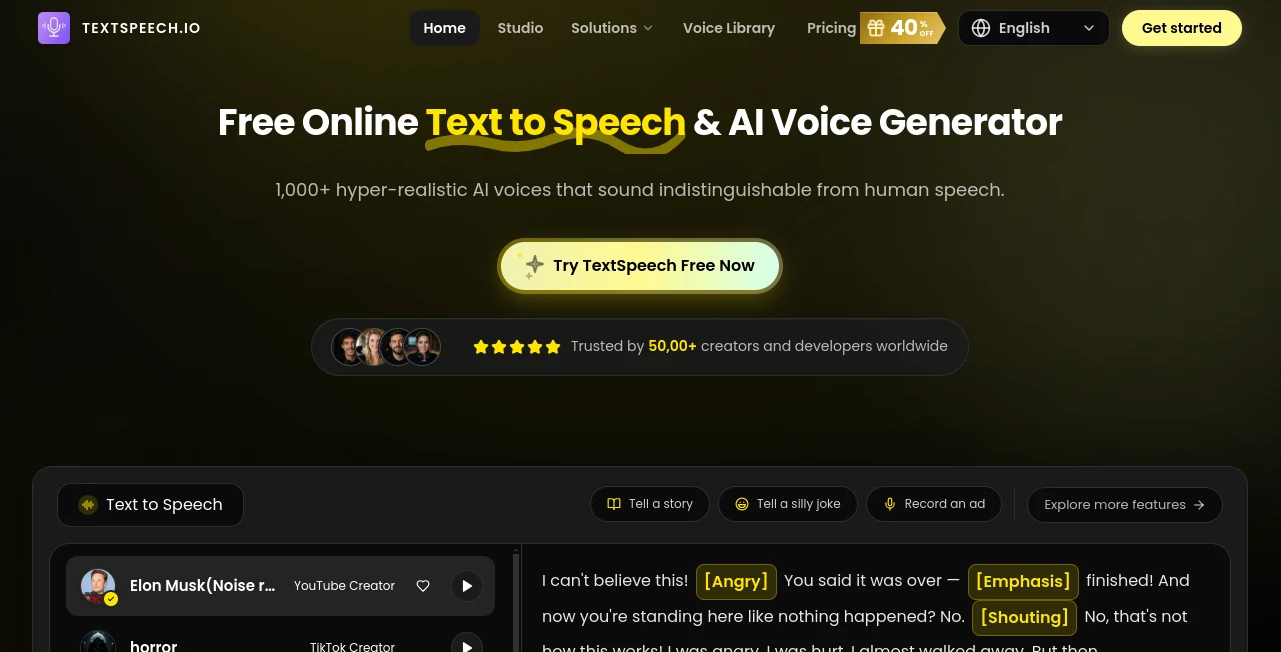
The platform offers more than 1,000 AI voices, emotional speaking styles, multiple languages, and multi-speaker conversations. That combination makes it useful for both quick experiments and more serious content production. You can paste a script, select a suitable voice, adjust the style, generate the audio, and download the result as an MP3 file without needing recording equipment.
For a creator who has ever recorded the same sentence five times because the delivery did not sound quite right, this type of workflow can be a real time saver.
Key Features
- More than 1,000 AI voice options with different tones, ages, styles, and character types.
- Natural-sounding speech with pauses, tone changes, and expressive delivery.
- Emotional voice styles for moods such as calm, happy, serious, excited, dramatic, and more.
- Multi-speaker conversations for creating dialogues and story-based audio.
- Support for 11 languages, including English, Spanish, German, French, Japanese, Korean, Portuguese, Russian, Thai, Vietnamese, and Traditional Chinese.
- Browser-based generation without requiring desktop software or specialized recording hardware.
- MP3 downloads for using generated audio in videos, presentations, stories, and other projects.
- Commercial use is available with the paid plans.
User Interface
The interface is designed around the task users actually want to complete: turning text into speech. A text editor sits at the center of the workflow, while voice and language choices can be selected before generating the audio.
There are also sample prompts that can help new users understand what the system can produce. Once text has been entered, the process feels much like working with a simple online voice studio rather than learning complicated audio software.
The large voice library is another useful part of the experience. Instead of being limited to one generic narrator, creators can look for voices that fit a particular project, from professional narration to energetic social content or character-driven storytelling.
Accuracy & Performance
The main strength of the platform is the quality and variety of its generated speech. Its AI voice engine is designed to produce natural tone changes, pauses, and expressive delivery rather than simply reading every sentence with the same rhythm.
This matters when the audio is going to be heard for several minutes. A flat synthetic voice can become tiring quickly, while changes in tone and emotional delivery can make narration easier to follow.
Generation speed can also make a difference for creators working on frequent content. Instead of setting up a microphone, recording several takes, and editing unwanted sections, a revised script can be generated again directly from the browser.
Capabilities
The platform goes beyond basic text-to-speech conversion. Its voice library can be used for YouTube narration, short-form videos, advertisements, stories, audiobooks, educational material, and faceless content.
Multi-speaker generation is particularly useful for scripts that contain conversations. Rather than producing every character separately and assembling the files manually, creators can build dialogue using different AI voices within the same project.
The service also supports emotional styles, which gives a script more flexibility. A serious explanation can sound professional, while a fictional story can use a more dramatic or mysterious delivery. This makes the tool practical for projects where voice personality is almost as important as the words themselves.
Security & Privacy
Privacy is addressed directly in the platform's policies. The service states that it does not sell personal data and provides users with options to access, update, or delete account information.
The website also describes its service as privacy-focused and GDPR-aligned. Users should still review the current privacy policy and terms before processing sensitive or confidential material, particularly for professional projects with specific data-handling requirements.
Use Cases
YouTube videos: Create narration for educational videos, explainers, documentaries, reviews, and faceless channels without recording your own voice.
Short-form social content: Add expressive narration to TikTok videos, Instagram Reels, and YouTube Shorts. Different voices and emotional styles can help match the tone of each clip.
Audiobooks and stories: Long-form scripts can be converted into spoken audio, making the platform useful for authors, storytellers, and independent publishers.
Advertisements: Marketing teams can create voiceovers for promotional videos and ads without arranging a separate recording session.
Educational content: Teachers, course creators, and training teams can turn written lessons into narrated material that students can listen to.
Dialogue and character content: Multi-speaker conversations are well suited to podcasts, fictional scenes, role-play, and story-based videos where several voices are needed.
International content: Support for multiple languages makes it possible to adapt narration for audiences in different regions without recording every version manually.
Pros and Cons
- Pros: Large library of more than 1,000 voices.
- Pros: Natural and expressive AI-generated speech.
- Pros: Emotional voice styles add flexibility to narration.
- Pros: Multi-speaker dialogue is useful for stories and conversations.
- Pros: Browser-based workflow with no software installation required.
- Pros: A free plan is available for trying the basic functionality.
- Pros: Paid plans include commercial use.
- Cons: The free plan limits each generation to 500 characters.
- Cons: Larger projects may require a paid plan or additional credits.
- Cons: Users creating highly specialized professional voice work may still want to compare the available voices before committing to a particular workflow.
Pricing Plans
The service offers a permanent free plan as well as Basic, Pro, and Ultra subscriptions. There are also one-time credit packs for users who need additional generation capacity without changing their subscription.
- Free: $0 forever, with basic text-to-speech functionality, daily rewards, one-day cloud storage, up to 500 characters per generation, and commercial use listed on the pricing page.
- Basic: $7.30 per month on the displayed annual pricing, with 1,200,000 yearly credits, up to 960 minutes of generation per year, up to 15,000 characters per generation, 30-day cloud storage, 1,000+ voices, 11 supported languages, emotion tags, and advanced features.
- Pro: $11.92 per month on the displayed annual pricing, with 3,000,000 yearly credits and up to 2,400 minutes of generation per year, plus larger generation capacity and additional advanced features.
- Ultra: $31.60 per month on the displayed annual pricing, with 7,200,000 yearly credits, up to 5,760 minutes of generation per year, up to 30,000 characters per generation, permanent cloud storage, and the most advanced feature set.
- Credit Packs: One-time options include 500,000 credits, equivalent to roughly 400 minutes of generation, and 1,100,000 credits, equivalent to roughly 880 minutes. These credits do not expire.
Pricing and included features can change, so users should check the current plan details before purchasing.
How to Use It
- Step 1: Open the online voice generator and enter or paste your script into the text editor.
- Step 2: Select the language and voice that best matches your content.
- Step 3: Choose an appropriate emotional style when needed, such as calm, serious, happy, or excited.
- Step 4: Generate the speech and listen to the result.
- Step 5: If the delivery does not fit your project, adjust the voice or script and generate another version.
- Step 6: Download the finished audio as an MP3 file and add it to your video, presentation, story, advertisement, or other project.
Comparison with Similar Tools
Many text-to-speech services concentrate primarily on converting written content into speech. This platform takes a broader approach by combining a large voice library with emotional styles and multi-speaker conversations.
For someone who only needs a short, neutral narration once in a while, a basic TTS service may be enough. However, creators producing videos, stories, social media clips, or dialogue-heavy content can benefit from having more voice choices and greater control over the personality of the narration.
Another practical advantage is the availability of a free entry point. It allows users to test voices and the generation workflow before deciding whether a larger subscription is worthwhile. For frequent production, the higher credit allowances and longer storage options become more relevant.
Conclusion
TextSpeech is a strong option for creators who want to turn written scripts into convincing spoken audio without setting up a recording studio. Its combination of more than 1,000 voices, emotional styles, multilingual support, and multi-speaker conversations gives it considerably more flexibility than a simple text-to-speech converter.
The free plan makes experimentation easy, while the paid tiers are better suited to people producing larger volumes of narration. YouTube creators, social media publishers, authors, educators, marketers, and developers can all find practical uses for the platform.
If your workflow regularly starts with a written script and ends with a voiceover, having that entire process available in the browser can remove a lot of unnecessary production work.
Frequently Asked Questions (FAQ)
Is there a free plan?
Yes. A free plan is available with basic text-to-speech functionality and a limit of up to 500 characters per generation.
How many voices are available?
The platform advertises more than 1,000 AI voices covering different styles, tones, ages, and character types.
Can I download generated speech?
Yes. After generating the audio, users can download the result as an MP3 file.
How many languages are supported?
The service currently lists 11 supported languages, including English, Spanish, German, French, Japanese, Korean, Portuguese, Russian, Thai, Vietnamese, and Traditional Chinese.
Can I create conversations with multiple voices?
Yes. Multi-speaker conversation support allows different AI voices to participate in the same dialogue, which is useful for stories, scripts, and conversational content.
Can generated audio be used commercially?
Commercial use is included with the paid plans, subject to the service's usage policies and restrictions.
Does the service require software installation?
No. The voice generation workflow runs in the browser, so users can create audio without installing dedicated desktop recording software.
Are there one-time credit options?
Yes. One-time credit packs are available for users who need additional generation capacity without taking out a larger subscription.
Is my personal data sold?
The privacy policy states that personal data is not sold to outside parties. Users should review the current privacy policy for the full details of data handling and account controls.
AI Text to Speech , AI Speech Synthesis .
These classifications represent its core capabilities and areas of application. For related tools, explore the linked categories above.

TextSpeech Alternatives Product
SpeechGen AI

Maestra

Qwen3 TTS

Qwen3 TTS

Free Voice C…

AI Voice Clo…

Seed Audio

Omni Voice

AutoDub