
















SpeechGen AI
What is SpeechGen AI?
Creating professional voiceovers no longer requires a recording studio, expensive equipment, or hours of editing. This platform transforms written text into clear, expressive speech using advanced neural voice technology, making it easy for creators, educators, businesses, and developers to produce natural-sounding audio in just a few clicks.
Whether the goal is producing YouTube narration, e-learning lessons, podcasts, audiobooks, marketing videos, customer support recordings, or accessibility content, the experience feels fast and polished. The service supports thousands of AI voices across a wide range of languages, giving users the flexibility to find the perfect voice for virtually any audience.
One feature that stands out immediately is the level of customization. Instead of simply converting text into speech, users can adjust speaking speed, pitch, pauses, pronunciation, emotional delivery, and even combine multiple speakers within a single project. For anyone producing dialogue, training materials, or storytelling content, these options dramatically improve the listening experience.
Another welcome advantage is the ability to upload documents instead of copying text manually. Long articles, books, PDFs, and scripts can be processed efficiently, saving valuable production time while maintaining high-quality audio output.
Key Features
- More than 5,000 AI-generated voices.
- Support for over 150 languages and accents.
- Natural neural speech synthesis.
- Export audio in MP3, WAV, FLAC, OGG, and other supported formats.
- Multiple speakers in a single audio project.
- Fine control over speed, pitch, volume, and pauses.
- SSML support for advanced speech customization.
- Background music integration.
- Document import from PDF, DOCX, TXT, and EPUB.
- Commercial usage license for eligible plans.
- Voice previews before consuming credits.
- Cloud-based processing with no software installation.
User Interface
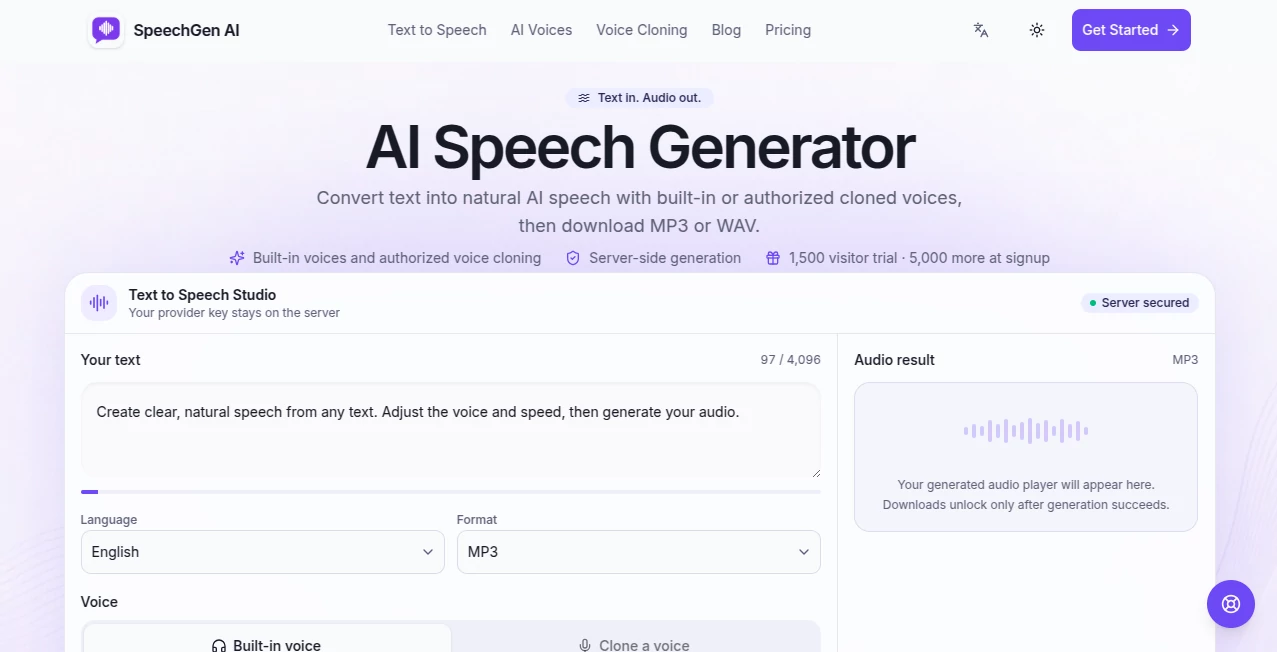
The workspace is designed with productivity in mind. Users simply paste text or upload a document, select a preferred voice, customize speech settings, and generate audio. Important controls remain easily accessible without overwhelming the interface, making it suitable for both beginners and experienced content creators.
The preview functionality is particularly useful because voices can be tested before generating the final output. This reduces trial-and-error and helps users quickly identify the most suitable narration style.
Accuracy & Performance
Voice generation is impressively natural, with realistic pronunciation and smooth pacing across supported languages. Advanced neural speech models deliver expressive narration that sounds engaging instead of robotic. Even lengthy documents can be processed efficiently, making the platform suitable for both short announcements and full audiobook production.
The support for pronunciation controls and SSML commands gives experienced users additional precision when working with technical terminology, branded names, or multilingual content.
Capabilities
Beyond basic text-to-speech conversion, the platform offers a complete audio production environment. Users can generate conversations using multiple voices, create chapter-based exports for long books, mix narration with background music, and adjust speech characteristics to match different scenarios.
Its flexibility makes it suitable for educational content, commercial advertising, podcasts, YouTube channels, accessibility projects, training materials, IVR systems, presentations, and digital storytelling.
Security & Privacy
Audio generation takes place through a cloud-based workflow that removes the need for local processing or complicated software installation. Users maintain control over their own projects while benefiting from online accessibility across different devices. Commercial licensing options also provide additional confidence for businesses creating professional content.
Use Cases
- Creating YouTube voiceovers.
- Producing podcasts.
- Generating audiobook narration.
- Building e-learning courses.
- Marketing and promotional videos.
- Social media content.
- Customer support phone systems.
- Accessibility for visually impaired users.
- Business presentations.
- Training and onboarding materials.
- Educational tutorials.
- Multilingual content localization.
Pros and Cons
Pros
- Huge collection of realistic AI voices.
- Excellent multilingual support.
- Multiple export formats.
- Advanced speech customization.
- Supports multiple speakers.
- Simple workflow suitable for beginners.
- Document upload saves significant time.
- Useful for both personal and commercial projects.
Cons
- Some premium voices require paid credits.
- Internet connection is required.
- Advanced customization may require learning SSML syntax.
Pricing Plans
A free trial allows new users to experience voice generation before purchasing credits. Paid options are available for individuals, professionals, and businesses with larger production requirements, while commercial usage is supported through eligible plans. Pricing remains flexible depending on the amount of generated content rather than forcing every user into the same workflow.
How to Use SpeechGen AI
- Paste text or upload a supported document.
- Select a language and preferred AI voice.
- Adjust speed, pitch, pauses, and other speech settings.
- Preview the narration.
- Generate the final audio.
- Download the file in the preferred format.
Comparison with Similar Tools
Compared with many online text-to-speech services, this solution provides a broader voice library, stronger multilingual support, flexible export formats, document importing, background music integration, and multi-speaker projects within a streamlined workflow. The ability to preview voices before spending credits is another practical advantage that improves efficiency during content creation.
Conclusion
For anyone looking to produce professional-quality voice content without recording equipment, this platform delivers an impressive combination of realism, flexibility, and ease of use. Its extensive voice collection, multilingual capabilities, document support, and advanced customization tools make it a valuable resource for creators, educators, marketers, and businesses alike. Whether producing a short advertisement or narrating an entire book, it offers a polished workflow that significantly reduces production time while maintaining excellent audio quality.
Frequently Asked Questions (FAQ)
Can I create commercial voiceovers?
Yes. Commercial usage is supported through eligible pricing plans.
How many languages are available?
The platform supports more than 150 languages and regional accents.
Can I upload documents instead of pasting text?
Yes. PDF, DOCX, TXT, EPUB, and other supported documents can be imported for conversion.
Which audio formats can I download?
Generated audio can be exported in formats including MP3, WAV, FLAC, and other supported formats.
Can I use multiple voices in one project?
Yes. Different AI speakers can be assigned throughout the same project to create conversations or dialogue.