Thefake
What is Thefake?
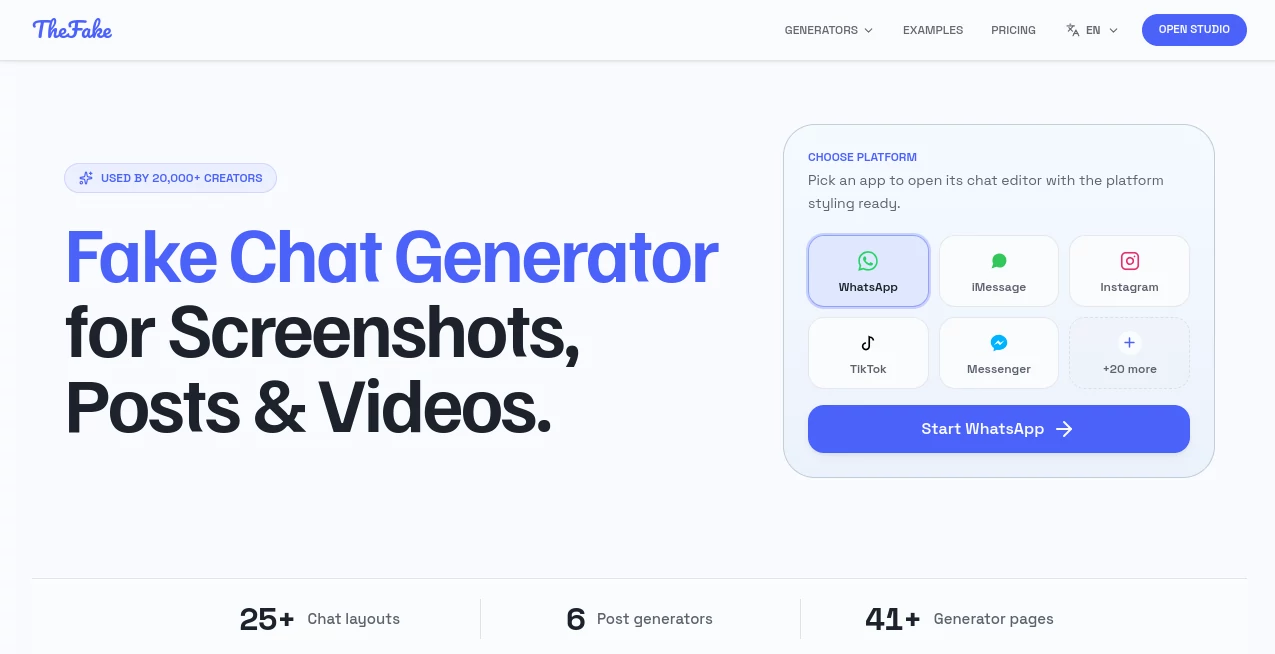
TheFake is a creative platform designed for making realistic chat screenshots, social media mockups, and animated conversation videos without spending hours recreating interfaces manually. It helps creators, marketers, filmmakers, educators, and designers turn ideas into believable visual scenes that look familiar and professional.
Instead of building conversation layouts from scratch, users can choose popular messaging styles, customize names, avatars, messages, timestamps, and other details, then export ready-to-use visuals for their projects. The platform is especially useful for storytelling, video production, advertising concepts, presentations, and UI demonstrations.
With support for multiple chat and social platforms, it provides a flexible workspace where creative ideas can quickly become polished visual content. The simple editing experience makes it accessible for beginners while still offering enough control for professional creators.
Key Features
User Interface
The platform offers a clean browser-based editor that focuses on speed and simplicity. Users can start creating scenes without complicated design software or advanced technical knowledge. The interface allows creators to adjust conversation details, profile information, layouts, and visual elements with minimal effort.
Its template-based workflow helps users quickly select a familiar communication style and customize it according to their needs. Whether creating a short video scene, a marketing example, or a presentation mockup, the editing process feels similar to writing a conversation rather than designing a complete interface.
Accuracy & Performance
The platform focuses on creating realistic-looking social and messaging visuals by paying attention to small interface details such as message bubbles, timestamps, profile images, typing indicators, and layout structures. These elements help exported scenes feel natural and suitable for professional content creation.
Projects can be created quickly, reviewed before export, and adjusted whenever changes are needed. This makes it a practical choice for teams that need multiple variations of the same concept.
Capabilities
The tool provides a wide range of creative options, including chat scene generation, social media post mockups, and animated message videos. Users can create content for platforms such as messaging apps and social networks while controlling the visible details of each scene.
- Create realistic conversation screenshots
- Build social media post and comment mockups
- Generate animated chat videos with timing effects
- Edit names, avatars, messages, and timestamps
- Create multilingual conversation scenes
- Export visuals for marketing, entertainment, and education
Security & Privacy
Privacy-focused workflows allow creators to maintain control over their generated content. The platform is designed for legitimate creative purposes such as storytelling, design previews, education, and marketing demonstrations.
Users should always ensure that generated conversations are clearly presented as fictional when there is any possibility of confusion. Responsible usage helps maintain trust while allowing creators to explore new storytelling formats.
Use Cases
This platform can support many creative workflows across different industries. Content creators can use it to build engaging social media videos, short-form stories, and entertainment content for platforms like TikTok, YouTube, and Instagram.
Marketing teams can create product demonstrations, campaign concepts, and customer journey examples without designing complex interface mockups. Filmmakers and writers can visualize dialogue scenes before production, while educators can create examples for digital literacy and training materials.
- Social media content creation
- Video storytelling and skits
- Marketing campaign previews
- UI and product demonstrations
- Film and script visualization
- Educational examples and tutorials
Pros and Cons
Pros
- Simple browser-based editing experience
- Realistic conversation and social interface designs
- Useful templates for different creative projects
- Fast export options for images and videos
- Suitable for creators, marketers, and designers
Cons
- Advanced export options require a paid plan
- Best suited for creative mockups rather than real messaging needs
- Users need to follow responsible usage guidelines
Pricing Plans
The platform offers a free option that allows users to create and export PNG screenshots. Paid plans unlock additional capabilities such as AI-assisted writing, video exports, animation features, higher-quality rendering, and carousel exports.
- Free Plan: Create projects and export PNG screenshots
- Pro 7-Day Pass: Short-term access for focused projects
- Pro Monthly: Continuous access with flexible billing
- Pro Lifetime: One-time payment for permanent access
How to Use TheFake
Creating a visual scene is a straightforward process. Start by selecting a preferred chat or social layout, customize the conversation details, adjust visual elements, and preview the final result before exporting.
Creators can modify messages, participant information, timing, and appearance until the scene matches their idea. Once finished, the content can be exported and used in videos, presentations, advertisements, or creative projects.
Comparison with Similar Tools
Compared with traditional design software, this platform provides a faster approach for creating conversation-based visuals. Instead of manually recreating every interface element, users can focus on the story, message, and purpose behind the content.
While general graphic design tools offer broader editing capabilities, this solution specializes in realistic communication scenes and makes the creation process much faster for projects centered around chats and social interactions.
Conclusion
TheFake provides a practical solution for anyone who needs realistic conversation visuals without complex design work. Its combination of ready-made layouts, flexible customization, and export options makes it valuable for creators, marketers, educators, and production teams.
By simplifying the process of creating believable digital conversations, it allows users to spend more time developing ideas and less time building interfaces from scratch. For creative professionals looking for a fast way to visualize stories and concepts, it offers an efficient and accessible workflow.
Frequently Asked Questions (FAQ)
What can this platform be used for?
It can be used for creating fictional chat screenshots, social media mockups, videos, marketing concepts, educational examples, and creative storytelling projects.
Can I create content without paying?
Yes. Users can create projects and export PNG screenshots with the free option. Additional features such as advanced video and animation exports are available through paid plans.
Is it suitable for professional creators?
Yes. The platform is designed for content creators, agencies, filmmakers, marketers, and teams that need realistic communication visuals.
Can generated conversations be used commercially?
Yes, for appropriate creative and business purposes. Users should avoid presenting fictional conversations as real communications or using them for misleading activities.
Does it support different languages?
Yes. Users can create multilingual scenes, making it useful for global content creation and localized campaigns.
AI Photo & Image Generator , AI Video Generator , AI Social Media Assistant , AI Design Assistant .
These classifications represent its core capabilities and areas of application. For related tools, explore the linked categories above.

Thefake Alternatives Product

KKV AI

GPT Image 2

Veo 4
Sora 2 Video
Z-Image Free

Framepack AI

NanoBananaPro

aiiStudio

UNi-1 AI