MeetingBrief
What is MeetingBrief?
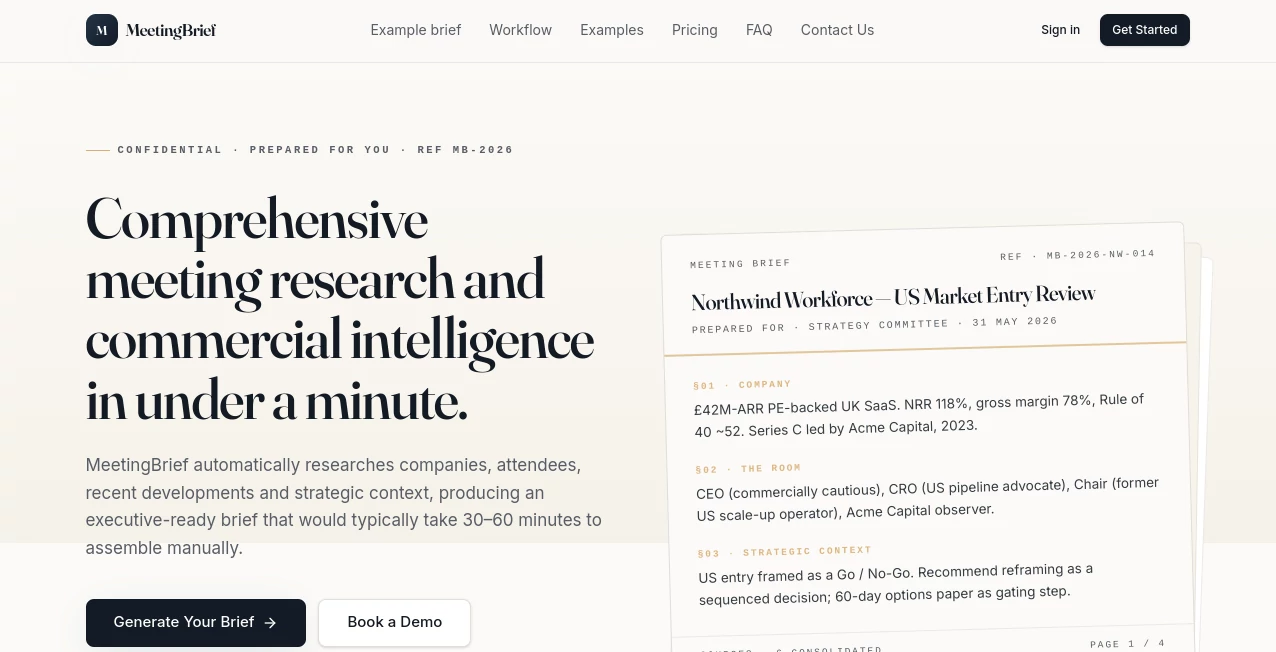
I’ve walked into important meetings after spending 45 minutes frantically Googling the company, checking LinkedIn profiles, and piecing together recent news, only to still feel underprepared. Then I started using this tool. You give it the company name and meeting details, and in less than a minute it delivers a clean, executive-ready brief with company context, who’s in the room, strategic signals, smart talking points, potential opportunities, and even suggested questions. It feels like having a sharp researcher who never sleeps and actually understands business nuance. The difference in confidence when you walk into that room is noticeable.
Introduction
Good preparation separates average meetings from ones that actually move the needle. But in fast-paced B2B environments, who has 30–60 minutes to do proper research every single time? This platform solves that problem elegantly. It pulls from public sources — company websites, LinkedIn, news, filings — and delivers a structured briefing that covers everything you need before stepping into the conversation. It’s private by default, built for professionals who value their time, and has quickly become the secret weapon for salespeople, consultants, founders, and executives who refuse to wing important discussions anymore.
Key Features
User Interface
The experience is refreshingly minimal. You enter the company name, meeting context, and key attendees if you know them. Everything else happens automatically. The output arrives as a clean, well-structured document with clear sections and professional formatting. You can export it, save it to your workspace, or share it internally. No steep learning curve, no cluttered dashboards — just fast, focused intelligence when you need it.
Accuracy & Performance
It consistently pulls relevant, up-to-date information and presents it in a way that feels thoughtful rather than dumped. Recent developments, strategic context, and nuanced observations about the people in the room come through clearly. Generation usually finishes in under a minute, even for complex companies. While it always recommends double-checking critical facts (smart advice), the quality is high enough that most users feel significantly better prepared than with manual research.
Capabilities
Beyond basic company overviews, it analyzes “the room” (key people and their likely perspectives), surfaces commercial context, suggests strategic talking points, identifies potential opportunities, and even prepares intelligent questions to ask. It handles everything from sales discovery calls and investor meetings to board discussions and partnership negotiations. The output is designed for senior-level conversations — concise, strategic, and actionable.
Security & Privacy
Your meeting details and generated briefs stay private and are never shared publicly or used to train models for others. Everything is securely stored in your workspace. For professionals handling sensitive deals or client information, this level of discretion is essential and reassuring.
Use Cases
A sales director prepares for a big enterprise meeting and walks in with sharp insights about the CRO’s recent moves and the company’s expansion challenges. A consultant uses it before every client workshop to demonstrate deep understanding from day one. A founder meeting potential investors gets tailored questions and context that make the conversation flow naturally. Private equity teams review portfolio company updates and prepare for board meetings with structured intelligence. Anyone who walks into high-stakes conversations benefits from showing up better informed than the other side expects.
Pros and Cons
Pros:
- Saves enormous time while delivering higher quality preparation.
- Structured output that feels executive-ready, not generic AI slop.
- Strong focus on commercial and strategic context, not just surface facts.
- Completely private by default — critical for sensitive discussions.
- Flexible pricing from one-off briefs to team plans.
Cons:
- Still benefits from human review on the most critical points (as it openly states).
- Very niche or extremely private companies may have thinner public data.
Pricing Plans
You can buy single briefs for occasional use at a very reasonable per-brief price. Monthly plans (Essential and Professional) offer better value for regular users, with Professional giving unlimited briefs and premium intelligence layers. Team and enterprise options are available for larger organizations. The pricing is transparent and matches how people actually use it — whether occasionally or every week.
How to Use MeetingBrief
Sign up, go to the generator, enter the company name and any context you already have (meeting purpose, key attendees, etc.). Click generate and wait under a minute. Review the polished brief, make any personal notes, and export or save it. Use the talking points and suggested questions to prepare your own thoughts. Over time, you’ll develop the habit of running a quick brief before every important conversation — and you’ll quickly notice the difference in outcomes.
Comparison with Similar Tools
Generic research tools give you scattered search results. ChatGPT can summarize but lacks consistent structure and depth for business context. This platform sits in the sweet spot: fast, structured, commercially intelligent, and purpose-built for meeting preparation. It doesn’t try to do everything — it does one thing exceptionally well, and that focus shows in the quality of every brief.
Conclusion
In business, preparation is often the invisible edge that separates good outcomes from great ones. This tool makes that preparation faster, smarter, and more consistent without adding complexity to your day. It respects your time, protects your privacy, and delivers insights that actually help you show up stronger. For anyone who values walking into meetings confident and informed, it’s quickly becoming an indispensable part of the workflow.
Frequently Asked Questions (FAQ)
How accurate is the research?
It pulls from reliable public sources and is designed for senior-level prep, but important facts should always be double-checked before critical decisions.
Is my data private?
Yes — briefs are private by default and never publicly shared or used to train models for others.
Can teams use it together?
Absolutely — team and enterprise plans include shared workspaces and collaborative features.
How long does a brief take?
Usually under one minute from start to finished document.
Do I need to provide much information?
Just the company name and basic context is usually enough — the more you give, the more tailored it becomes.
AI Productivity Tools , AI Research Tool , AI Meeting Assistant , AI Notes Assistant .
These classifications represent its core capabilities and areas of application. For related tools, explore the linked categories above.

MeetingBrief Alternatives Product
Embedful

Zivy

Eleven AI

Metal

Coresite
AnyToURL

DocReplacer

Surmado

TruthSpine