
Thumblore
What is Thumblore?
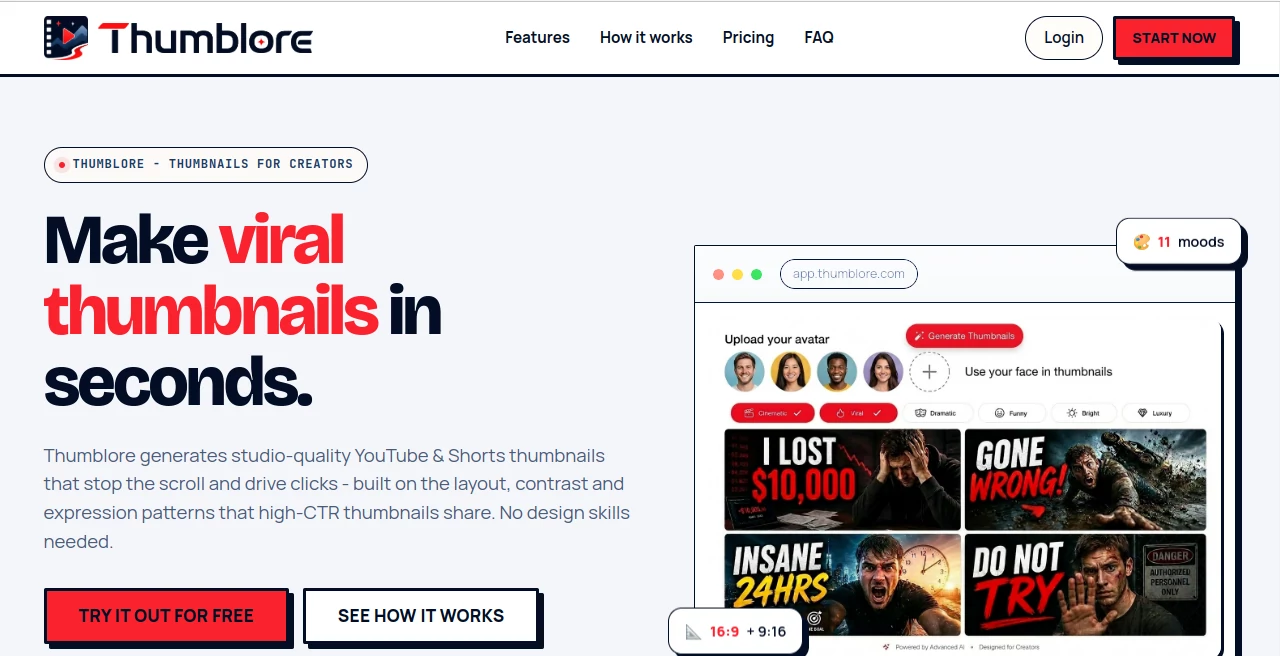
Creating a YouTube thumbnail that makes people stop scrolling can take almost as much thought as creating the video itself. The right image, facial expression, headline, colors, and composition all need to work together in a very small space. Thumblore takes much of that design work off the creator's shoulders by turning a video title or topic into a ready-to-use thumbnail.
The platform is designed specifically for creators who want polished YouTube and Shorts thumbnails without spending hours inside a traditional design application. Instead of starting with a blank canvas, users can describe their video, generate thumbnail concepts, and then refine the result through simple instructions.
This approach is particularly useful for creators who publish frequently. A gaming channel, podcast, tutorial creator, or commentary channel can maintain a recognizable visual style without having to manually rebuild every thumbnail from scratch.
Key Features
- AI-generated thumbnails for YouTube videos and Shorts
- Support for both 16:9 and 9:16 formats
- Multiple mood and visual style presets
- Chat-based thumbnail editing
- Custom AI avatar creation
- Reusable saved avatars for consistent branding
- Support for multiple people in a single thumbnail
- Face and background replacement
- Automatic handling of text, colors, and composition
- HD thumbnail exports
- Templates designed around common high-click-through thumbnail patterns
User Interface
The interface is built around a straightforward creation process rather than a complicated collection of design controls. A creator can start by entering a video title or describing the topic. The system then uses that information to produce thumbnail options with the major visual elements already arranged.
One of the more practical touches is the conversational editing system. Instead of searching through menus to change a headline, color, or layout, users can simply describe the adjustment they want. This makes the workflow feel closer to giving instructions to a designer than operating a traditional graphics editor.
Creators who regularly appear on camera can also create an avatar and reuse it across future designs. That can be helpful for channels where keeping the same recognizable person across a series of videos matters.
Accuracy & Performance
Thumbnail generation is focused on the visual conventions that tend to work well at small sizes. Clear focal points, readable text, contrast, expressive faces, and uncluttered compositions are given particular attention.
The workflow is also quick. A creator can provide a topic, generate options, select a direction, and make revisions without rebuilding the composition manually. For channels publishing several videos each week, saving that repeated design time can be more valuable than having dozens of individual editing controls.
The platform also exports thumbnails in formats suitable for common YouTube and Shorts workflows, reducing the need for additional resizing before publishing.
Capabilities
The feature set goes beyond simply turning text into an image. Users can choose different visual moods, create reusable avatars, place several people in one composition, and change faces or backgrounds while keeping the existing layout intact.
The avatar functionality is especially interesting for creators building a recognizable channel identity. A saved character or presenter can appear repeatedly without requiring a completely new setup for every thumbnail.
There is also flexibility for different types of content. Bright and expressive designs can suit gaming or reaction videos, while cinematic, dramatic, documentary, luxury, or futuristic styles can be better suited to other niches. The ability to choose a direction before generating gives creators more control over the final look.
Security & Privacy
Because the service can work with faces and creator-generated avatars, privacy is an important consideration for anyone using the platform. Users should review the service's current privacy policy and terms before uploading personal photographs or other sensitive material.
For creators using their own image, it is also sensible to use photographs they have the rights to use and to understand how uploaded material is handled before incorporating it into a long-term content workflow.
Use Cases
YouTube creators: Generate polished thumbnails for regular video uploads without creating every composition manually.
Short-form creators: Use the vertical format for Shorts and other short-form content where the thumbnail needs to communicate an idea immediately.
Podcasters: Create compositions containing multiple saved avatars, making the format useful for interviews, guest episodes, and podcast discussions.
Gaming channels: Use expressive faces, bold layouts, and attention-grabbing visual styles for gameplay, reactions, challenges, and entertainment content.
Educational channels: Create cleaner, text-focused compositions for tutorials, explainers, software guides, and instructional videos.
Content teams: Establish a repeatable thumbnail workflow so different videos can retain a consistent visual identity.
Creators without design experience: Avoid the learning curve of traditional graphic design software and concentrate on the video's topic rather than the technical details of composition.
Pros and Cons
Pros
- Designed specifically around YouTube and Shorts thumbnails
- Fast text-to-thumbnail workflow
- Chat-based editing makes revisions simple
- Reusable avatars help maintain creator consistency
- Supports multiple people in one composition
- Includes both horizontal and vertical formats
- HD exports are available
- Useful for creators who publish frequently
Cons
- Creators who want detailed pixel-level control may still prefer a traditional design editor
- Credit-based generation means heavy users may need a paid plan
- Results can still benefit from human judgment before publication
- Creators working with highly specialized brand guidelines may need additional editing
Pricing Plans
The service offers a free starting option, allowing new users to test the workflow without providing a credit card. New accounts receive 200 free credits.
The Starter plan is listed at $9 per month and includes 700 credits, approximately 40 thumbnails, up to 10 saved avatars, three AI-generated avatars per month, Story, Short, and Reel formats, unlocked editing tools, HD exports, and no watermark.
The Pro plan is listed at $24 per month and provides 2,000 credits, approximately 120 thumbnails, unlimited saved avatars, 20 AI-generated avatars per month, and additional avatar editing features.
The Studio plan is listed at $45 per month and includes 4,200 credits, approximately 240 thumbnails, unlimited avatars and AI generations, and the shortest generation wait time available on the platform.
How to Use Thumblore
Start by describing your video or entering its title. The system analyzes the topic and generates thumbnail concepts based on the information provided.
Review the generated options and choose the composition that best matches the video's subject. You can then request changes using natural language rather than manually rebuilding the design.
If you regularly appear in your videos, create an avatar that represents you and save it for future projects. Multiple saved avatars can also be combined in a single thumbnail for collaborations, interviews, podcasts, or comparison-style videos.
Once the composition looks right, export the finished thumbnail in HD and use it with the corresponding YouTube video or Short.
Comparison with Similar Tools
Traditional thumbnail editors give experienced designers extensive control over every element, but that flexibility often comes with a steeper learning curve and more manual work. Template-based design platforms are easier to approach, although creators may still need to adjust layouts, typography, images, and spacing themselves.
This platform takes a more automated route. Its main advantage is the combination of AI generation, creator-focused thumbnail layouts, conversational editing, and reusable avatars. That makes it particularly appealing to people who care more about producing strong thumbnails quickly than manually controlling every design layer.
For a creator who already has a professional designer or prefers complete manual control, a conventional editor may remain the better choice. For an individual creator managing an entire channel alone, however, the faster workflow can be a significant advantage.
Conclusion
A good thumbnail has a difficult job: it needs to communicate an idea almost instantly and give someone a reason to click. That makes thumbnail creation one of the most repetitive parts of running a YouTube channel, especially for creators who publish several times a week.
This platform offers a practical alternative to building every thumbnail from scratch. Its combination of AI generation, conversational editing, mood presets, reusable avatars, multi-person compositions, and YouTube-friendly formats creates a workflow that is easy to understand and quick to repeat.
It is not intended to replace every professional design workflow. Instead, it is most compelling for creators who want attractive, consistent thumbnails without becoming full-time graphic designers. For that audience, the ability to go from a video idea to a finished visual in a few steps makes it a useful addition to the content creation process.
Frequently Asked Questions (FAQ)
What is Thumblore?
It is an AI thumbnail generator designed to create YouTube and Shorts thumbnails from a video title or topic without requiring traditional design skills.
What size are the generated thumbnails?
The platform supports 16:9 and 9:16 formats and is designed to produce thumbnails suitable for YouTube and short-form video workflows.
Can I use my own face?
Yes. Users can upload a photo or create an AI avatar, save it, and reuse the same person across future thumbnail designs.
Can I put multiple people in one thumbnail?
Yes. Saved avatars can be combined in a single composition, which is useful for podcasts, collaborations, interviews, reactions, and versus-style content.
Do I need graphic design experience?
No. The platform is designed to handle much of the layout, typography, color, and composition work automatically, while conversational editing lets users request changes in plain language.
Is there a free option?
Yes. New users can start without a credit card and receive 200 free credits before deciding whether to upgrade.
Can I edit a generated thumbnail?
Yes. Users can request changes to elements such as the headline, colors, layout, face, or background while preserving parts of the design they want to keep.
Is it useful for YouTube Shorts?
Yes. Alongside standard 16:9 thumbnails, the platform supports 9:16 formats for vertical short-form content.
Which creators can benefit most from it?
It is particularly useful for YouTubers, podcasters, gaming creators, educators, commentators, and other publishers who need to produce thumbnails regularly without spending significant time on manual design.
Are the generated thumbnails ready to publish?
The platform provides HD exports intended for publishing, but creators should still review every thumbnail before uploading to make sure the wording, imagery, branding, and overall message accurately represent the video.
These classifications represent its core capabilities and areas of application. For related tools, explore the linked categories above.

Thumblore Alternatives Product

Thumbspick
ytzolo

WonderShare …

Leonardo.ai

AI Thumbnail…