
Thumio
What is Thumio?
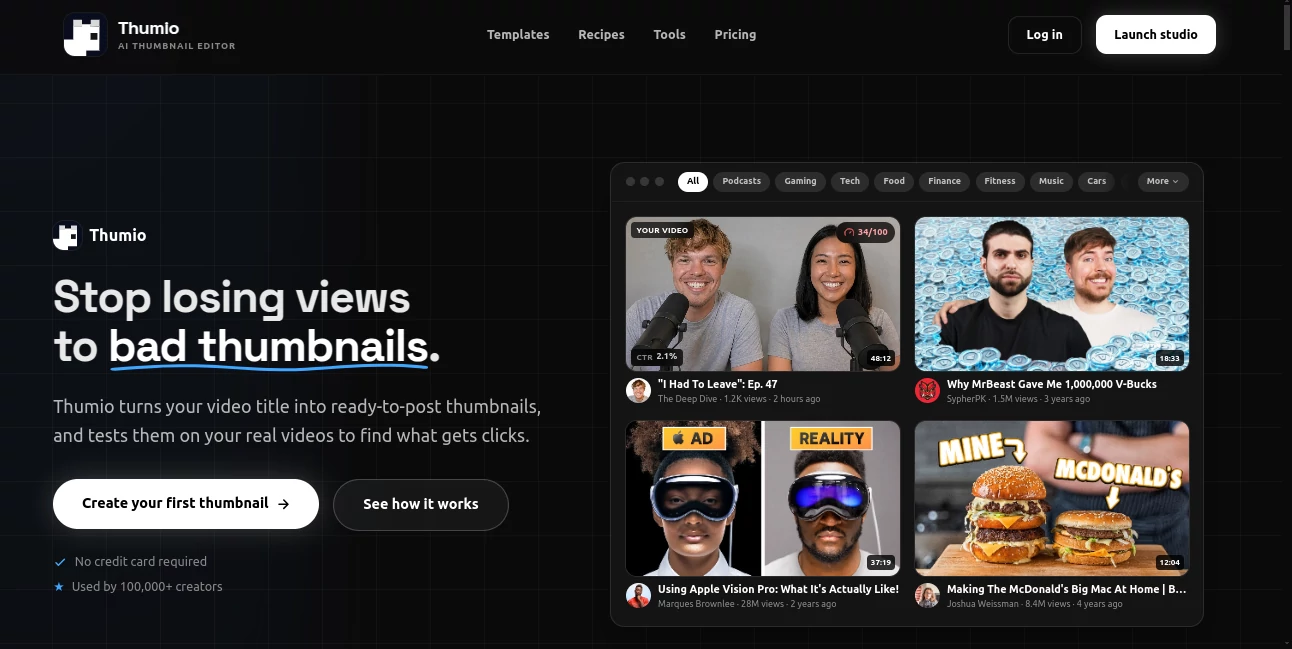
Creating a YouTube thumbnail that actually earns attention can take surprisingly long. Finding the right image, adjusting a face, cleaning up a background, testing different compositions, and making everything fit the 1280×720 format often turns a simple thumbnail into a small design project.
This AI-powered creative studio takes a different approach. Instead of forcing creators through a traditional editing workflow, it lets them upload an existing thumbnail, describe the changes they want, generate new variations, and prepare visuals for publication. The experience is designed specifically around the needs of YouTube creators rather than general-purpose graphic design.
That focus makes a noticeable difference for creators who publish regularly. A gaming channel, for example, can test several expressions and compositions without rebuilding every version from scratch, while a business creator can turn a rough concept into a polished thumbnail much faster.
Key Features
- AI-assisted editing for existing thumbnails
- AI thumbnail generation from prompts or reference images
- Multiple thumbnail variations for testing different concepts
- Expression changes and background cleanup
- Sketch-to-design workflows
- Reusable thumbnail compositions
- Bulk editing for multiple thumbnails
- Social-format exports for different platforms
- AI-powered thumbnail scoring
- AI-generated YouTube title suggestions
- YouTube channel connections and CTR reporting
- PNG export at YouTube-ready resolution
User Interface
The interface is built around the thumbnail rather than a complicated collection of design panels. Creators can upload an image, open a project, describe an edit, and work through the result without needing to recreate the entire design manually.
The workflow is particularly useful when an existing thumbnail is close to being right but needs a few important changes. Instead of starting again, users can ask for adjustments such as a different expression, a cleaner background, or a redesigned visual treatment.
For regular creators, features such as Thumbnail Sets, Composites, and Bulk Edits make the workspace more practical than a simple one-image generator.
Accuracy & Performance
The platform is optimized around the YouTube thumbnail format, which means the workflow considers more than simply producing an attractive image. Composition, clarity, emotion, and curiosity are also evaluated through its AI scoring system.
The scoring feature rates a thumbnail from 1 to 100 and provides a breakdown across four areas: Composition, Clarity, Emotion, and Curiosity. It can also suggest specific improvements, giving creators something more actionable than a generic quality rating.
Generation speed is another strong point. The goal is to shorten the gap between an idea and a publish-ready thumbnail, allowing creators to iterate instead of settling for the first design that looks acceptable.
Capabilities
The platform covers both generation and editing. Users can begin with a text idea, use a reference image, or upload an existing thumbnail and request changes. This flexibility is useful because not every creator starts with the same workflow.
One practical feature is the ability to generate multiple thumbnail variations. Rather than spending an afternoon manually changing layouts, creators can explore several directions and select the one that best fits their video.
There are also reusable recipes and compositions. A creator who has developed a recognizable visual style can use these structures repeatedly instead of rebuilding the same design from zero for every upload.
The workflow extends beyond the image itself. Users can also generate three AI title suggestions matched to their thumbnail, with suggestions based on hooks such as curiosity, numbers, drama, and personal voice.
Security & Privacy
Privacy deserves attention when working with personal photos, especially for features that can modify faces or insert a person's likeness into a thumbnail. The service states that facial data is not sold and that reference images used for its likeness-related processing are not retained on its servers after processing.
AI image editing requests are processed through Google's Gemini service, meaning images and prompts can be transmitted to Google's servers for processing. Users should therefore review the relevant privacy policies and avoid uploading material they do not have permission to process.
As with any generative image service, the final output should be reviewed before publication. AI-generated results can contain unexpected visual details, and creators remain responsible for ensuring that their thumbnails comply with platform rules and applicable laws.
Use Cases
YouTube creators: The most obvious use case is producing thumbnails faster for regular uploads. A creator can start with an existing design, change the visual direction, and export a finished version without rebuilding the entire composition.
Gaming channels: Gaming thumbnails often depend on strong facial expressions, characters, dramatic backgrounds, and clear visual hierarchy. Multiple variations make it easier to test different approaches before publishing.
Education and tutorial channels: A tutorial creator can turn a topic, screenshot, or rough sketch into a more polished visual while keeping the central message easy to understand.
Personal brands: Creators who regularly feature themselves can use expression changes, background adjustments, and likeness-based workflows to produce consistent visuals without photographing a new pose for every video.
Agencies and teams: Higher-volume users can benefit from bulk editing, shared workflows, larger credit allowances, and support for multiple YouTube channels.
Pros and Cons
Pros
- Purpose-built for YouTube thumbnail workflows
- Can edit existing thumbnails instead of always starting from scratch
- Supports thumbnail variations and reusable compositions
- Includes an AI thumbnail scoring system
- Provides free AI title suggestions
- Exports without a watermark
- Free access is available for exploring the platform
- Useful tools for creators managing multiple channels
Cons
- AI generation uses credits
- Heavy users may need a paid plan or additional credit packs
- AI-generated results still require human review
- Some advanced workflow features are aimed primarily at regular or high-volume creators
- Users working with sensitive images should consider the third-party AI processing involved
Pricing Plans
The platform uses a combination of subscriptions and prepaid credits. A free Hobby plan is available for users who want to explore templates, recipes, CTR reports, and three free thumbnail scores per day. AI generation credits can be purchased separately, starting with a one-time $2.99 trial pack containing 60 credits.
The Creator plan costs $19 per month and includes 400 monthly credits, Thumbnail Sets, Composites, Bulk Edits, social-format exports, 25 GB of media storage, and support for up to 100 YouTube channels.
Creator+ costs $59 per month and provides 1,200 monthly credits, while Ultra costs $129 per month with 4,000 monthly credits. A Team option is available at $25 per seat per month, with each seat contributing 500 credits to a shared pool and a minimum of two seats.
Additional prepaid credit packs are also available. The trial pack costs $2.99 for 60 credits, while larger packs include 100 credits for $5, 300 credits for $15 standard pricing, 600 credits for $30, and 1,500 credits for $75. Subscribers can receive discounted member pricing on larger packs.
How to Use It
Start by creating an account and opening the editor. You can begin with an existing thumbnail, choose a template or recipe, or work from a visual idea.
For an existing thumbnail, upload the image and describe the change you want. For example, you might request a stronger facial expression, a cleaner background, or a different visual treatment. The AI then produces an edited version that you can review and refine.
If you are starting from an idea, describe the scene or concept you want to create. Reference images can also be used when you already have a particular visual direction in mind.
Once you have a promising result, create additional variations when necessary. Use the scoring feature to evaluate composition, clarity, emotion, and curiosity, then apply the suggested improvements.
Finally, export the thumbnail as a PNG and use the title-generation feature to create three title options that complement the visual rather than simply repeating its text.
Comparison with Similar Tools
Traditional design platforms are excellent when you want complete manual control over layers, typography, shapes, and individual elements. However, they can require considerably more hands-on work when the goal is simply to produce a new YouTube thumbnail quickly.
General-purpose AI image generators are powerful for creating original imagery, but they are not necessarily designed around the specific requirements of YouTube thumbnails. They may require additional work for composition, dimensions, typography, and final layout.
This solution sits between those two approaches. It combines AI image generation and editing with a workflow designed specifically for thumbnails, giving creators a more focused environment for producing, comparing, scoring, and exporting YouTube visuals.
Conclusion
For creators, a thumbnail is more than decoration. It is one of the first things a viewer sees, and a small change in composition or expression can completely alter the impression of a video.
The biggest strength here is its specialization. Instead of trying to be an all-purpose design application, the platform concentrates on the thumbnail workflow and adds useful creator-focused features around it, including AI editing, variations, scoring, reusable recipes, title suggestions, and bulk production.
It is especially appealing for channels that publish frequently and need to experiment with different visual concepts without spending hours on manual editing. Casual creators can start with the free option, while established channels and teams have plans designed for higher-volume production.
Frequently Asked Questions (FAQ)
Can I create YouTube thumbnails for free?
Yes. The free Hobby plan lets users explore templates and recipes, build projects, connect YouTube channels for CTR reports, and receive three free AI thumbnail scores per day. Image generation requires credits.
Does the free export contain a watermark?
No. Free and paid exports are provided without a watermark, according to the service's published information.
Can I edit an existing thumbnail?
Yes. You can upload an existing thumbnail and describe the changes you want, allowing the AI workflow to reshoot, restyle, or refine the visual.
Can I generate multiple thumbnail versions?
Yes. Thumbnail Sets are available on paid plans and are designed for generating multiple variations of a concept.
Is there an AI thumbnail scoring feature?
Yes. The AI scoring system rates thumbnails from 1 to 100 and evaluates Composition, Clarity, Emotion, and Curiosity while providing suggested improvements.
Can it generate YouTube titles?
Yes. Three AI title options can be generated for a thumbnail at no additional credit cost. The suggestions are designed to complement the visual instead of simply repeating its message.
What is the recommended plan for regular creators?
The Creator plan is aimed at creators who make thumbnails regularly. It includes 400 monthly credits and additional features such as Thumbnail Sets, Composites, Bulk Edits, social-format exports, and expanded storage.
Are the generated thumbnails ready for YouTube?
The workflow is designed specifically for YouTube thumbnails and supports export at 1280×720 resolution, making the resulting PNG suitable for uploading to YouTube.
AI Thumbnail Maker , Photo & Image Editor , AI Image to Image , AI YouTube Assistant .
These classifications represent its core capabilities and areas of application. For related tools, explore the linked categories above.

Thumio Alternatives Product
Photoshoot A…

AI Polaroid …

photo to URL

Blur & Unblu…

qwen image 2…

NanoBanana2F…

WatermarkZero

Imagine2

Yodayo AI