

















Imagine2
What is Imagine2?
Imagine2 is an AI image creation workspace designed for people who want more control over the creative process rather than simply generating an image and moving on. It brings image generation, editing, and reference-based workflows together in a browser environment, making it easier to develop an idea through several deliberate iterations.
The platform is built around Imagine Image 2.0 and uses a practical workflow: describe what you want, choose the format and output quality, generate several directions, and refine the strongest result. This approach makes it particularly useful for designers, marketers, creators, product teams, and anyone who needs images that follow a specific visual brief.
Instead of treating every generation as a completely new attempt, the workspace encourages users to keep developing a promising result. That small change in workflow can make a noticeable difference when working on product visuals, advertising concepts, portraits, illustrations, social media graphics, or other image-heavy projects.
Key Features
- Text-to-image generation from detailed visual descriptions
- Image editing using an existing image as the starting point
- Support for multiple reference images
- 1K and 2K output options
- Multiple generation directions from a single brief
- Support for different aspect ratios and visual formats
- Prompt-based control over composition, lighting, subjects, and text
- Reference-based continuity for products, subjects, styles, and environments
- Visible model identification for generated results
- Private handling of generated results and uploaded references
- Gallery examples with prompts and generation settings
User Interface
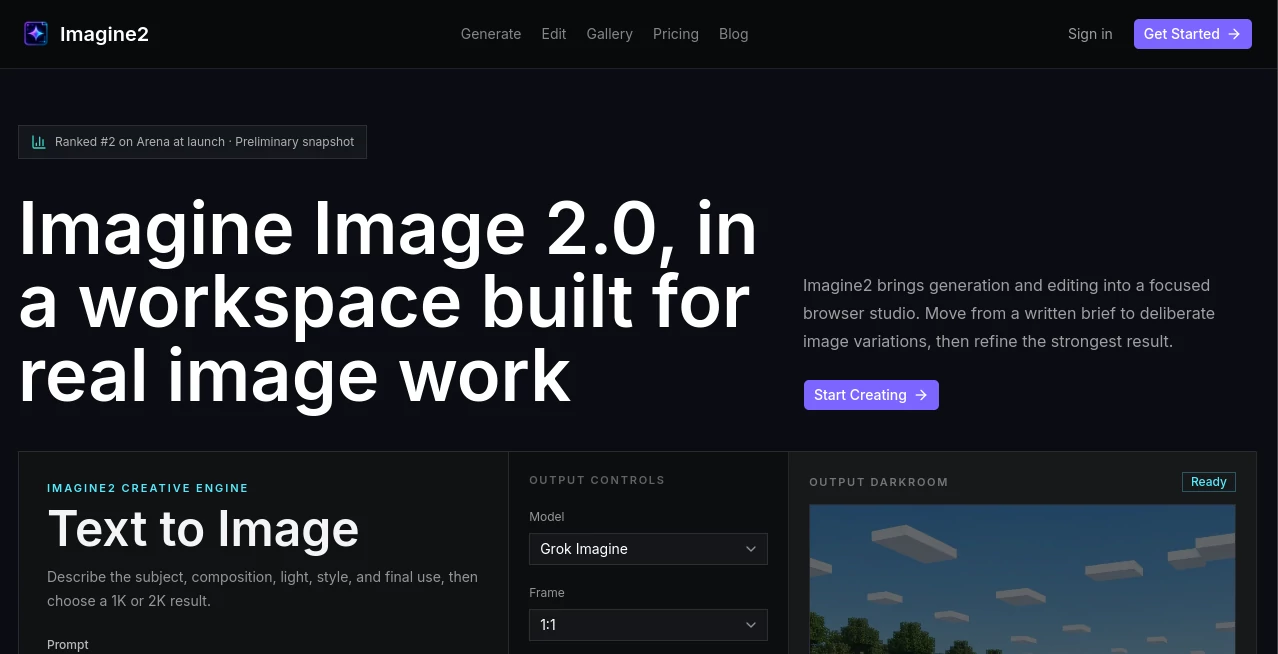
The interface takes a workspace-first approach instead of presenting users with a complicated collection of unrelated controls. The main generation area keeps the prompt, model, frame, resolution, variations, and estimated credit cost close together.
This makes the workflow easy to understand even for someone who is not an experienced prompt writer. Preset directions such as product photography, posters, photorealistic imagery, and anime can also help users get started when they already have an idea but do not want to build a detailed prompt from scratch.
Accuracy & Performance
One of the strongest aspects of the system is its focus on following structured instructions. Users can describe the subject, composition, lighting, visual treatment, text, and intended use instead of relying only on broad style keywords.
The launch results are also noteworthy. According to the platform's published Arena snapshot from August 7, 2026, Imagine Image 2.0 ranked second on both the overall text-to-image leaderboard and the single-image-edit leaderboard. These were preliminary launch results rather than a permanent ranking, so they are best viewed as an indication of early performance rather than a guarantee of future results.
For professional work, generated images should still be reviewed by a person. Details such as text, geometry, identity, product characteristics, and factual visual claims can require additional checking before publication.
Capabilities
The system covers more than straightforward text-to-image generation. Users can upload an existing image and describe the changes they want, while also specifying which elements should remain unchanged. This makes it useful when the goal is refinement rather than starting over.
Multi-image references add another layer of control. Two or three source images can be assigned different roles, such as providing a subject, product, style, or environment. This is especially useful for creative projects where one reference cannot communicate the complete visual direction.
The workflow also supports one, two, or four generated directions, giving users room to compare ideas before deciding which version deserves further refinement.
Security & Privacy
Privacy is built into the workflow. Generated results and uploaded references remain private by default unless the user chooses to publish them elsewhere. The platform states that results expire after 24 hours, while saved results can remain available for up to 30 days.
Another useful detail is model transparency. The selected model is displayed in the workspace and on completed results, helping users understand which model produced an image instead of leaving the model source unclear.
Use Cases
- Product photography: Create product-focused visual concepts without arranging a complete physical shoot for every early idea.
- Advertising: Explore campaign concepts, compositions, layouts, and promotional visuals before committing to a final direction.
- Social media content: Produce portraits, illustrations, promotional graphics, and other visual material for social channels.
- Design exploration: Test several visual directions quickly and continue refining the most promising result.
- Portrait creation: Develop natural-looking portrait concepts with specific lighting, environments, and visual treatments.
- Anime and illustration: Experiment with stylized characters, scenes, and artistic compositions.
- Game assets: Explore game-inspired environments, characters, and visual concepts during the early stages of development.
- Image editing: Modify an existing image while describing the elements that should remain stable.
- Creative references: Combine several source images when a single reference cannot fully communicate the desired result.
Pros and Cons
- Pros: Generation and editing are available in one workspace.
- Pros: Supports detailed prompts and structured visual briefs.
- Pros: Offers 1K and 2K output options.
- Pros: Multiple reference images can guide a single creative direction.
- Pros: The selected model is clearly identified.
- Pros: Results and references are private by default.
- Pros: Useful gallery examples provide prompts and generation context.
- Cons: Generation and reference operations use credits.
- Cons: Generated images still require human review before important commercial or factual use.
- Cons: Temporary result storage means users should save important work within the available retention period.
Pricing Plans
The platform uses a credit-based system rather than presenting a conventional monthly subscription structure on its main workspace. New accounts receive 10 credits without requiring a card, allowing users to try the workflow before committing to additional usage.
A 1K image generation costs 5 credits, while a 2K generation costs 7 credits. Using a reference image costs 1 credit. The exact cost therefore depends on the type of creative workflow and the output selected.
This model can be appealing for occasional creators who prefer paying according to usage instead of maintaining an ongoing subscription. Users working on larger projects should keep an eye on credit consumption, particularly when generating multiple variations or using higher-resolution outputs.
How to Use the Tool
- Open the image generation workspace and describe the visual result you want.
- Include useful details such as the subject, environment, composition, lighting, style, and any required text.
- Choose the desired aspect ratio and output resolution.
- Select one, two, or four variations depending on how many directions you want to explore.
- Add a reference image when an existing subject, product, style, or environment needs to influence the result.
- Generate the images and compare them against your original brief.
- Choose the strongest direction and continue with targeted editing instead of rebuilding the entire concept.
- Review important visual details before using the final result publicly or commercially.
Comparison with Similar Tools
Many AI image generators are designed around a simple prompt-and-generate experience. That approach works well when the goal is to produce a quick visual, but it can become limiting when a project requires several rounds of controlled changes.
This platform takes a more iterative approach. Generation, editing, and reference composition are connected within the same workflow, so a promising result can become the foundation for the next version. The ability to provide multiple references is particularly useful when a project needs to combine a specific subject, product, visual style, and environment.
Another difference is the emphasis on traceability. The selected model, resolution, frame, prompt, and references are treated as meaningful parts of the creative process. For users who regularly revisit or refine visual concepts, that context can be more valuable than simply having a large stream of unrelated generated images.
Conclusion
For anyone looking beyond one-click image generation, Imagine2 offers a thoughtful environment for building visuals through controlled iteration. Its combination of text-to-image generation, image editing, multi-reference workflows, resolution controls, and model transparency gives creators more room to shape the final result.
The platform is particularly interesting for product visuals, advertising concepts, portraits, illustrations, social media graphics, and early-stage creative exploration. The credit system also makes it possible to test the experience without immediately committing to a long-term subscription.
What stands out most is the workflow itself. Instead of treating an AI-generated image as the end of the process, the system encourages users to regard a good first result as the starting point for something better. For creators who value refinement and visual control, that is a useful way to work.
Frequently Asked Questions (FAQ)
What can the platform create?
It can generate visual concepts from text prompts across areas such as product photography, advertising, portraits, anime, illustration, game-inspired scenes, typography, UI concepts, and other creative formats.
Can I edit an existing image?
Yes. You can upload an existing image and describe the changes you want. You can also explain which parts should remain unchanged to give the editing process a clearer direction.
Can I use multiple reference images?
Yes. The multi-image workflow allows users to work with two or three references and assign them different roles, such as subject, product, style, or environment.
What resolutions are available?
The workspace provides 1K and 2K output options. The selected resolution affects the number of credits required for generation.
How much does an image generation cost?
A 1K generation uses 5 credits, while a 2K generation uses 7 credits. A reference operation uses 1 credit. New accounts receive 10 credits without requiring a card.
Are generated results private?
Yes. Generated results and references are private by default. Results expire after 24 hours, while saved results can be kept for up to 30 days.