

















TierCove
What is TierCove?
TierCove is a practical online tier list creator built for people who want to rank games, anime, food, products, characters, sports teams, ideas, or almost anything else without spending time setting up a complicated editor. The experience starts directly in the browser, with no login required to begin a draft.
What makes the platform particularly useful is the combination of traditional drag-and-drop ranking with AI-assisted features. You can upload images, paste text items, choose a ranking standard, and let AI create an initial suggestion before making your own final decisions. The browser also autosaves the active draft locally, which is a welcome safeguard when working on a long ranking.
Key Features
- AI Quick Rank: Generates an initial tier placement based on the items and selected ranking criteria.
- AI Ranking Reasons: Creates short explanations for why items may belong in particular tiers.
- AI Caption Writer: Helps turn a completed ranking into Reddit titles, X posts, TikTok captions, YouTube hooks, or community prompts.
- Image and text items: Upload JPG, PNG, or WEBP images or add text items directly.
- Local autosave: Active work can be restored from the same browser and device after a refresh.
- Custom tiers: Add tiers, rename rows, and adjust the ranking structure to suit the subject.
- PNG export: Finished rankings can be exported as images.
- Cloud projects: Paid plans provide expanded cloud storage and private project options.
- Mobile ranking: Smaller screens support a tap-based ranking flow rather than relying entirely on desktop drag-and-drop.
User Interface
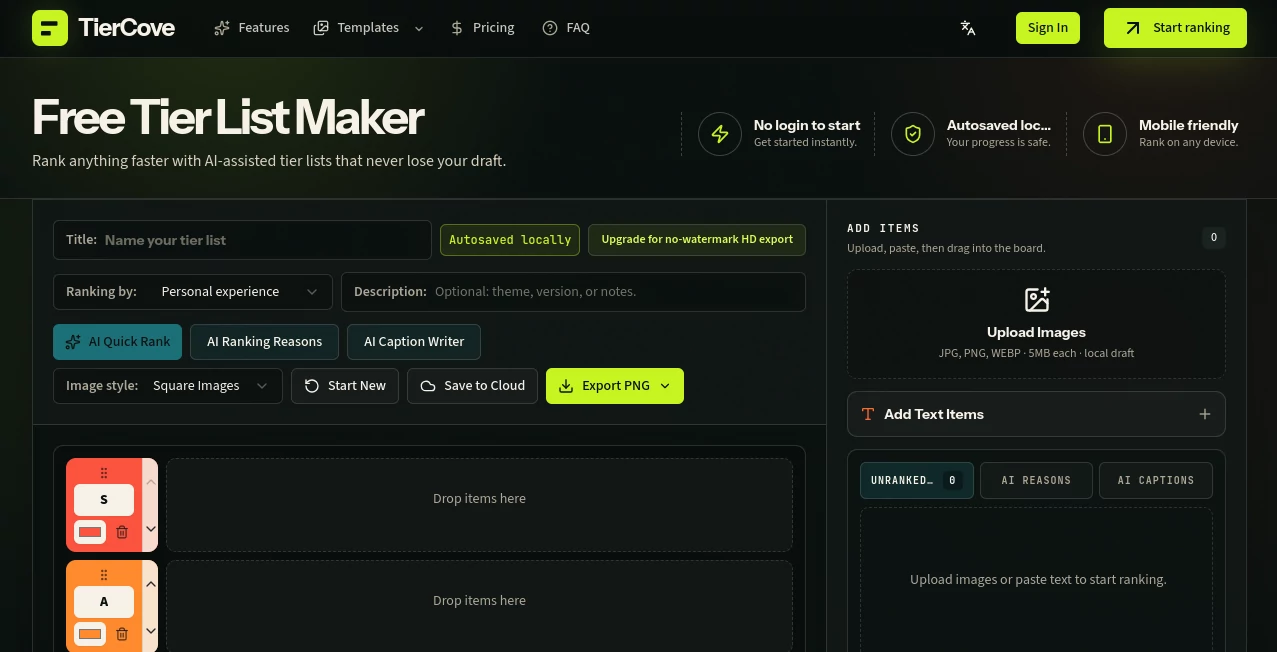
The interface is centered around the ranking board, keeping the main workflow easy to understand. Users can add items, place them into tiers, reorder them, and create additional rows when the default structure does not fit the project.
Desktop users get a familiar drag-and-drop experience, while mobile users can assign items to tiers with taps. The ability to combine image cards and text cards is especially useful for rankings where visual references and written labels need to appear together.
Accuracy & Performance
AI Quick Rank is best treated as a starting point rather than an authority. It can speed up the first pass by suggesting placements according to the chosen ranking standard, while the user remains free to move every item afterward.
This approach works well for subjective topics. For example, someone comparing game characters can ask for rankings based on strength, while a food list might use taste or value as the standard. The final board remains under the user's control.
Local autosave is another practical performance feature. Changes to titles, tiers, uploaded items, text items, AI suggestions, and item movement can be preserved in the browser, reducing the frustration of losing a lengthy ranking after an accidental refresh.
Capabilities
The platform supports both quick personal rankings and more involved creator workflows. Users can begin with a blank board or use templates covering subjects such as Genshin, Brawl Stars, anime, League of Legends, Pokémon, Marvel Rivals, Smash Ultimate, fast food, and other popular topics.
Ranking standards can be based on qualities such as strength, quality, value, popularity, fun, or difficulty. Custom criteria make the editor flexible enough for unusual subjects that do not fit a conventional S-to-F ranking.
For creators, the AI Ranking Reasons and AI Caption Writer features add another useful layer. A finished tier list can become more than an image: it can also serve as the basis for a social post, discussion prompt, or video idea.
Security & Privacy
The active draft is autosaved locally in the browser, which means the initial editing workflow does not require every change to be sent to cloud storage. This is useful for quick projects where users simply want to build a ranking on their current device.
Cloud saving and AI-related features require sign-in. Users who plan to keep projects online should therefore use an account when those features are needed. As with any cloud-based service, users should review the site's privacy and terms information before uploading sensitive or confidential material.
Use Cases
- Gaming: Rank characters, weapons, teams, maps, builds, or competitive picks.
- Anime: Compare shows, characters, episodes, fights, or personal favorites.
- Content creation: Turn rankings into social posts, discussion topics, video hooks, or community content.
- Food comparisons: Sort burgers, drinks, sauces, restaurants, snacks, or favorite meals.
- AI tool comparisons: Organize software according to usefulness, value, features, or personal preference.
- Sports: Create rankings for teams, players, tournaments, or memorable moments.
- Personal decision-making: Compare options visually when a simple list is not enough.
- Community discussions: Create shareable rankings designed to encourage debate and different opinions.
Pros and Cons
Pros
- Can be used without logging in to start a draft.
- Local browser autosave helps protect ongoing work.
- AI can provide an initial ranking, explanations, and captions.
- Supports both images and text items.
- Custom tiers and ranking criteria provide flexibility.
- Works across desktop and mobile workflows.
- Offers templates for popular gaming, anime, sports, and entertainment topics.
Cons
- Some AI and export features require signing in.
- Free exported PNG files include a watermark.
- The free plan is limited to 50 ranked items per tier list.
- AI usage is credit-based.
- Advanced private projects and higher limits require a paid plan.
Pricing Plans
The service uses a Free, Plus, and Pro structure. The Free option allows users to create rankings and use local autosave, while signed-in users can export standard PNG files with a watermark and maintain one public cloud project. Free users receive 10 AI credits per day without rollover and can rank up to 50 items.
The Plus plan costs $12 per month when billed monthly or $6 per month with yearly billing. It increases the allowance to 600 AI credits per month, supports up to 200 items, removes the export watermark, adds HD export, and provides unlimited private projects.
The Pro plan costs $24 per month when billed monthly or $12 per month with yearly billing. It provides 3,000 AI credits per month and supports up to 1,000 ranked items, making it more appropriate for large rankings and heavier creator workflows.
How to Use It
- Start a new ranking: Open the editor and give the tier list a title.
- Add your items: Upload JPG, PNG, or WEBP images or paste text items into the board.
- Choose your standard: Decide whether items should be judged by quality, strength, value, popularity, fun, difficulty, or another criterion.
- Use AI if helpful: Run AI Quick Rank to receive an initial placement suggestion.
- Review everything: Move items manually and adjust the tiers until the ranking reflects your own opinion.
- Add explanations: Use AI Ranking Reasons when you want short reasoning alongside the ranking.
- Create promotional text: Use AI Caption Writer to generate ideas for social posts and community discussions.
- Export or save: Export the completed board as PNG or save the project to the cloud when an account and cloud storage are appropriate.
Comparison with Similar Tools
Many basic tier list makers focus almost entirely on arranging items into rows. This platform takes a broader approach by combining the familiar ranking board with AI assistance, browser autosave, customizable criteria, image and text inputs, and creator-oriented publishing features.
The distinction is most noticeable when a ranking is more than a quick one-off activity. Someone creating a game ranking, for example, can use a template, apply a specific standard, receive an AI-generated first pass, manually refine the results, generate explanations, and prepare a social caption from the same workflow.
It is also more flexible than a fixed template because users can change labels, replace items, add tiers, and establish their own criteria. For people who enjoy making rankings but dislike rebuilding them after a refresh, local autosave is another meaningful advantage.
Conclusion
A good tier list should make comparison easier, not turn the ranking process into a project of its own. This platform keeps the fundamentals simple while adding useful AI features for people who want help with the first draft, explanations, or publishing.
The combination of local autosave, flexible tiers, image and text support, mobile-friendly controls, templates, and AI-assisted ranking makes it suitable for everything from casual debates to recurring creator content. The free version is also a sensible way to test the workflow before deciding whether higher item limits, HD exports, private projects, and additional AI credits are worth the upgrade.
Frequently Asked Questions (FAQ)
Can I create a tier list without signing in?
Yes. You can begin creating a ranking directly from the homepage without an account. Sign-in is required for certain features such as AI tools, cloud saving, and exporting.
Does the editor save my work automatically?
Yes. The active draft is autosaved locally in the browser. If you refresh while using the same device and browser, the saved draft can be restored.
Can I upload my own images?
Yes. JPG, PNG, and WEBP images are supported, with an individual upload limit of 5MB.
Can I add text instead of images?
Yes. Text items can be pasted into the editor, making it possible to build rankings from names, ideas, products, teams, characters, or other written entries.
What does AI Quick Rank do?
It suggests an initial placement for your items according to the selected ranking standard. You can then review the suggestions and manually change any position.
Can I customize the tier names?
Yes. You can add tiers, change labels, and create a ranking structure that matches the subject instead of relying on a fixed S-to-F format.
Can I export my finished ranking?
Yes. PNG export is available after signing in. Free exports contain a small watermark, while paid plans include no-watermark HD export.
Is there a free plan?
Yes. The Free plan supports creation and local autosave, provides 10 AI credits per day without rollover, and allows up to 50 ranked items. Paid plans increase the limits and unlock additional export and project features.
Is it useful on mobile devices?
Yes. Desktop users can drag and reorder items, while mobile users can use a tap-based workflow to assign items to tiers and then make final adjustments on the board.
Can I use templates?
Yes. There are templates for subjects including popular games, anime, Pokémon, sports, entertainment, and food. Templates can be edited so that the final ranking reflects your own criteria and preferences.