
TimeLines AI
What is TimeLines AI?
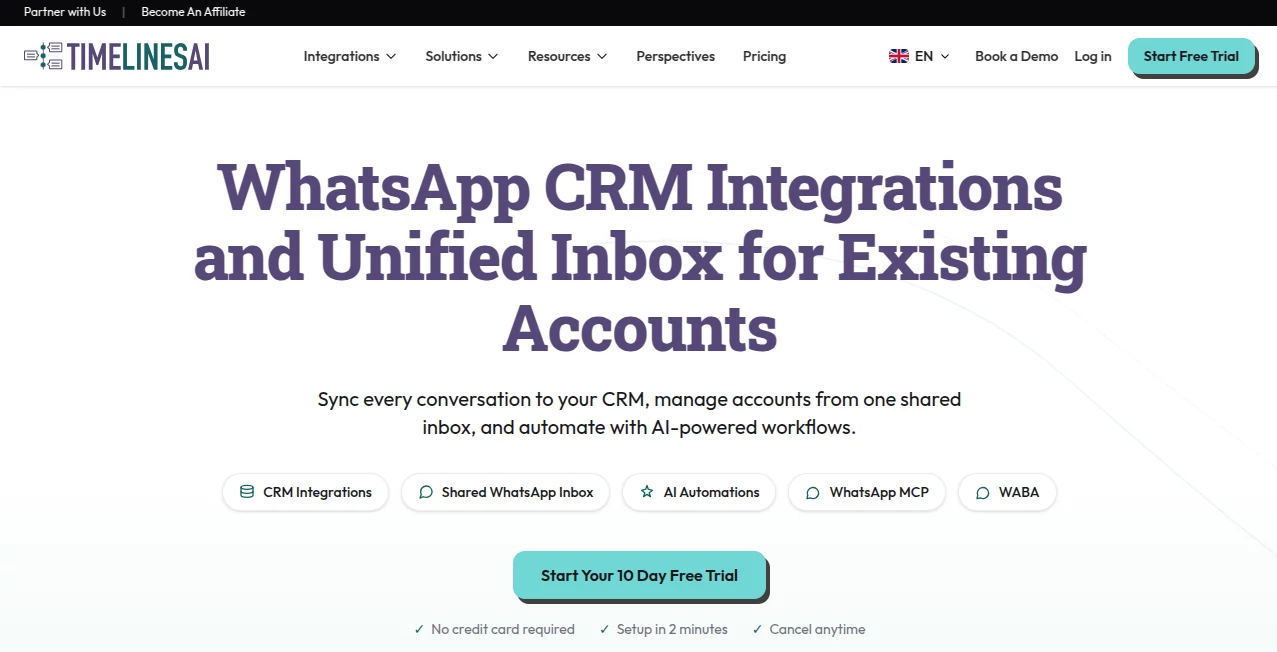
TimelinesAI is a powerful WhatsApp management and automation platform designed to help businesses organize customer conversations, connect messaging workflows with CRM systems, and improve team collaboration. It gives companies a centralized workspace where multiple WhatsApp accounts can be managed, conversations can be tracked, and customer communication can become more efficient.
For businesses that rely heavily on WhatsApp for sales, support, and customer relationships, managing hundreds of conversations across different devices can quickly become complicated. This platform simplifies that process by bringing messages, automation, analytics, and CRM synchronization into one convenient environment.
Key Features
- Shared WhatsApp Inbox: Manage conversations from multiple WhatsApp numbers in one organized dashboard and allow teams to collaborate efficiently.
- CRM Integration: Connect WhatsApp conversations with popular CRM platforms such as HubSpot, Pipedrive, Zoho, Salesforce, and monday.com.
- AI-Powered Responses: Use intelligent automation to create faster replies, generate summaries, and handle repetitive communication tasks.
- Workflow Automation: Build automated processes for follow-ups, notifications, and customer engagement without complex coding.
- Mass Messaging Campaigns: Create personalized WhatsApp campaigns and communicate with customers at scale.
- Team Collaboration: Assign conversations, add internal notes, and manage responsibilities between team members.
- Analytics and Reporting: Monitor communication performance and understand customer interaction patterns.
User Interface
The platform provides a clean and business-focused interface that makes WhatsApp management easier for teams of all sizes. The dashboard is designed around real workflows, allowing users to quickly find conversations, organize chats, assign responsibilities, and monitor customer interactions without switching between multiple applications.
The simple setup process is especially useful for companies that want to improve their communication system without spending weeks learning complicated software.
Accuracy & Performance
The system focuses on reliable message synchronization and smooth communication between WhatsApp accounts and business tools. By keeping conversations connected with CRM platforms, teams can maintain better customer records and reduce the risk of missing important messages or sales opportunities.
AI-assisted features help businesses save time by handling repetitive tasks such as message suggestions, summaries, and automated responses while allowing human agents to take control whenever a personal response is needed.
Capabilities
This solution is built for companies that want to transform WhatsApp from a simple messaging channel into a structured business communication platform. It supports multiple WhatsApp numbers, CRM workflows, automated replies, team management, customer tracking, and marketing campaigns.
Whether a company needs better customer support, faster sales communication, or improved lead management, the platform provides practical tools to create a more organized communication process.
Security & Privacy
Businesses can control access levels, manage team permissions, and organize communication within dedicated workspaces. The platform is designed to help companies handle customer conversations professionally while maintaining structured access for different team members.
Use Cases
- Customer Support Teams: Manage customer questions from multiple WhatsApp accounts and provide faster responses.
- Sales Teams: Track leads, follow up with prospects, and connect conversations with CRM pipelines.
- Marketing Agencies: Manage client communication and create targeted WhatsApp campaigns.
- E-commerce Businesses: Improve order communication, customer updates, and support workflows.
- Growing Companies: Replace scattered WhatsApp conversations with a professional collaboration system.
Pros and Cons
Pros
- Centralized management for multiple WhatsApp accounts
- Strong CRM integration options
- User-friendly setup process
- Useful automation and AI features
- Designed for sales and support teams
Cons
- Best value is mainly for businesses using WhatsApp as a primary communication channel
- Advanced features may require higher pricing plans
- Smaller teams with limited messaging needs may not use every feature
Pricing Plans
The platform offers different pricing options based on business requirements. Plans include CRM integration features, shared inbox capabilities, and advanced messaging options. Businesses can start with a free trial to explore the available tools before choosing a suitable subscription.
- CRM Integration Plan: Designed for businesses that need WhatsApp conversations connected with CRM systems and automation tools.
- Shared Inbox Plan: Suitable for teams managing multiple conversations together.
- Mass Messaging Plan: Built for companies that need larger communication campaigns and outreach workflows.
How to Use TimelinesAI
- Create an account and connect your WhatsApp number.
- Set up your workspace and invite team members.
- Connect your preferred CRM or business tools.
- Create workflows, automated replies, and communication rules.
- Start managing conversations from a unified dashboard.
Comparison with Similar Tools
Compared with traditional WhatsApp management solutions, this platform stands out by combining shared inbox functionality, CRM synchronization, automation, and AI assistance in one environment. Many alternatives focus only on messaging, while this solution is designed for businesses that need structured customer relationship management.
For teams that already use CRM platforms and want WhatsApp communication included in their existing workflows, this approach provides a more connected and scalable experience.
Conclusion
Managing business communication through WhatsApp does not have to become overwhelming. With centralized conversations, automation features, CRM connections, and team collaboration tools, this platform helps companies create a more organized and professional messaging workflow.
It is a valuable choice for businesses that want to improve customer engagement, increase team productivity, and turn everyday WhatsApp conversations into meaningful business opportunities.
Frequently Asked Questions (FAQ)
Can businesses connect multiple WhatsApp numbers?
Yes, businesses can manage multiple WhatsApp accounts inside a unified workspace depending on their subscription plan.
Does it work with CRM platforms?
Yes, it supports integrations with several popular CRM systems to synchronize customer conversations and business data.
Can teams collaborate on WhatsApp conversations?
Yes, team members can share conversations, assign chats, and work together to manage customer communication.
Does it include AI automation features?
Yes, AI-powered features can assist with automated replies, summaries, and workflow improvements.
Is it suitable for small businesses?
Yes, small businesses can use it to organize customer communication, while larger teams can benefit from advanced collaboration and automation features.
AI Workflow Management , AI Sales Assistant , AI CRM Assistant , AI Customer Service Assistant .
These classifications represent its core capabilities and areas of application. For related tools, explore the linked categories above.

TimeLines AI Alternatives Product

FeatureShark

Vapi

Claude and C…
Dedoctive

Tate-A-Tate

Toflow AI

TrySchedule

AILeadz.io

Medialyst