


















Timi AI
What is Timi AI?
Timi AI is a practical creative workspace for people who use AI image generators but often spend too much time searching for good prompts, saving visual references, or figuring out how to recreate a style they like. It brings together a large collection of image prompts and a simple workflow for discovering ideas, turning references into reusable prompts, and creating new visuals.
The platform is particularly useful for designers, content creators, marketers, social media managers, and anyone experimenting with AI-generated images. Instead of starting with a blank prompt box every time, users can browse existing ideas, study how successful prompts are written, copy prompts, and use them as a starting point for their own projects.
Its prompt library covers popular image-generation models and includes searchable examples that can be explored by model, popularity, or category. This makes it easier to move from inspiration to an actual creative result without spending unnecessary time researching prompt techniques.
Key Features
- Large collection of AI image prompts
- Searchable prompt library for discovering creative ideas
- Prompts for popular image-generation models
- One-click prompt copying
- Image-to-prompt functionality for saved visual references
- Built-in AI image generation
- Support for image-to-image workflows with reference images
- Personal library for saving visual inspiration
- Prompt editing and reuse
- Inspiration search across multiple creative platforms
- PNG downloads for generated images
- Free access to the core prompt and generation features
User Interface
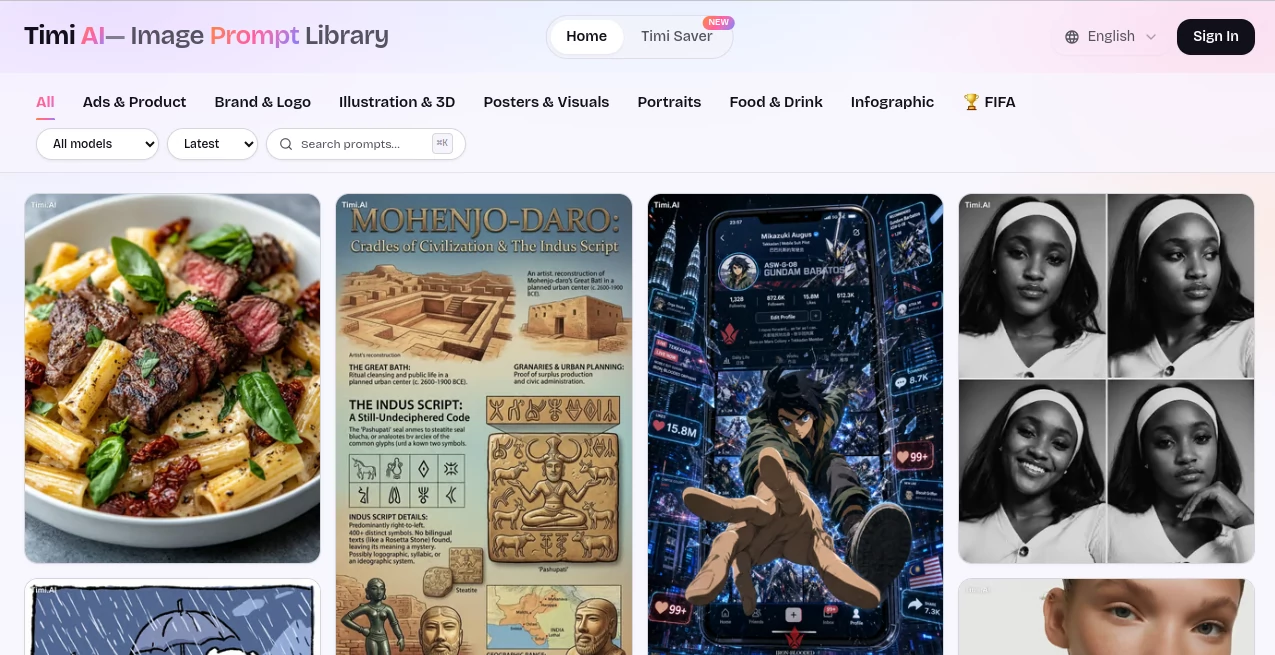
The interface is designed around discovery rather than complicated settings. Visitors can search through prompts, browse different examples, and filter content based on available models and sorting options. The straightforward layout makes the service approachable even for someone who has never spent much time learning prompt engineering.
The saving workflow is equally convenient. When browsing an image online through the companion browser extension, users can save a reference to their personal library. From there, they can request a prompt based on the image or move the reference directly into the generation workflow. For designers who collect references throughout the day, this can be much more useful than keeping hundreds of screenshots in a downloads folder.
Accuracy & Performance
The quality of an image-generation workflow depends heavily on the prompt and the selected model, so the main advantage here is not simply generating another random image. The service helps users understand the visual ingredients behind a reference, including elements such as subject, composition, lighting, color palette, and style.
The image-to-prompt feature is especially useful when a creator has a strong visual reference but cannot easily describe it in words. Turning that reference into an editable prompt creates a practical bridge between visual inspiration and text-based generation.
For everyday creative work, the workflow is fast: find an idea, copy or adapt the prompt, add references when needed, and generate a new result. That simplicity makes experimentation much less tedious.
Capabilities
The service goes beyond being a static collection of prompts. Users can explore prompts for different image-generation models, copy useful examples, and use them as foundations for their own experiments. The generation workflow can also accept multiple reference images, allowing creators to combine inspiration rather than relying on a single source.
The companion saving functionality adds another useful layer. A designer browsing a stock-photo website, social network, or another public creative platform can save an image reference and later turn it into a reusable prompt. This is particularly helpful when building a visual direction for a campaign, product launch, social media series, or branding project.
It can also be useful for producing posters, social media graphics, logos, advertisements, product imagery, thumbnails, and restaurant menus. The range of applications makes the workflow relevant to both professional design work and casual experimentation.
Security & Privacy
Privacy is an important part of the browser-based workflow. The companion extension states that it only processes images that users explicitly choose to save and does not scan or read pages simply because they are being browsed. This gives users control over which visual references enter their personal library.
The service also allows saved images, prompts, and generated results to be deleted. Authentication is handled through Google's official OAuth flow, while the privacy policy explains how information associated with the extension is handled.
As with any browser extension that interacts with webpages, users should still review the permissions and privacy documentation before installing it, particularly when using the extension in a professional environment.
Use Cases
- Graphic Design: Collect visual references and turn them into reusable prompts for new design concepts.
- Social Media Content: Create fresh visuals for Instagram posts, promotional graphics, banners, and campaign content.
- Advertising: Experiment with ad creatives and product-focused imagery before committing to a final concept.
- Product Photography: Explore AI-generated product scenes, backgrounds, lighting styles, and commercial compositions.
- Branding: Save visual references and develop new directions for logos, promotional materials, and brand imagery.
- Thumbnail Creation: Generate attention-grabbing visual concepts for videos, articles, and social platforms.
- Creative Research: Study existing prompts to understand how composition, lighting, style, and subject descriptions influence image generation.
- Prompt Experimentation: Start from proven examples instead of writing every prompt from scratch.
- Restaurant Marketing: Develop menu visuals, promotional graphics, and food-focused creative concepts.
- Design Inspiration: Keep useful references in one place instead of losing them among screenshots and downloaded files.
Pros and Cons
- Pros: Large prompt collection, simple search experience, useful visual inspiration, prompt copying, image-to-prompt workflow, reference-image support, built-in generation, and a convenient personal library.
- Pros: The workflow connects inspiration, prompting, and generation instead of treating them as separate tasks.
- Pros: Core features are currently available without requiring a paid subscription.
- Cons: The quality of generated results can vary depending on the underlying image model and the prompt used.
- Cons: Users looking for advanced professional image-editing tools may still need a dedicated image editor.
- Cons: The browser extension requires users to consider its permissions before installing it.
Pricing Plans
The core experience is currently free to use. Users can browse and save prompts, use the inspiration functionality, extract prompts from saved images, and access the image-generation workflow with a free account. The browser extension also states that these features are available without an in-app purchase.
According to the current product information, paid plans for additional AI features may be introduced in the future. For users who simply want to explore prompts and experiment with image generation, the current free access makes it easy to try the workflow without committing to a subscription.
How to Use It
Start by exploring the prompt gallery and searching for a visual concept that matches the type of image you want to create. You can browse recent or popular examples and look at prompts associated with different image-generation models.
When you find a useful prompt, copy it and adapt the description to your own project. Change the subject, colors, setting, composition, clothing, lighting, or other details until the prompt fits your idea.
For a more reference-driven workflow, save an image that inspires you using the companion browser extension. Open the saved image in your personal library and use the prompt-generation option to turn the visual reference into an editable text prompt.
You can then move that prompt into the generation workflow and, when appropriate, add reference images for an image-to-image result. After generating an image, the result can be downloaded as a PNG and used as a starting point for further creative work.
Comparison with Similar Tools
Many AI image platforms concentrate primarily on generation. This service takes a slightly different approach by putting prompt discovery and visual inspiration at the center of the experience. That distinction is valuable for users who know what they want visually but struggle to describe it in a useful prompt.
Traditional prompt libraries are useful for finding text examples, while image generators are useful for producing final visuals. Here, those two stages are connected more closely. A user can discover an existing prompt, inspect a visual reference, save an image, extract a prompt from it, modify the prompt, and generate another image.
This makes the platform especially appealing to creators who learn by looking at examples. Rather than treating prompting as a technical skill that must be mastered before creating anything, it provides a library of practical starting points that can be studied and adapted.
Conclusion
For anyone working regularly with AI-generated images, finding the right starting point can be just as important as the generation model itself. A good reference or well-structured prompt can save considerable experimentation and make the creative process more predictable.
This platform combines a broad prompt library with tools for saving inspiration, extracting prompts from images, and generating new visuals. The result is a workflow that feels particularly natural for designers and creators who collect ideas while browsing the web.
Its free access also lowers the barrier to experimentation. Whether the goal is a social media graphic, product concept, advertising visual, thumbnail, poster, or simply a new creative experiment, the service offers a convenient place to discover ideas and turn them into something original.
Frequently Asked Questions (FAQ)
What is this AI tool used for?
It is designed for discovering AI image prompts, saving visual inspiration, turning images into reusable prompts, and generating new images from text and visual references.
Can I use the prompt library for free?
Yes. The current core prompt library and several creative features are available for free with an account.
Can I turn an image into an AI prompt?
Yes. Saved images can be analyzed to create editable prompts describing important visual elements such as the subject, composition, lighting, palette, and style.
Can I use reference images when generating?
Yes. The generation workflow supports adding multiple reference images for image-to-image creation, with up to five references available according to the current extension information.
Who can benefit from this tool?
It is well suited to designers, marketers, social media creators, content producers, advertisers, product teams, and anyone who regularly experiments with AI image generation.
Does it have paid plans?
The core features are currently free. Additional paid AI features may be introduced in the future, so users should check the current service information for any pricing changes.
Does the browser extension scan everything I browse?
The extension states that it does not scan or read pages simply because they are being browsed. Images are processed when the user explicitly chooses to save them.
Can generated images be downloaded?
Yes. Generated results can be downloaded as PNG files for use in creative projects.
AI Photo & Image Generator , AI Design Assistant , Prompt , AI Text to Image .
These classifications represent its core capabilities and areas of application. For related tools, explore the linked categories above.

Timi AI Alternatives Product

Leonardo.ai

bananaai.app

Kontext AI

meta ai image

Gemini AI Ph…

Image2GPT

SellerPic

Reztune

Nano Banana …
