
TopView
What is TopView?
Turning an idea into a polished video used to mean hours of scripting, filming, editing, and voiceovers. This tool changes that completely. You type a concept or upload a few images, and it builds a full video with natural movement, matching voiceover, and clean transitions that actually feel professional. I’ve watched small business owners go from “we need a video but have no budget” to posting something that looks like it came from an agency—all in under ten minutes. The best part? It doesn’t feel robotic. The pacing, tone, and visuals carry real personality.
Introduction
Most AI video tools still feel experimental—jerky motion, robotic voices, or generic stock footage slapped together. TopView stands apart because it focuses on making videos that actually work for real businesses and creators. Whether you need product explainers, social media clips, training videos, or marketing content, it handles the heavy lifting while letting you steer the direction. Founders and marketers love how it removes the usual bottlenecks and lets them ship content consistently without burning out or breaking the bank. It’s one of those rare tools that feels like it was built by people who understand both marketing and the frustration of traditional video production.
Key Features
User Interface
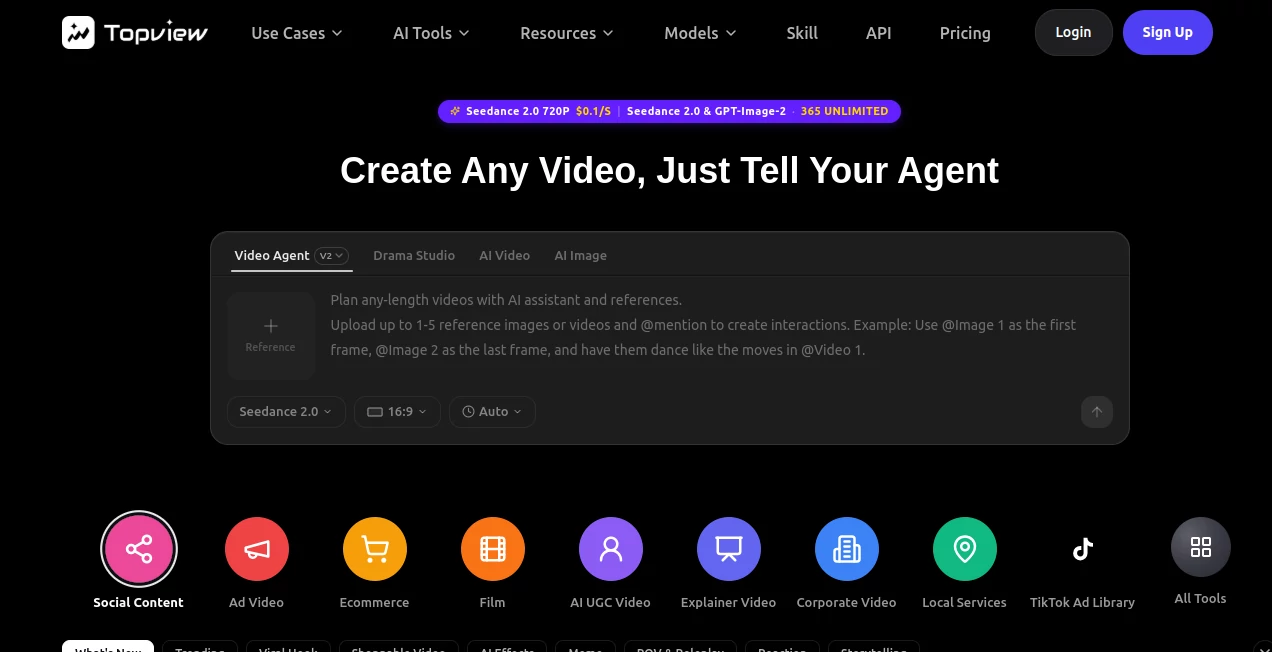
The dashboard is refreshingly clean and intuitive. You start with a prompt box or template gallery, add your product images or brand assets, choose a style, and the system does the rest. Everything is visual—preview updates happen in real time as you tweak text, voice, or timing. No steep learning curve. Even my friend who “hates tech” created her first product video without any hand-holding. The flow just makes sense.
Accuracy & Performance
The AI understands context well—product features, brand tone, target audience—and translates that into visuals and narration that feel on-point. Lip-sync is impressively accurate, motion between scenes is smooth, and the generated footage avoids most of the weird artifacts you see in lesser tools. Generation speed is solid, often delivering a complete video in a few minutes, so you can iterate quickly instead of waiting around.
Capabilities
It supports text-to-video, image-to-video, script-to-video, talking avatars, auto voiceovers in multiple languages and natural tones, background music matching the mood, and customizable templates for different platforms (vertical for TikTok/Reels, horizontal for YouTube, etc.). You can upload your own footage or images to blend with AI-generated scenes, adjust pacing, and fine-tune the output. It’s powerful enough for serious marketing yet simple enough for weekly social content.
Security & Privacy
Your brand assets and video ideas stay protected. The platform doesn’t train on user content without permission, and commercial plans give you full ownership of the generated videos. For businesses sharing product details or campaign strategies, that peace of mind matters a lot.
Use Cases
A skincare founder turns a single product photo and bullet points into a compelling 30-second Instagram Reel that actually converts. A SaaS company creates consistent explainer videos for new features without calling the video team every time. Coaches record short training modules with their own AI avatar so students feel personally guided. E-commerce stores generate dozens of product videos per week to test different angles and messaging. The common theme is speed with quality—getting professional-looking content out consistently.
Pros and Cons
Pros:
- End-to-end video creation that feels remarkably complete from the first generation.
- Strong talking avatar and voiceover quality that doesn’t sound robotic.
- Great for both short social videos and longer marketing pieces.
- Fast iteration—generate, tweak, regenerate in minutes.
- Commercial rights included so you can use the videos for business.
Cons:
- Very complex or highly specific creative visions still benefit from human direction.
- Longer videos (beyond a few minutes) work best when broken into segments.
- Some advanced custom styles require higher-tier plans.
Pricing Plans
It starts with a generous free tier so you can test quality on real projects without commitment. Paid plans unlock more minutes, higher resolution, priority generation, custom avatars, and commercial licensing features. Pricing is reasonable for the time and cost it saves compared to traditional video production—many users say it pays for itself after just a couple of good campaigns.
How to Use TopView
Sign up, go to create, and either pick a template or start from scratch with a description. Upload any reference images or product shots. Write or paste your script, choose a voice style, and hit generate. Review the draft—adjust timing, narration, or visuals as needed—then export in your preferred format. For regular content, save templates with your brand assets so future videos stay on-brand with minimal effort.
Comparison with Similar Tools
Many AI video platforms focus on quantity over quality or require heavy manual editing afterward. TopView stands out by delivering more complete, usable videos right away with better motion, voice, and brand alignment. It’s less about flashy gimmicks and more about practical marketing results—which is exactly what most businesses actually need.
Conclusion
Video is still one of the most powerful ways to connect with customers, but creating it consistently has always been painful. This tool removes most of that pain without sacrificing quality. It lets real businesses and creators produce content that looks and sounds professional, even when they don’t have a full production team. If you’ve been putting off video because it feels too hard or expensive, this might be the nudge you’ve been waiting for.
Frequently Asked Questions (FAQ)
How long does it take to generate a video?
Usually 2–8 minutes depending on length and complexity.
Can I use my own voice?
Yes—voice cloning and custom voice options are available on higher plans.
Are the videos suitable for commercial use?
Absolutely—paid plans include full commercial licensing.
Do I need video editing experience?
No—the tool is designed so complete beginners can create strong videos quickly.
What platforms are the videos optimized for?
All major ones—vertical for TikTok/Reels/Shorts, horizontal for YouTube, and square for other uses.
AI Animated Video , AI Image to Video , AI Video Generator , AI Text to Video .
These classifications represent its core capabilities and areas of application. For related tools, explore the linked categories above.

TopView Alternatives Product

seedance 2.0
Wan AI Video…

AI Happy Hor…
seedance2-pro

Seedance 2.0…

Wan-Animate.…

vei4 ai

Sora 2 Video…

Aura AI