MP3 to Transcript
What is MP3 to Transcript?
Converting spoken conversations into clean, editable text can save hours of manual work. Whether you're documenting interviews, recording lectures, creating meeting notes, or repurposing video content, a reliable transcription solution makes the entire workflow much faster. This platform is designed to transform audio and video recordings into accurate text that can be reviewed, edited, and shared with ease.
Instead of spending valuable time replaying recordings and typing every sentence, users can upload their files and receive organized transcripts that are easy to search, modify, and export. The service supports common media formats such as MP3 and MP4, making it suitable for creators, businesses, educators, researchers, and anyone who regularly works with spoken content.
Its straightforward workflow removes unnecessary complexity while delivering dependable results. From short voice memos to lengthy meetings and podcasts, the transcription process remains efficient and accessible even for users with no technical background.
Key Features
- Convert MP3 recordings into editable text.
- Transcribe MP4 video files without extra conversion.
- Generate searchable transcripts.
- Edit transcripts directly after processing.
- Fast upload and processing workflow.
- Simple browser-based experience.
- Supports long-form recordings.
- Useful for interviews, meetings, lectures, and podcasts.
- Reduces manual transcription effort.
- Produces text suitable for documentation and content creation.
User Interface
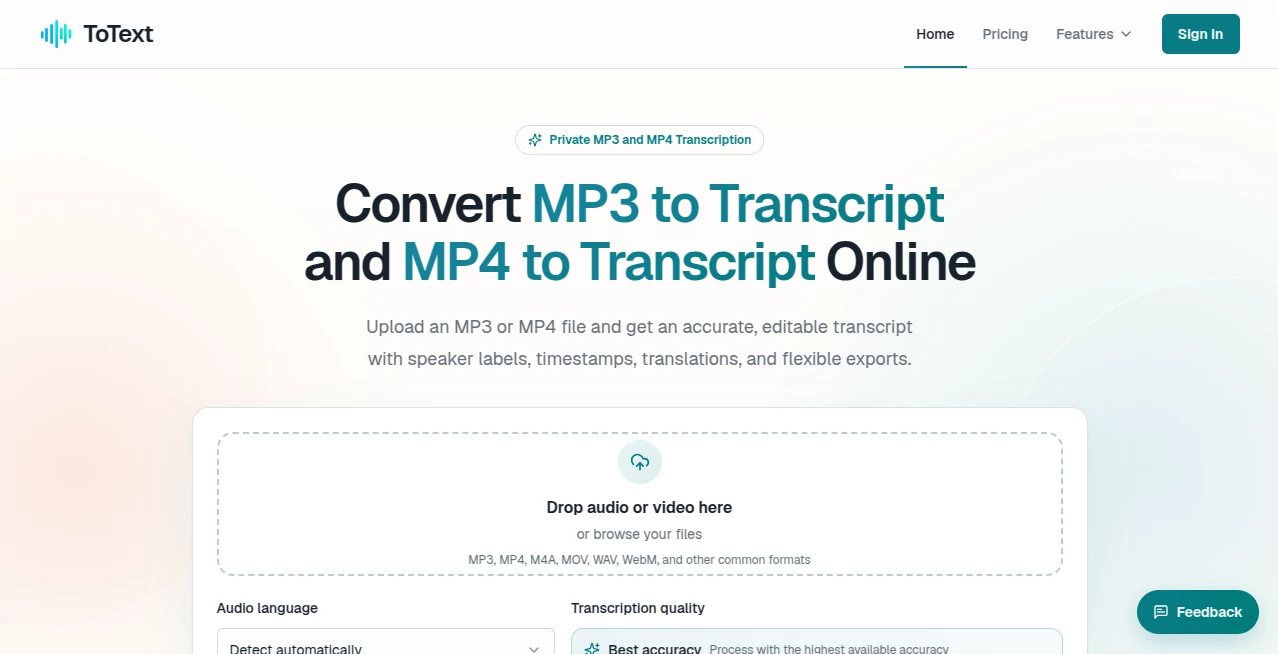
The interface focuses on simplicity. Uploading recordings requires only a few clicks, allowing users to begin the transcription process immediately. Navigation is intuitive, making it easy to manage files and review completed transcripts without searching through complicated menus.
The clean layout is especially helpful for users who need quick results. Even first-time visitors can understand the workflow almost instantly, making the platform approachable for professionals and casual users alike.
Accuracy & Performance
High-quality recordings produce clear and reliable transcripts that require minimal editing. Processing is designed to be efficient, allowing users to handle everything from short conversations to extended recordings without an unnecessarily complicated workflow.
While every automatic transcription system may occasionally benefit from minor proofreading—especially with heavy accents or background noise—the generated text provides an excellent starting point that dramatically reduces manual effort.
Capabilities
The platform goes beyond basic speech recognition by creating editable documents that can be reused in many different ways. Users can transform recorded meetings into minutes, convert interviews into articles, prepare subtitles, organize research notes, archive business discussions, or build written documentation from spoken content.
Because transcripts remain editable, they can easily be refined, formatted, summarized, or repurposed for blogs, reports, newsletters, educational material, and internal company documentation.
Security & Privacy
Many professionals work with confidential conversations, making privacy an important consideration. A browser-based workflow allows users to upload recordings and manage transcripts conveniently while maintaining control over their documents. Organizations handling sensitive information should always review the platform's published privacy policies before processing confidential files.
Use Cases
- Transcribing business meetings.
- Creating interview transcripts.
- Converting podcast episodes into articles.
- Preparing lecture notes for students.
- Documenting legal or research interviews.
- Creating searchable archives of recordings.
- Producing subtitles from spoken content.
- Repurposing video content into blogs.
- Generating written documentation from voice recordings.
- Saving time on manual transcription tasks.
Pros and Cons
Pros
- Simple upload process.
- Supports both MP3 and MP4 files.
- Produces editable transcripts.
- Suitable for many professional workflows.
- Helps reduce hours of manual typing.
- Easy to learn and use.
Cons
- Very noisy recordings may require additional editing.
- Complex technical terminology may occasionally need manual correction.
- Audio quality significantly affects transcription accuracy.
Pricing Plans
The platform offers pricing options that may change over time depending on available plans and features. Users should check the official pricing page for the latest subscription details, usage limits, and available features before making a purchasing decision.
How to Use ToText
Begin by uploading an MP3 or MP4 recording through the web interface. After processing is complete, review the generated transcript, make any necessary edits, and export or copy the finished text for your preferred workflow. The process is straightforward and requires very little technical knowledge.
Comparison with Similar Tools
Compared with many transcription services that include extensive editing suites and advanced collaboration features, this solution focuses on delivering a fast and uncomplicated transcription experience. Its emphasis on converting common media formats into editable text makes it an attractive option for users who value speed, simplicity, and practical usability over unnecessary complexity.
Conclusion
For anyone regularly working with recorded conversations, interviews, lectures, podcasts, or business meetings, an efficient transcription workflow can significantly improve productivity. By converting audio and video into editable text with a streamlined interface, this solution helps eliminate repetitive manual work while making recorded information easier to organize, search, and reuse across multiple projects.
Frequently Asked Questions (FAQ)
What file formats are supported?
The platform supports MP3 audio files and MP4 video files for transcription.
Can I edit the transcript after it is generated?
Yes. The generated transcript is editable, allowing you to make corrections or formatting changes.
Who can benefit from this platform?
Journalists, students, researchers, businesses, content creators, educators, and podcasters can all benefit from automated transcription.
Can transcripts be used for content creation?
Yes. They can be transformed into articles, reports, meeting notes, documentation, subtitles, and many other written materials.
Does recording quality affect transcription accuracy?
Yes. Clear recordings with minimal background noise generally produce the best transcription results.
AI Recording , AI Transcriber , AI Transcription , AI Speech to Text .
These classifications represent its core capabilities and areas of application. For related tools, explore the linked categories above.
MP3 to Transcript details
Website unavailable — View Alternatives
Pricing
- Freemium
Apps
- Web App
Categories

MP3 to Transcript Alternatives Product

Quso AI
Adobe Podcast
Seed Audio

WhispriNote

TurboScribe

FluentDictat…

Zeemo AI

ekstrakt

Klyra AI