

















Seed Audio
What is Seed Audio?
Creating immersive audio used to require multiple applications, voice actors, sound libraries, and plenty of editing time. This platform changes that workflow by bringing every essential element into a single AI-powered workspace. Instead of generating only speech, it produces complete audio experiences that include expressive voices, natural conversations, background music, ambient sound, and realistic sound effects.
Whether you are producing podcasts, marketing content, educational material, short films, game audio, or social media videos, the platform dramatically reduces production time while maintaining impressive quality. The ability to transform a simple text prompt into a polished sound scene makes it an attractive solution for both professionals and beginners. Even creators without audio engineering experience can produce cinematic results within minutes.
Key Features
User Interface
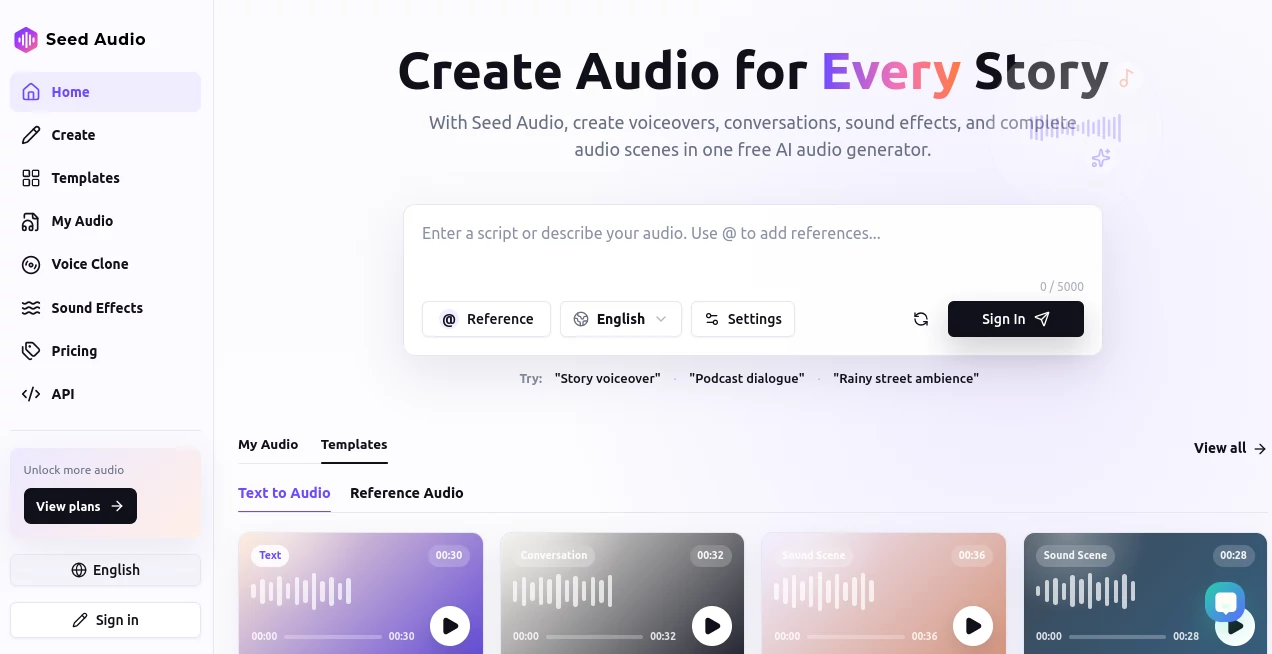
The workspace is refreshingly simple and easy to navigate. Users can start with a text prompt, optionally upload reference audio, preview generated results, refine outputs, and export finished projects without navigating complicated editing panels. Built-in templates also provide inspiration for different storytelling styles and production scenarios.
Accuracy & Performance
The audio generation engine delivers remarkably natural speech with convincing emotional delivery. Multiple speakers maintain distinct identities throughout conversations while music, environmental sounds, and effects remain synchronized. The generated scenes feel cohesive rather than assembled from disconnected audio clips, making the final result suitable for professional content creation.
Capabilities
- Generate complete audio scenes from text prompts.
- Create expressive voiceovers with emotional delivery.
- Produce multi-speaker conversations.
- Add realistic background ambience automatically.
- Generate synchronized sound effects.
- Create background music that matches the scene.
- Use reference audio to guide tone and style.
- Refine outputs through multiple iterations.
- Export ready-to-use audio files.
- Support storytelling, advertising, education, entertainment, and creative production.
Security & Privacy
Users maintain control over their creative workflow by optionally using personal reference recordings to influence generated results. Audio generation takes place inside a dedicated online workspace, allowing creators to manage projects without relying on multiple third-party editing services. This streamlined approach helps simplify project management while keeping production assets organized.
Use Cases
- Podcast production with engaging narration.
- Audiobook storytelling.
- YouTube and social media voiceovers.
- Marketing advertisements.
- Educational lessons and e-learning content.
- Video game dialogue and ambient sound creation.
- Film pre-production and concept audio.
- Interactive storytelling experiences.
- Product demonstrations.
- Creative sound design for digital media.
Pros and Cons
Pros
- Generates complete audio scenes instead of only speech.
- Combines dialogue, music, ambience, and effects automatically.
- Easy-to-use interface suitable for beginners.
- Reference audio improves creative consistency.
- High-quality emotional voice generation.
- Saves significant production time.
Cons
- Complex scenes may require prompt refinement.
- Advanced creators may still perform final mastering externally.
- Internet connection is required for generation.
Pricing Plans
A free plan is available for users who want to experiment with AI audio generation before upgrading. Premium options unlock additional generation capacity, larger projects, and enhanced production capabilities for frequent creators and professional teams.
How to Use Seed Audio
Begin by describing the scene, dialogue, or narration you want to create. Optionally upload voice, music, or ambience samples to influence the final style. Generate the first version, preview the complete audio scene, adjust the prompt where needed, regenerate improved versions, and export the finished result for your project. The workflow is designed to minimize technical barriers while maximizing creative freedom.
Comparison with Similar Tools
Many AI audio platforms specialize in either text-to-speech, voice cloning, or music generation separately. This solution stands out by producing complete audio environments in a single generation process. Instead of combining several independent tools for narration, music, ambience, and effects, creators receive an integrated sound scene that feels naturally synchronized. This significantly shortens production time while delivering a more cinematic listening experience.
Conclusion
For creators who want more than traditional text-to-speech, this platform offers a refreshing approach to AI-powered audio production. Its ability to merge expressive voices, natural dialogue, music, sound effects, and immersive ambience into one workflow makes it an outstanding choice for storytellers, educators, marketers, filmmakers, and digital content creators. The combination of accessibility, creative flexibility, and impressive output quality makes it one of the most exciting AI audio solutions available today.
Frequently Asked Questions (FAQ)
Can beginners use this platform?
Yes. The interface is designed for users with little or no audio production experience.
Can it generate more than simple voiceovers?
Yes. It can create complete audio scenes that combine dialogue, music, ambience, and sound effects.
Can reference audio improve results?
Yes. Users can upload voice or ambience samples to influence the generated style and atmosphere.
Is it suitable for commercial content?
It is appropriate for podcasts, marketing campaigns, educational media, videos, games, and many other professional creative projects.
Does it support iterative editing?
Yes. Users can modify prompts, regenerate outputs, compare versions, and export their preferred result.